Skip to content
  • Categories
  • Recent
  • Popular
  • Support
  • MyRoute-app
Collapse
Brand Logo

MRA Community Forum

  1. Home
  2. [Beta] The MyRoute-app
  3. [Beta] Problems, Bugs and other Issues
  4. Positionsanzeige fehlerhaft

Positionsanzeige fehlerhaft

Scheduled Pinned Locked Moved [Beta] Problems, Bugs and other Issues
15 Posts 5 Posters 140 Views 3 Watching
  • Oldest to Newest
  • Newest to Oldest
  • Most Votes
Reply
  • Reply as topic
Log in to reply
This topic has been deleted. Only users with topic management privileges can see it.
  • Dave J 0 Dave J 0

    @Doug-Robinson Try this link - might help you.

    RetiredWingMan Offline
    RetiredWingMan Offline
    RetiredWingMan
    Valued contributor
    wrote on last edited by
    #5

    @Dave-J-0 thank you. It shows up on my S20 phone ... but not on my Tab A7.

    2010 GL1800 Goldwing using Samsung Galaxy S20 5G Android 13.

    Dave J 0 1 Reply Last reply
    0
    • RetiredWingMan RetiredWingMan

      @Dave-J-0 thank you. It shows up on my S20 phone ... but not on my Tab A7.

      Dave J 0 Offline
      Dave J 0 Offline
      Dave J 0
      Valued contributor
      wrote on last edited by
      #6

      @Doug-Robinson I do not think the tab a7 has the function.

      Kind Regards. Help where I can.
      Ducati Multistrada V4 Rally
      iPhone 15 Pro
      CHIGEE AIO-6 LTE
      Google Pixel 6 Pro - mounted on SP Connect Plus
      Ex Garmin XT2 and XT1 as well as Ex TomTom Rider User

      1 Reply Last reply
      0
      • Con Hennekens Con Hennekens

        @Holger-Schulte, if you could share a screen recording here, that would be great!

        Holger Schulte Offline
        Holger Schulte Offline
        Holger Schulte
        wrote on last edited by Holger Schulte
        #7

        @Con-Hennekens

        Screenshot vertikale Ausrichtung (Hochformat) MIT Positionspunkt
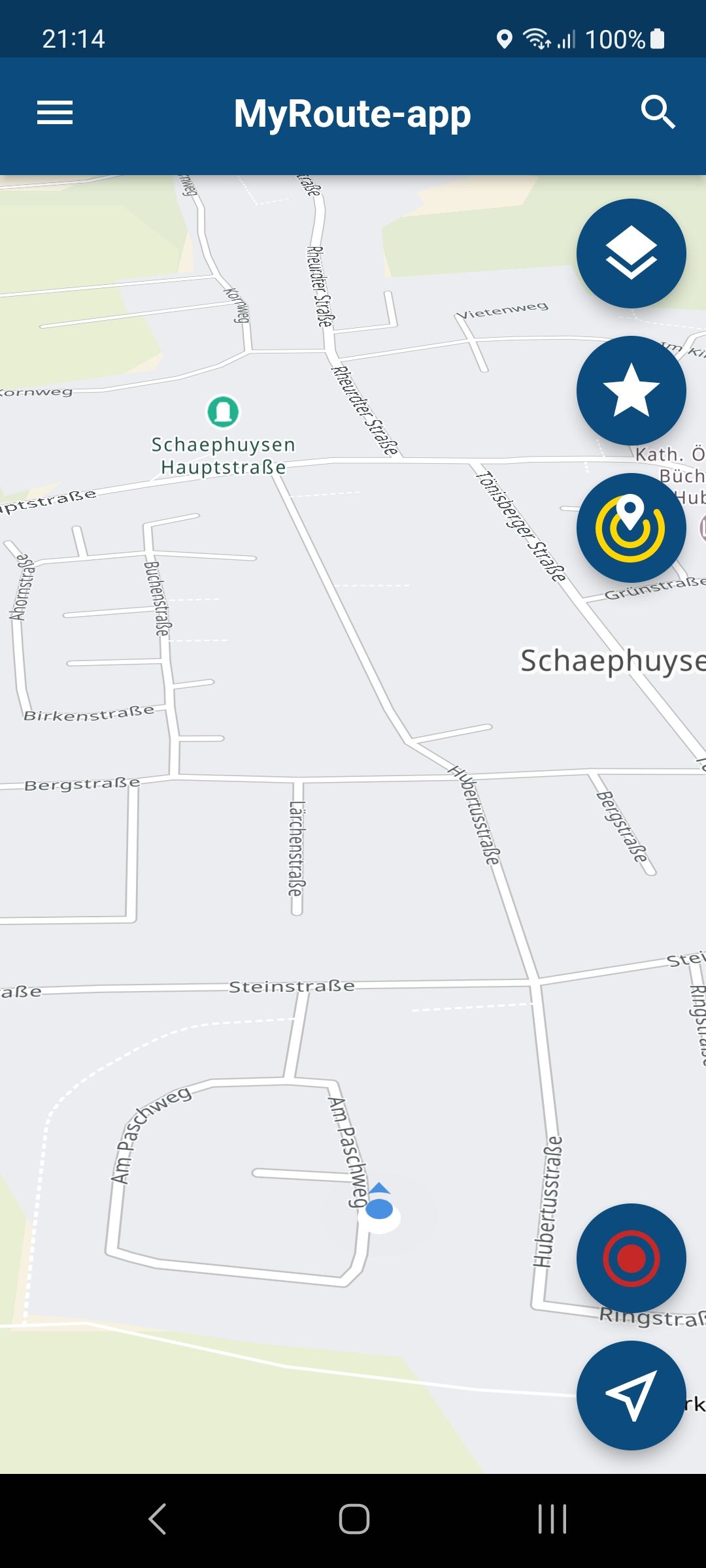
        Screenshot_20230716_211444.jpg

        Screenshot horizontale Ausrichtung (Querformat) OHNE Positionspunkt
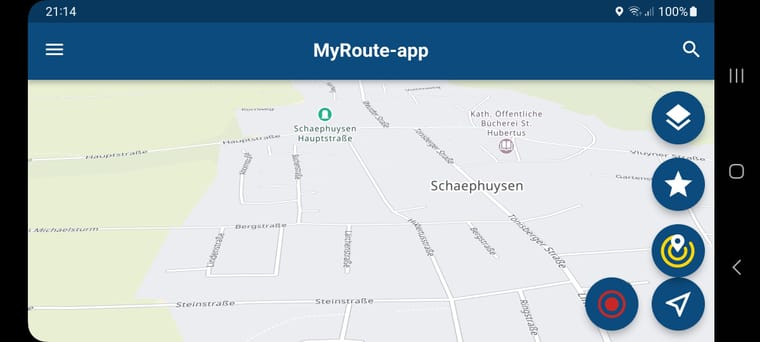
        Screenshot_20230716_211427.jpg

        Screenshot_20230717_215333.jpg

        Bitte auf das Bild klicken für volle Größe!!!

        Es scheint an der 3D-Darstellung zu liegen, die funktioniert im Querformat nicht

        Gruß, Holger

        1 Reply Last reply
        0
        • Jörgen Offline
          Jörgen Offline
          Jörgen
          Valued contributor
          wrote on last edited by
          #8

          Tap on the compass needle (once or twice), it looks like you use the 3D view.

          Hardware
          iPhone 12 pro (iOS 26.2.1)
          iPad (7.Gen.) 18.7.3
          Oukitel RT3 Pro (Andr. 14)
          Wireless CarPlay mit (Elebest C650)
          Wired CarPlay (SEAT Arona - 2021)
          MRA Workshops in Deutsch sind hier zu finden

          Holger Schulte 1 Reply Last reply
          0
          • Jörgen Jörgen

            Tap on the compass needle (once or twice), it looks like you use the 3D view.

            Holger Schulte Offline
            Holger Schulte Offline
            Holger Schulte
            wrote on last edited by
            #9

            @Jörgen
            Richtig, das hatte ich unter die Bilder geschrieben, 3D-Modus schiebt den Positionspunkt aus der Kartendarstellung. Es liegt also nicht an der "Top-Down" Perspektive, sondern am 3D-Modus.

            That's right, I wrote that under the pictures, 3D mode pushes the position point out of the map display. So it's not because of the "top-down" perspective, but because of the 3D mode.

            (Danke an Google für die Übersetzung)

            Holger

            1 Reply Last reply
            0
            • Holger Schulte Holger Schulte

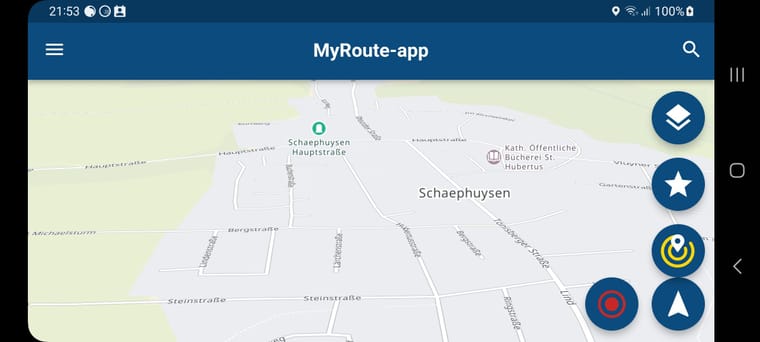
              Ich nutze die Beta Version 4.0.2 Build 203 auf einem Samsung A54 unter Android 13, alle Updates ausgeführt. Mir ist heute bei einer kleinen Testrunde aufgefallen, das die Positionsanzeige -Perspektive "Top Down"- im Querformat ohne laufende Navigation, also nur beim Anzeigen der Straße auf der Karte, am unteren Bildschirmrand verschwindet. Hin und wieder rutscht sie ins Bild, verschwindet aber sofort wieder. Bei vertikaler Ausrichtung alles ok.

              Bilder kann ich nachreichen
              Gruß, Holger

              Con Hennekens Offline
              Con Hennekens Offline
              Con Hennekens
              Alpha tester
              wrote on last edited by
              #10

              @Holger-Schulte said in Positionsanzeige fehlerhaft:

              Hin und wieder rutscht sie ins Bild, verschwindet aber sofort wieder. Bei vertikaler Ausrichtung alles ok.

              This made me think that the position point is constantly moving larger distances. Is this not what you meant?

              I am just an enthusiastic MRA user, and hope you will be one too!

              Most motorcycle problems are caused by the nut that connects the handlebar to the saddle.

              Check out RideSleepRepeat.eu, a biker community for sharing stays across Europe

              Holger Schulte 1 Reply Last reply
              0
              • Con Hennekens Con Hennekens

                @Holger-Schulte said in Positionsanzeige fehlerhaft:

                Hin und wieder rutscht sie ins Bild, verschwindet aber sofort wieder. Bei vertikaler Ausrichtung alles ok.

                This made me think that the position point is constantly moving larger distances. Is this not what you meant?

                Holger Schulte Offline
                Holger Schulte Offline
                Holger Schulte
                wrote on last edited by
                #11

                @Con-Hennekens
                Leider nein, die Positionsanzeige ist im Querformat etwas zu tief positioniert, deshalb "rutscht" sie während der Fahrt nur hin und wieder ins Bild.

                Unfortunately no, the position display is positioned a little too low in landscape format, which is why it only "slips" into the picture every now and then while driving.

                Grüße, H.
                Greets, H.

                Con Hennekens 1 Reply Last reply
                0
                • Holger Schulte Holger Schulte

                  @Con-Hennekens
                  Leider nein, die Positionsanzeige ist im Querformat etwas zu tief positioniert, deshalb "rutscht" sie während der Fahrt nur hin und wieder ins Bild.

                  Unfortunately no, the position display is positioned a little too low in landscape format, which is why it only "slips" into the picture every now and then while driving.

                  Grüße, H.
                  Greets, H.

                  Con Hennekens Offline
                  Con Hennekens Offline
                  Con Hennekens
                  Alpha tester
                  wrote on last edited by Con Hennekens
                  #12

                  @Holger-Schulte, Tatsächlich! 😉
                  I have exactly the same problem. I have never seen it before, because I never have the app open when I free-drive. I think that the dev-team should have a look at it.

                  @Corjan-Meijerink (for after his vacation!) When free-driving the OSM main screen in 3D view the position marker is not compensated for the angle and falls below the screen. This is only in landscape view, not in portrait.

                  I am just an enthusiastic MRA user, and hope you will be one too!

                  Most motorcycle problems are caused by the nut that connects the handlebar to the saddle.

                  Check out RideSleepRepeat.eu, a biker community for sharing stays across Europe

                  1 Reply Last reply
                  0
                  • Jörgen Offline
                    Jörgen Offline
                    Jörgen
                    Valued contributor
                    wrote on last edited by
                    #13

                    How does it look if you do a track recording, same?

                    Hardware
                    iPhone 12 pro (iOS 26.2.1)
                    iPad (7.Gen.) 18.7.3
                    Oukitel RT3 Pro (Andr. 14)
                    Wireless CarPlay mit (Elebest C650)
                    Wired CarPlay (SEAT Arona - 2021)
                    MRA Workshops in Deutsch sind hier zu finden

                    Holger Schulte 1 Reply Last reply
                    0
                    • Jörgen Jörgen

                      How does it look if you do a track recording, same?

                      Holger Schulte Offline
                      Holger Schulte Offline
                      Holger Schulte
                      wrote on last edited by
                      #14

                      @Jörgen
                      Hallo Jörgen, wie man im 3. und letzten Screenshot sehen kann, wäre eine Navigation im 3D-Modus fehlerfrei möglich. Allerdings ist die fehlerhafte Darstellung im Querformat auch dort vorhanden. Das darzustellende Bild ist für den Monitor auch hier, sagen wir, zu groß, um an die Buttons zu kommen, muß der Bildschirm auch hier gescrollt werden. Dazu habe ich dann noch die beiden anderen Screenshots angehangen. Mein Lösungsvorschlag für diese Problematik wäre das Nutzen einer dynamischen Bildschirmauflösung, eventuell gibt es ja Smartphone Modelle, bei denen aufgrund anderer Größenverhältnisse dieser Fehler nicht auftaucht? Ich nutze MRA allerdings sehr gerne auch ohne Navigation, einfach um anhand der angezeigten Karte zu sehen, was mich hinter der nächsten Kurve oder nächsten Hügel so erwartet 😉

                      Hello Jörgen, as you can see in the 3rd and last screenshot, navigation in 3D mode would be possible without errors. However, the incorrect display in landscape format is also present there. Here, too, the image to be displayed is, let's say, too big for the monitor, in order to reach the buttons, the screen has to be scrolled here as well. I then attached the other two screenshots. My suggested solution to this problem would be to use a dynamic screen resolution, maybe there are smartphone models where this error does not appear due to different proportions? However, I also like to use MRA without navigation, simply to see what awaits me around the next bend or next hill using the map displayed 😉

                      Grüße, H.
                      Greetz, H.

                      Abgeschnittener Monitor auch hier:
                      Cropped monitor here too:
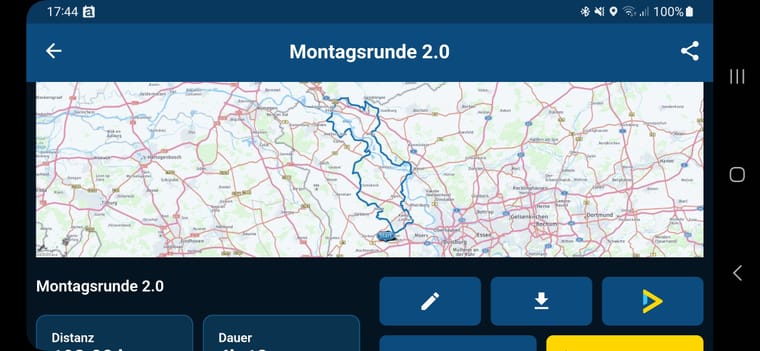
                      Screenshot_20230718_174401.jpg

                      Hier sieht man den Rest der Buttons, nun fehlt ein Teil der Karte:
                      Here you can see the rest of the buttons, now part of the map is missing:
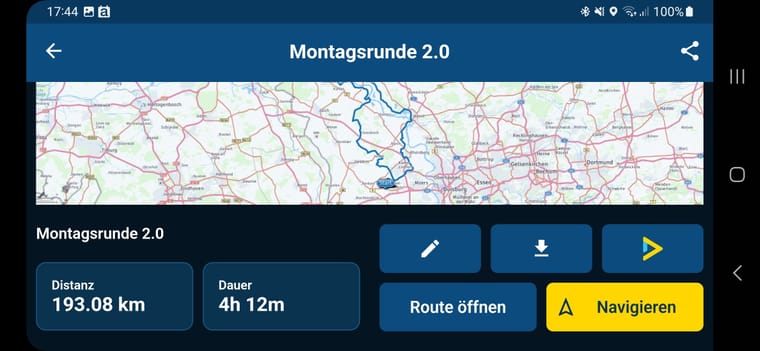
                      Screenshot_20230718_174414.jpg

                      Navigation (!!) im 3D-Modus mit Positionsanzeiger:
                      Navigation (!!) in 3D mode with position indicator:
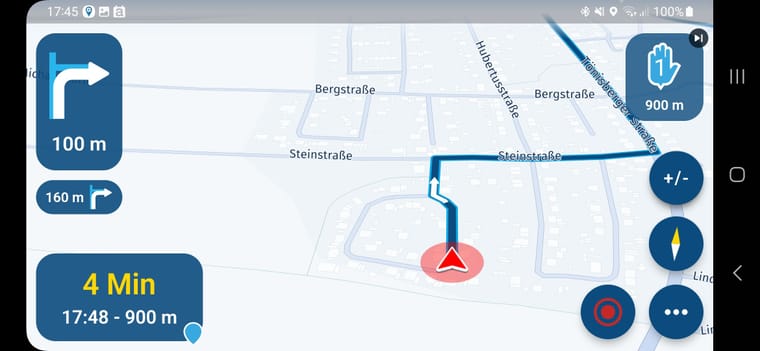
                      Screenshot_20230718_174531.jpg

                      Holger Schulte 1 Reply Last reply
                      0
                      • Holger Schulte Holger Schulte

                        @Jörgen
                        Hallo Jörgen, wie man im 3. und letzten Screenshot sehen kann, wäre eine Navigation im 3D-Modus fehlerfrei möglich. Allerdings ist die fehlerhafte Darstellung im Querformat auch dort vorhanden. Das darzustellende Bild ist für den Monitor auch hier, sagen wir, zu groß, um an die Buttons zu kommen, muß der Bildschirm auch hier gescrollt werden. Dazu habe ich dann noch die beiden anderen Screenshots angehangen. Mein Lösungsvorschlag für diese Problematik wäre das Nutzen einer dynamischen Bildschirmauflösung, eventuell gibt es ja Smartphone Modelle, bei denen aufgrund anderer Größenverhältnisse dieser Fehler nicht auftaucht? Ich nutze MRA allerdings sehr gerne auch ohne Navigation, einfach um anhand der angezeigten Karte zu sehen, was mich hinter der nächsten Kurve oder nächsten Hügel so erwartet 😉

                        Hello Jörgen, as you can see in the 3rd and last screenshot, navigation in 3D mode would be possible without errors. However, the incorrect display in landscape format is also present there. Here, too, the image to be displayed is, let's say, too big for the monitor, in order to reach the buttons, the screen has to be scrolled here as well. I then attached the other two screenshots. My suggested solution to this problem would be to use a dynamic screen resolution, maybe there are smartphone models where this error does not appear due to different proportions? However, I also like to use MRA without navigation, simply to see what awaits me around the next bend or next hill using the map displayed 😉

                        Grüße, H.
                        Greetz, H.

                        Abgeschnittener Monitor auch hier:
                        Cropped monitor here too:

                        Screenshot_20230718_174401.jpg

                        Hier sieht man den Rest der Buttons, nun fehlt ein Teil der Karte:
                        Here you can see the rest of the buttons, now part of the map is missing:

                        Screenshot_20230718_174414.jpg

                        Navigation (!!) im 3D-Modus mit Positionsanzeiger:
                        Navigation (!!) in 3D mode with position indicator:

                        Screenshot_20230718_174531.jpg

                        Holger Schulte Offline
                        Holger Schulte Offline
                        Holger Schulte
                        wrote on last edited by
                        #15

                        Gibt es mittlerweile neue Erkenntnisse?

                        Are there any new discoveries?

                        Gruß, Holger
                        Kind Regards, Holger

                        1 Reply Last reply
                        0

                        Hello! It looks like you're interested in this conversation, but you don't have an account yet.

                        Getting fed up of having to scroll through the same posts each visit? When you register for an account, you'll always come back to exactly where you were before, and choose to be notified of new replies (either via email, or push notification). You'll also be able to save bookmarks and upvote posts to show your appreciation to other community members.

                        With your input, this post could be even better 💗

                        Register Login
                        Reply
                        • Reply as topic
                        Log in to reply
                        • Oldest to Newest
                        • Newest to Oldest
                        • Most Votes


                        ACTIVE USERS
                        RetiredWingMan
                        RetiredWingMan
                        Con Hennekens
                        Con Hennekens
                        Jörgen
                        Jörgen
                        Dave J 0
                        Dave J 0
                        Holger Schulte
                        Holger Schulte
                        POPULAR TOPICS
                        • It was not possible to find a correct route to Wheels Through Time
                          Nick Carthew
                          Nick Carthew
                          0
                          16
                          244

                        • Is there a way to put a Home button in the program
                          RetiredWingMan
                          RetiredWingMan
                          0
                          5
                          48

                        • MRA 5.2.2 (489) Route time is calculated incorrectly /// Strecken Zeit wird falsch berechnet
                          Nick Carthew
                          Nick Carthew
                          0
                          4
                          29

                        • Is there a way to re-order the routes in your routes folder?
                          superg
                          superg
                          0
                          3
                          48

                        • Route doesn’t recalculate to my destination
                          Peter Zehentreiter
                          Peter Zehentreiter
                          0
                          7
                          236

                        • routepunten overslaan gebeurd niet zoals verwacht
                          Bruno 7
                          Bruno 7
                          1
                          21
                          632

                        • MRA In the BMW - Cradel vertically and horizontally /// MRA im BMW - Cradel senkrecht und waagerecht nutzen
                          Hubert Thoring
                          Hubert Thoring
                          0
                          2
                          36

                        • Opening Route Direct from Android Auto Screen
                          Marinus van Deudekom
                          Marinus van Deudekom
                          0
                          6
                          262

                        MY GROUPS
                        • Login

                        • Login or register to search.
                        • First post
                          Last post
                        0
                        • Categories
                        • Recent
                        • Popular
                        • Support
                        • MyRoute-app