Skip to content

[Export] Garmin

31 Topics 486 Posts

For all Garmin questions

  • GPX Versions 1.1 vs 1.2 for Garmin Visually Explained

    Pinned Moved gpx 1.1 gpx 1.2 garmin xt
    196
    4
    7 Votes
    196 Posts
    64k Views
    Andy Beviere
    @Stevedo-6-0 totally agree... DMD is superb but I still use MRA for planning as I prefer the way the mapping displays on screen.
  • Mac to Garmin Zumo XT* GPX Transfer

    Pinned Moved mac gpx file transfer import export
    17
    2
    3 Votes
    17 Posts
    4k Views
    Steve Jarrell
    What type of computer are you using?
  • problem exporting from iphone to zumo xt using garmin drive?

    18
    0 Votes
    18 Posts
    1k Views
    Nick Carthew
    @Chris-4p We have @rob-veerman to thank for breaking the news.
  • Drive app fails to send GPX file - again...

    26
    1 Votes
    26 Posts
    3k Views
    Thomas Schäfer
    Thanks for pointing that out; I’ve installed it and it’s working as it used to.
  • How to export GPX files to Zumo XT without recalculation

    51
    2 Votes
    51 Posts
    4k Views
    John S Parry
    @Andy-Beviere said: uite simply I’ll stick with DMD as at the moment as it’s faultless, now looking for wood to touch!!! The route I plan is the route it follows and guides, no laying tracks over routes, deciding between 1.1 or 1.2, putting on and off a device to make sure it’s accurate, WiFi or wired, juggling what map layer to use… I find it incredible as I said before that paying customers are willing to jump through these hoops just to get a device to accurately follow a route Andy, good luck with DMD and your upcoming trip. At some point, I'd like to read a comprehensive compare between an XT3 and DMD2 for on-road navigation. At its heart, DMD was originally developed primarily as an off-road navigation system. I've done many searches, and clarifying information is spotty. My nature is to test and experiment with competing navigation options. It's my main retirement hobby. Unfortunately, DMD2 usage in the USA is minimal. Some of what I've found suggests DMD2 POIs are a weak point relative to the XT3 capabilities. There might be other little disqualifying bombshells waiting to be exposed too. I'd need to test myself before concluding anything. The devil is always in the details, which the Internet isn't always great at exposing. Over time, I've jumped through all the hoops for successfully using XT devices, so I'm not anxious to start that process with something else. At least not yet. In any case, report back after you conclude your trip.

  • Track garmin naar mra

    2
    0 Votes
    2 Posts
    131 Views
    Mzokk
    You can but not directly with MRA as far as I know. I have an XT on that you plug the device into a computer and open "basecamp" the "Active log" for the day/days of your trip will be in the internal storage of the Garmin. In basecamp you can link active logs if you wish to create a complete track or split the track for further use. You can create a "list" in Basecamp for the track(s) you want to export. Go to file> export selection and export the file(s) to somewhere on your computer. Open MRA go to Upload and upload the files you have saved from basecamp as a Route Track and you can then open it in MRA. You may be able to use Garmin Tread to accomplish this but I don't have experience of this.
  • -1 Votes
    1 Posts
    140 Views
    No one has replied
  • Recent trip made hard !

    14
    0 Votes
    14 Posts
    2k Views
    Andy Beviere
    @Evzie its the Garmin plain and simple you can either accept this and move on or get all stressed about it…what it’s not is the planning software. I’ve had all sorts of problems with the XT2 and tread, exactly as you described with people having differing routes, people getting arsey with each other on tour and in the end couldn’t be doing with stress and sold it and went with the DMD tablet from Thork racing, I still plan on here as a gold member as its simply the best platform to plan on…
  • transfer from phone to zoom xt

    31
    0 Votes
    31 Posts
    5k Views
    Don Stauffer
    I don't recall that the Connector had any options for saving the file to a specific location on the Garmin. My GPS is out of my possession at the moment, so I can't actually test that.
  • Garmin upload issues

    2
    0 Votes
    2 Posts
    418 Views
    John S Parry
    @Dave-Reaves-0 said: Recently there has been an issue with Garmin downloading my My Route app routes. When imported into my Garmin XT it says it cannot calculate the route. My Route has not changed their gpx. So it appears the issue is on the Garmin explore site. Looking forward to a quick fix. Explore is unpredictable in how it reassembles route components for calculation. If you've been bit by the infamous "cannot calculate the route", I'm not aware of a quick fix. The ultimate answer is to remove Explore from the process and perform manual wired transfers of your routes into your Garmin. That's the only way you can guarantee clean Garmin side route recalculations. You don't say what Zumo you're using (XT/XT2/XT3) or what app (Drive/Tread) you're using for route transfer. Eliminating Explore is a bigger fix than I can address here. As a start, there is an exceptional topic here that addresses the subject. Look specifically at reply #11: https://forum.myrouteapp.com/topic/11124/gpx-versions-1.1-vs-1.2-for-garmin-visually-explained?page=1
  • Verkeers Informatie Garmin en GPX 1.2

    16
    0 Votes
    16 Posts
    2k Views
    John S Parry
    @Carl-Lee said: I wanted to add this comment in case anyone is offering a solution that is XT2/3 only. I wish I had solid input to provide you, but I don't. For most of my time on the XT, I didn't use the Drive app. And in my time with the XT3, I have Traffic enabled in Tread, but I haven't run into any road closures. I understand (now) that road closures (as opposed to major traffic jams) trigger an automatic route recalculation. As users, we can't turn this behavior off. From my standpoint it's a terrible design, but Garmin views this as a feature, and not a bug. In any case, I found a great thread on the Zumo User Forums that gets into the guts of it: https://zumouserforums.co.uk/viewtopic.php?p=17562&hilit=road+closure#p17562 There is a saying that "The best defense is a good offense". In my case, before leaving for a day of riding, I use Google Maps to do a complete scan of the area I'll be traveling for any closures. If you know up front, it's much easier to adjust than dealing with it in real-time. An added benefit is that Google will expose closures that Garmin Traffic Services (or HERE notifications in MRA) don't even know about. I've found out the hard way that Google is the gold standard other sources will never equal. Catch these things early, and life on the road will be happier.
  • Garmin Drive app update route fail

    4
    0 Votes
    4 Posts
    675 Views
    jmbprinceton.edu
    I realize that I will have perform a master reset on my Garmin XT to get rid of the Garmin Explore integration. Which I have tried multiple times and also deleted the Garmin Drive app from an Android phone. Unfortunately, the latest Garmin Drive app version 4.29 from the Google play store re-enables Garmin Explore. My question is where can I get a safe copy of the Garmin Drive version 4.28 APK for Android.
  • Export naar ZUMO XT2 verandert routes

    9
    0 Votes
    9 Posts
    1k Views
    John S Parry
    @Barteld-Hartstra said: Thank you very much for your answer. For the first time, a clear explanation of what happens to your routes when you use Tread, including the storage in the cloud. And more importantly: a solution that I can use. You're welcome. There is another use here who documented his nightmare with Tread/Explore, and how he corrected his situation. It can be viewed in post #11: https://forum.myrouteapp.com/topic/11124/gpx-versions-1.1-vs-1.2-for-garmin-visually-explained?page=1 It's clear that Garmin is deemphasizing external GPX route imports in favor of doing all route creation directly on their GPS navigation devices. They've officially cut out transfers from Basecamp to XT2/XT3 devices. And it's also clear there is a glitchy hit/miss problem transferring with Tread/Explore. If they ever change their Garmin/GPX file structure to eliminate allowing wired GPX file copies, that will be it for me. I think they're smart enough to not completely block outside transfers moving forward, but who knows?
  • Garmin XT2 - losing my mind!

    8
    0 Votes
    8 Posts
    829 Views
    John S Parry
    @Marinus-van-Deudekom Interesting. in the Garmin, "Traffic" is a real-time service that alerts me to conditions up ahead. If an accident happened 10-minutes ago and is backing everything up, I'm alerted on the device. This service has nothing to do with how my route was originally imported into the Garmin and calculated. Traffic related Recalculation can only happen if I allow it. in the Optimize Route navigation setting, I have the "On Request" set. In other words, I'm prompted (asked) if I want to route around the delay. Again, nothing happens unless I say yes to the reroute. If I do nothing, I'll sit with everyone else until the delay is resolved. But again (for emphasis), this has nothing to do with the original import/route calculation. So, please explain the "Traffic info has a serious impact on the way Garmin treats the route".
  • How do i export or 'save as' a file into Garmin Camper 770 - Help

    4
    0 Votes
    4 Posts
    632 Views
    Hubert Thoring
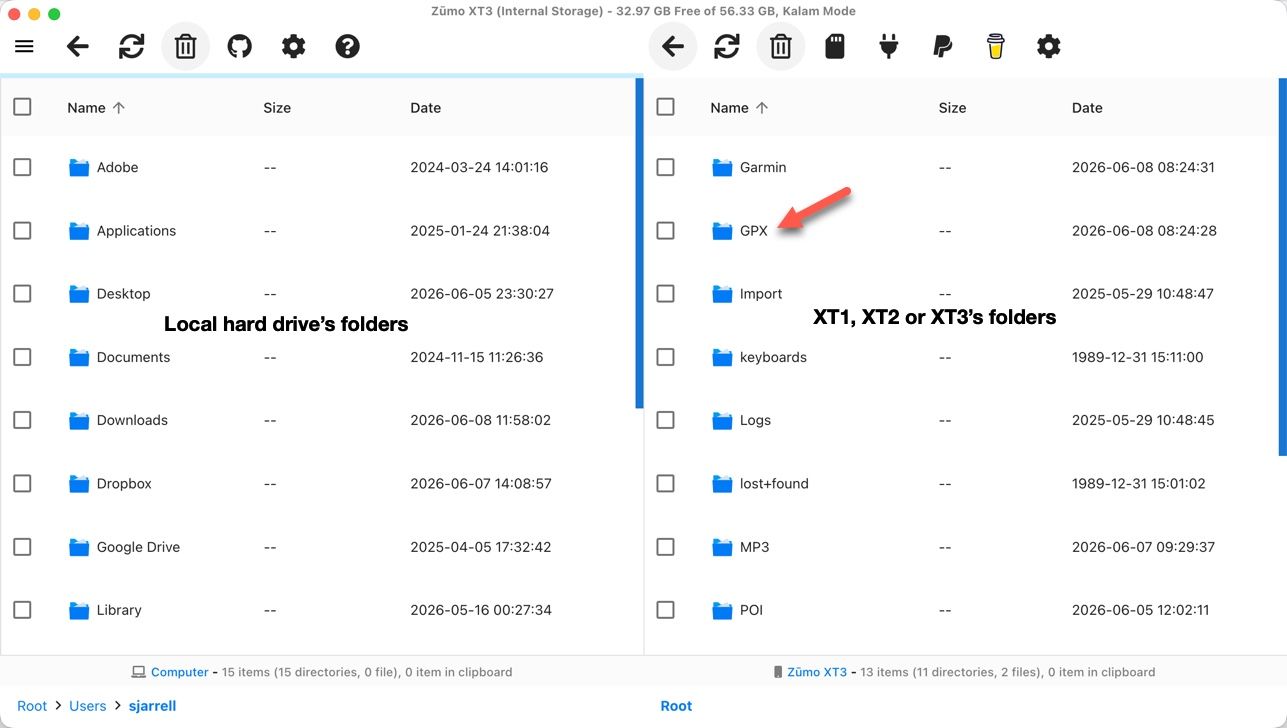
    To get a GPX route to the Garmin Camper 770, copy the GPX file via USB cable into the GPX folder on the device or a memory card and then import the route directly in the navigation menu under Apps -> Route Planner -> Import Save the route via Save as in 1.1 GPX format to the PC and then transfer as described ..
  • GPX1.2 & Garmin Tread

    13
    0 Votes
    13 Posts
    1k Views
    Danny 1d
    Sorry Stevedo 6 0 that I replied in Dutch, and thanks for the kind comment about this.
  • MRA favorites, not POIs, as waypoints in a Garmin XT2 or GPX file?

    2
    0 Votes
    2 Posts
    364 Views
    Hubert Thoring
    Unfortunately, this is currently not possible.... —-## Das geht aktuell leider nicht….
  • Zumo XT3/Tread

    2
    0 Votes
    2 Posts
    355 Views
    nomko
    Je mist niks Bedraad overbrengen werkt niet zo, zelfs nog beter.
  • Showing Tracks with Routes on the Garmin XT3

    7
    6
    0 Votes
    7 Posts
    891 Views
    Steve Jarrell
    @Carl-Lee I agree. Less is absolutely more in that case. I have been doing a lot of testing with my XT3 hence all of the collections and routes. I normally don't have anywhere near that many collections, routes or track on the Garmin although the XT3 can easily handle them. I just don't like the clutter!
  • Export To My Nav 5 Fails

    5
    0 Votes
    5 Posts
    707 Views
    Mzokk
    @Brian-Dingsdale-0 The reason I suggest a track for the 7day overview of the route is that you can enable it on the NAV5 and have it visible beneath the route. For the 7 day route segments I would suggest that each day you start the route at least 1/2 mile from your accommodation, in the direction of travel, to ensure that you pass through the start point. If you try and start the route from where you are located you might accidently not pass through the start of the route and the device will keep trying to return you to the beginning. By placing the start some way away the unit knows where you are can route you to and through the start of the route.
ACTIVE USERS POPULAR TOPICS
MY GROUPS