
@a-v-damme, nee er is niets gewijzigd aan de abonnementsstructuur, en Navigation is ook nooit gekoppeld geweest aan het Gold abonnement voor de route planner. De link die Bouke geeft laat zien welke abonnementen je hebt, als je helemaal naar beneden scrollt. Zou het kunnen dat je een jaar abonnement hebt gehad dat verlopen is? In het verleden zijn er ook wel eens Navigation aanbiedingen geweest voor 3 jaar Navigation.
@Dennis-Dawson once you have started navigation you can't move waypoints. That has to be done in the planner. You can however skip a waypoint. Assuming you are displaying the next wapoint (top right corner),you can easily skip to the next waypoint by tapping on the waypoint and then answering yes to the confirmation message, or long press on the next waypoint to quickly skip it.
To display waypoints, use the (...) menu and select Waypoints. Once you have the list of waypoints you can skip to another waypoint by pressing on the waypoint.
Honestly, this is all basic operation if you simply took the time to watch some of the training videos and perhaps even reviewed the manual.
@Rob-Veerman Rob bedankt, het was me gisteren per ongeluk een keer gelukt, maar ik kon hetb kunstje niet herhalen. dank zij jou beschrijving zag ik dat ik goed zou moeten zitten, maar ik zat net 1 scherm te ver in MRA, in mijn eigen MRA, en dan werkt het niet. Ik heb het probleem boven water en al een paar keer geoefend voor de zekerheid. Bedankt!!!
@Hans-van-de-Ven-MR-MRA waarom gpx 1.1? Ik gebruik voor mijn navigator 5 de export naar BMW gpx1.2 en die doet zowel de via punten als de route conversie prima. Ook als ik gpx 1.2 exporteer en via verkenner in de GPXdir van de navigator zet.
Ik heb gemerkt dat een Zumo396 wel verschil maakt tussen exporteren via connector en via de file export. Bij de laatste geen via-punten, bij de eerste wel.
@Stormforce8 Bare in mind that you change the map from TomTom to HERE and you change the route calculation, again from TT to Garmin. Its not strange the resulting routes differ. Also the settings in de navigation devices can differ; avoid ..., fastest versus adventurous etc etc.
What you should do is import the gpx from TT into MRA on a HERE card (which is used bij Garmin/Navigator). This wil give a different route. Now add the gpx file as a layer behind the route. Add via points until the routes are the same. Now export to your Navigator. Have fun!
@Willem-Jonker maybe a little trick. you look in google maps were you want to go and click on spot you get location gps number/code. copy that and paste it in your route and you get your point in MRA.
@geert-13
Die uitnodiging heb ik verstuurd uit mijn test met groep.
Als je een groep uitnodigt voor een evenement worden na acceptatie toegevoegd aan het evenement.
Je zou dus iedere motorrijder van Mars Europe kunnen uitnodigen voor de groep en de routes per land in een mapje zetten in de groep
@Peter-Schiefer
Das kenne ich. Mein Problem sind die persönlichen POIs.
Beispiel: Ich bin bei den Passknackern. Insgesamt sind da über 4000 POI. Natürlich aktiviere ich nur die in dem entsprechenden Land.
Aber dann gibt es ja noch so andere POIs. Sehenswürdigkeiten oder so. Dinge, die ich sonstwoher habe.
Alle sehen halt gleich aus.
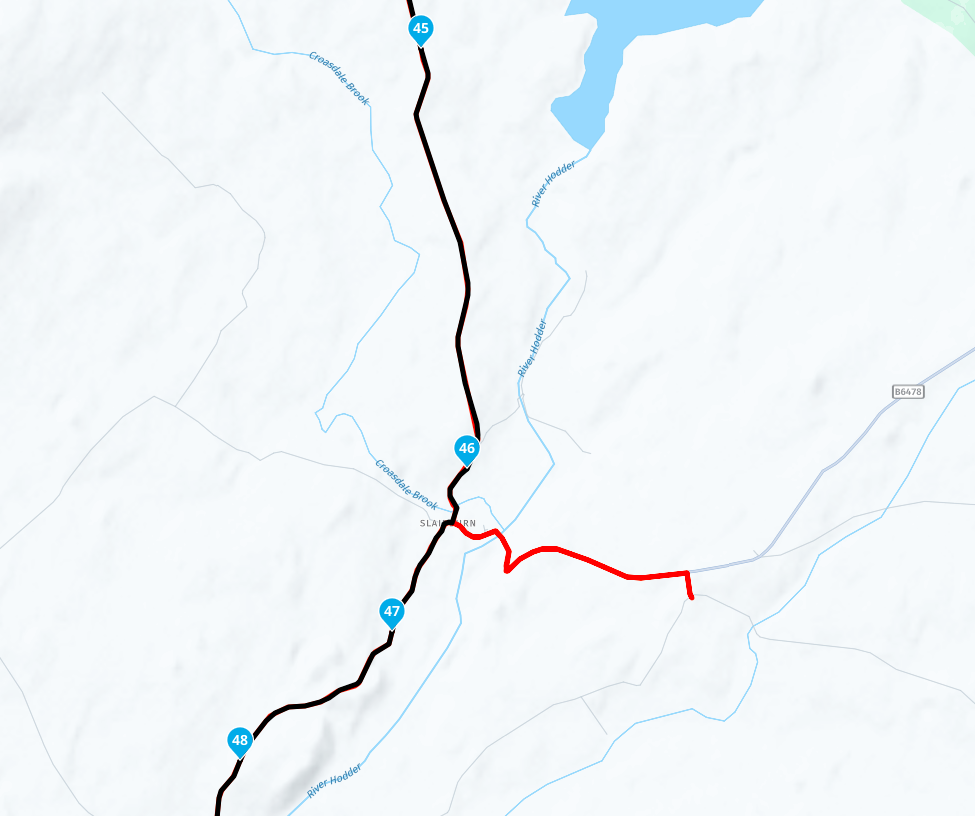
@David-Buttery Thank you for sharing your route. When I use the plan.tomtom route planner I also see the same issue, so obviously an error in the TomTom map.
[image: 17d8b006-59cd-43ff-ad0d-a300afa82c92-image.png]
I have reported the error to TomTom, you can do the same here: https://www.tomtom.com/mapshare/tools/new/mapshare/#loc=53.96705,-2.44067,19.5
If @Willie-Davidson indeed means TomTom Go.
Then the TomTom Mydrive Website is need to push the tracks to TomTom Go.
For TomTom Mydrive, a TomTom account is needed (Free account). Login with this account on the MyDrive website and in TomTom Go. In TomTom Go it is mostly one time. The app remembers it for future use. The same credentials are also needed for TomTom traffic services.
With the same credentials, you can also push a route from MRA Routeplanner to TomTom MyDrive.
Summarizing
Create an account on TomTom Mydrive and use it also in TomTom Go.
When it's done. It is now a 2 step journey every time.
In MRA push the route to TomTom MyDrive (found under "Save as).
Go to TomTom Mydrive. Select the route. Disabled synchronise and Enabled it again. Now your route is visible in TomTom Go.