Carpuride
-
i use a carpuride w702B, most of the time except when i am touring when I use my oukitel RT3 rugged tablet.
the reason is, when using Cp you cannot use some the features e.g cannot skip waypoints manually etc as the icon is not on view, I am informed this an Apple issue and not the fault of MRA
It's for this reason I use my RT3 when touring, because it can become a PITA when you have to get your phone out of your pocket to carry out certain tasks.
 ️
️
I use a CP 702BS with CP and I can confirm that it is possible to skip waypoints with MRA Next.
-
when using Cp you cannot use some the features e.g cannot skip waypoints manually etc as the icon is not on view, I am informed this an Apple issue and not the fault of MRA
Are you sure about this?
I don’t have a CarPlay device to check, but I was under the impression that going into the settings gives you the option to skip.
Hopefully someone with CP device can answer.Number 6.
hi,
@Nick-Carthewapologies, I stand corrected, I was not aware of this icon, (I ask why myself why am I not aware DOH)
the icon that appears in the top right corner when using the next app directly is not viewable in CP on my particular device.
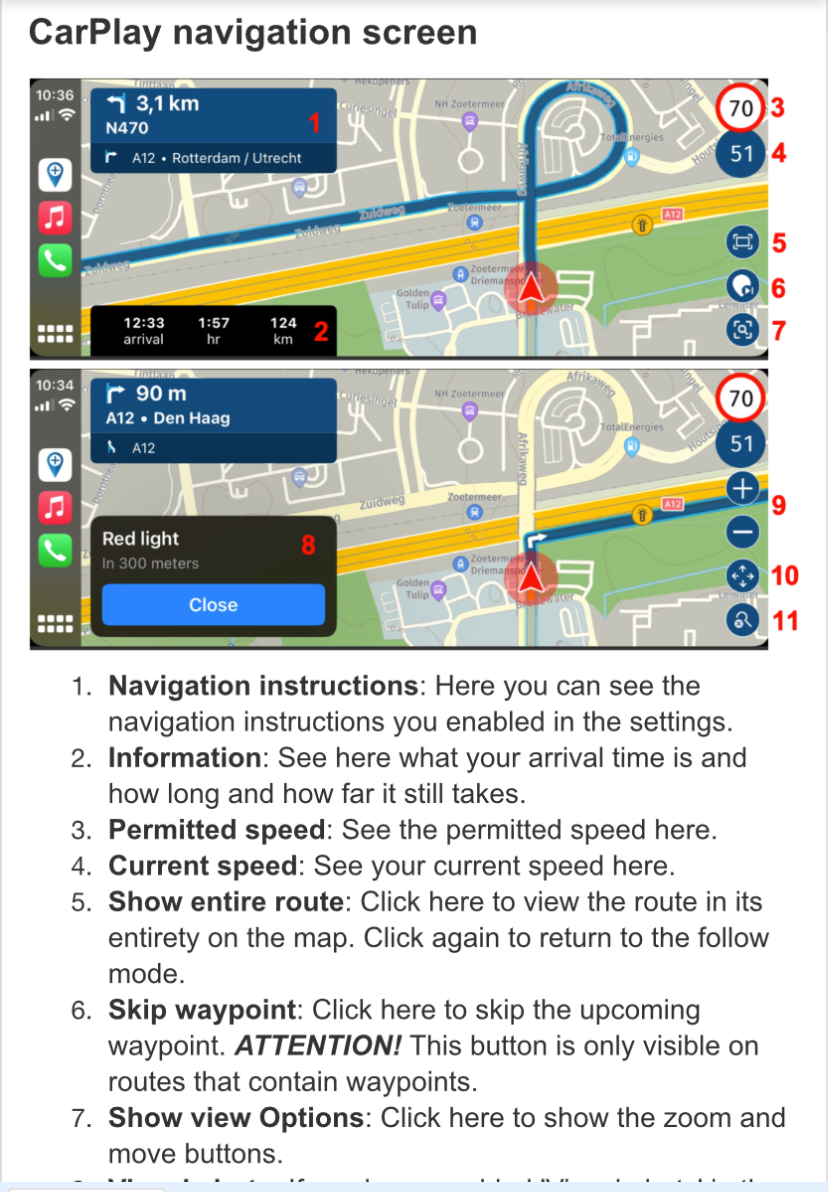
I am not sure how to add that icon, #6, can someone enlighten me please.
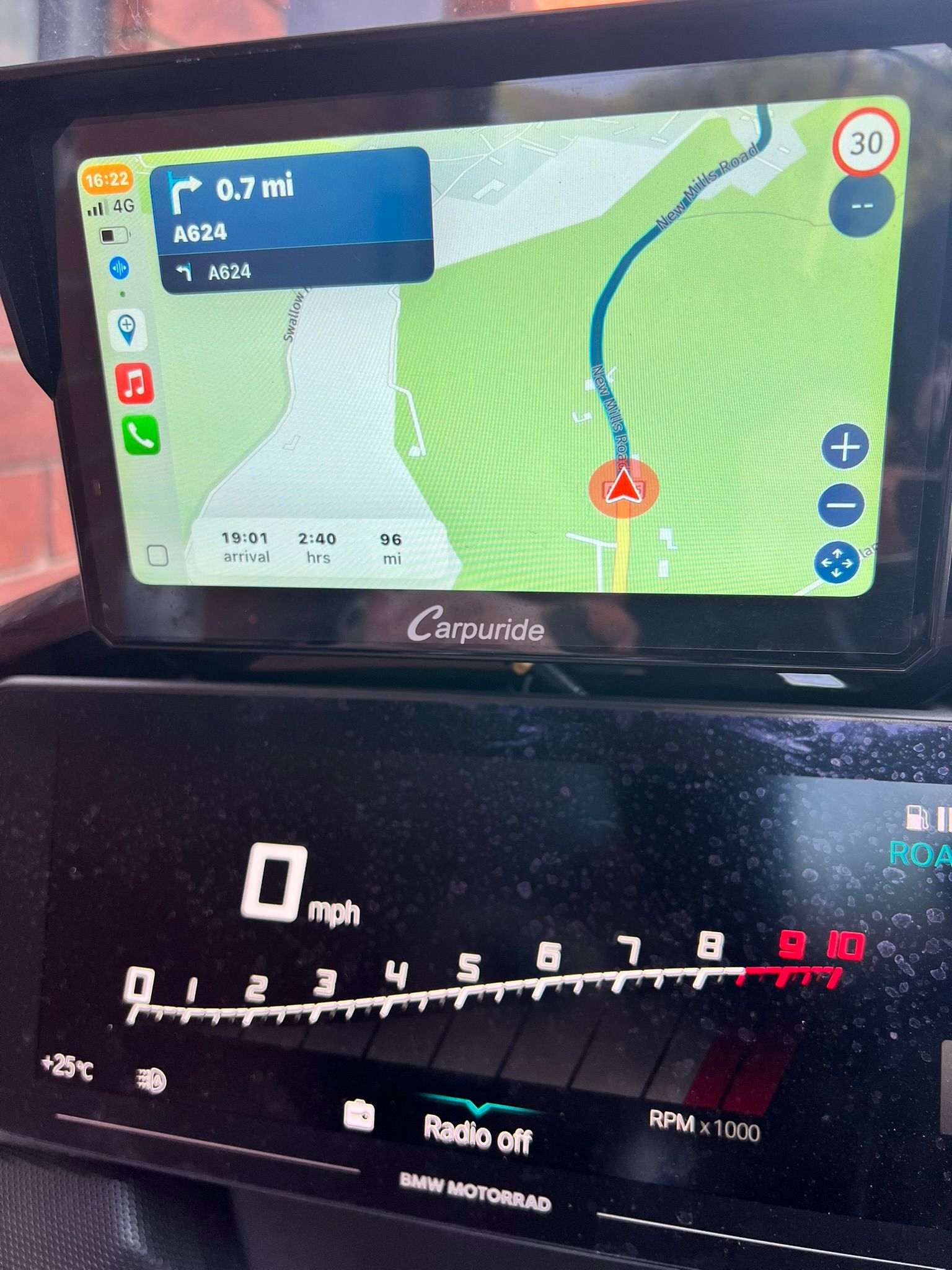
unable to skip waypoints on screen below,
-
hi,
@Nick-Carthewapologies, I stand corrected, I was not aware of this icon, (I ask why myself why am I not aware DOH)
the icon that appears in the top right corner when using the next app directly is not viewable in CP on my particular device.
I am not sure how to add that icon, #6, can someone enlighten me please.
unable to skip waypoints on screen below,
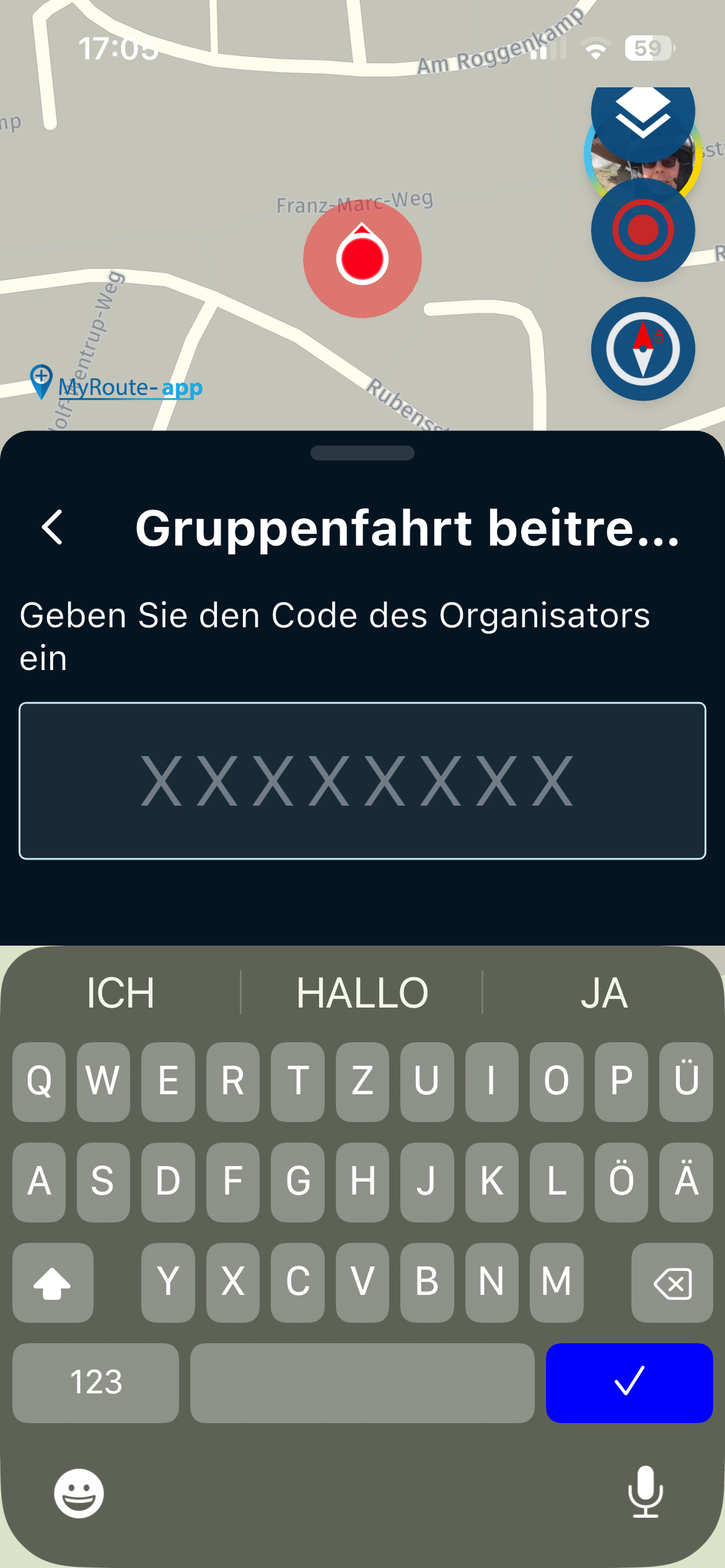
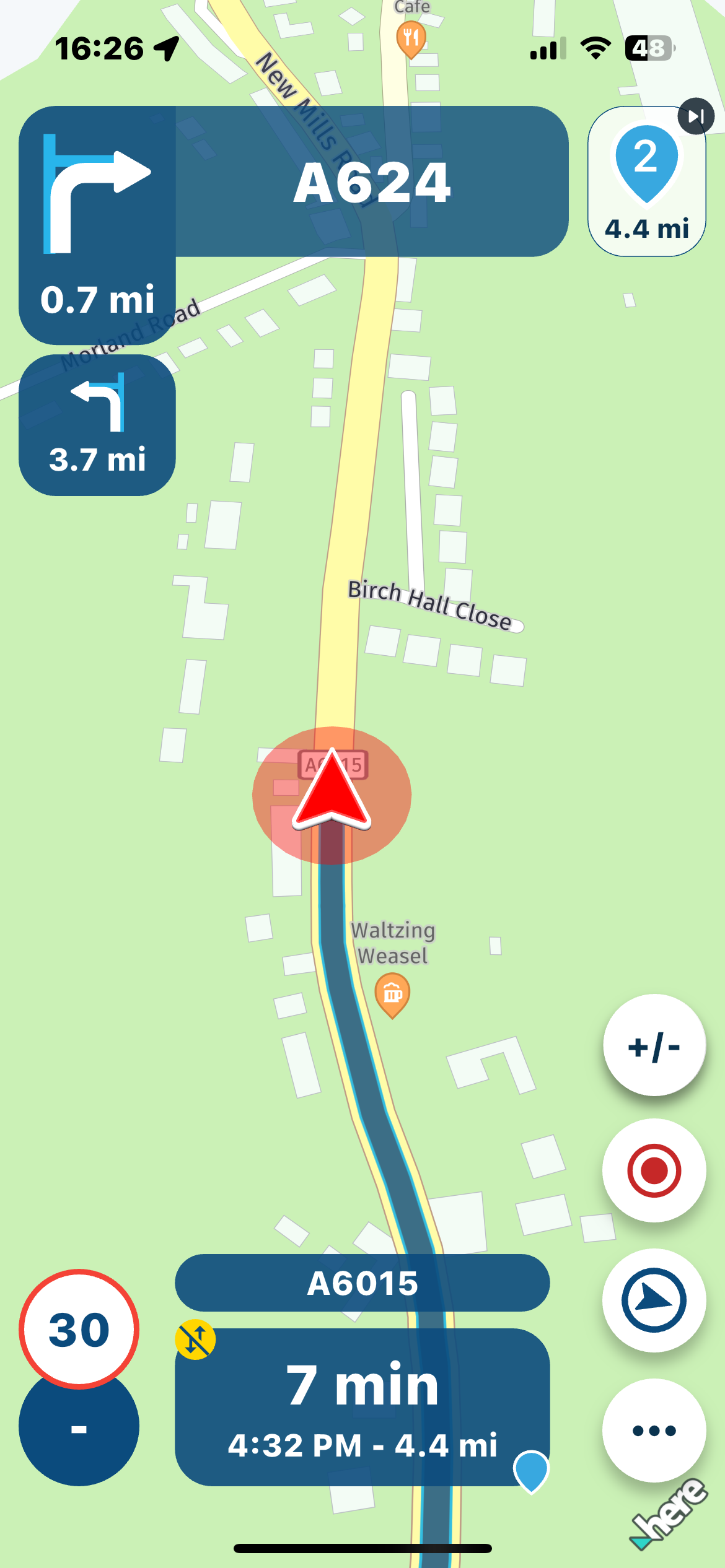
for clarity, below is a view of the screen when using NEXT directly on the phone,
notice the waypoint icon top right, recording icon bottom right, settings icon and compass icon, non of which can be seen on CP screen
-
for clarity, below is a view of the screen when using NEXT directly on the phone,
notice the waypoint icon top right, recording icon bottom right, settings icon and compass icon, non of which can be seen on CP screen

@paul69 in the CP and AA devices the skin waypoint button is not available. To ski a waypoint on those devices you must hit the menu button on the lower right and then you can buy the skip waypoint button
-
for clarity, below is a view of the screen when using NEXT directly on the phone,
notice the waypoint icon top right, recording icon bottom right, settings icon and compass icon, non of which can be seen on CP screen

@paul69 For various reasons, the upcoming waypoint icon that you refer to is not available for AA or CP.
-
@paul69 in the CP and AA devices the skin waypoint button is not available. To ski a waypoint on those devices you must hit the menu button on the lower right and then you can buy the skip waypoint button
hi @Marinus-van-Deudekom said in Carpuride:
To ski a waypoint on those devices you must hit the menu button on the lower right and then you can buy the skip waypoint button
to which icon do you refer, the one on the lower right is the pan icon, not menu.
i am clearly doing something wrong if others can skip waypoints. I will have to have a play around.
to achieve, we must first attempt ✌️
K1600 GTL
Oukitel RT3
iPhone 13 Pro, carpuride 702b -
hi @Marinus-van-Deudekom said in Carpuride:
To ski a waypoint on those devices you must hit the menu button on the lower right and then you can buy the skip waypoint button
to which icon do you refer, the one on the lower right is the pan icon, not menu.
i am clearly doing something wrong if others can skip waypoints. I will have to have a play around.
@paul69 The menu button down right
Honda Goldwing GL1500,
Honda Silverwing GL 650
DMD2 T865X 8 inch Android tablet using MRA next for navigation
Garmin XT sold
Samsung S24FE mounted on a Quadlock and using Android Auto in my car -
@paul69 The menu button down right
@Marinus-van-Deudekom said in Carpuride:
The menu button down right
please excuse my ignorance once again, but may I again enquire to which one you refer.
the CP bottom right is the pan icon/button (4 arrows)
the iphone bottom right is the menu button (3 dots), however this is of no use when the phone is in a pocket.
-
hi,
@Nick-Carthewapologies, I stand corrected, I was not aware of this icon, (I ask why myself why am I not aware DOH)
the icon that appears in the top right corner when using the next app directly is not viewable in CP on my particular device.
I am not sure how to add that icon, #6, can someone enlighten me please.
unable to skip waypoints on screen below,

icon #6 is not available in CarPlay when you are in 'manual zoom', because in 'Manual Zoom' the + and - icons are displayed instead.
Once you go back to automatic zoom, then icon #6 is available on your Carplay screen
Ronny
-
Also using CarPlay you can't start a recording and no speedo or speed limit on a free ride, you would think an easy fix but the developers are not focused on these developments.
Shame as so many people are switching to CarPlay based systems.
@HighPeakRider said in Carpuride:
Also using CarPlay you can't start a recording and no speedo or speed limit on a free ride, you would think an easy fix but the developers are not focused on these developments.
There are limits imposed by Google and Apple concerning the AA/CP GUI. There is simply no possibility to throw all app features into the AA/CP GUI. Personally I think it is a shame that so many people buy AA/CP devices not knowing about the limitations it brings.
I am just an enthusiastic MRA user, and hope you will be one too!
Most motorcycle problems are caused by the nut that connects the handlebar to the saddle.
Check out RideSleepRepeat.eu, a biker community for sharing stays across Europe
-
@HighPeakRider said in Carpuride:
Also using CarPlay you can't start a recording and no speedo or speed limit on a free ride, you would think an easy fix but the developers are not focused on these developments.
There are limits imposed by Google and Apple concerning the AA/CP GUI. There is simply no possibility to throw all app features into the AA/CP GUI. Personally I think it is a shame that so many people buy AA/CP devices not knowing about the limitations it brings.
@Con-Hennekens I couldn't agree more Con. There are a lot of issues with people using CP and AA. I think most of them because they expect to much from CP and AA and were a bit misguided in buying devices that are not that expensive.
On the otherhand there are users that know the limitations of CP and AA devices and can live with it.Honda Goldwing GL1500,
Honda Silverwing GL 650
DMD2 T865X 8 inch Android tablet using MRA next for navigation
Garmin XT sold
Samsung S24FE mounted on a Quadlock and using Android Auto in my car -
@Con-Hennekens I couldn't agree more Con. There are a lot of issues with people using CP and AA. I think most of them because they expect to much from CP and AA and were a bit misguided in buying devices that are not that expensive.
On the otherhand there are users that know the limitations of CP and AA devices and can live with it.
@Marinus-van-Deudekom said in Carpuride:
On the otherhand there are users that know the limitations of CP and AA devices and can live with it.
Personally, I know the limitations of CP hence why I use a rugged tablet for touring.
I’m not too worried about features like skipping waypoints or recording a tracklog from the screen, as they’re not part of my usual setup. I was merely replying to the OP.
My carpuride is my media centre, i would use the TFT but the maps and navigation and phone connections have a lot of problems.@Marinus-van-Deudekom may I ask could you answer my query regarding the menu button, please could confirm which one you think is the menu button, in my screen shots above. just to ease my confusion.
thanksto achieve, we must first attempt ✌️
K1600 GTL
Oukitel RT3
iPhone 13 Pro, carpuride 702b -
@Marinus-van-Deudekom said in Carpuride:
On the otherhand there are users that know the limitations of CP and AA devices and can live with it.
Personally, I know the limitations of CP hence why I use a rugged tablet for touring.
I’m not too worried about features like skipping waypoints or recording a tracklog from the screen, as they’re not part of my usual setup. I was merely replying to the OP.
My carpuride is my media centre, i would use the TFT but the maps and navigation and phone connections have a lot of problems.@Marinus-van-Deudekom may I ask could you answer my query regarding the menu button, please could confirm which one you think is the menu button, in my screen shots above. just to ease my confusion.
thanks
@paul69 I'll try to make some screenshots and report back
-
@paul69
I gave you not the wright info.
Here it is
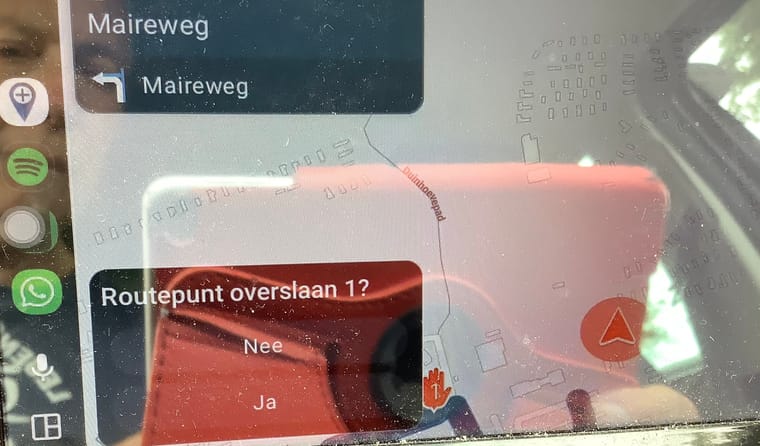
If you push the button on th down Right Side of the screen, indicated by the arrow. Another screen opens and on the down left under there’s a pop up where you can skip the waypoint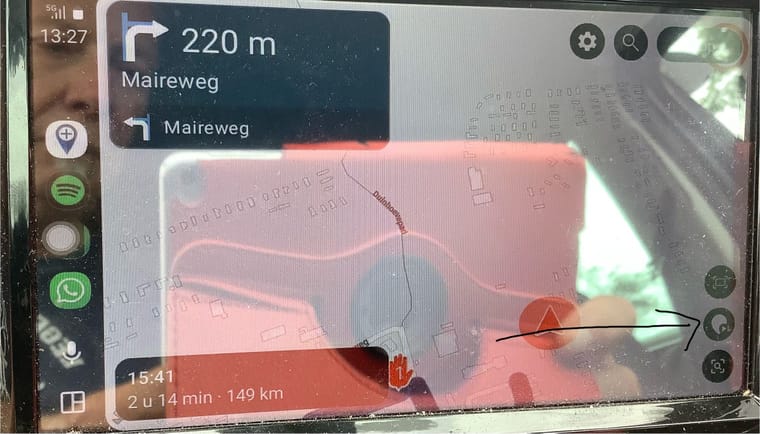
Honda Goldwing GL1500,
Honda Silverwing GL 650
DMD2 T865X 8 inch Android tablet using MRA next for navigation
Garmin XT sold
Samsung S24FE mounted on a Quadlock and using Android Auto in my car -
@paul69
I gave you not the wright info.
Here it is
If you push the button on th down Right Side of the screen, indicated by the arrow. Another screen opens and on the down left under there’s a pop up where you can skip the waypoint
hi again, @Marinus-van-Deudekom
thanks for taking the time to reply, however, as shown in my screen shot, shown again below, i do not see the icon you point out
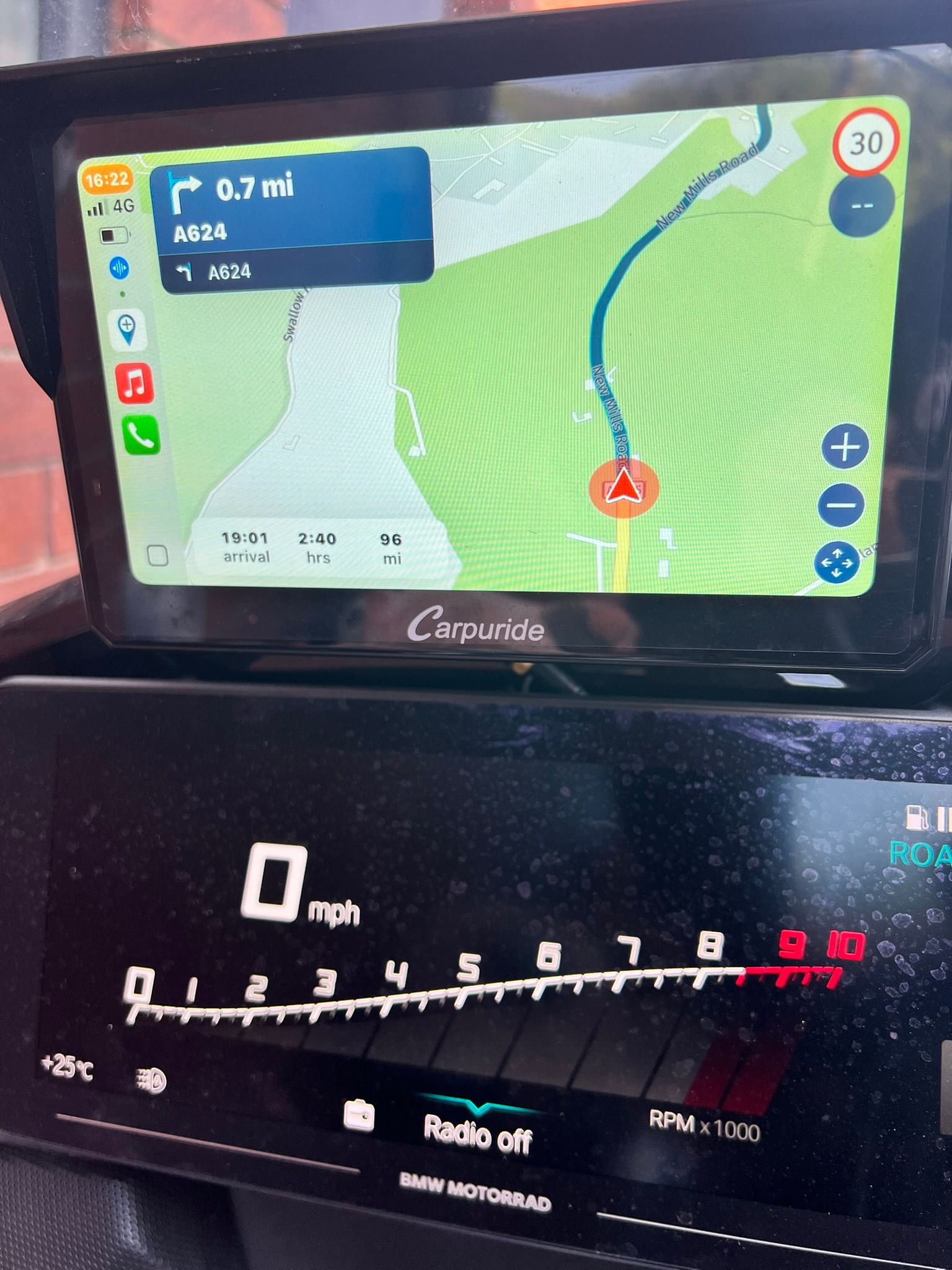
as i stated earlier i will do some digging, perhaps i will uninstall and reinstall the app, and reset the CP device.
thanks -
I see what you mean. Maybe that someone who’s got a carpuride cab help you
-
hi again, @Marinus-van-Deudekom
thanks for taking the time to reply, however, as shown in my screen shot, shown again below, i do not see the icon you point out
as i stated earlier i will do some digging, perhaps i will uninstall and reinstall the app, and reset the CP device.
thanks
@paul69, You are in the zoom-menu...
Tap the bottom right icon to exit the zoom menu, you will find the skip button there.I am just an enthusiastic MRA user, and hope you will be one too!
Most motorcycle problems are caused by the nut that connects the handlebar to the saddle.
Check out RideSleepRepeat.eu, a biker community for sharing stays across Europe
-
@paul69, You are in the zoom-menu...
Tap the bottom right icon to exit the zoom menu, you will find the skip button there.
for information, below screenshot is what happens when I press/touch the bottom right icon, (4 way arrow), when I press done (top right corner) it reverts back the screen above, this is my point all along.
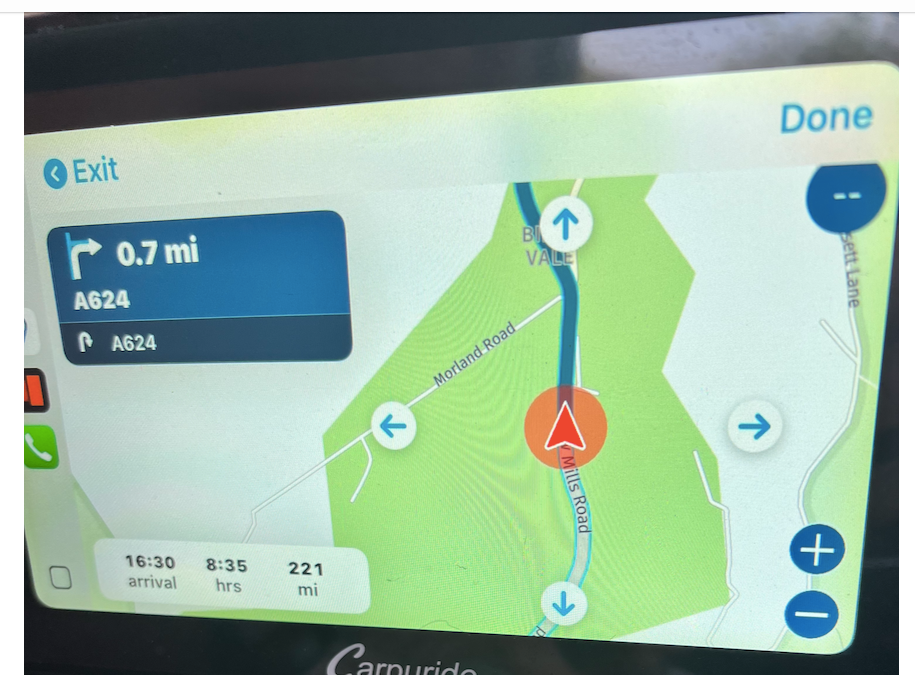
i will uninstall and reinstall.
thanks
-

I believe that you can’t skip waypoints in a track, because there are none.
Hello! It looks like you're interested in this conversation, but you don't have an account yet.
Getting fed up of having to scroll through the same posts each visit? When you register for an account, you'll always come back to exactly where you were before, and choose to be notified of new replies (either via email, or push notification). You'll also be able to save bookmarks and upvote posts to show your appreciation to other community members.
With your input, this post could be even better 💗
Register Login-
 02042
02042
-
013199
-
 0732
0732
-
 1562
1562
-
 011731
-
15138
-
 08327
08327
-
 0521
0521