Skip to content
  • Categories
  • Recent
  • Popular
  • Support
  • MyRoute-app
Collapse
Brand Logo

MRA Community Forum

  1. Home
  2. The MyRoute-app
  3. [App] Problems, Bugs and other Issues
  4. Skip waypoint problem...

Skip waypoint problem...

Scheduled Pinned Locked Moved [App] Problems, Bugs and other Issues
7 Posts 4 Posters 1.1k Views 4 Watching
  • Oldest to Newest
  • Newest to Oldest
  • Most Votes
Reply
  • Reply as topic
Log in to reply
This topic has been deleted. Only users with topic management privileges can see it.
  • LennyO Offline
    LennyO Offline
    LennyO
    RouteXpert
    wrote on last edited by
    #1

    Well... there is definitely a problem with the "Skip waypoint" function.
    Today I tried a different route.
    The problem remains.
    Once I start the route, I see a point #2 in the "Skip" symbol, and as I move along, #2 just sits there....
    If I cancel Navigation in the middle or the route and restart it, it finds my location, starts the navigation, shows the next upcoming point in the "Skip" symbol and then again it never changes as I progress along the route.
    Am I the only one with this issue?
    Thanks!

    Positive emotions are worth every penny ;)

    Hubert Thoring Jörgen 2 Replies Last reply
    0
    • LennyO LennyO

      Well... there is definitely a problem with the "Skip waypoint" function.
      Today I tried a different route.
      The problem remains.
      Once I start the route, I see a point #2 in the "Skip" symbol, and as I move along, #2 just sits there....
      If I cancel Navigation in the middle or the route and restart it, it finds my location, starts the navigation, shows the next upcoming point in the "Skip" symbol and then again it never changes as I progress along the route.
      Am I the only one with this issue?
      Thanks!

      Hubert Thoring Offline
      Hubert Thoring Offline
      Hubert Thoring
      Valued contributor
      wrote on last edited by Hubert Thoring
      #2

      @Lenny-O

      Yes.

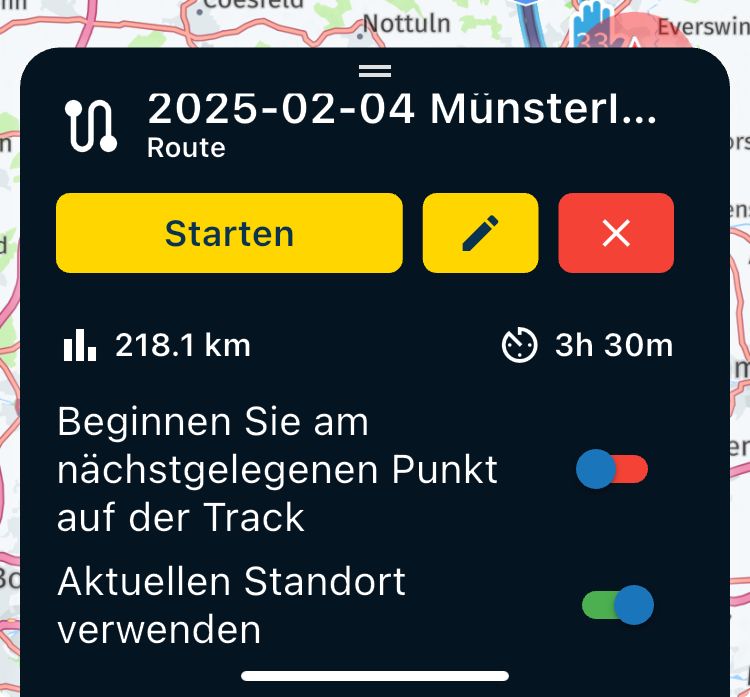
      Please check the settings of the navigation under the app account.

      The starting point, for example, do not place too close to the destination for a round trip or for a route, the starting point about 100m from the location.

      IMG_0477.png

      And when starting the route, be sure to pay attention to the selection .....
      IMG_0478.jpeg

      VG 👋

      VG Hubert
      Beta Test "Next App" dazu die Hardware .
      iPad 9. Gen iOS 26.5.2/ iPhone 16e iOS 26.5.2/ Navi iPhone Xr iOS 18.7.9 / PC mit MS Win11 /❗️MyRoute-App im Cradel und Remotek-One❗️ Info zu MRA & Remotek One

      LennyO 1 Reply Last reply
      1
      • LennyO LennyO

        Well... there is definitely a problem with the "Skip waypoint" function.
        Today I tried a different route.
        The problem remains.
        Once I start the route, I see a point #2 in the "Skip" symbol, and as I move along, #2 just sits there....
        If I cancel Navigation in the middle or the route and restart it, it finds my location, starts the navigation, shows the next upcoming point in the "Skip" symbol and then again it never changes as I progress along the route.
        Am I the only one with this issue?
        Thanks!

        Jörgen Offline
        Jörgen Offline
        Jörgen
        Valued contributor
        wrote on last edited by
        #3

        @Lenny-O What is a skip symbol for you? Can you share a picture?
        Skip a waypoint, can be done with 4 different methods.

        1. tap on the WP at the top right of the navigation and confirm skip.
        2. long tap on the WP at the top right of the navigation, it is then automatically skipped.
        3. go to the menu via the three dots and select Skip WP.
        4. go to the menu via the three dots and select the WP list and then the next WP.

        Hardware
        iPhone 12 pro (iOS 26.2.1)
        iPad (7.Gen.) 18.7.3
        Oukitel RT3 Pro (Andr. 14)
        Wireless CarPlay mit (Elebest C650)
        Wired CarPlay (SEAT Arona - 2021)
        MRA Workshops in Deutsch sind hier zu finden

        LennyO 1 Reply Last reply
        1
        • Jörgen Jörgen

          @Lenny-O What is a skip symbol for you? Can you share a picture?
          Skip a waypoint, can be done with 4 different methods.

          1. tap on the WP at the top right of the navigation and confirm skip.
          2. long tap on the WP at the top right of the navigation, it is then automatically skipped.
          3. go to the menu via the three dots and select Skip WP.
          4. go to the menu via the three dots and select the WP list and then the next WP.
          LennyO Offline
          LennyO Offline
          LennyO
          RouteXpert
          wrote on last edited by
          #4

          @Jörgen I mean the one you mention in #1 and #2. The symbol in the upper right corner of the screen that shows the next way point. Thanks!

          Positive emotions are worth every penny ;)

          1 Reply Last reply
          0
          • Hubert Thoring Hubert Thoring

            @Lenny-O

            Yes.

            Please check the settings of the navigation under the app account.

            The starting point, for example, do not place too close to the destination for a round trip or for a route, the starting point about 100m from the location.

            IMG_0477.png

            And when starting the route, be sure to pay attention to the selection .....

            IMG_0478.jpeg

            VG 👋

            LennyO Offline
            LennyO Offline
            LennyO
            RouteXpert
            wrote on last edited by
            #5

            @Hubert-Thoring Thank you! Mine is the same way aside from the Track options, I have the both off.

            Positive emotions are worth every penny ;)

            1 Reply Last reply
            0
            • M. Schrijver Online
              M. Schrijver Online
              M. Schrijver
              Valued contributor
              wrote on last edited by
              #6

              @Lenny-O
              Please share the route you have your problem with. The route itself can also be the problem

              (I use MRA Next only on Android Auto. Every comment, suggestion, etc will be based on my usage with Android Auto)

              LennyO 1 Reply Last reply
              1
              • M. Schrijver M. Schrijver

                @Lenny-O
                Please share the route you have your problem with. The route itself can also be the problem

                LennyO Offline
                LennyO Offline
                LennyO
                RouteXpert
                wrote on last edited by
                #7

                Gents, the issue has been resolved!
                I reinstalled the App and it works perfectly now, YEY!
                Thank you for your attention and help!

                Positive emotions are worth every penny ;)

                1 Reply Last reply
                1

                Hello! It looks like you're interested in this conversation, but you don't have an account yet.

                Getting fed up of having to scroll through the same posts each visit? When you register for an account, you'll always come back to exactly where you were before, and choose to be notified of new replies (either via email, or push notification). You'll also be able to save bookmarks and upvote posts to show your appreciation to other community members.

                With your input, this post could be even better 💗

                Register Login
                Reply
                • Reply as topic
                Log in to reply
                • Oldest to Newest
                • Newest to Oldest
                • Most Votes


                ACTIVE USERS
                M. Schrijver
                M. Schrijver
                LennyO
                LennyO
                Hubert Thoring
                Hubert Thoring
                Jörgen
                Jörgen
                POPULAR TOPICS
                • GPX Versions 1.1 vs 1.2 for Garmin Visually Explained
                  Mzokk
                  Mzokk
                  7
                  174
                  13.5k

                • The compas direction on the elevation circle is wrong
                  Guzzist
                  Guzzist
                  0
                  30
                  1.0k

                • HERE maps updates
                  Travellexxie
                  Travellexxie
                  0
                  9
                  280

                • App probleem scenic route niet mogelijk
                  Philip Verbeek
                  Philip Verbeek
                  0
                  3
                  59

                • Latest version of the App?
                  white.mouse
                  white.mouse
                  0
                  3
                  77

                • Auto skip many waypoints by itself while I was on route. [5.2.0 - 474]
                  paul69
                  paul69
                  0
                  35
                  1.6k

                • Straatnamen worden uitgesproken
                  M. Schrijver
                  M. Schrijver
                  0
                  6
                  376

                MY GROUPS
                • Login

                • Login or register to search.
                • First post
                  Last post
                0
                • Categories
                • Recent
                • Popular
                • Support
                • MyRoute-app