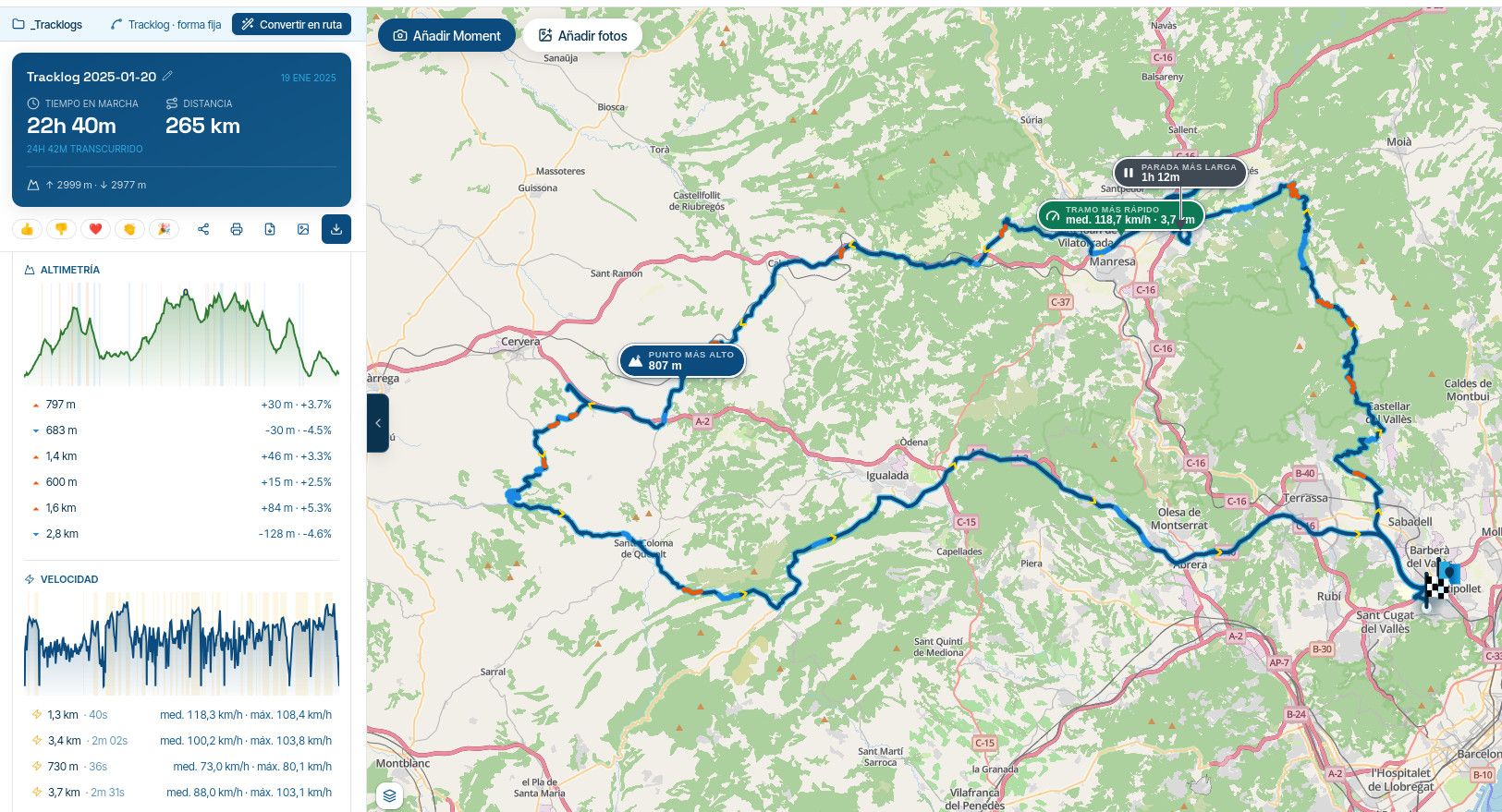
Verkeersinfo uitleg gevraagd
-

Ik heb gisteren een voor de eerste een route gereden in de online modus waarbij ik ook verkeersinfo op het scherm zag.
Ik reed in trackmodus als dat nog invloed zou kunnen hebben.Tijdens het rijden van de route lag er zeer regelmatig een oranje lijn over de blauwe routelijn. Ik neem aan dat dit door de verkeersinfo komt.
Kan iemand mij uitleg over de verschillende gangbare dingen/kleuren die door de verkeersinfo gebruikt wordt?
-
Ik heb gisteren een voor de eerste een route gereden in de online modus waarbij ik ook verkeersinfo op het scherm zag.
Ik reed in trackmodus als dat nog invloed zou kunnen hebben.Tijdens het rijden van de route lag er zeer regelmatig een oranje lijn over de blauwe routelijn. Ik neem aan dat dit door de verkeersinfo komt.
Kan iemand mij uitleg over de verschillende gangbare dingen/kleuren die door de verkeersinfo gebruikt wordt?

@M-Schrijver
Traffic notifications are explained here:https://forum.myrouteapp.com/topic/8405/new-update-4-3-4-massive-navigation-improvements
-
I've read the first post of the mentioned topic. But nothing about the meaning of the colors.
I saw yesterday a lot of orange (traffic) lines on my route. I think it suggested heavy traffic. But all where false. There was no traffic at all. In many cases i was the only one riding on that stretch no other vehicles present on the road.
The orange lines where already present when i started the route.
They had one thing in common. Most of them where in populated area's.It is my first time i had trafficinfo enabled (normally i ride offline). So i cannot say to much about the functioning of the traffic flows. But my first impression is not good. 10 out 10 wrong is a bad first start.
There was also a part of the route blocked by route maintenance. This was visual on the map by trafficinfo. But MRA did not advise a reroute to skip the maintenance.
Is this because i used "track mode"(I use MRA Next only on Android Auto. Every comment, suggestion, etc will be based on my usage with Android Auto)
-
I've read the first post of the mentioned topic. But nothing about the meaning of the colors.
I saw yesterday a lot of orange (traffic) lines on my route. I think it suggested heavy traffic. But all where false. There was no traffic at all. In many cases i was the only one riding on that stretch no other vehicles present on the road.
The orange lines where already present when i started the route.
They had one thing in common. Most of them where in populated area's.It is my first time i had trafficinfo enabled (normally i ride offline). So i cannot say to much about the functioning of the traffic flows. But my first impression is not good. 10 out 10 wrong is a bad first start.
There was also a part of the route blocked by route maintenance. This was visual on the map by trafficinfo. But MRA did not advise a reroute to skip the maintenance.
Is this because i used "track mode"
@M-Schrijver I also only navigate offline, I live in a rural area so the only traffic that affects me might be a farmer moving some sheep
 I guess that live traffic reports will always be slow to implement and slow to clear. Google maps are more accurate because they have the advantage of tracking mobile movements.
I don’t know why MRA did not skip the road closure, maybe @Corjan-Meijerink can answer. -

Yesterday, I drove from Maarsbergen to Breda and then back. I often saw the orange stripes on the road, but I didn't pay much attention to the traffic. I also received five work alerts, both as a warning and with the symbol on the map. In none of the five cases were there actual works, or works on the roadway, so I also wonder how accurate this information is!
Gisteren reed ik van Maarsbergen naar Breda en later weer terug. Onderweg veelvuldig de oranje strepen gehad maar geen noemenswaardige drukte waar kunnen nemen. Ook kreeg ik een vijftal keer een melding van werkzaamheden zowel als waarschuwing als met het symbool op de kaart. In geen van de vijf gevallen waren er daadwerkelijk werkzaamheden, dan wel werkzaamheden op de rijbaan.
Ik vraag me dus ook af hoe accuraat deze informatie is!met een R1250RT met TFT
en BMW Connected Ride App(die dus nog steeds niet voldoet!) ; M.R.A. in combinatie met de Carpuride W702 (voor Android op de Motor!), de Garmin Zumo XT als backup en een Samsung Galaxy S24 -
Yesterday, I drove from Maarsbergen to Breda and then back. I often saw the orange stripes on the road, but I didn't pay much attention to the traffic. I also received five work alerts, both as a warning and with the symbol on the map. In none of the five cases were there actual works, or works on the roadway, so I also wonder how accurate this information is!
Gisteren reed ik van Maarsbergen naar Breda en later weer terug. Onderweg veelvuldig de oranje strepen gehad maar geen noemenswaardige drukte waar kunnen nemen. Ook kreeg ik een vijftal keer een melding van werkzaamheden zowel als waarschuwing als met het symbool op de kaart. In geen van de vijf gevallen waren er daadwerkelijk werkzaamheden, dan wel werkzaamheden op de rijbaan.
Ik vraag me dus ook af hoe accuraat deze informatie is!
@white-mouse Durlinger the kast few months I’ve found the warnings to be accurate
-
Yesterday i ride a different route. Yesterday some orange traffic flow lines could be sort of corrrect. There were more cars driving slower. But not slow.
Most of the orange lines were again not correct. Half of those moment there was no traffic at all.Today i opened the route again. I was very suprised to see orange lines on the same spots as yesterday. That is not possible.
When i open HereWeGo with the traffic layer enabled. There is no heavy traffic on those spots.Found the cause (i think)
Somewhere in the last few days the route is started with ONline navigation enabled. The traffic flow which was there at that specific moment is saved in the route.
Today i opened that route with OFFline navigation enabled. Therefore the traffic will not be refreshed and the old traffic flow is shown.
As a test. I enabled ONline navigation and started the route again. And gone are the orange traffic flow lines. -
M. Schrijver referenced this topic on
-

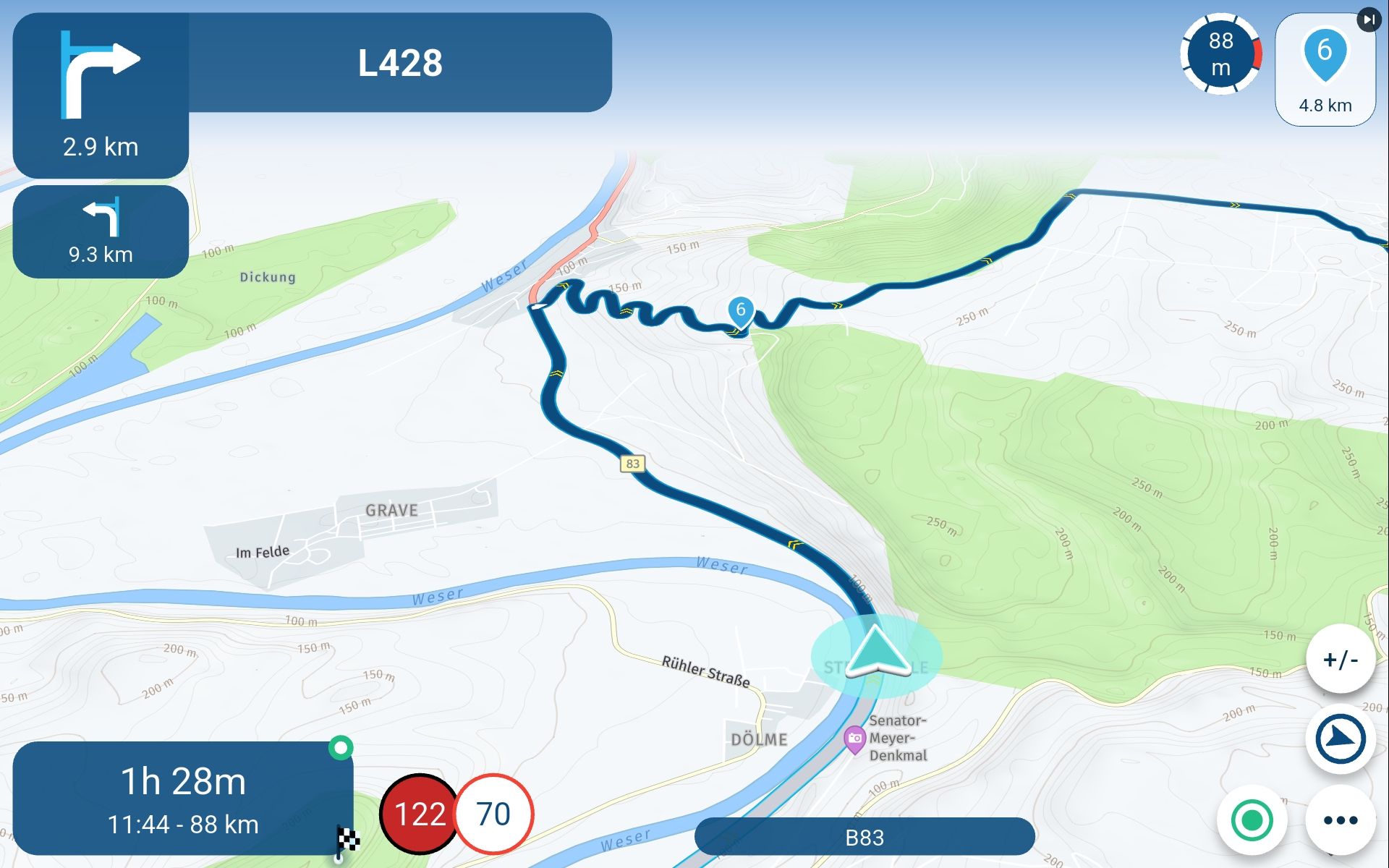
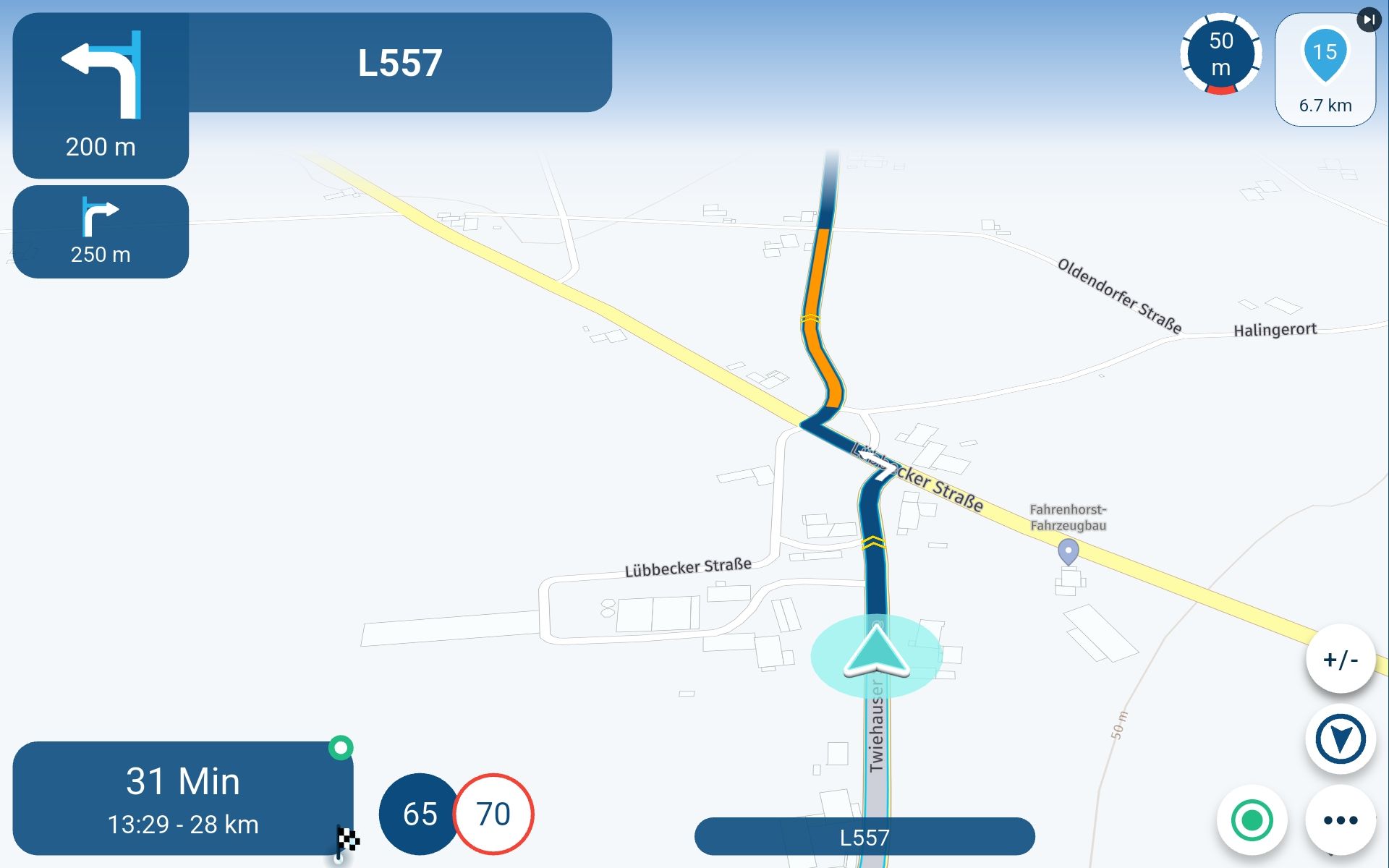
The orange route sections are meant to indicate traffic disruptions, aren’t they?
During my recent journeys, I’ve seen this marking on various roads, even though there was either very little traffic or not a single vehicle there apart from mine.
There were no roadworks that were inactive.
And despite having the option to take traffic disruptions into account enabled, the route wasn’t automatically changed. That would have been a bit silly, too.
Is there perhaps another explanation for this oranje colour – maybe it has something to do with nationalism? :-))
Is there another explanation?
-
The orange route sections are meant to indicate traffic disruptions, aren’t they?
During my recent journeys, I’ve seen this marking on various roads, even though there was either very little traffic or not a single vehicle there apart from mine.
There were no roadworks that were inactive.
And despite having the option to take traffic disruptions into account enabled, the route wasn’t automatically changed. That would have been a bit silly, too.
Is there perhaps another explanation for this oranje colour – maybe it has something to do with nationalism? :-))
Is there another explanation?
@RainerT The traffic information is not instantly updated, maybe when you are travelling at 122 in a 70 you have arrived before the traffic was there

-
@RainerT The traffic information is not instantly updated, maybe when you are travelling at 122 in a 70 you have arrived before the traffic was there
@RainerT The traffic information is not instantly updated,
I get the idea that the traffic info is updated once a day. 99 out of 100 the orange traffic info is way off.
It seems mote logic that those orange stretches indicates that given the historic data more often it can be busy.
Those orange stretches are most of the time at places were during rush-hour a lot of traffic can be expected -
As I’ve already mentioned in another thread, I think the orange traffic information may be an estimate based on historical data.
As for the red one, I’ve noticed that it is actually quite accurate. -
Ik heb gisteren een voor de eerste een route gereden in de online modus waarbij ik ook verkeersinfo op het scherm zag.
Ik reed in trackmodus als dat nog invloed zou kunnen hebben.Tijdens het rijden van de route lag er zeer regelmatig een oranje lijn over de blauwe routelijn. Ik neem aan dat dit door de verkeersinfo komt.
Kan iemand mij uitleg over de verschillende gangbare dingen/kleuren die door de verkeersinfo gebruikt wordt?

Kan iemand mij uitleg over de verschillende gangbare dingen/kleuren die door de verkeersinfo gebruikt wordt?
Van geel naar rood: een beetje-, meer- en veel verkeersintensiteit
-
Yellow indicates heavy traffic, which may cause delays. Red indicates a traffic jam, which may lead to a traffic congestion!
Geel is een hoge verkeersintensiteit welke tot vertraging kan leiden. Rood is verkeersopstopping wat tot een file kan leiden
Hello! It looks like you're interested in this conversation, but you don't have an account yet.
Getting fed up of having to scroll through the same posts each visit? When you register for an account, you'll always come back to exactly where you were before, and choose to be notified of new replies (either via email, or push notification). You'll also be able to save bookmarks and upvote posts to show your appreciation to other community members.
With your input, this post could be even better 💗
Register Login-
 1511
1511
-
 0613
0613
-
 0524
0524
-
0417
-
2492
-
 0522
0522
-
 036
036
-
0313