MyRoute-App - worst navigation experience ever
-

De route op jouw CarPlay scherm is identiek aan die welke in je telefoon op het scherm komt.
Wel is het een bekend probleem, dat nog verder onderzocht wordt, de combinatie van sommige telefoons en CP of AA niet lekker verloopt.
Kun je aangeven wat er fout gaat zodat we je dat misschien mee kunnen helpen
Als we het probleem kunnen isoleren, kunnen we het in de regel ook oplossen.
De beperkingen die door Apple en Google zijn opgelegd zien niet op het navigeren zelf. Alleen op wat je op je CP scherm te zien kunt krijgen. Dat heeft op zich niks te maken met het navigeren zelf.
Stuur me anders en link naar een van die routes, dan kijk ik daar naar om je te helpen met het isoleren van het probleem -

Gebruik je de originele kabel of een Apple Certified kabel. Dit kan absoluut invloed hebben op de stabiliteit.
Daarnaast moet je tijd wennen aan een stuk software. Ze namelijk allemaal bepaalde eigenaardigheden. Die moet je doorgronden -
@Marinus-van-Deudekom
Ik zeg niet dat ik misschien geen fout maak, maar ik heb al mijn route opgestuurd naar MRA en de route bleek foutloos te zijn. Ik heb al twee online cursussen gevolgd en heb mij al serieus verdiept in MRA. De routeplanner is top, maar het rijden gaat fout. Ik rijd met een iPhone 12 op een Honda NT 1100 en gebruik CarPlay op het Honda scherm. ik deed gisteren hetzelfde met Osmand en het ging van de eerste keer perfect. Dus het zal niet aan de motor liggen of aan het CarPlay scherm of aan de bekabelde verbinding of weet ik veel. Dus wat gaat er fout?
@pvspike I've been using MyRoute app as my primary navigation tool for the past 15 months despite having a Garmin Zumo XT. (Earlier testing is on this thread) two years ago. I have a 2021 MY Honda Africa twin with Android Auto and was using a wired connection until October 2025 until the wired connection to my phone got wet on tour (In Scotland) and I had to revert to my ZumoXT. I now use it with a wireless dongle. I have found the app very stable for over a year and have used it on 5 multi day trips in that period leading up to eight other riders. I have a lifetime gold subscription and the 5.2 iteration of the app is very good for me as I often design my routes with optional "Loops" so that they can be bypassed so I can now select a forward waypoint to bypass loops as required. I also use OSMand+ from time to time for off road tracks and hill walking. But it's much less user friendly than MRA for motorcycle navigation and creating Via points with information and skipping optional parts of routes is much more difficult as the navigation is Track based.
I keep my XT as a backup these days and for proximity alerted POI's which neither MRA or OSMand+ do.
-

I am not saying @thomas-piechocki has no problems, but I have to say I am overall satisfied+ regarding MRA Navigation App. I rode Scotland with it on a €60 6,25" Wireless AA display from our Chinese friends. And Yes: every sometimes connection is lost. I thought I could reduce that to having a less good GPS signal, resulting in a position calculation error, which resulted in restart of the communication: BT connect, WiFi connect and on it goes; automaticly. Sometimes 5 times aday sometimes ten. This reaction might be dependent of the used AA display. Other improvement point, which is far more anoying, is the behaviour wg\hen you come to a standstill. suddenly the screen starts rotating, preferably in the opposite direction from where you came. If you have a bad direction-antenna like me, you are constantly turning arround because MRA tells you so. Look fairly simple to solve using the speed: under 5 kmh, no updates needed. edit: Meanwhile noticed: the "Map Spinning" issue.
For @thomas-piechocki: I use a S25 android phone with offline navigation as much as I can. This saves a lot battery and data. My phone is in the tankbag and is connected to a powerbank: always a stable supply. Hope this helps you a bit.
-
Ik heb het zelfde meegemaakt, Met MRA Carplay er moet een Software fout in zitten. Vanaf de 5.2 update
Met de ander apps geen probleem, zoals Osmand en Kurvinger
ik zou zeggen duik daar eens in .
Gr Jan -
Ik ben net terug van een 4 weken vakantie UK (Wales en lake District).
Ik heb al mijn zelfgemaakte routes, die hoofdzakelijk over de smalste wegen gaan, met de auto perfect kunnen rijden.
Routepunten moeten soms handmatig worden overgeslagen door wegafzettingen etc, maar dat gaat eigenlijk feilloos.
Ik heb al de mooie passen in Wales en lake Districht gereden (o.a Honnister Pass, Wrynose Pass, Kirkstone Pass, Hardknott Pass etc).
De combinatie Iphone 14+,IOS 26.5, Apple Carplay Ford Puma icm wireles adapter Carlikit 2 air en tevens een hele goedkope Ali adapter werkten gewoonweg feilloos.
De Online en daarnaast in enkele gevallen ook de Offline mode gebruikt.
Ik heb geen issues kunnen ontdekken.
Dus complimenten voor MRA! -
I am having a lot of issues with Android auto:
Switch on bike/nav after a stop & it just spins for minutes before I give up
After a stop it sometimes does allow me to resume, but often doesn't and I have to restart the route which it doesn't skip waypoints on to my current position
Erratic behaviour where it doesn't think I've moved from where I switched on and draws straight lines for my track
I have written to support to see if it's something I'm doing wrong, but I will not use it again unless there is a clear explanation.
It feels like the focus is on new features rather than a 100% reliable navigator. -
I am having a lot of issues with Android auto:
Switch on bike/nav after a stop & it just spins for minutes before I give up
After a stop it sometimes does allow me to resume, but often doesn't and I have to restart the route which it doesn't skip waypoints on to my current position
Erratic behaviour where it doesn't think I've moved from where I switched on and draws straight lines for my track
I have written to support to see if it's something I'm doing wrong, but I will not use it again unless there is a clear explanation.
It feels like the focus is on new features rather than a 100% reliable navigator.
am having a lot of issues with Android auto:
Although I use MRA without Android Auto, I've read several times that you should disable location sharing in the Android Auto app settings—maybe you should try that this time.
Regarding your comment that the system doesn't recognize your location, you can adjust this in the routing settings when starting a route
“Start at the nearest waypoint”
“Use current location”If you decide to use MRA via Android Auto, it's important to use the correct settings.
This has been discussed several times here in the forum...please use the search function to get to this threads.
The MRA support page also explains which settings have which effects.
Please enter “Android Auto” in the search function there and check whether your settings are correct.
BMW R 1250 GS
MRA Navigation & SilverFox C1 Controller
DMD-NOR7E 7"
SPC Universal mount
Motorola Edge 40 "offline"
Sena SLR 3
Sena 50 R -
am having a lot of issues with Android auto:
Although I use MRA without Android Auto, I've read several times that you should disable location sharing in the Android Auto app settings—maybe you should try that this time.
Regarding your comment that the system doesn't recognize your location, you can adjust this in the routing settings when starting a route
“Start at the nearest waypoint”
“Use current location”If you decide to use MRA via Android Auto, it's important to use the correct settings.
This has been discussed several times here in the forum...please use the search function to get to this threads.
The MRA support page also explains which settings have which effects.
Please enter “Android Auto” in the search function there and check whether your settings are correct.

“Start at the nearest waypoint”
“Use current location”These settings aren’t accessible or functional if you restart the route from Android Auto – and I imagine the same applies to CarPlay. If I’m already on the route and need to start or restart it, I do so via the app and then switch on the motorbike, which in turn activates Android Auto.
-
No not correct. If you pause a route, MRA will continue automaticly when you restart.
The function start from nearest point must be active on your phone -
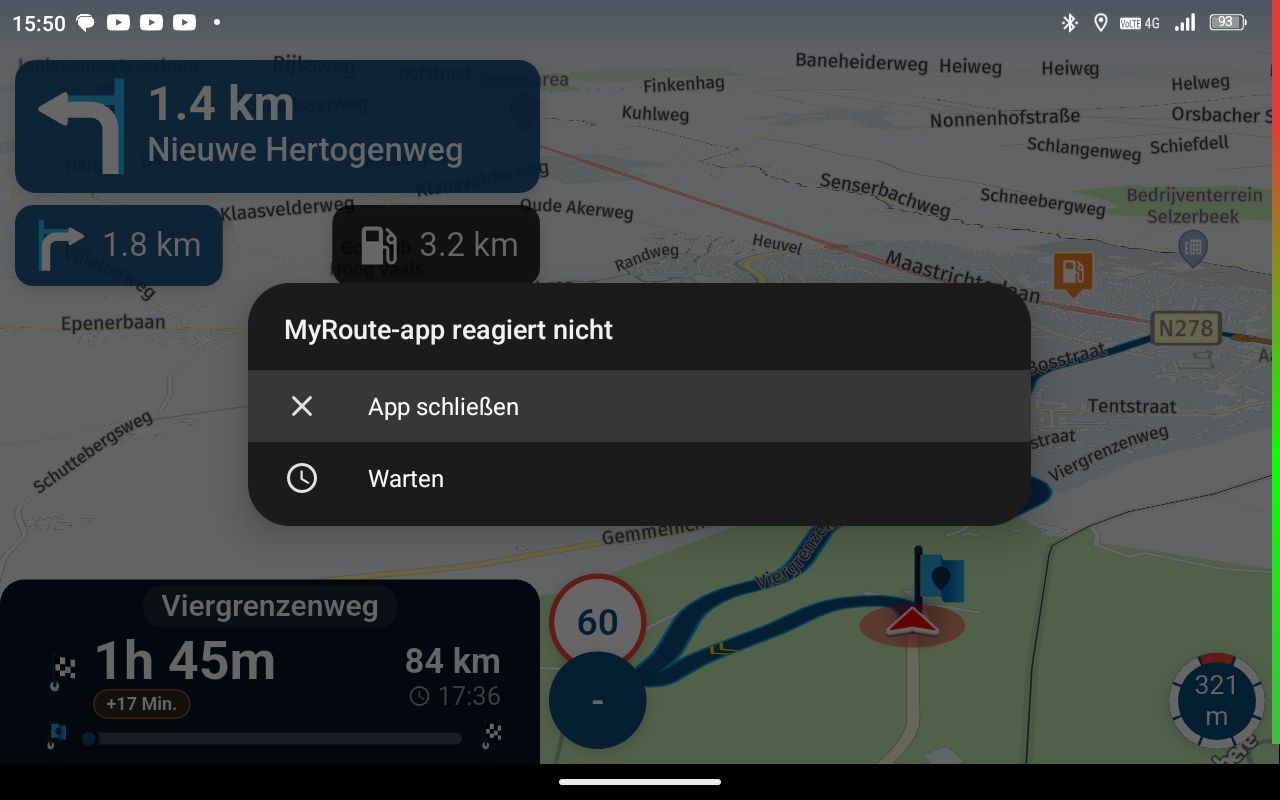
I've been using MyRoute App Gold for six months now and I have to say that I'm totally disappointed. Under Android Auto (v13.2.644464), the app regularly crashes after several hours, often starts without sound, which then suddenly reappears a few waypoints later or is lost again during the rest of the journey. Or the synchronization with the GPS signal is lost and then only the current position is displayed, but without location-based information such as speed limits. Of course, the planned navigation then also stops. What's particularly bad is that you can't get to a working app again by restarting the app or the smartphone (Motorola edge 20 pro/Android 13), you can only switch to Ami Go or Google Maps, which of course work without any problems. If I start a route with my home as waypoint 1 and drive off, I am always (!) taken back to my house in a circle and I could continue the whole thing until the tank is empty or I skip waypoint 1. That can't be true! All in all, MyRoute app is the worst navigation experience I've had so far, even though it sounds so powerful and convincing in theory. In the meantime, I have little hope that it will make the necessary progress in the coming months to ever be used safely on the road.

I've been using MyRoute App Gold for six months now and I have to say that I'm totally disappointed. Under Android Auto (v13.2.644464), the app regularly crashes after several hours, often starts without sound, which then suddenly reappears a few waypoints later or is lost again during the rest of the journey. Or the synchronization with the GPS signal is lost and then only the current position is displayed, but without location-based information such as speed limits. Of course, the planned navigation then also stops. What's particularly bad is that you can't get to a working app again by restarting the app or the smartphone (Motorola edge 20 pro/Android 13), you can only switch to Ami Go or Google Maps, which of course work without any problems. If I start a route with my home as waypoint 1 and drive off, I am always (!) taken back to my house in a circle and I could continue the whole thing until the tank is empty or I skip waypoint 1. That can't be true! All in all, MyRoute app is the worst navigation experience I've had so far, even though it sounds so powerful and convincing in theory. In the meantime, I have little hope that it will make the necessary progress in the coming months to ever be used safely on the road.
The same things happening to you as it did to me. And then you can wait for comments ignoring the crashes and downplaying all criticism.
And although user errors are naturally to be expected (partly due to the high probability of misuse driven by unnecessary complexity not found elsewhere), the well-intentioned responses are often of this nature: RTFM or on the level of 'is the plug actually in?'
Time and again, it is ignored that there is also a user group experiencing outright software crashes and phantom behavior. As if a lack of knowledge of the app has anything to do with this...
Good luck!
-
I have to say I agree with Thomas. I love MRA route planner, it's the most powerful I have ever tried and works quite well, but I tried the navigation app once and I think I'll never use it again.
You can say that to solve the first waypoint problem you can just move it to another place, but that's the problem! You always have to remember this or that workaround. You even have to tell the app that if you are calculating a route while you have no internet connection then yes, you want to calculate the route with no internet connection. It seems this app always require a lot of extra manual work just to do what other apps do by themselves.
It doesn't matter that there are videos or tutorials explaining how the app work, because the problem is that you need all these videos and tutorials while other apps just work.
I have to say I agree with Thomas. I love MRA route planner, it's the most powerful I have ever tried and works quite well, but I tried the navigation app once and I think I'll never use it again.
You can say that to solve the first waypoint problem you can just move it to another place, but that's the problem! You always have to remember this or that workaround. You even have to tell the app that if you are calculating a route while you have no internet connection then yes, you want to calculate the route with no internet connection. It seems this app always require a lot of extra manual work just to do what other apps do by themselves.
It doesn't matter that there are videos or tutorials explaining how the app work, because the problem is that you need all these videos and tutorials while other apps just work.Bulls eye !
-
No not correct. If you pause a route, MRA will continue automaticly when you restart.
The function start from nearest point must be active on your phone
No not correct. If you pause a route, MRA will continue automaticly when you restart.
The function start from nearest point must be active on your phoneSometimes you might start the route when you’re already many kilometres away from the starting point, or you might have accidentally paused navigation; and as I’ve already mentioned, if you start the route from Android Auto, the options to start from your current location or from the nearest waypoint aren’t available and don’t work.
-
The options aren't available in AA. But the settings as they are on your phone are taken as the reference for starting the route in AA. At least this is how it should work.
But I never start of stop a route in AA. Always on the phone. causes less problems. -
No not correct. If you pause a route, MRA will continue automaticly when you restart.
The function start from nearest point must be active on your phoneSometimes you might start the route when you’re already many kilometres away from the starting point, or you might have accidentally paused navigation; and as I’ve already mentioned, if you start the route from Android Auto, the options to start from your current location or from the nearest waypoint aren’t available and don’t work.
@ginogino of you have set those options in the settings of your phone. AA will act accordingly. So if you have the start from nearest point option on on your phone AA will do the same
-

...may I'm late in this discussion. My some discussed points are valid. But nothing is perfect, and with such a technical thing, you need to learn at least the basics!
In meantime I drove >200.000 Km with MyRouteApp and I'm still happy. More than with all other navigation tools I used before.I also don't like to change your mind setting - but I personally would never use an extra device like AA or CP which are just "mirrors" of my main device - and are restricted and does still have early development issues. It's simply one more are which causes problems, I don't need. So, I use MRA Routeplanner and Navigation Next - that's it...
Hello! It looks like you're interested in this conversation, but you don't have an account yet.
Getting fed up of having to scroll through the same posts each visit? When you register for an account, you'll always come back to exactly where you were before, and choose to be notified of new replies (either via email, or push notification). You'll also be able to save bookmarks and upvote posts to show your appreciation to other community members.
With your input, this post could be even better 💗
Register Login




-
07137
-
 0517
0517
-
127347
-
0780
-
216136
-
 0394
0394
-
0361
-
 713148