Skip to content
  • Categories
  • Recent
  • Popular
  • Support
  • MyRoute-app
Collapse
Brand Logo

MRA Community Forum

  1. Home
  2. General Discussion
  3. Via's

Via's

Scheduled Pinned Locked Moved General Discussion
13 Posts 5 Posters 3.5k Views 2 Watching
  • Oldest to Newest
  • Newest to Oldest
  • Most Votes
Reply
  • Reply as topic
Log in to reply
This topic has been deleted. Only users with topic management privileges can see it.
  • Mark  McDonald Mark McDonald

    Cheers, How do I get a shaping point & what should it look like?
    Sometimes if I miss a waypoint by a few yards the Garmin wants me to do a U turn & go back because it thinks I've missed it 😕 How do I stop this from happening?
    Many thanks 👍

    Nick Carthew Offline
    Nick Carthew Offline
    Nick Carthew
    RouteXpert
    wrote on last edited by
    #4

    @Mark-McDonald

    A shaping point is the standard teardrop or ballon shape.
    Make sure to fully zoom in on each route point (shaping and via) to see that it is accurately positioned on the route line, you shouldn’t miss any then.

    Always willing to help if I can.
    Triumph Tiger 1200 XRT called Tina.
    MRA Navigation Next and SilverFox BJ8

    Mark  McDonald 1 Reply Last reply
    1
    • Nick Carthew Nick Carthew

      @Mark-McDonald

      A shaping point is the standard teardrop or ballon shape.
      Make sure to fully zoom in on each route point (shaping and via) to see that it is accurately positioned on the route line, you shouldn’t miss any then.

      Mark  McDonald Offline
      Mark  McDonald Offline
      Mark McDonald
      wrote on last edited by
      #5

      @Nick-Carthew Many thanks 👍

      1 Reply Last reply
      0
      • Mark  McDonald Mark McDonald

        Cheers, How do I get a shaping point & what should it look like?
        Sometimes if I miss a waypoint by a few yards the Garmin wants me to do a U turn & go back because it thinks I've missed it 😕 How do I stop this from happening?
        Many thanks 👍

        Mzokk Offline
        Mzokk Offline
        Mzokk
        wrote on last edited by
        #6

        @Mark-McDonald Also set up your Zumo with the waypoint/shapingpoint skip button on the main screen so that you can skip problematic shaping or waypoints.

        Practice using it by simulating a route to see what effect it has......you don't even need to leave your sofa 🙂

        223fc2a1-6212-4932-9083-8a8616a2066e-20292[1].png

        1 Reply Last reply
        1
        • Mark  McDonald Offline
          Mark  McDonald Offline
          Mark McDonald
          wrote on last edited by
          #7

          Thanks, how do I find the skip waypoint button on my Zumo 390/BMW Street Nav ?

          Looking just now but can't find it 😠

          Guzt Mzokk 2 Replies Last reply
          0
          • Mark  McDonald Mark McDonald

            Thanks, how do I find the skip waypoint button on my Zumo 390/BMW Street Nav ?

            Looking just now but can't find it 😠

            Guzt Offline
            Guzt Offline
            Guzt
            wrote on last edited by
            #8

            @Mark-McDonald on the 590 you'll find it under clicking the 3 Horizontal lines, which opens a screen, than click skip

            SP2820, 550, 660, 590, XT. Mapsource, Tyre (met de nodige conversaties tot hierboven), Kurviger, Routeyou, MRA Gold sinds het begin, MRA Next app, App68studio,.. en BC natuurlijk

            1 Reply Last reply
            0
            • Mark  McDonald Mark McDonald

              Thanks, how do I find the skip waypoint button on my Zumo 390/BMW Street Nav ?

              Looking just now but can't find it 😠

              Mzokk Offline
              Mzokk Offline
              Mzokk
              wrote on last edited by
              #9

              @Mark-McDonald

              Hi Mark you can also put it on your screen so that you don't have to use the hamburger and scroll to the icon.

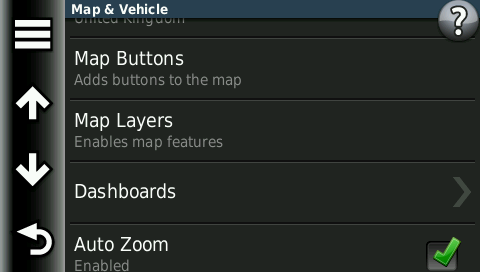
              On my Zumo 390 I have the Stop navigation and Skip button permanently displayed on the navigation screen. You set it up thus.

              Settings
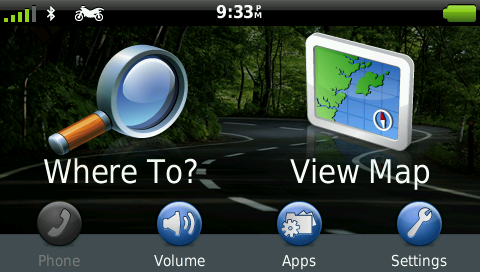
              23499.png

              Map and Vehicle
              Chose Map Buttons

              6f6ca1cb-5b44-4e1b-ba42-59dba9b8f927-25007.png

              Chose Map Buttons

              7be31269-039e-4db0-b43a-d0bb2154a836-38627.png

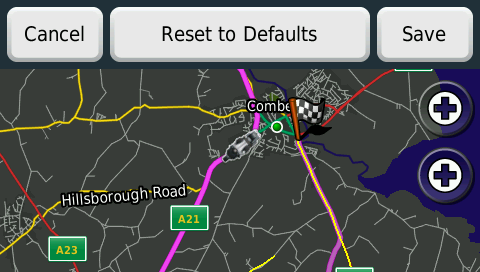
              The Zumo 390 allows two custom function buttons (from several) to be displayed on the screen click the plus buttons

              Select the function you want to display from the list. I use stop and skip.
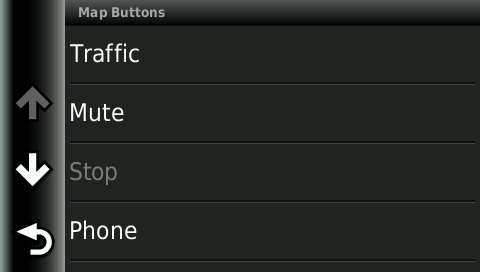
              c40be364-f27a-4f58-9688-c5557be6619a-55864.png

              fa8f9574-b28b-4797-b83b-09259956f94d-54336.png

              When you navigate these will be to hand without using the hamburger and scrolling.

              d2b966fb-16d8-4dd5-90bf-8b1159e9ffd5-43000.png

              I keep these buttons "Live" on the navigation map as I find them the most useful. But you can put any on the list on the map.

              Mark  McDonald 1 Reply Last reply
              0
              • Mzokk Mzokk

                @Mark-McDonald

                Hi Mark you can also put it on your screen so that you don't have to use the hamburger and scroll to the icon.

                On my Zumo 390 I have the Stop navigation and Skip button permanently displayed on the navigation screen. You set it up thus.

                Settings

                23499.png

                Map and Vehicle
                Chose Map Buttons

                6f6ca1cb-5b44-4e1b-ba42-59dba9b8f927-25007.png

                Chose Map Buttons

                7be31269-039e-4db0-b43a-d0bb2154a836-38627.png

                The Zumo 390 allows two custom function buttons (from several) to be displayed on the screen click the plus buttons

                Select the function you want to display from the list. I use stop and skip.
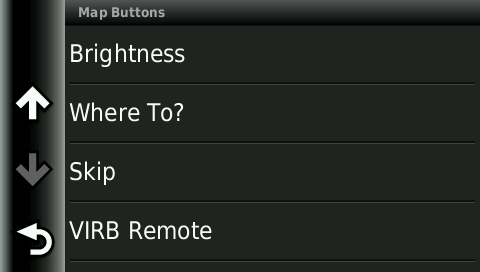
                c40be364-f27a-4f58-9688-c5557be6619a-55864.png

                fa8f9574-b28b-4797-b83b-09259956f94d-54336.png

                When you navigate these will be to hand without using the hamburger and scrolling.
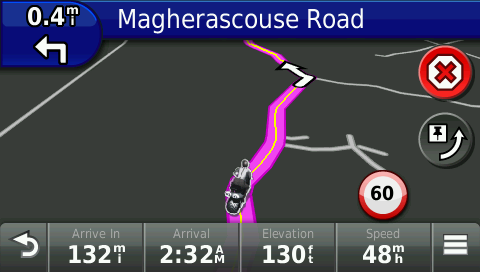
                d2b966fb-16d8-4dd5-90bf-8b1159e9ffd5-43000.png

                I keep these buttons "Live" on the navigation map as I find them the most useful. But you can put any on the list on the map.

                Mark  McDonald Offline
                Mark  McDonald Offline
                Mark McDonald
                wrote on last edited by
                #10

                Thanks for all your help guys, much appreciated ☺

                1 Reply Last reply
                0
                • Mark  McDonald Offline
                  Mark  McDonald Offline
                  Mark McDonald
                  wrote on last edited by
                  #11

                  I was out for a test run today & managed to get the Skip waypoint button to work ok.

                  I usually save all my routes (usually about 26 waypoints) as a .gpx 1.0 (route, track, POI) to my pc then send to my Garmin but today I saved it as a .gpx 1.1 (route, track, POI) & it worked perfectly, is this the best format to use in the older Zumo 390's ?
                  What are the basic differences between the 1.0 & 1.1 ?

                  Many thanks, Mark

                  Mzokk 1 Reply Last reply
                  0
                  • Mark  McDonald Mark McDonald

                    I was out for a test run today & managed to get the Skip waypoint button to work ok.

                    I usually save all my routes (usually about 26 waypoints) as a .gpx 1.0 (route, track, POI) to my pc then send to my Garmin but today I saved it as a .gpx 1.1 (route, track, POI) & it worked perfectly, is this the best format to use in the older Zumo 390's ?
                    What are the basic differences between the 1.0 & 1.1 ?

                    Many thanks, Mark

                    Mzokk Offline
                    Mzokk Offline
                    Mzokk
                    wrote on last edited by
                    #12

                    @Mark-McDonald

                    I use GPX1.1 on my XT and my 390. The 390 is a great little unit and I prefer it's routing logic compared to the XT
                    👍

                    1 Reply Last reply
                    0
                    • Mark  McDonald Mark McDonald

                      Cheers, How do I get a shaping point & what should it look like?
                      Sometimes if I miss a waypoint by a few yards the Garmin wants me to do a U turn & go back because it thinks I've missed it 😕 How do I stop this from happening?
                      Many thanks 👍

                      Ralph Janssen Offline
                      Ralph Janssen Offline
                      Ralph Janssen
                      wrote on last edited by
                      #13

                      @Mark-McDonald
                      When i finished my route, i go to the first point, press the zoom button and go trough al the point with the arrow keys.
                      On this level you can see if your point is on the correct place. Its also easy to spot if it's to close a crossing or intersection.
                      It takes a couple of minutes for 40 or 50 waypoints but in this way you make sure everything is placed where it needs to be.


                      Triumph Tiger 800 Xrt 2020
                      Yamaha tracer 700 (wifes bike)
                      Using MRA next on Samsung A35 & OnePlus & DooGee T20 mini tablet

                      Drove a Yamaha TDM850 1998
                      Used TomTom 6000 & Garmin devices with MRA

                      1 Reply Last reply
                      1

                      Hello! It looks like you're interested in this conversation, but you don't have an account yet.

                      Getting fed up of having to scroll through the same posts each visit? When you register for an account, you'll always come back to exactly where you were before, and choose to be notified of new replies (either via email, or push notification). You'll also be able to save bookmarks and upvote posts to show your appreciation to other community members.

                      With your input, this post could be even better 💗

                      Register Login
                      Reply
                      • Reply as topic
                      Log in to reply
                      • Oldest to Newest
                      • Newest to Oldest
                      • Most Votes


                      ACTIVE USERS
                      Nick Carthew
                      Nick Carthew
                      Mzokk
                      Mzokk
                      Ralph Janssen
                      Ralph Janssen
                      Guzt
                      Guzt
                      Mark  McDonald
                      Mark McDonald
                      POPULAR TOPICS
                      • Vormingspunt, viapunt en Eindpunt op Carplay
                        Marinus van Deudekom
                        Marinus van Deudekom
                        0
                        22
                        390

                      • Routes en verblijf Zwitserland
                        Huibertus
                        Huibertus
                        0
                        6
                        79

                      • Carpuride BMW unit stalling or restarting
                        Sytze van der Laan
                        Sytze van der Laan
                        0
                        11
                        134

                      • routepunten overslaan gebeurd niet zoals verwacht
                        Bruno 7
                        Bruno 7
                        1
                        11
                        132

                      • Upgrading from Zumo XT to XT2
                        John S Parry
                        John S Parry
                        0
                        5
                        53

                      • Audio van Navigatie scheiden van muziek in Android Auto
                        M. Schrijver
                        M. Schrijver
                        1
                        16
                        805

                      • Traffic Aware setting toggle greyed out
                        Nick Carthew
                        Nick Carthew
                        0
                        4
                        70

                      • MRA Beta V6.x - und Beta Webplaner 2.0 vielleicht bald
                        Kudee
                        Kudee
                        0
                        2
                        63

                      MY GROUPS
                      • Login

                      • Login or register to search.
                      • First post
                        Last post
                      0
                      • Categories
                      • Recent
                      • Popular
                      • Support
                      • MyRoute-app