Skip to content
  • Categories
  • Recent
  • Popular
  • Support
  • MyRoute-app
Collapse
Brand Logo

MRA Community Forum

  1. Home
  2. MyRoute-app Routeplanner
  3. [Web] Problems, Bugs and other Issues
  4. Foto's uploaden in profiel

Foto's uploaden in profiel

Scheduled Pinned Locked Moved [Web] Problems, Bugs and other Issues
7 Posts 5 Posters 1.1k Views 2 Watching
  • Oldest to Newest
  • Newest to Oldest
  • Most Votes
Reply
  • Reply as topic
Log in to reply
This topic has been deleted. Only users with topic management privileges can see it.
  • Lieven B. Offline
    Lieven B. Offline
    Lieven B.
    wrote on last edited by
    #1

    Hoe kan ik mijn foto uploaden in mijn MyRoute app???

    Hans van de Ven MR.MRA 1 Reply Last reply
    0
    • Lieven B. Lieven B.

      Hoe kan ik mijn foto uploaden in mijn MyRoute app???

      Hans van de Ven MR.MRA Do not disturb
      Hans van de Ven MR.MRA Do not disturb
      Hans van de Ven MR.MRA
      Valued contributor
      wrote on last edited by
      #2

      @Lieven-B

      Via je profielpagina op de website

      Garmin Zumo XT3/XT2/XT/BMW Connected Ride Navigator/Tourstart/ MyRouteapp (The App)/...
      Een dag niet gelachen is een dag niet geleefd / Een route is net zo goed als deze uitgezet is.

      Lieven B. 1 Reply Last reply
      0
      • Hans van de Ven MR.MRA Hans van de Ven MR.MRA

        @Lieven-B

        Via je profielpagina op de website

        Lieven B. Offline
        Lieven B. Offline
        Lieven B.
        wrote on last edited by
        #3

        @Hans-van-de-Ven-MR-MRA said in Foto's uploaden in profiel:

        @Lieven-B

        Via je profielpagina op de website

        Dat lukt mij niet 😞

        Marinus van Deudekom 1 Reply Last reply
        0
        • Lieven B. Lieven B.

          @Hans-van-de-Ven-MR-MRA said in Foto's uploaden in profiel:

          @Lieven-B

          Via je profielpagina op de website

          Dat lukt mij niet 😞

          Marinus van Deudekom Offline
          Marinus van Deudekom Offline
          Marinus van Deudekom
          RouteXpert
          wrote on last edited by
          #4

          @Lieven-B het gaat het makkelijkst via de web browser op een pc

          Honda Goldwing GL1500,
          Honda Silverwing GL 650
          DMD2 T865X 8 inch Android tablet using MRA next for navigation
          Garmin XT sold
          Samsung S24FE mounted on a Quadlock and using Android Auto in my car

          1 Reply Last reply
          0
          • Frank Capenberghs Offline
            Frank Capenberghs Offline
            Frank Capenberghs
            wrote on last edited by
            #5

            Kan dit misschien enkel in de betalende versies want mij lukt het ook niet.

            Nick Carthew 1 Reply Last reply
            0
            • Frank Capenberghs Frank Capenberghs

              Kan dit misschien enkel in de betalende versies want mij lukt het ook niet.

              Nick Carthew Online
              Nick Carthew Online
              Nick Carthew
              RouteXpert
              wrote on last edited by
              #6

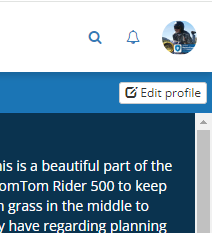
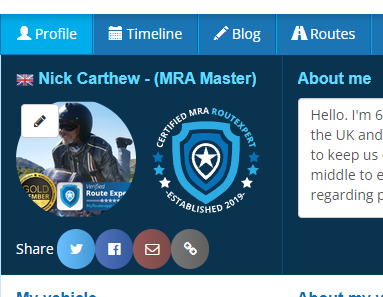
              @Frank-Capenberghs Ga naar je MRA-profiel op de website. Klik op profiel bewerken (rechtsboven) en klik vervolgens op het bewerkingspictogram (potlood) waar je profielfoto zou moeten staan.
              951c5bfb-827c-4315-bdfa-4ef774b875dc-image.png

              6be521dc-2863-455b-bf09-526bb09fc292-image.png

              Go to your MRA profile in the website. Click edit profile (top right) then click the edit icon where your profile picture should be.

              Always willing to help if I can.
              Triumph Tiger 1200 XRT called Tina.
              MRA Navigation Next and SilverFox BJ8

              Frank Capenberghs 1 Reply Last reply
              0
              • Nick Carthew Nick Carthew

                @Frank-Capenberghs Ga naar je MRA-profiel op de website. Klik op profiel bewerken (rechtsboven) en klik vervolgens op het bewerkingspictogram (potlood) waar je profielfoto zou moeten staan.

                951c5bfb-827c-4315-bdfa-4ef774b875dc-image.png

                6be521dc-2863-455b-bf09-526bb09fc292-image.png

                Go to your MRA profile in the website. Click edit profile (top right) then click the edit icon where your profile picture should be.

                Frank Capenberghs Offline
                Frank Capenberghs Offline
                Frank Capenberghs
                wrote on last edited by
                #7

                @Nick-Carthew Gelukt. Dank u wel !

                1 Reply Last reply
                0

                Hello! It looks like you're interested in this conversation, but you don't have an account yet.

                Getting fed up of having to scroll through the same posts each visit? When you register for an account, you'll always come back to exactly where you were before, and choose to be notified of new replies (either via email, or push notification). You'll also be able to save bookmarks and upvote posts to show your appreciation to other community members.

                With your input, this post could be even better 💗

                Register Login
                Reply
                • Reply as topic
                Log in to reply
                • Oldest to Newest
                • Newest to Oldest
                • Most Votes


                ACTIVE USERS
                Hans van de Ven MR.MRA
                Hans van de Ven MR.MRA
                Marinus van Deudekom
                Marinus van Deudekom
                Nick Carthew
                Nick Carthew
                Frank Capenberghs
                Frank Capenberghs
                Lieven B.
                Lieven B.
                POPULAR TOPICS
                • HERE maps updates
                  Peter Zehentreiter
                  Peter Zehentreiter
                  0
                  4
                  118

                • GPX Versions 1.1 vs 1.2 for Garmin Visually Explained
                  Guzzist
                  Guzzist
                  7
                  166
                  11.9k

                • Linker in MRA kleurt blauw (alles geselecteerd)
                  Alfred Schrittwieser
                  Alfred Schrittwieser
                  0
                  10
                  197

                • Auto skip many waypoints by itself while I was on route. [5.2.0 - 474]
                  Brian McG
                  Brian McG
                  0
                  34
                  1.3k

                • Route maken in TomTom kaart en vervolgens met de app navigeren
                  Bruno 7
                  Bruno 7
                  0
                  6
                  133

                • Straatnamen worden uitgesproken
                  Theo Lammerts
                  Theo Lammerts
                  0
                  5
                  308

                • The compas direction on the elevation circle is wrong
                  Dave J 0
                  Dave J 0
                  0
                  23
                  628

                • Useful Speed Camera Information
                  Marinus van Deudekom
                  Marinus van Deudekom
                  3
                  3
                  156

                MY GROUPS
                • Login

                • Login or register to search.
                • First post
                  Last post
                0
                • Categories
                • Recent
                • Popular
                • Support
                • MyRoute-app