Offline navigation
-

I wonder if someone can help me, please. I think it might be user error but I cannot see where I have made a mistake.
-
I have downloaded the full sets of UK and French maps to my iPhone.
-
I have downloaded a day out route in France to my iPhone.
-
In Navigation settings > Functional > Offline navigation is active (green).
I am at home in the UK.
If I switch my phone to airplane mode, logically it replicates being offline.
In airplane mode I can display the day out route in France.
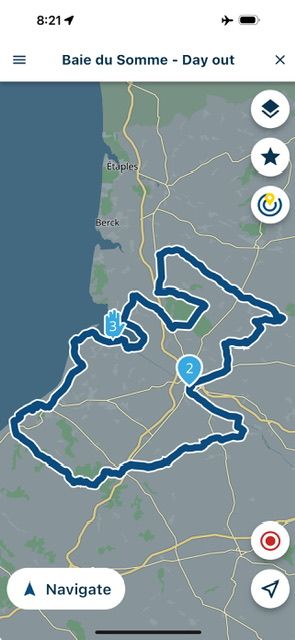
If I then touch Navigate, I assume (which is maybe where I am going wrong) that the app will calculate me a route from my home in the UK to the start of the route in France. But it will not do it. Instead, I get a message which shows:
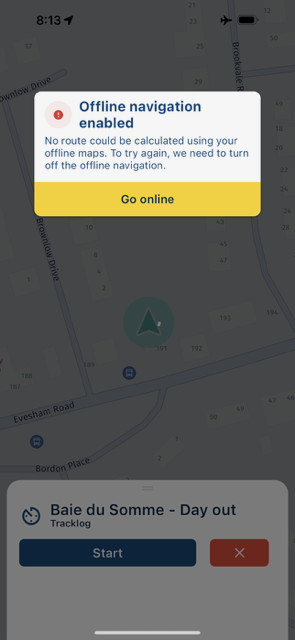
Surely, if I have downloaded the full set of UK and French maps, the app should, I assume, be able to calculate an route to join me in the UK to the start of the route in France?
If though I switch out of aeroplane mode (go online) the app will calculate me a perfect route from home to the start of the route in France and navigate me around it.
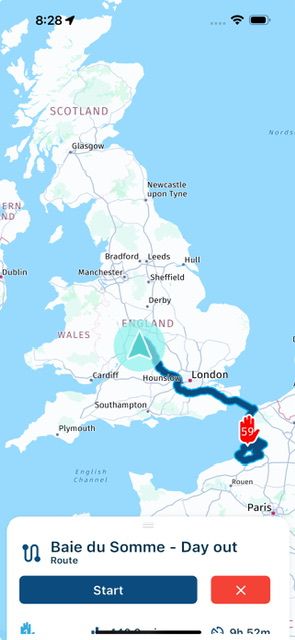
What am I doing wrong and / or what have I misunderstood?
Thank you.
Richard
PS Is my mistake at point 3 above, where I say:
3. In Navigation settings > Functional > Offline navigation is active (green).
Should I turn this to off (red)?
If so, that means that you need to be online in order to commence any navigation and then switch to offline mode? If so, surely that defeats a part of the purpose of the app’s offline capabilities?
-
-
I wonder if someone can help me, please. I think it might be user error but I cannot see where I have made a mistake.
-
I have downloaded the full sets of UK and French maps to my iPhone.
-
I have downloaded a day out route in France to my iPhone.
-
In Navigation settings > Functional > Offline navigation is active (green).
I am at home in the UK.
If I switch my phone to airplane mode, logically it replicates being offline.
In airplane mode I can display the day out route in France.
If I then touch Navigate, I assume (which is maybe where I am going wrong) that the app will calculate me a route from my home in the UK to the start of the route in France. But it will not do it. Instead, I get a message which shows:
Surely, if I have downloaded the full set of UK and French maps, the app should, I assume, be able to calculate an route to join me in the UK to the start of the route in France?
If though I switch out of aeroplane mode (go online) the app will calculate me a perfect route from home to the start of the route in France and navigate me around it.
What am I doing wrong and / or what have I misunderstood?
Thank you.
Richard
PS Is my mistake at point 3 above, where I say:
3. In Navigation settings > Functional > Offline navigation is active (green).
Should I turn this to off (red)?
If so, that means that you need to be online in order to commence any navigation and then switch to offline mode? If so, surely that defeats a part of the purpose of the app’s offline capabilities?

@Richard-18 I did it the other way around. I created a route in GB. Settings are as you've explained. When in Airplane-mode I'm able to navigate completely offline from NL to my route that starts in GB! So no clue what's wrong on your side!
-
-
I wonder if someone can help me, please. I think it might be user error but I cannot see where I have made a mistake.
-
I have downloaded the full sets of UK and French maps to my iPhone.
-
I have downloaded a day out route in France to my iPhone.
-
In Navigation settings > Functional > Offline navigation is active (green).
I am at home in the UK.
If I switch my phone to airplane mode, logically it replicates being offline.
In airplane mode I can display the day out route in France.
If I then touch Navigate, I assume (which is maybe where I am going wrong) that the app will calculate me a route from my home in the UK to the start of the route in France. But it will not do it. Instead, I get a message which shows:
Surely, if I have downloaded the full set of UK and French maps, the app should, I assume, be able to calculate an route to join me in the UK to the start of the route in France?
If though I switch out of aeroplane mode (go online) the app will calculate me a perfect route from home to the start of the route in France and navigate me around it.
What am I doing wrong and / or what have I misunderstood?
Thank you.
Richard
PS Is my mistake at point 3 above, where I say:
3. In Navigation settings > Functional > Offline navigation is active (green).
Should I turn this to off (red)?
If so, that means that you need to be online in order to commence any navigation and then switch to offline mode? If so, surely that defeats a part of the purpose of the app’s offline capabilities?

@Richard-18 said in Offline navigation:
What am I doing wrong and / or what have I misunderstood?
You are not doing anything wrong, and I would assume this to working offline too. I tried the other way, from my current location (in NL) to London, and I experience the same thing. I can only guess that for ferry / chunnel the app wants to reach out to traffic information concerning the ferry / train time tables.
I am just an enthusiastic MRA user, and hope you will be one too!
Most motorcycle problems are caused by the nut that connects the handlebar to the saddle.
Check out RideSleepRepeat.eu, a biker community for sharing stays across Europe
-
-
@Richard-18 said in Offline navigation:
What am I doing wrong and / or what have I misunderstood?
You are not doing anything wrong, and I would assume this to working offline too. I tried the other way, from my current location (in NL) to London, and I experience the same thing. I can only guess that for ferry / chunnel the app wants to reach out to traffic information concerning the ferry / train time tables.
Thank you, Con.
It is odd that it works perfectly online but not off line.
I wonder if this problem is in any way linked to the problem I had (again navigating off line) when I rode off the train in Calais and the map screen vanished?
Richard
-
Thank you, Con.
It is odd that it works perfectly online but not off line.
I wonder if this problem is in any way linked to the problem I had (again navigating off line) when I rode off the train in Calais and the map screen vanished?
Richard
@Richard-18, I am sorry, but I have to come back at my earlier reply... It seemed like I did left out France last time I downloaded offline maps
 Now I repeated the test, and it looks like it works just fine, like @Rob-Verhoeff experiences also...
Are you sure you did not leave out any regions that are needed (maybe for just a small part!)
Hello! It looks like you're interested in this conversation, but you don't have an account yet.
Getting fed up of having to scroll through the same posts each visit? When you register for an account, you'll always come back to exactly where you were before, and choose to be notified of new replies (either via email, or push notification). You'll also be able to save bookmarks and upvote posts to show your appreciation to other community members.
With your input, this post could be even better 💗
Register Login-
 08194
08194
-
 0520
0520
-
0745
-
 4234.9k
-
0310
-
 027
027
-
 42101
42101
-
 029
029