Skip to content
  • Categories
  • Recent
  • Popular
  • Support
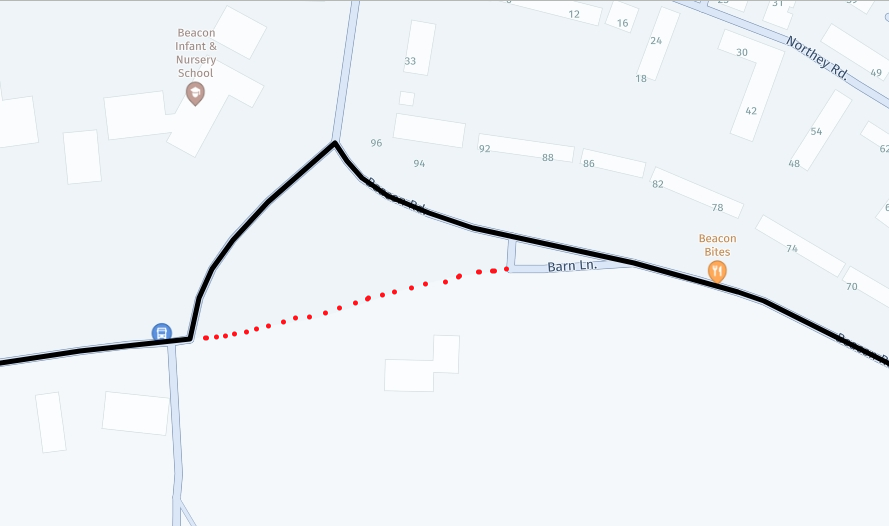
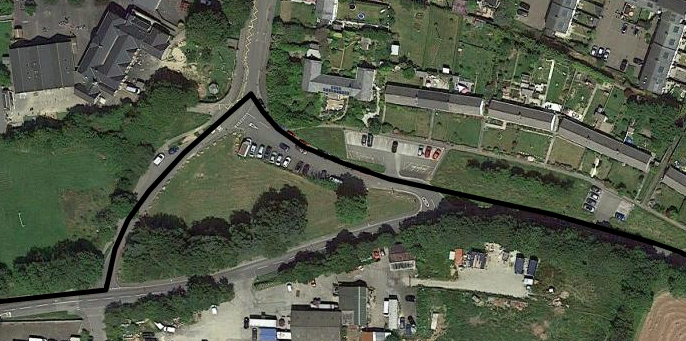
  • MyRoute-app
Collapse
Brand Logo

MRA Community Forum

  1. Home
  2. The MyRoute-app
  3. [App] Announcements
  4. New update! (4.1.2)

New update! (4.1.2)

Scheduled Pinned Locked Moved [App] Announcements
22 Posts 10 Posters 12.2k Views 6 Watching
  • Oldest to Newest
  • Newest to Oldest
  • Most Votes
Reply
  • Reply as topic
Log in to reply
This topic has been deleted. Only users with topic management privileges can see it.
  • Karel76 Offline
    Karel76 Offline
    Karel76
    wrote on last edited by
    #2

    error in petrol stations.

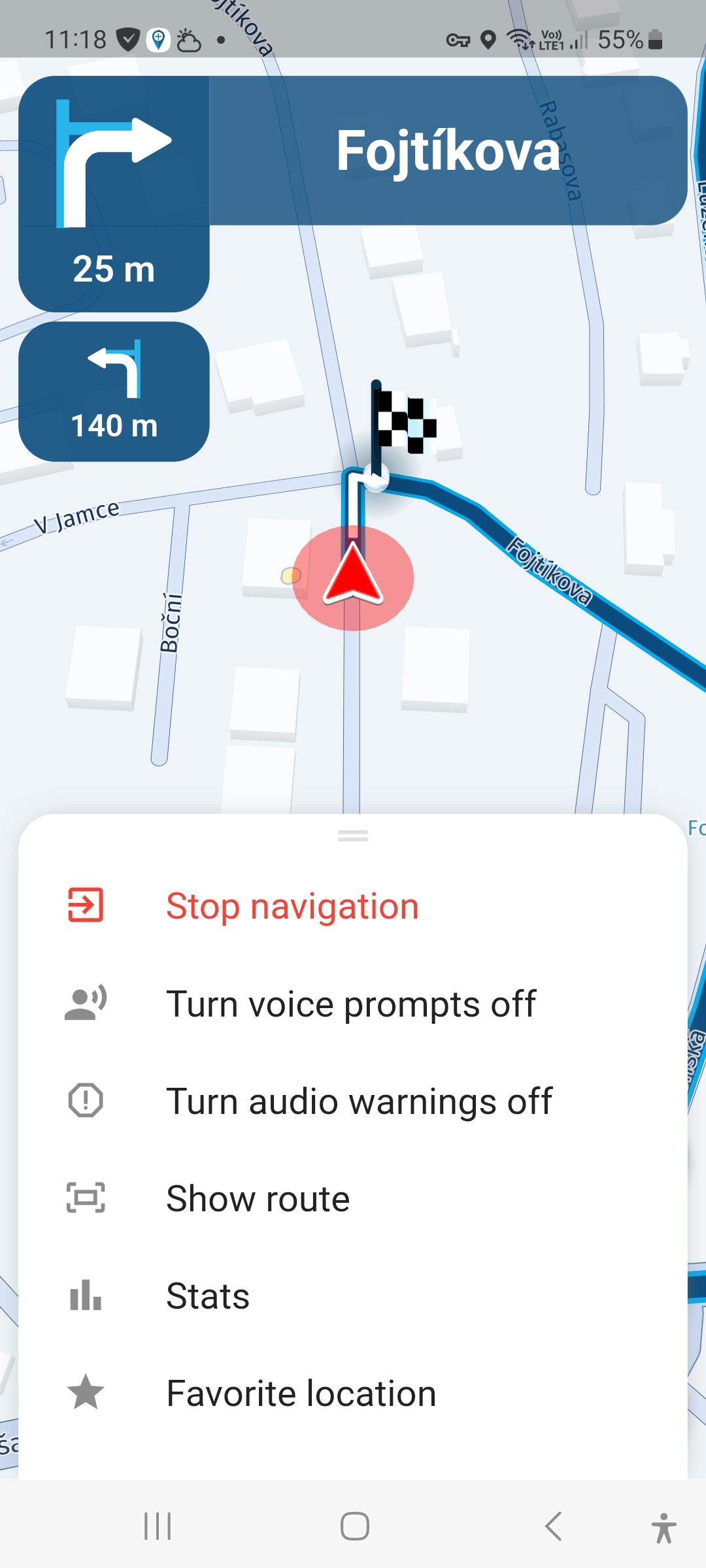
    When I create a route on the web and run it in the app, the gas stations are displayed correctly (thanks for this new feature). Unfortunately, when I create a route in the app (destination and round trip) the gas stations are not displayed and I can't find them in the menu - add stop.
    Screenshot_20240429_111814.jpg

    Stefan Hummelink 1 Reply Last reply
    0
    • Karel76 Karel76

      error in petrol stations.

      When I create a route on the web and run it in the app, the gas stations are displayed correctly (thanks for this new feature). Unfortunately, when I create a route in the app (destination and round trip) the gas stations are not displayed and I can't find them in the menu - add stop.

      Screenshot_20240429_111814.jpg

      Stefan Hummelink Offline
      Stefan Hummelink Offline
      Stefan Hummelink
      Alpha tester
      wrote on last edited by Stefan Hummelink
      #3

      @Karel76 said in New update! (4.1.2):

      are not displayed and I can't find them in the menu - add stop.

      That is because the added functionality is only available when navigation a pre-created route you created from your account or a true A2B route, and not a track created from within the app (note that any (except for true A2B) auto-generated route from within the app is in fact not a route, but a track since there are no waypoints used to shape the 'route').

      I'm not sure whether this will be possible in the future, because by definition, a track does not know about 'stops', or waypoints for that matter... Maybe the dev's can find a way around that... Artifically splitting the auto-generated track at the added stop or something like that. We'll have to wait and see :).

      Manks bu'j te bange.

      Corjan Meijerink 1 Reply Last reply
      0
      • Stefan Hummelink Stefan Hummelink

        @Karel76 said in New update! (4.1.2):

        are not displayed and I can't find them in the menu - add stop.

        That is because the added functionality is only available when navigation a pre-created route you created from your account or a true A2B route, and not a track created from within the app (note that any (except for true A2B) auto-generated route from within the app is in fact not a route, but a track since there are no waypoints used to shape the 'route').

        I'm not sure whether this will be possible in the future, because by definition, a track does not know about 'stops', or waypoints for that matter... Maybe the dev's can find a way around that... Artifically splitting the auto-generated track at the added stop or something like that. We'll have to wait and see :).

        Corjan Meijerink Offline
        Corjan Meijerink Offline
        Corjan Meijerink
        Developer
        wrote on last edited by
        #4

        @Stefan-Hummelink you are right ๐Ÿ™‚

        Karel76 1 Reply Last reply
        0
        • dungbeetle Offline
          dungbeetle Offline
          dungbeetle
          wrote on last edited by
          #5

          Hi,

          Since the update I am experiencing routing errors.

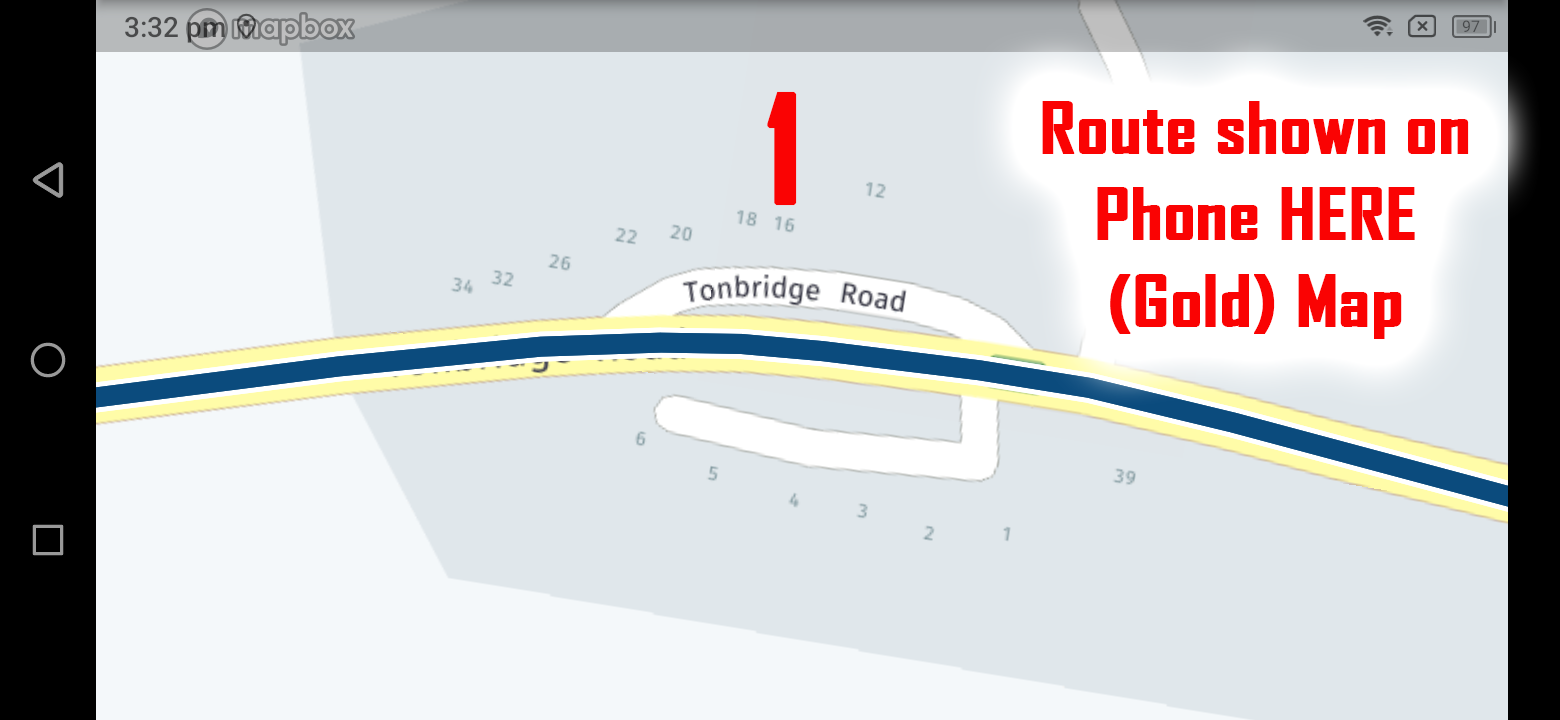
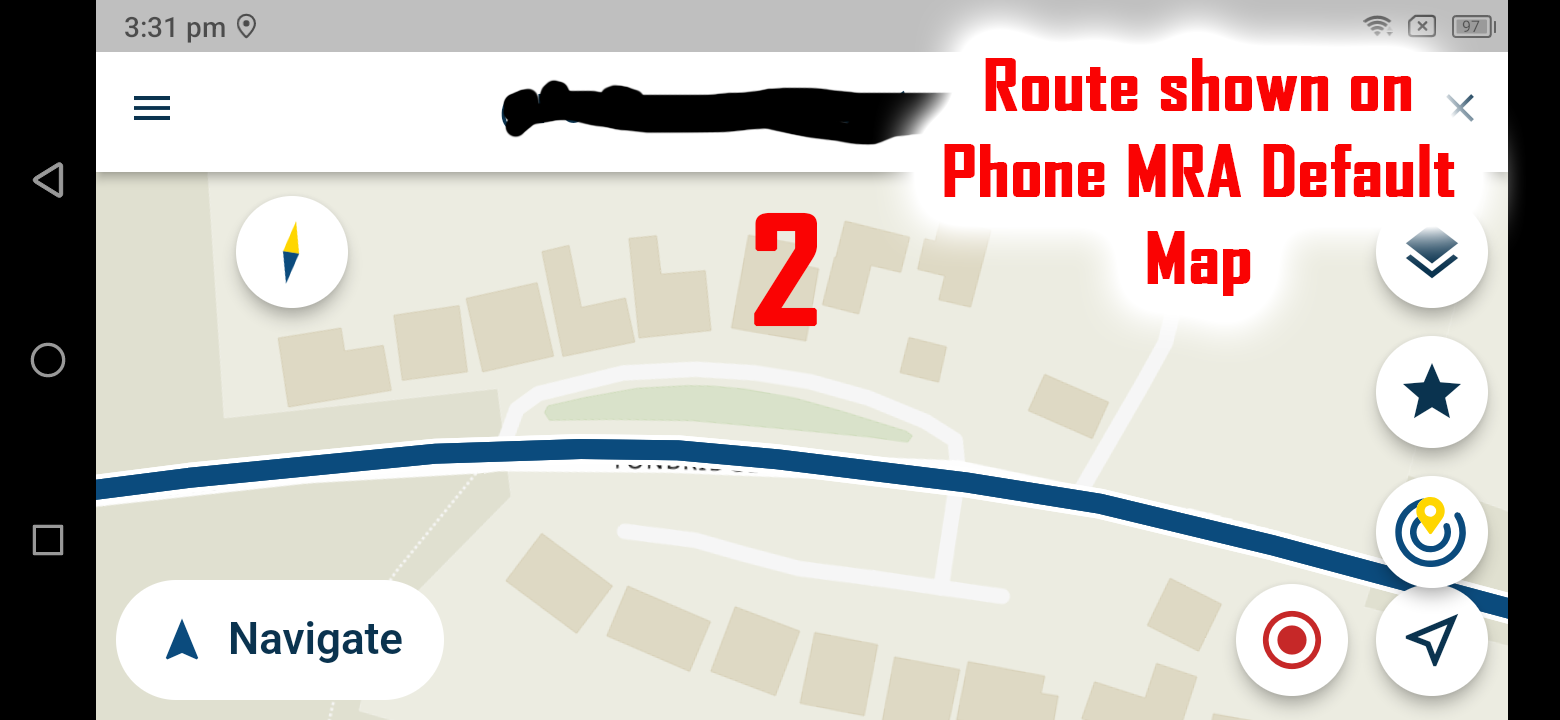
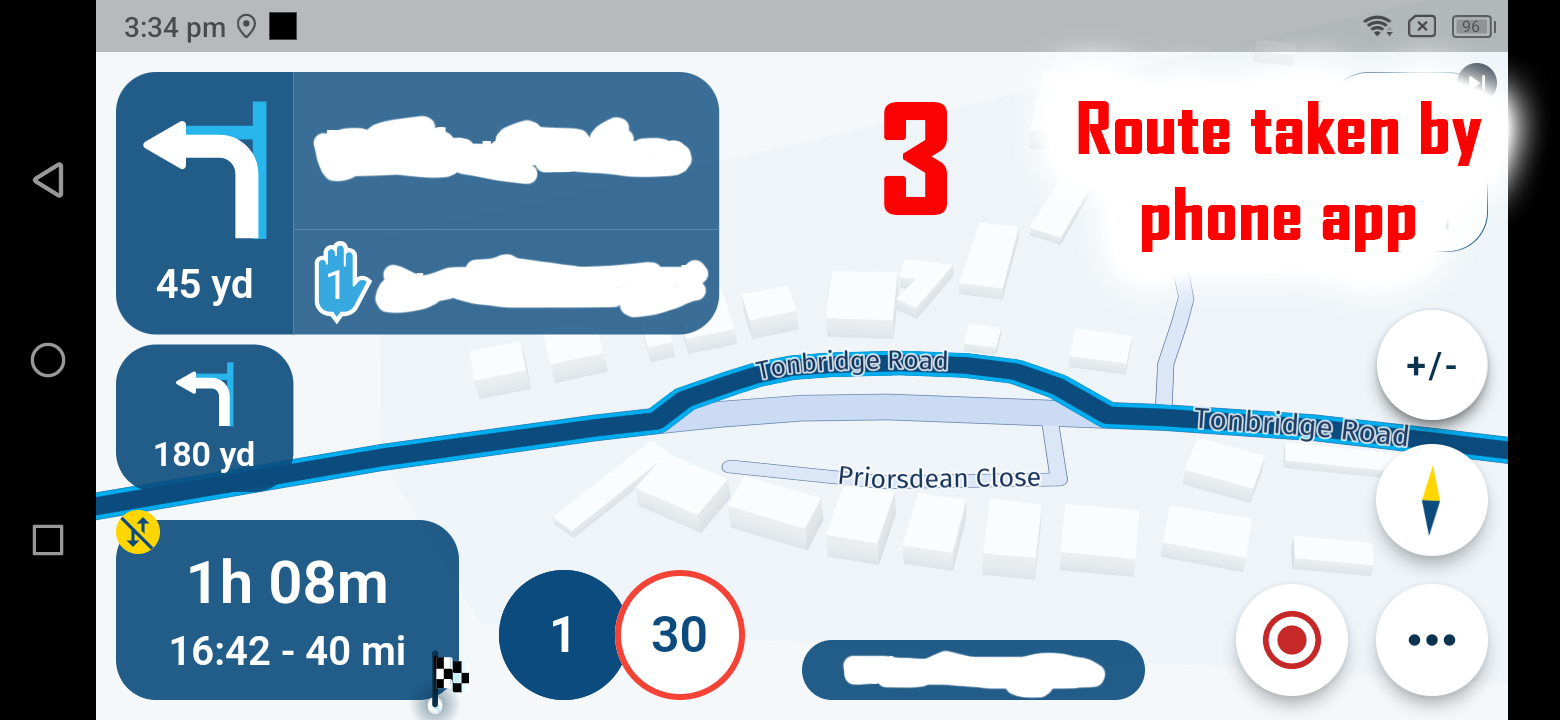
          The three pictures below show how the routing differs between viewing the maps prior to setting off and the actual route the app takes when travelling.

          I can't seem to change the map when travelling as I assume that this is always the default. Is there a way to fix this problem by using different maps during planning, or could this be a bug? (I have been using the default 'HERE' maps to plan on PC, as recommended in the past.)

          As you can see in the pictures, the app wants to take me via a residential slip road rather than just staying on the main road.

          Thanks,
          d.
          01_HERE (Gold) Map.png 02_MRA Default Map.png 03_Following the route.png

          Stefan Hummelink RetiredWingMan JP d 3 Replies Last reply
          0
          • Corjan Meijerink Corjan Meijerink

            @Stefan-Hummelink you are right ๐Ÿ™‚

            Karel76 Offline
            Karel76 Offline
            Karel76
            wrote on last edited by Karel76
            #6

            @Corjan-Meijerink
            It's not true what you say. I'm sending a video.

            1 situation:
            destination: Prague
            road: straight
            result: gas stations are displayed and add stop in the navigation menu.
            I can even turn off the motorway etc.. and still the petrol stations are shown

            Situation 2
            destination: Prague
            road: curves
            Result: neither the petrol stations nor the add stop button in the navigation menu are displayed

            so the petrol stations are displayed even if I create a route via the app, but only the entered route has to be straight. I think it's a strange behaviour of the app

            link text - video from phone

            Stefan Hummelink 1 Reply Last reply
            0
            • Karel76 Karel76

              @Corjan-Meijerink
              It's not true what you say. I'm sending a video.

              1 situation:
              destination: Prague
              road: straight
              result: gas stations are displayed and add stop in the navigation menu.
              I can even turn off the motorway etc.. and still the petrol stations are shown

              Situation 2
              destination: Prague
              road: curves
              Result: neither the petrol stations nor the add stop button in the navigation menu are displayed

              so the petrol stations are displayed even if I create a route via the app, but only the entered route has to be straight. I think it's a strange behaviour of the app

              link text - video from phone

              Stefan Hummelink Offline
              Stefan Hummelink Offline
              Stefan Hummelink
              Alpha tester
              wrote on last edited by Stefan Hummelink
              #7

              @Karel76 said in New update! (4.1.2):

              but only the entered route has to be straight

              That is exactly what I said, but I instead referred to it as (true) A2B instead of straight. ๐Ÿ˜Š

              Manks bu'j te bange.

              Karel76 1 Reply Last reply
              0
              • Stefan Hummelink Stefan Hummelink

                @Karel76 said in New update! (4.1.2):

                but only the entered route has to be straight

                That is exactly what I said, but I instead referred to it as (true) A2B instead of straight. ๐Ÿ˜Š

                Karel76 Offline
                Karel76 Offline
                Karel76
                wrote on last edited by Karel76
                #8

                @Stefan-Hummelink said in New update! (4.1.2):

                That is exactly what I said, but I instead referred to it as (true) A2B instead of straight.

                I'm sorry. I didn't understand you. thanks you for your help

                Jรถrgen Stefan Hummelink 2 Replies Last reply
                1
                • Karel76 Karel76

                  @Stefan-Hummelink said in New update! (4.1.2):

                  That is exactly what I said, but I instead referred to it as (true) A2B instead of straight.

                  I'm sorry. I didn't understand you. thanks you for your help

                  Jรถrgen Offline
                  Jรถrgen Offline
                  Jรถrgen
                  Valued contributor
                  wrote on last edited by
                  #9

                  @Karel76 when you use an A to B route, the app generates a route where you can add Waypoints e.g., patrol station etc.
                  When you use anything else e.g., curvy, the app will generate a track, where it is not possible to add a WP or patrol station.
                  Now clear?

                  Hardware
                  iPhone 12 pro (iOS 26.2.1)
                  iPad (7.Gen.) 18.7.3
                  Oukitel RT3 Pro (Andr. 14)
                  Wireless CarPlay mit (Elebest C650)
                  Wired CarPlay (SEAT Arona - 2021)
                  MRA Workshops in Deutsch sind hier zu finden

                  Karel76 1 Reply Last reply
                  0
                  • Jรถrgen Jรถrgen

                    @Karel76 when you use an A to B route, the app generates a route where you can add Waypoints e.g., patrol station etc.
                    When you use anything else e.g., curvy, the app will generate a track, where it is not possible to add a WP or patrol station.
                    Now clear?

                    Karel76 Offline
                    Karel76 Offline
                    Karel76
                    wrote on last edited by
                    #10

                    @Jรถrgen
                    Yes, I understand now.

                    1 Reply Last reply
                    1
                    • Karel76 Karel76

                      @Stefan-Hummelink said in New update! (4.1.2):

                      That is exactly what I said, but I instead referred to it as (true) A2B instead of straight.

                      I'm sorry. I didn't understand you. thanks you for your help

                      Stefan Hummelink Offline
                      Stefan Hummelink Offline
                      Stefan Hummelink
                      Alpha tester
                      wrote on last edited by
                      #11

                      @Karel76 said in New update! (4.1.2):

                      I didn't understand you

                      Haha no offense taken! It's hard sometimes to grasp the nuances in a non-native language. ๐Ÿ˜„

                      Manks bu'j te bange.

                      1 Reply Last reply
                      0
                      • dungbeetle dungbeetle

                        Hi,

                        Since the update I am experiencing routing errors.

                        The three pictures below show how the routing differs between viewing the maps prior to setting off and the actual route the app takes when travelling.

                        I can't seem to change the map when travelling as I assume that this is always the default. Is there a way to fix this problem by using different maps during planning, or could this be a bug? (I have been using the default 'HERE' maps to plan on PC, as recommended in the past.)

                        As you can see in the pictures, the app wants to take me via a residential slip road rather than just staying on the main road.

                        Thanks,
                        d.
                        01_HERE (Gold) Map.png 02_MRA Default Map.png 03_Following the route.png

                        Stefan Hummelink Offline
                        Stefan Hummelink Offline
                        Stefan Hummelink
                        Alpha tester
                        wrote on last edited by Stefan Hummelink
                        #12

                        @dungbeetle said in New update! (4.1.2):

                        via a residential slip road rather than just staying on the main road

                        Most likely a glitch in the map! I would be surprised if you would actually follow the executive order (oh, hell, I did not mean the wife at home, those executive orders are always to be followed up, aye aye!) of the app to get off the main road as soon as you this on your screen. ๐Ÿ˜‚

                        Manks bu'j te bange.

                        dungbeetle GT JWR 2 Replies Last reply
                        0
                        • Stefan Hummelink Stefan Hummelink

                          @dungbeetle said in New update! (4.1.2):

                          via a residential slip road rather than just staying on the main road

                          Most likely a glitch in the map! I would be surprised if you would actually follow the executive order (oh, hell, I did not mean the wife at home, those executive orders are always to be followed up, aye aye!) of the app to get off the main road as soon as you this on your screen. ๐Ÿ˜‚

                          dungbeetle Offline
                          dungbeetle Offline
                          dungbeetle
                          wrote on last edited by
                          #13

                          @Stefan-Hummelink

                          ๐Ÿ˜

                          Indeed.

                          Only thing is, I use this route regularly and this has only happened since the 4.1.2 update.

                          I guess something may have changed under the hood during the revisions.

                          d.

                          1 Reply Last reply
                          0
                          • Stefan Hummelink Stefan Hummelink

                            @dungbeetle said in New update! (4.1.2):

                            via a residential slip road rather than just staying on the main road

                            Most likely a glitch in the map! I would be surprised if you would actually follow the executive order (oh, hell, I did not mean the wife at home, those executive orders are always to be followed up, aye aye!) of the app to get off the main road as soon as you this on your screen. ๐Ÿ˜‚

                            GT JWR Offline
                            GT JWR Offline
                            GT JWR
                            Valued contributor
                            wrote on last edited by
                            #14

                            @Stefan-Hummelink I've seen that behaviour before (route, not home executive orders!) where the app wants to take you off a busy freeway on to a feeder (side road), only to get back on at the next opportunity. And in situations, the next opportunity is likely anywhere from 0.25mi to 0.75mi further up the road. This certainly can (and likely does) cause issues if in unknown area in busy traffic when trying to watch out for all the less than courteous drivers on said freeways and mind the direction as well. I chalked that up to some inherent algorythm in the app. ๐Ÿคท ๐Ÿคท

                            1 Reply Last reply
                            0
                            • dungbeetle dungbeetle

                              Hi,

                              Since the update I am experiencing routing errors.

                              The three pictures below show how the routing differs between viewing the maps prior to setting off and the actual route the app takes when travelling.

                              I can't seem to change the map when travelling as I assume that this is always the default. Is there a way to fix this problem by using different maps during planning, or could this be a bug? (I have been using the default 'HERE' maps to plan on PC, as recommended in the past.)

                              As you can see in the pictures, the app wants to take me via a residential slip road rather than just staying on the main road.

                              Thanks,
                              d.
                              01_HERE (Gold) Map.png 02_MRA Default Map.png 03_Following the route.png

                              RetiredWingMan Offline
                              RetiredWingMan Offline
                              RetiredWingMan
                              Valued contributor
                              wrote on last edited by RetiredWingMan
                              #15

                              @dungbeetle the only thing I can think of, is your travel mode Car? Does it change if you select Fastest or Shortest route optimization (this can be done on the screen with the yellow Startbutton)? I don't think any of the other options would make a difference.

                              2010 GL1800 Goldwing using Samsung Galaxy S20 5G Android 13.

                              1 Reply Last reply
                              0
                              • Nick Carthew Online
                                Nick Carthew Online
                                Nick Carthew
                                RouteXpert
                                wrote on last edited by
                                #16

                                @dungbeetle @Stefan-Hummelink Sometimes it can be as simple as a map error.
                                I drove this on Saturday and I was being instructed to turn left onto a small access road. The HERE map does not recognise the actual road. Actual road shown with red dots. I reported this to HERE some time ago and it still hasn't been updated.

                                37a55b2b-4208-4887-9c29-1f0fac2bfa39-image.png

                                924b2ac2-07f9-4519-8c3e-ee16186ca53f-image.png

                                Always willing to help if I can.
                                Triumph Tiger 1200 XRT called Tina.
                                MRA Navigation Next and SilverFox BJ8

                                1 Reply Last reply
                                0
                                • dungbeetle Offline
                                  dungbeetle Offline
                                  dungbeetle
                                  wrote on last edited by
                                  #17

                                  UPDATE

                                  Many thanks to everyone who replied to my question about routing errors.

                                  For some reason my copy of the app did not update correctly and remained on version 4.1.1-295. I have no idea why. ๐Ÿ˜•

                                  It was this version which had the routing problem.

                                  After updating again, my copy is now finally the latest version 4.1.2-305 and the problem appears to be fixed.

                                  Thank you all once again for your replies and my apologies for the confusion. ๐Ÿ‘

                                  Stefan Hummelink 1 Reply Last reply
                                  0
                                  • dungbeetle dungbeetle

                                    UPDATE

                                    Many thanks to everyone who replied to my question about routing errors.

                                    For some reason my copy of the app did not update correctly and remained on version 4.1.1-295. I have no idea why. ๐Ÿ˜•

                                    It was this version which had the routing problem.

                                    After updating again, my copy is now finally the latest version 4.1.2-305 and the problem appears to be fixed.

                                    Thank you all once again for your replies and my apologies for the confusion. ๐Ÿ‘

                                    Stefan Hummelink Offline
                                    Stefan Hummelink Offline
                                    Stefan Hummelink
                                    Alpha tester
                                    wrote on last edited by
                                    #18

                                    @dungbeetle said in New update! (4.1.2):

                                    the problem appears to be fixed

                                    This on it's own would be curious though. Why would an app update cause map interpretation errors. Well, it's fixed. You got that going for ya. ๐Ÿ˜Š

                                    Manks bu'j te bange.

                                    1 Reply Last reply
                                    0
                                    • Corjan Meijerink Corjan Meijerink

                                      Hi everyone! ๐Ÿ˜ƒ ๐Ÿ‘‹

                                      Next week a new update will be available to you all! ๐ŸŽ‰
                                      The following things have been changed.

                                      Tracklogs in groups / events
                                      You can now view tracklogs of not only yourself / friends but also for groups & events! ๐ŸŽ‰
                                      The main reason to implement this is to also facilitate the Navigation specific events (yes, this might needs some renaming on the website ๐Ÿ˜‰). When you've marked an event as such, the tracklogs recorded for those routes will be added to the event automatically ๐Ÿ˜

                                      As this means the tracklog needs to be saved while the route is still open, you will see a slight change in the app regarding stopping your navigation. When you stop the navigation, the route will still be displayed in the main (home) screen.

                                      iOS crashes
                                      We've continued working on the stability of the app. This should have led to a dramatic decrease in random crashes you get on iOS when for example not actively using the app.

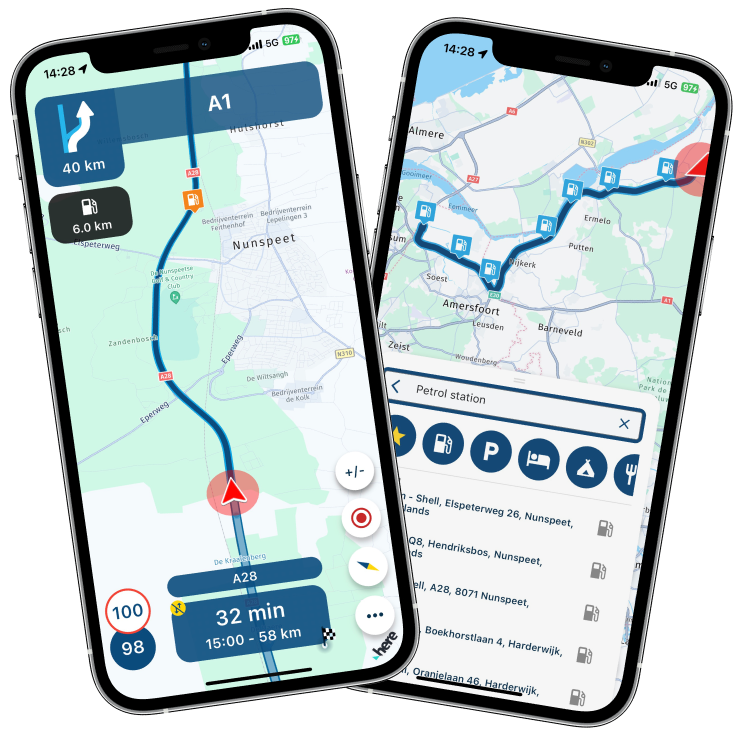
                                      Nearby fuel stations
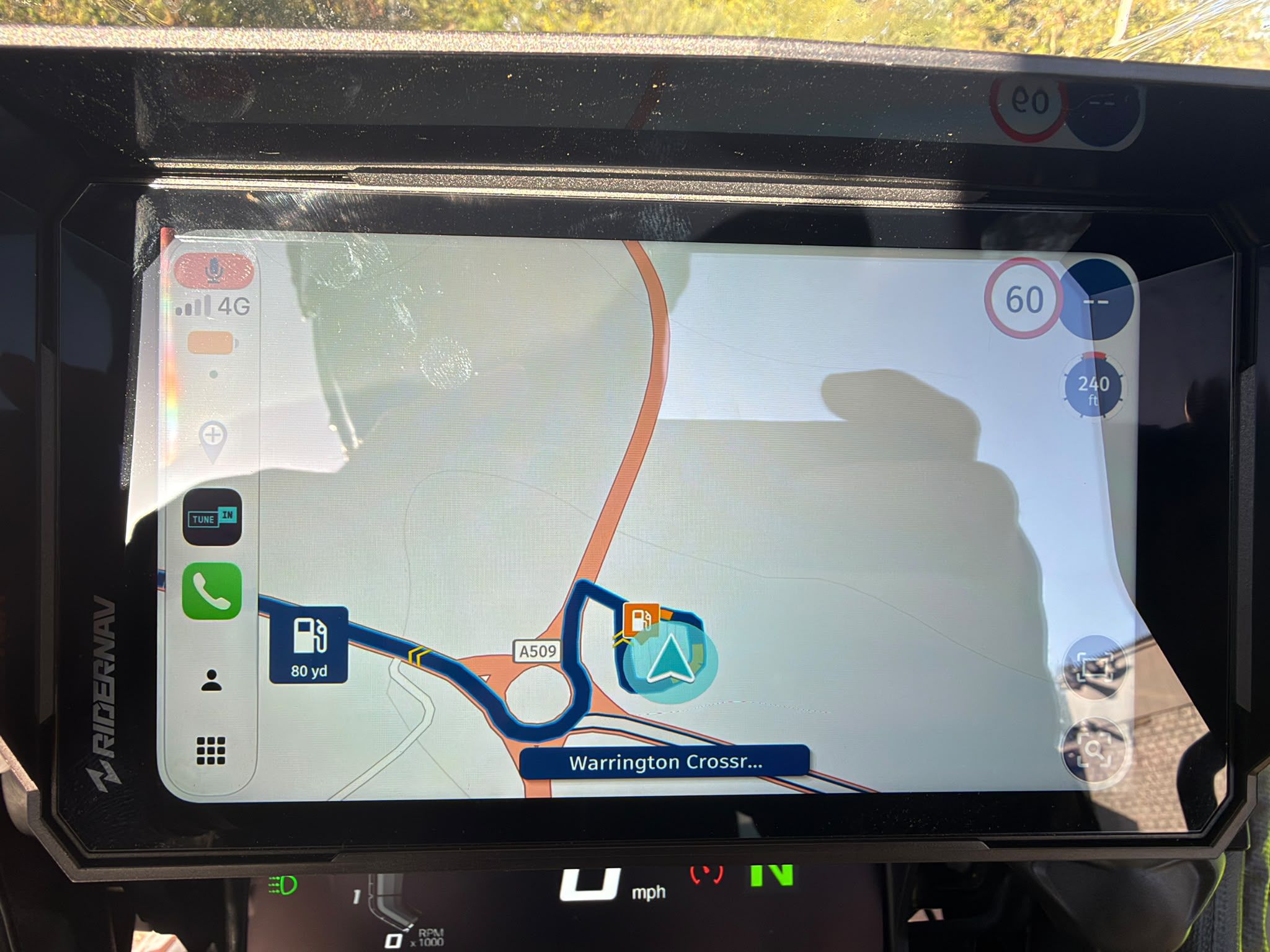
                                      We've massively improved the search algorithm for fuel stations along your route. Get on the road with this version and do let us know what your experiences are! ๐Ÿ™‚

                                      fuel_2.png

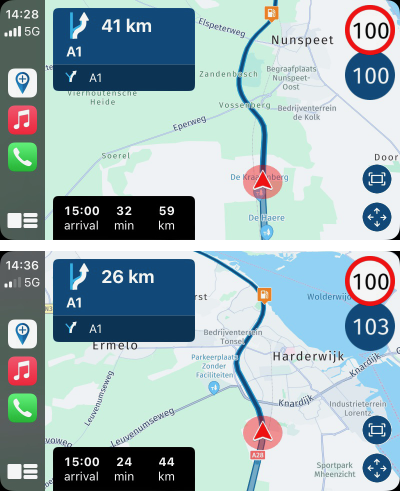
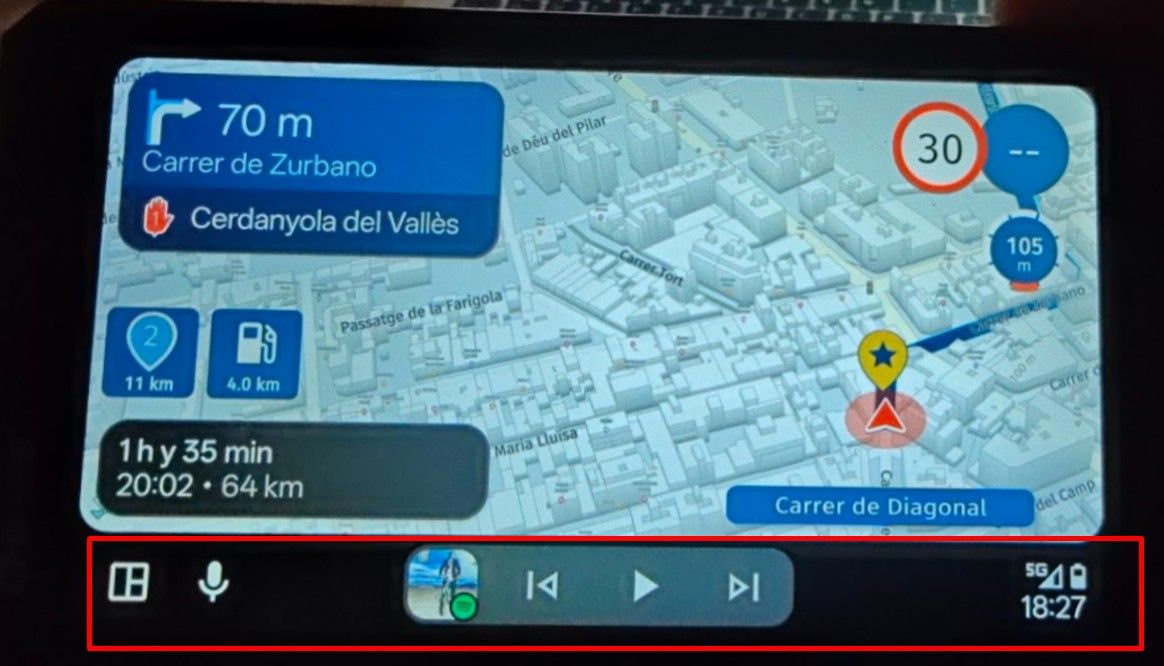
                                      Besides providing you with better recommendations, the fuel station is also displayed on the map ๐Ÿ™‚ That is also visible on your CarPlay / Android Auto display.

                                      cp_1_small.png

                                      Display of search results

                                      When searching for destinations along your route, we now display them on the map too! ๐Ÿ’ฅ This gives a great overview of any search results relevant to you. If searching for fuel, we will quickly show all the possibilities along your route.

                                      fuel_1.png

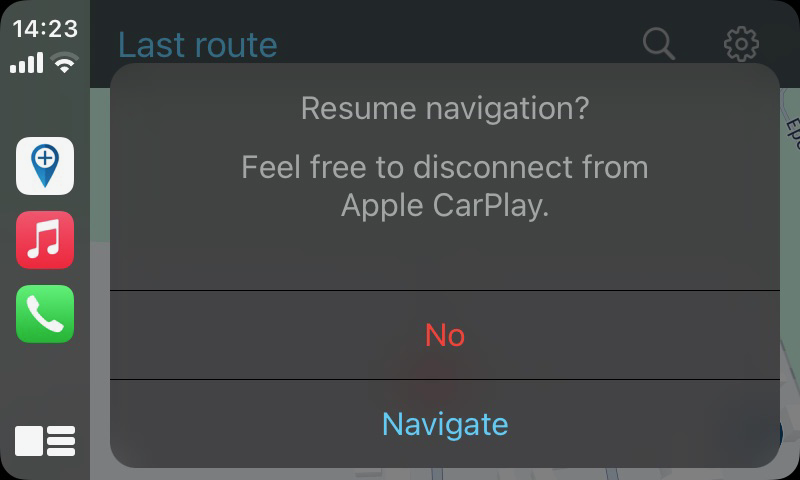
                                      Resume navigation from CarPlay / Android Auto

                                      When you've got the possibility to resume an active navigation session, CarPlay / Android Auto will ask you if you want to resume this in a more instinctive manner.

                                      cp_2.png

                                      Fix incorrect lane assist
                                      Lane assist icons were often incorrect due to a mistake from our side. That has now been corrected ๐Ÿ˜‰

                                      Improved auto-skip algorithm
                                      The algorithm that determines what should happen when you seem to ignore waypoints has been changed. We got some feedback that is was too aggressive so that has been improved. Do remember, you can always disable the auto-skip feature completely and viapoints must always be skipped manually ๐Ÿ™‚

                                      What is next?
                                      The 4.1.3 update will definitely include the possibility to select any of your routes from CarPlay / Android Auto. Besides that we will add some more stuff to those platforms and continue working on the stability.

                                      Best,
                                      Corjan

                                      Jannes van Dijken Offline
                                      Jannes van Dijken Offline
                                      Jannes van Dijken
                                      wrote on last edited by
                                      #19

                                      @Corjan-Meijerink
                                      Would it be possible in the future to choose your own preferred color for the route line? The standard blue gets sometimes a bit lost in a sea of white and shades of blue on the Here map on a small phone.

                                      JP d 1 Reply Last reply
                                      2
                                      • Jannes van Dijken Jannes van Dijken

                                        @Corjan-Meijerink
                                        Would it be possible in the future to choose your own preferred color for the route line? The standard blue gets sometimes a bit lost in a sea of white and shades of blue on the Here map on a small phone.

                                        JP d Offline
                                        JP d Offline
                                        JP d
                                        wrote on last edited by
                                        #20

                                        @Jannes-van-Dijken I agree with you. Also I would like a totally different colour for the route from your location to the start of your planned route. So your location to via point (1).

                                        1 Reply Last reply
                                        0
                                        • dungbeetle dungbeetle

                                          Hi,

                                          Since the update I am experiencing routing errors.

                                          The three pictures below show how the routing differs between viewing the maps prior to setting off and the actual route the app takes when travelling.

                                          I can't seem to change the map when travelling as I assume that this is always the default. Is there a way to fix this problem by using different maps during planning, or could this be a bug? (I have been using the default 'HERE' maps to plan on PC, as recommended in the past.)

                                          As you can see in the pictures, the app wants to take me via a residential slip road rather than just staying on the main road.

                                          Thanks,
                                          d.

                                          01_HERE (Gold) Map.png 02_MRA Default Map.png 03_Following the route.png

                                          JP d Offline
                                          JP d Offline
                                          JP d
                                          wrote on last edited by
                                          #21

                                          @dungbeetle I think this is due to the Here map as my Garmin which uses the Here map has done this twice.

                                          1 Reply Last reply
                                          0

                                          Hello! It looks like you're interested in this conversation, but you don't have an account yet.

                                          Getting fed up of having to scroll through the same posts each visit? When you register for an account, you'll always come back to exactly where you were before, and choose to be notified of new replies (either via email, or push notification). You'll also be able to save bookmarks and upvote posts to show your appreciation to other community members.

                                          With your input, this post could be even better ๐Ÿ’—

                                          Register Login
                                          Reply
                                          • Reply as topic
                                          Log in to reply
                                          • Oldest to Newest
                                          • Newest to Oldest
                                          • Most Votes


                                          • 1
                                          • 2
                                          ACTIVE USERS
                                          Nick Carthew
                                          Nick Carthew
                                          Jรถrgen
                                          Jรถrgen
                                          Corjan Meijerink
                                          Corjan Meijerink
                                          RetiredWingMan
                                          RetiredWingMan
                                          GT JWR
                                          GT JWR
                                          JP d
                                          JP d
                                          Stefan Hummelink
                                          Stefan Hummelink
                                          dungbeetle
                                          dungbeetle
                                          Karel76
                                          Karel76
                                          Jannes van Dijken
                                          Jannes van Dijken
                                          POPULAR TOPICS
                                          • The compas direction on the elevation circle is wrong
                                            M. Schrijver
                                            M. Schrijver
                                            0
                                            59
                                            2.1k

                                          • Er gaat hier iets mis melding
                                            white.mouse
                                            white.mouse
                                            0
                                            7
                                            102

                                          • New update 5.2 - Avoid roadblocks, persistent map items, POI management and share
                                            Nick Carthew
                                            Nick Carthew
                                            28
                                            52
                                            6.6k

                                          • Carpuride scherm vast
                                            Marinus van Deudekom
                                            Marinus van Deudekom
                                            3
                                            30
                                            1.4k

                                          • New update 5.2.1
                                            white.mouse
                                            white.mouse
                                            16
                                            24
                                            1.2k

                                          • Vermijd Wegversperringen
                                            0
                                            1
                                            6

                                          • Google maps and Streetview
                                            0
                                            1
                                            36

                                          • Blauwe routelijn lijft in Carplay wit
                                            0
                                            1
                                            21

                                          MY GROUPS
                                          • Login

                                          • Login or register to search.
                                          • First post
                                            Last post
                                          0
                                          • Categories
                                          • Recent
                                          • Popular
                                          • Support
                                          • MyRoute-app