Hide waypoints when planning?
-

Hi everyone,
Is it possible to hide waypoints after creating a route? My current trip has hundreds of waypoints which serve no other purpose than maintaining the route on the correct road. Is there a way to toggle off or hide the way points after I'm done adjusting my route? As it currently is, the map is saturated with routing waypoints and it's difficult to see my favorites and POIs. All I want to see is the line on the road. Google Maps only shows their shaping points when you click on the route, otherwise they're normally hidden. -
Hi everyone,
Is it possible to hide waypoints after creating a route? My current trip has hundreds of waypoints which serve no other purpose than maintaining the route on the correct road. Is there a way to toggle off or hide the way points after I'm done adjusting my route? As it currently is, the map is saturated with routing waypoints and it's difficult to see my favorites and POIs. All I want to see is the line on the road. Google Maps only shows their shaping points when you click on the route, otherwise they're normally hidden.
@Michael-McMahon said in Hide waypoints when planning?:
Hi everyone,
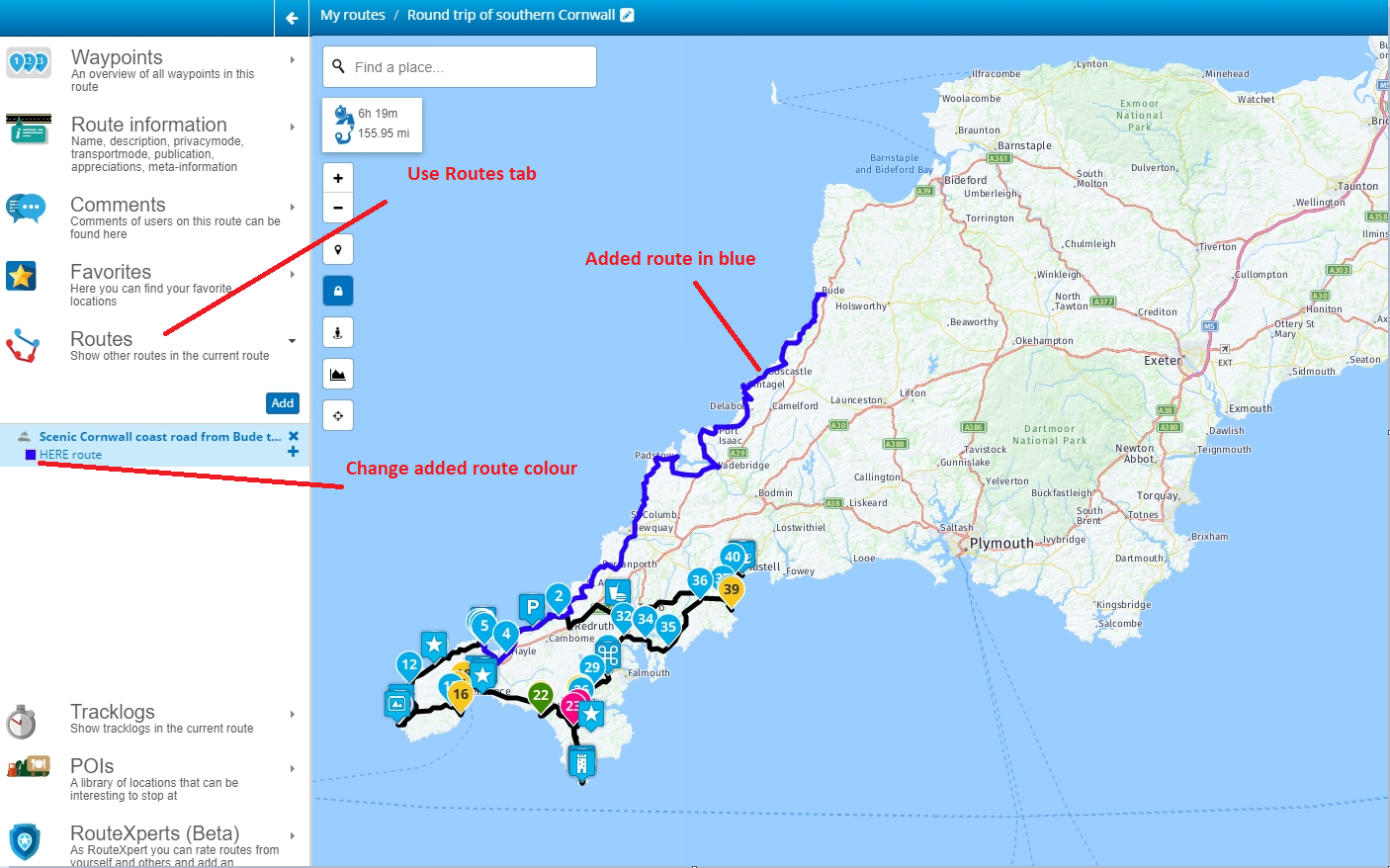
Is it possible to hide waypoints after creating a route? My current trip has hundreds of waypoints which serve no other purpose than maintaining the route on the correct road. Is there a way to toggle off or hide the way points after I'm done adjusting my route? As it currently is, the map is saturated with routing waypoints and it's difficult to see my favorites and POIs. All I want to see is the line on the road. Google Maps only shows their shaping points when you click on the route, otherwise they're normally hidden.Hello @Michael-McMahon. Generally speaking, you shouldn't require hundreds of waypoints to form your route. It is not possible to hide the waypoints, so you could try deleting some to make your route more visible. Alternately, you can use the Route tab on the left of the route editor to add this particular route to an existing one. This will just show a line of your route that cannot be edited. I suggest making a new route (call it display or something) with just 1 waypoint that you can use to display other routes. Open the display route and choose to add the route with hundreds of waypoints.
Always willing to help if I can.
Triumph Tiger 1200 XRT called Tina.
MRA Navigation Next and SilverFox BJ8 -
@Michael-McMahon said in Hide waypoints when planning?:
Hi everyone,
Is it possible to hide waypoints after creating a route? My current trip has hundreds of waypoints which serve no other purpose than maintaining the route on the correct road. Is there a way to toggle off or hide the way points after I'm done adjusting my route? As it currently is, the map is saturated with routing waypoints and it's difficult to see my favorites and POIs. All I want to see is the line on the road. Google Maps only shows their shaping points when you click on the route, otherwise they're normally hidden.Hello @Michael-McMahon. Generally speaking, you shouldn't require hundreds of waypoints to form your route. It is not possible to hide the waypoints, so you could try deleting some to make your route more visible. Alternately, you can use the Route tab on the left of the route editor to add this particular route to an existing one. This will just show a line of your route that cannot be edited. I suggest making a new route (call it display or something) with just 1 waypoint that you can use to display other routes. Open the display route and choose to add the route with hundreds of waypoints.

@Nick-Carthew Hi, I also wanted to display routes and toggle-off the waypoints to give a clear uncluttered over view of the route. But when I followed your proposed 'work around', ie adding and merging two routes. As soon as I "merge", the two routes, the waypoints for the added route become visible. - Or am I missing something???
-
@Nick-Carthew Hi, I also wanted to display routes and toggle-off the waypoints to give a clear uncluttered over view of the route. But when I followed your proposed 'work around', ie adding and merging two routes. As soon as I "merge", the two routes, the waypoints for the added route become visible. - Or am I missing something???
@An9dy said in Hide waypoints when planning?:
@Nick-Carthew Hi, I also wanted to display routes and toggle-off the waypoints to give a clear uncluttered over view of the route. But when I followed your proposed 'work around', ie adding and merging two routes. As soon as I "merge", the two routes, the waypoints for the added route become visible. - Or am I missing something???
You can’t toggle off the route points.
My suggestion is to add routes not merge them. This allows you to see the track lines of the added route. It’s useful for seeing daily routes of a tour.
Hello! It looks like you're interested in this conversation, but you don't have an account yet.
Getting fed up of having to scroll through the same posts each visit? When you register for an account, you'll always come back to exactly where you were before, and choose to be notified of new replies (either via email, or push notification). You'll also be able to save bookmarks and upvote posts to show your appreciation to other community members.
With your input, this post could be even better 💗
Register Login-
 12996
12996
-
 0851
0851
-
 013206
-
 0732
0732
-
0631
-
 1630
1630
-
16103
-
 15150
15150