
newbie with two questions
-
hi, two quick questions.
-
can i reverse a track, without converting it to a route first? when i convert it, it gets all messed up since its 90% offroad. so can i reverse it without converting?
-
can i just follow a track, without navigating on it? i want to see the track on my phone but i dont need tun-by-turn navigation for it. just a "follow track" function like in osmand
thank you for your time
-
-
hi, two quick questions.
-
can i reverse a track, without converting it to a route first? when i convert it, it gets all messed up since its 90% offroad. so can i reverse it without converting?
-
can i just follow a track, without navigating on it? i want to see the track on my phone but i dont need tun-by-turn navigation for it. just a "follow track" function like in osmand
thank you for your time
@mdj said in newbie with two questions:
hi, two quick questions.
-
can i reverse a track, without converting it to a route first? when i convert it, it gets all messed up since its 90% offroad. so can i reverse it without converting?
-
can i just follow a track, without navigating on it? i want to see the track on my phone but i dont need tun-by-turn navigation for it. just a "follow track" function like in osmand
thank you for your time
- No, only routes can be reversed.
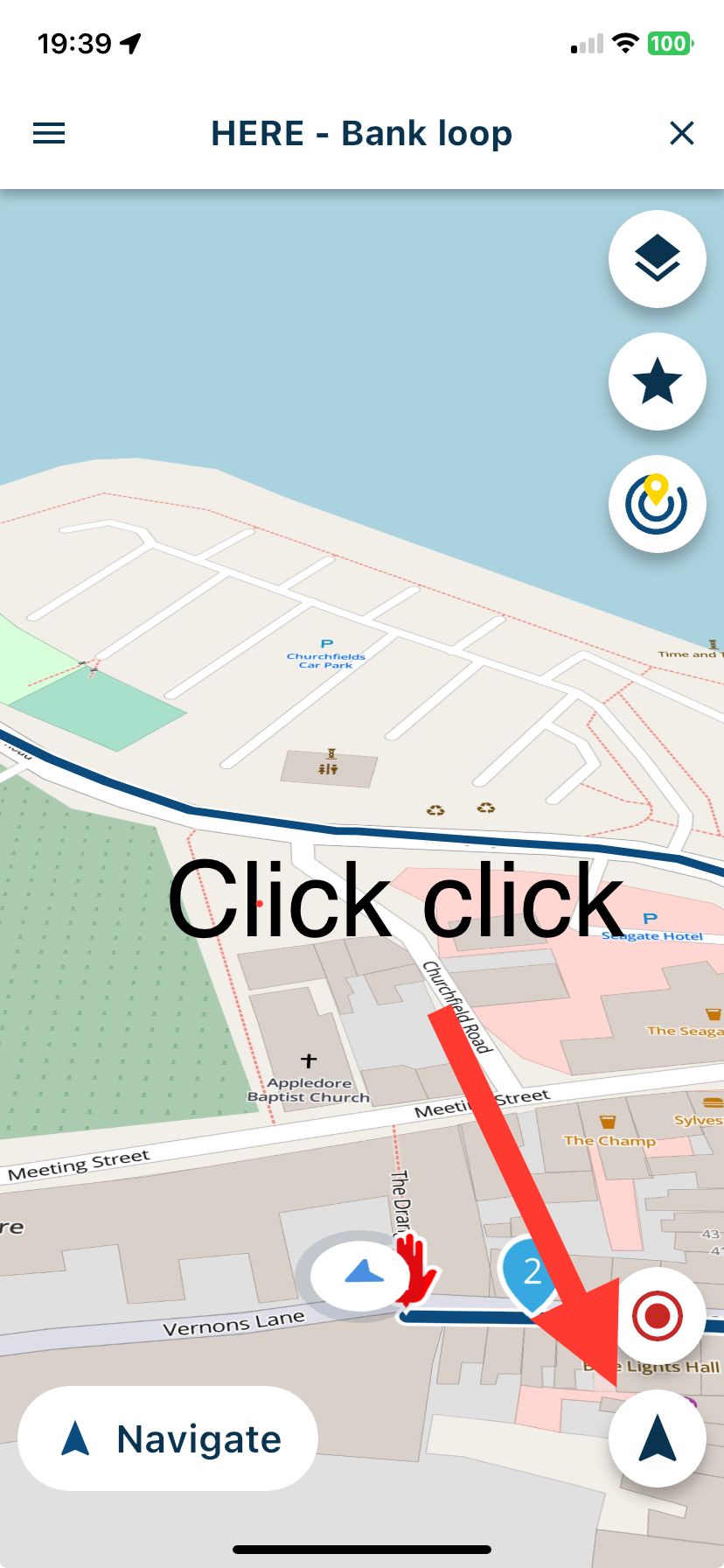
- Yes, open a route or a track and click the position indicator twice (arrow bottom right). This will show the route or track and your position will move along the line.
-
-
thank you for your quick help!
a follow-up question; When converting a track into a route, would it be possible to still display the orginal track on a layer so i can make quick adjustments to the route? right now i have the track and new route open in two tabs, dragging the map around to compare where/if something went wrong.
-
thank you for your quick help!
a follow-up question; When converting a track into a route, would it be possible to still display the orginal track on a layer so i can make quick adjustments to the route? right now i have the track and new route open in two tabs, dragging the map around to compare where/if something went wrong.
@mdj
You can take a look in the Support section and find
Manual 'Display and merge multiple routes'.
And many, many more useful help. -
@mdj
You can take a look in the Support section and find
Manual 'Display and merge multiple routes'.
And many, many more useful help.@Jack-van-Tilburg this is perfect! thank you so much



Hello! It looks like you're interested in this conversation, but you don't have an account yet.
Getting fed up of having to scroll through the same posts each visit? When you register for an account, you'll always come back to exactly where you were before, and choose to be notified of new replies (either via email, or push notification). You'll also be able to save bookmarks and upvote posts to show your appreciation to other community members.
With your input, this post could be even better 💗
Register Login-
 0351.0k
-
 011143
-
 014475
-
 013436
-
0383
-
 08259
08259
-
 018840