Skip to content
  • Categories
  • Recent
  • Popular
  • Support
  • MyRoute-app
Collapse
Brand Logo

MRA Community Forum

  1. Home
  2. MyRoute-app Routeplanner
  3. [Web] Problems, Bugs and other Issues
  4. Using Connector to export routes to Zumo XT but does not show in Trip Planner

Using Connector to export routes to Zumo XT but does not show in Trip Planner

Scheduled Pinned Locked Moved [Web] Problems, Bugs and other Issues
32 Posts 7 Posters 15.0k Views 2 Watching
  • Oldest to Newest
  • Newest to Oldest
  • Most Votes
Reply
  • Reply as topic
Log in to reply
This topic has been deleted. Only users with topic management privileges can see it.
  • Hans van de Ven MR.MRA Hans van de Ven MR.MRA

    @BD-1

    Can you share the url of the route, make sure it is set public

    BD 1 Offline
    BD 1 Offline
    BD 1
    wrote on last edited by
    #13

    @Hans-van-de-Ven-MRA-Master
    link text

    Hans van de Ven MR.MRA 2 Replies Last reply
    0
    • BD 1 BD 1

      @Hans-van-de-Ven-MRA-Master
      link text

      Hans van de Ven MR.MRA Offline
      Hans van de Ven MR.MRA Offline
      Hans van de Ven MR.MRA
      Valued contributor
      wrote on last edited by
      #14

      @BD-1

      Thanks I will have a look at it

      Garmin Zumo XT3/XT2/XT/BMW Connected Ride Navigator/Tourstart/ MyRouteapp (The App)/...
      Een dag niet gelachen is een dag niet geleefd / Een route is net zo goed als deze uitgezet is.

      1 Reply Last reply
      0
      • BD 1 BD 1

        @Hans-van-de-Ven-MRA-Master
        link text

        Hans van de Ven MR.MRA Offline
        Hans van de Ven MR.MRA Offline
        Hans van de Ven MR.MRA
        Valued contributor
        wrote on last edited by Hans van de Ven MR.MRA
        #15

        @BD-1

        The route is added to my Zumo without any problems. After disconnecting the Zumo, I am asked whether I want to import the new route. Then I get the message that the route cannot be calculated because the maps are not present in my device

        Make sure that you place the route points correctly on the route line. Zoom in maximum.

        Garmin Zumo XT3/XT2/XT/BMW Connected Ride Navigator/Tourstart/ MyRouteapp (The App)/...
        Een dag niet gelachen is een dag niet geleefd / Een route is net zo goed als deze uitgezet is.

        BD 1 1 Reply Last reply
        0
        • Hans van de Ven MR.MRA Hans van de Ven MR.MRA

          @BD-1

          The route is added to my Zumo without any problems. After disconnecting the Zumo, I am asked whether I want to import the new route. Then I get the message that the route cannot be calculated because the maps are not present in my device

          Make sure that you place the route points correctly on the route line. Zoom in maximum.

          BD 1 Offline
          BD 1 Offline
          BD 1
          wrote on last edited by
          #16

          @Hans-van-de-Ven-MRA-Master
          Thank you Hans; I have been diligent on placing the shaping points correctly on the routes as well as putting the via points close to the desired location per your tutorial

          Since you were able to successfully import the routes, I wonder if there is some windows glitch that snuck in on the last update? This is a new issue for me as the route import previously would work fine.
          The work around currently is to save the route as gpx1.2 and copy it to the gpx folder on my SD card and then import into trip planner. Just a few more steps and I have full functionality for traveling.

          I appreciate your quick responses and suggestions

          V/R

          BD

          Hans van de Ven MR.MRA 1 Reply Last reply
          0
          • BD 1 BD 1

            @Hans-van-de-Ven-MRA-Master
            Thank you Hans; I have been diligent on placing the shaping points correctly on the routes as well as putting the via points close to the desired location per your tutorial

            Since you were able to successfully import the routes, I wonder if there is some windows glitch that snuck in on the last update? This is a new issue for me as the route import previously would work fine.
            The work around currently is to save the route as gpx1.2 and copy it to the gpx folder on my SD card and then import into trip planner. Just a few more steps and I have full functionality for traveling.

            I appreciate your quick responses and suggestions

            V/R

            BD

            Hans van de Ven MR.MRA Offline
            Hans van de Ven MR.MRA Offline
            Hans van de Ven MR.MRA
            Valued contributor
            wrote on last edited by
            #17

            @BD-1
            The problem probably lies with a Windows update or a Garmin update (I've had that before).
            Save it as... and then copy it to the GPX folder or with the MyRoute app (App) and the Garmin Drive App you can also get the routes on your XT. Open the route on the App and choose to download, then choose export (Apple) or export (Android) and choose the Garmin Dive App.

            If you are going to install the Garmin Drive app, skip the Explorer step.

            Garmin Zumo XT3/XT2/XT/BMW Connected Ride Navigator/Tourstart/ MyRouteapp (The App)/...
            Een dag niet gelachen is een dag niet geleefd / Een route is net zo goed als deze uitgezet is.

            BD 1 1 Reply Last reply
            0
            • Hans van de Ven MR.MRA Hans van de Ven MR.MRA

              @BD-1
              The problem probably lies with a Windows update or a Garmin update (I've had that before).
              Save it as... and then copy it to the GPX folder or with the MyRoute app (App) and the Garmin Drive App you can also get the routes on your XT. Open the route on the App and choose to download, then choose export (Apple) or export (Android) and choose the Garmin Dive App.

              If you are going to install the Garmin Drive app, skip the Explorer step.

              BD 1 Offline
              BD 1 Offline
              BD 1
              wrote on last edited by
              #18

              @Hans-van-de-Ven-MRA-Master 10-4; thank you Hans

              paul69 1 Reply Last reply
              0
              • BD 1 BD 1

                @Hans-van-de-Ven-MRA-Master 10-4; thank you Hans

                paul69 Offline
                paul69 Offline
                paul69
                wrote on last edited by
                #19

                @BD-1

                just a quick thought, I am not going to write many lines of text unless you require more explanation.

                do you have explore activated on your XT. I had a similar problem, the problem was not resolved until I removed/de-activated explore.

                to achieve, we must first attempt ✌️
                K1600 GTL
                Oukitel RT3
                iPhone 13 Pro, carpuride 702b

                Hans van de Ven MR.MRA 1 Reply Last reply
                1
                • paul69 paul69

                  @BD-1

                  just a quick thought, I am not going to write many lines of text unless you require more explanation.

                  do you have explore activated on your XT. I had a similar problem, the problem was not resolved until I removed/de-activated explore.

                  Hans van de Ven MR.MRA Offline
                  Hans van de Ven MR.MRA Offline
                  Hans van de Ven MR.MRA
                  Valued contributor
                  wrote on last edited by
                  #20

                  @paul-69

                  Or create the collection in Explore and make it visible in the XR and Explore

                  Garmin Zumo XT3/XT2/XT/BMW Connected Ride Navigator/Tourstart/ MyRouteapp (The App)/...
                  Een dag niet gelachen is een dag niet geleefd / Een route is net zo goed als deze uitgezet is.

                  paul69 BD 1 2 Replies Last reply
                  0
                  • Hans van de Ven MR.MRA Hans van de Ven MR.MRA

                    @paul-69

                    Or create the collection in Explore and make it visible in the XR and Explore

                    paul69 Offline
                    paul69 Offline
                    paul69
                    wrote on last edited by
                    #21

                    @Hans-van-de-Ven-MRA-Master

                    I had all sorts of problems with routes/tracks etc not loading onto the XT. when connected it would show a pop up window
                    "would you like to import route track etc" I would click yes, but it would not show up in the trip planner.

                    I spent quite some time trying to sort this out, various forums, the only thing that worked in the end was to deactivate explore, all my problems went away.
                    I think the explore app is a bit of a donkey, but I am sure there will be people that have success with it, although I certainly did not.

                    to achieve, we must first attempt ✌️
                    K1600 GTL
                    Oukitel RT3
                    iPhone 13 Pro, carpuride 702b

                    1 Reply Last reply
                    0
                    • Hans van de Ven MR.MRA Hans van de Ven MR.MRA

                      @paul-69

                      Or create the collection in Explore and make it visible in the XR and Explore

                      BD 1 Offline
                      BD 1 Offline
                      BD 1
                      wrote on last edited by
                      #22

                      @Hans-van-de-Ven-MRA-Master
                      I have found that without the Zumo XT hooked up, when I use the connector to export, it says "Completed" The route is exported to your device. Enjoy!
                      Prior to this challenge, if the Zumo was not fully 'synched' to the computer, I would get an error message indicating the device could not be found.

                      Did install the latest windows update - which had no effect on the problem
                      2023-09 Cumulative Update Preview for Windows 11 Version 22H2 for x64-based Systems (KB5030310)

                      Thoughts?

                      Hans van de Ven MR.MRA 1 Reply Last reply
                      0
                      • BD 1 BD 1

                        @Hans-van-de-Ven-MRA-Master
                        I have found that without the Zumo XT hooked up, when I use the connector to export, it says "Completed" The route is exported to your device. Enjoy!
                        Prior to this challenge, if the Zumo was not fully 'synched' to the computer, I would get an error message indicating the device could not be found.

                        Did install the latest windows update - which had no effect on the problem
                        2023-09 Cumulative Update Preview for Windows 11 Version 22H2 for x64-based Systems (KB5030310)

                        Thoughts?

                        Hans van de Ven MR.MRA Offline
                        Hans van de Ven MR.MRA Offline
                        Hans van de Ven MR.MRA
                        Valued contributor
                        wrote on last edited by Hans van de Ven MR.MRA
                        #23

                        @BD-1

                        You have to wait until you see the xt on your PC before you use the connector
                        I mostly use my windows 10 desktop, I will check this on my windows 11 laptop.

                        Garmin Zumo XT3/XT2/XT/BMW Connected Ride Navigator/Tourstart/ MyRouteapp (The App)/...
                        Een dag niet gelachen is een dag niet geleefd / Een route is net zo goed als deze uitgezet is.

                        BD 1 1 Reply Last reply
                        0
                        • Hans van de Ven MR.MRA Hans van de Ven MR.MRA

                          @BD-1

                          You have to wait until you see the xt on your PC before you use the connector
                          I mostly use my windows 10 desktop, I will check this on my windows 11 laptop.

                          BD 1 Offline
                          BD 1 Offline
                          BD 1
                          wrote on last edited by
                          #24

                          @Hans-van-de-Ven-MRA-Master
                          Good morning - please try to use the connector w/o a device hooked up and see if you get an error message indicating there is no device.
                          Without any device hooked up, the connector indicates the file transferred.
                          I can see and use the Zumo from Windows (11) Explorer and I can download and copy the files to my SD card - just can't transfer via connector.
                          I have done a repair to myroute app w/o change. Tried both Chrome and Edge with the same results.

                          Hans van de Ven MR.MRA 1 Reply Last reply
                          0
                          • BD 1 BD 1

                            @Hans-van-de-Ven-MRA-Master
                            Good morning - please try to use the connector w/o a device hooked up and see if you get an error message indicating there is no device.
                            Without any device hooked up, the connector indicates the file transferred.
                            I can see and use the Zumo from Windows (11) Explorer and I can download and copy the files to my SD card - just can't transfer via connector.
                            I have done a repair to myroute app w/o change. Tried both Chrome and Edge with the same results.

                            Hans van de Ven MR.MRA Offline
                            Hans van de Ven MR.MRA Offline
                            Hans van de Ven MR.MRA
                            Valued contributor
                            wrote on last edited by
                            #25

                            @BD-1
                            Just transferred a route to the XT using the Windows 11 laptop.
                            No problems encountered, the route is neatly placed on the device in the GPX folder, after which I can import the route.
                            If no device is connected to the laptop, I get the message that the device cannot be found.

                            So on this side everything works as it should.

                            Garmin Zumo XT3/XT2/XT/BMW Connected Ride Navigator/Tourstart/ MyRouteapp (The App)/...
                            Een dag niet gelachen is een dag niet geleefd / Een route is net zo goed als deze uitgezet is.

                            BD 1 1 Reply Last reply
                            0
                            • Hans van de Ven MR.MRA Hans van de Ven MR.MRA

                              @BD-1
                              Just transferred a route to the XT using the Windows 11 laptop.
                              No problems encountered, the route is neatly placed on the device in the GPX folder, after which I can import the route.
                              If no device is connected to the laptop, I get the message that the device cannot be found.

                              So on this side everything works as it should.

                              BD 1 Offline
                              BD 1 Offline
                              BD 1
                              wrote on last edited by
                              #26

                              @Hans-van-de-Ven-MRA-Master
                              Can we switch sides? 🙂

                              BD 1 1 Reply Last reply
                              0
                              • BD 1 BD 1

                                @Hans-van-de-Ven-MRA-Master
                                Can we switch sides? 🙂

                                BD 1 Offline
                                BD 1 Offline
                                BD 1
                                wrote on last edited by
                                #27

                                @BD-1
                                Morning Hans - issues is resolved!

                                I had a SanDisk Ultra USB plugged in at the same time my Zumo XT was plugged in. Removing the SanDisk allowed the connector app to seek out the Zumo as intended. Removing both the USB and Zumo and using the connector app gave me the error message there is no device.
                                When the USB and Zumo are connected to the PC, the connector app is sending the file to the Garmin folder on the USB only.

                                Appreciate your kind assistance in trying to solve my problem - appears to have been 'self inflicted' !

                                Best regards,

                                BD

                                1 Reply Last reply
                                1
                                • BD 1 BD 1

                                  @Hans-van-de-Ven-MRA-Master
                                  link text
                                  Thank you

                                  Hans van de Ven MR.MRA Offline
                                  Hans van de Ven MR.MRA Offline
                                  Hans van de Ven MR.MRA
                                  Valued contributor
                                  wrote on last edited by
                                  #28

                                  @BD-1

                                  Always place the points on the route line, zoom in as much as possible.
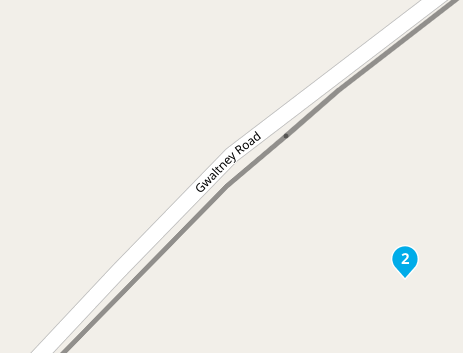
                                  f279fa22-6cb2-40d0-909d-891ef168a82c-image.png

                                  Garmin Zumo XT3/XT2/XT/BMW Connected Ride Navigator/Tourstart/ MyRouteapp (The App)/...
                                  Een dag niet gelachen is een dag niet geleefd / Een route is net zo goed als deze uitgezet is.

                                  Guzzist 1 Reply Last reply
                                  0
                                  • Hans van de Ven MR.MRA Hans van de Ven MR.MRA

                                    @BD-1

                                    Always place the points on the route line, zoom in as much as possible.
                                    f279fa22-6cb2-40d0-909d-891ef168a82c-image.png

                                    Guzzist Offline
                                    Guzzist Offline
                                    Guzzist
                                    Valued contributor
                                    wrote on last edited by
                                    #29

                                    I had the same issue with transferring routes from MRA Routeplanner to GARMIN XT. But since I

                                    • Listenpunkt use HERE maps to plan the route in MRA Routeplanner,
                                    • Listenpunkt check in very close detail if all way points are placed exactly on roads,
                                    • Listenpunkt export it as gpx 1.1 (not gox 1.2)

                                    issues are gone! The GARMIN XT doesn't work well with imported gpx 1.2 out of MRA Routeplanner. You may use this format only with XT2 device.

                                    Nothing is impossible ;-)
                                    In past: GARMIN Zumo 210->GARMIN Zumo 395->GARMIN XT=> now: DMD T865-X + MyRoute-App, LocusMaps, OsmAnd.
                                    In past: GARMIN MapSource ->GARMIN BaseCamp->Tyre->Kurviger->Calimoto=> now: MRA-Routplanner.

                                    Hans van de Ven MR.MRA 1 Reply Last reply
                                    0
                                    • Guzzist Guzzist

                                      I had the same issue with transferring routes from MRA Routeplanner to GARMIN XT. But since I

                                      • Listenpunkt use HERE maps to plan the route in MRA Routeplanner,
                                      • Listenpunkt check in very close detail if all way points are placed exactly on roads,
                                      • Listenpunkt export it as gpx 1.1 (not gox 1.2)

                                      issues are gone! The GARMIN XT doesn't work well with imported gpx 1.2 out of MRA Routeplanner. You may use this format only with XT2 device.

                                      Hans van de Ven MR.MRA Offline
                                      Hans van de Ven MR.MRA Offline
                                      Hans van de Ven MR.MRA
                                      Valued contributor
                                      wrote on last edited by
                                      #30

                                      @Guzzist

                                      The gpx 1.2 works also perfect in the XT, used that format always

                                      Garmin Zumo XT3/XT2/XT/BMW Connected Ride Navigator/Tourstart/ MyRouteapp (The App)/...
                                      Een dag niet gelachen is een dag niet geleefd / Een route is net zo goed als deze uitgezet is.

                                      Guzzist 1 Reply Last reply
                                      0
                                      • Hans van de Ven MR.MRA Hans van de Ven MR.MRA

                                        @Guzzist

                                        The gpx 1.2 works also perfect in the XT, used that format always

                                        Guzzist Offline
                                        Guzzist Offline
                                        Guzzist
                                        Valued contributor
                                        wrote on last edited by
                                        #31

                                        @Hans-van-de-Ven-MR-MRA said in Using Connector to export routes to Zumo XT but does not show in Trip Planner:

                                        @Guzzist

                                        The gpx 1.2 works also perfect in the XT, used that format always

                                        @Hans-van-de-Ven-MR-MRA you may right. But I had issues with a never updated XT. Now I can't compare any longer, because I don't have the XT any more.

                                        Nothing is impossible ;-)
                                        In past: GARMIN Zumo 210->GARMIN Zumo 395->GARMIN XT=> now: DMD T865-X + MyRoute-App, LocusMaps, OsmAnd.
                                        In past: GARMIN MapSource ->GARMIN BaseCamp->Tyre->Kurviger->Calimoto=> now: MRA-Routplanner.

                                        Marinus van Deudekom 1 Reply Last reply
                                        0
                                        • Guzzist Guzzist

                                          @Hans-van-de-Ven-MR-MRA said in Using Connector to export routes to Zumo XT but does not show in Trip Planner:

                                          @Guzzist

                                          The gpx 1.2 works also perfect in the XT, used that format always

                                          @Hans-van-de-Ven-MR-MRA you may right. But I had issues with a never updated XT. Now I can't compare any longer, because I don't have the XT any more.

                                          Marinus van Deudekom Offline
                                          Marinus van Deudekom Offline
                                          Marinus van Deudekom
                                          RouteXpert
                                          wrote on last edited by
                                          #32

                                          @Guzzist I'm sure that the 1.2 export works good on an XT done it a lot of times

                                          Honda Goldwing GL1500,
                                          Honda Silverwing GL 650
                                          DMD2 T865X 8 inch Android tablet using MRA next for navigation
                                          Garmin XT sold
                                          Samsung S24FE mounted on a Quadlock and using Android Auto in my car

                                          1 Reply Last reply
                                          0

                                          Hello! It looks like you're interested in this conversation, but you don't have an account yet.

                                          Getting fed up of having to scroll through the same posts each visit? When you register for an account, you'll always come back to exactly where you were before, and choose to be notified of new replies (either via email, or push notification). You'll also be able to save bookmarks and upvote posts to show your appreciation to other community members.

                                          With your input, this post could be even better 💗

                                          Register Login

                                          Reply
                                          • Reply as topic
                                          Log in to reply
                                          • Oldest to Newest
                                          • Newest to Oldest
                                          • Most Votes


                                          • 1
                                          • 2
                                          ACTIVE USERS
                                          Guzzist
                                          Guzzist
                                          Hans van de Ven MR.MRA
                                          Hans van de Ven MR.MRA
                                          paul69
                                          paul69
                                          Marinus van Deudekom
                                          Marinus van Deudekom
                                          Albert van den Elsen
                                          Albert van den Elsen
                                          BD 1
                                          BD 1
                                          Carlos Garcia
                                          Carlos Garcia
                                          POPULAR TOPICS
                                          • GPX Versions 1.1 vs 1.2 for Garmin Visually Explained
                                            Guzzist
                                            Guzzist
                                            7
                                            166
                                            11.7k

                                          • HERE maps updates
                                            Peter Zehentreiter
                                            Peter Zehentreiter
                                            0
                                            4
                                            105

                                          • Linker in MRA kleurt blauw (alles geselecteerd)
                                            Alfred Schrittwieser
                                            Alfred Schrittwieser
                                            0
                                            10
                                            188

                                          • Auto skip many waypoints by itself while I was on route. [5.2.0 - 474]
                                            Brian McG
                                            Brian McG
                                            0
                                            34
                                            1.3k

                                          • Useful Speed Camera Information
                                            Marinus van Deudekom
                                            Marinus van Deudekom
                                            3
                                            3
                                            152

                                          • Route maken in TomTom kaart en vervolgens met de app navigeren
                                            Bruno 7
                                            Bruno 7
                                            0
                                            6
                                            119

                                          • Straatnamen worden uitgesproken
                                            Theo Lammerts
                                            Theo Lammerts
                                            0
                                            5
                                            304

                                          • The compas direction on the elevation circle is wrong
                                            Dave J 0
                                            Dave J 0
                                            0
                                            23
                                            592

                                          MY GROUPS
                                          • Login

                                          • Login or register to search.
                                          • First post
                                            Last post
                                          0
                                          • Categories
                                          • Recent
                                          • Popular
                                          • Support
                                          • MyRoute-app