Skip to content
  • Categories
  • Recent
  • Popular
  • Support
  • MyRoute-app
Collapse
Brand Logo

MRA Community Forum

  1. Home
  2. [Beta] The MyRoute-app
  3. [Beta] Problems, Bugs and other Issues
  4. Pointer not repositioning correctly after scolling

Pointer not repositioning correctly after scolling

Scheduled Pinned Locked Moved [Beta] Problems, Bugs and other Issues
4 Posts 3 Posters 63 Views
  • Oldest to Newest
  • Newest to Oldest
  • Most Votes
Reply
  • Reply as topic
Log in to reply
This topic has been deleted. Only users with topic management privileges can see it.
  • mouckatrongmail.com Offline
    mouckatrongmail.com Offline
    mouckatrongmail.com
    wrote on last edited by
    #1

    Hi,

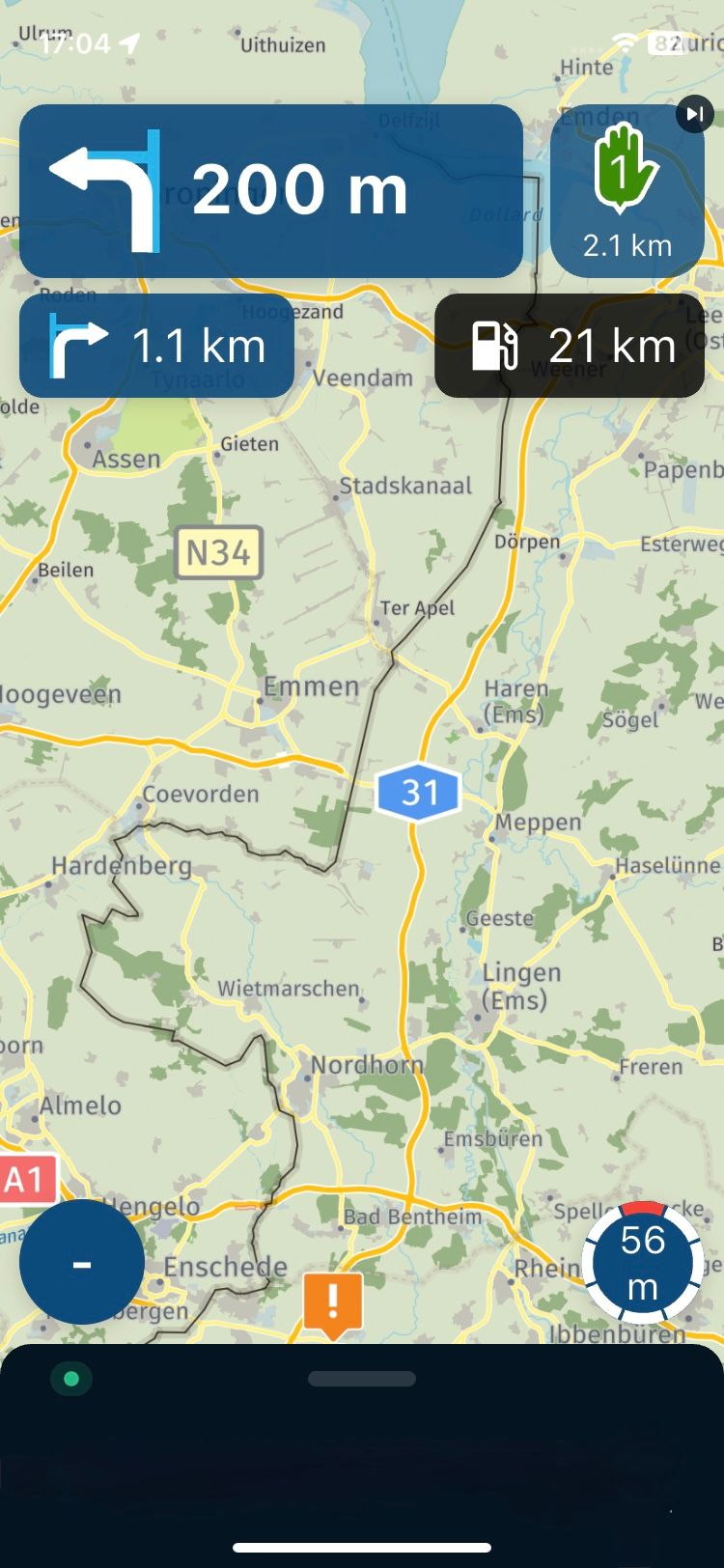
    I had this intermittently a couple of times on different routes where, while on route, I zoomed out and scolled around to see the route and when I clicked the north arrow button to go back to my current position and continue following the route, the pointer was off to the side of the screen on one occasion, on another it was centered but closer to the top of the screen which was hard to see what was coming next.

    See attached screenshot.

    position error screenshot

    Con Hennekens 1 Reply Last reply
    0
    • mouckatrongmail.com mouckatrongmail.com

      Hi,

      I had this intermittently a couple of times on different routes where, while on route, I zoomed out and scolled around to see the route and when I clicked the north arrow button to go back to my current position and continue following the route, the pointer was off to the side of the screen on one occasion, on another it was centered but closer to the top of the screen which was hard to see what was coming next.

      See attached screenshot.

      position error screenshot

      Con Hennekens Online
      Con Hennekens Online
      Con Hennekens
      Alpha tester
      wrote on last edited by
      #2

      @mouckatrongmail-com, Most likely thing to have happened is that you accidentally swiped over your screen a bit. Some screens are so sensitive that they do not even have to be touched physically. Tapping the compass should recenter again.

      I am just an enthusiastic MRA user, and hope you will be one too!

      Most motorcycle problems are caused by the nut that connects the handlebar to the saddle.

      Check out RideSleepRepeat.eu, a biker community for sharing stays across Europe

      mouckatrongmail.com 1 Reply Last reply
      0
      • Con Hennekens Con Hennekens

        @mouckatrongmail-com, Most likely thing to have happened is that you accidentally swiped over your screen a bit. Some screens are so sensitive that they do not even have to be touched physically. Tapping the compass should recenter again.

        mouckatrongmail.com Offline
        mouckatrongmail.com Offline
        mouckatrongmail.com
        wrote on last edited by
        #3

        @Con-Hennekens Afraid not, the position of the pointer on the screen is where it went after I pressed the compass button. I tried moving the screen away/zooming out again and pressing the compass again but the same thing happened. The error happened to me on a few occasions. Sometimes I was able to get it to reset correctly back towards the centre bottom of screen, others I just had to live with it and try and carry on.

        Corjan Meijerink 1 Reply Last reply
        0
        • mouckatrongmail.com mouckatrongmail.com

          @Con-Hennekens Afraid not, the position of the pointer on the screen is where it went after I pressed the compass button. I tried moving the screen away/zooming out again and pressing the compass again but the same thing happened. The error happened to me on a few occasions. Sometimes I was able to get it to reset correctly back towards the centre bottom of screen, others I just had to live with it and try and carry on.

          Corjan Meijerink Online
          Corjan Meijerink Online
          Corjan Meijerink
          Developer
          wrote on last edited by
          #4

          @mouckatrongmail-com In the latest update we've fixed a issue with the location of the position icon on screen.

          Please let us know if you still have the issue.

          1 Reply Last reply
          0

          Hello! It looks like you're interested in this conversation, but you don't have an account yet.

          Getting fed up of having to scroll through the same posts each visit? When you register for an account, you'll always come back to exactly where you were before, and choose to be notified of new replies (either via email, or push notification). You'll also be able to save bookmarks and upvote posts to show your appreciation to other community members.

          With your input, this post could be even better 💗

          Register Login
          Reply
          • Reply as topic
          Log in to reply
          • Oldest to Newest
          • Newest to Oldest
          • Most Votes


          ACTIVE USERS
          Con Hennekens
          Con Hennekens
          Corjan Meijerink
          Corjan Meijerink
          mouckatrongmail.com
          mouckatrongmail.com
          POPULAR TOPICS
          • Linker in MRA kleurt blauw (alles geselecteerd)
            Rob Verhoeff
            Rob Verhoeff
            0
            22
            407

          • New update 5.2.1
            white.mouse
            white.mouse
            15
            20
            765

          • GPX Versions 1.1 vs 1.2 for Garmin Visually Explained
            John S Parry
            John S Parry
            7
            179
            14.7k

          • How can I change the verbal navigation directions from male to female?
            Brian McG
            Brian McG
            0
            5
            50

          • The compas direction on the elevation circle is wrong
            Rob Verhoeff
            Rob Verhoeff
            0
            34
            1.2k

          • Wegwerkzaamheden / Road works
            Travellexxie
            Travellexxie
            0
            4
            74

          • Apple Carplay - navigatie instructies zichtbaar, maar kaart niet??
            Huibertus
            Huibertus
            0
            4
            64

          • Problem with Route Animate/Video maker
            Marinus van Deudekom
            Marinus van Deudekom
            0
            4
            67

          MY GROUPS
          • Login

          • Login or register to search.
          • First post
            Last post
          0
          • Categories
          • Recent
          • Popular
          • Support
          • MyRoute-app