Skip to content
  • Categories
  • Recent
  • Popular
  • Support
  • MyRoute-app
Collapse
Brand Logo

MRA Community Forum

  1. Home
  2. General Discussion
  3. MRA and the BMW Connected App

MRA and the BMW Connected App

Scheduled Pinned Locked Moved General Discussion
37 Posts 18 Posters 31.4k Views 10 Watching
  • Oldest to Newest
  • Newest to Oldest
  • Most Votes
Reply
  • Reply as topic
Log in to reply
This topic has been deleted. Only users with topic management privileges can see it.
  • Nick Hodge Nick Hodge

    @Jack-van-Tilburg Thank you for translating the Dutch and I'm not sure if there's still questions here?

    To clarify. both Via and Shaping Points in MRA are seen as Waypoints in the Connected app and currently the limit is 50 waypoints. Many see that as insufficient and I'm not wanting to start a debate, but if you plan carefully, in my experience 50 is plenty for a day's route. This is because in general the route with be 'natural' (A to B). It's only when the route is 'unnatural' (I must go this way) that you need a shaping point to force the move. I normally plot my route manually to do what I wish and then (Gold membership needed), expand the number of points to say 48 or similar. I travelled 10,000km in June in 30 days to Nordkapp and back through Finland, etc. using this functionality and it was pretty well perfect.

    The only downside is you get an announcement at each connected app waypoint, which in the main are only shaping points from MRA. "In 800 metres you will reach your stop". That is in one way confusing/annoying, but in another way reassuring that you're 'on route'

    As I say, not sure there were further questions there but since posting my process I have used extensively with great success.

    NOTE: It would be great if you could change the announcement to be something typed in MRA but we'll need to wait for planets to align.

    Jack van Tilburg Offline
    Jack van Tilburg Offline
    Jack van Tilburg
    wrote on last edited by
    #22

    @Nick-Hodge
    The number of allowed waypoints in BMW CA may indeed be too short in our country (NL).
    For example, I have a route of 152 km in the middle of the Netherlands with 57 waypoints. The route there goes over small back roads (as you say "must go this way").
    At the same time I am also planning a trip to the North Cape and do not need more than 25 waypoints for the outward route via Sweden.

    NOTE: It would be great if you could change the announcement to be something typed in MRA but we'll need to wait for planets to align.

    That must be more due to the developers of TomTom than to BMW, I think?

    Nick Hodge 1 Reply Last reply
    1
    • Jack van Tilburg Jack van Tilburg

      @Nick-Hodge
      The number of allowed waypoints in BMW CA may indeed be too short in our country (NL).
      For example, I have a route of 152 km in the middle of the Netherlands with 57 waypoints. The route there goes over small back roads (as you say "must go this way").
      At the same time I am also planning a trip to the North Cape and do not need more than 25 waypoints for the outward route via Sweden.

      NOTE: It would be great if you could change the announcement to be something typed in MRA but we'll need to wait for planets to align.

      That must be more due to the developers of TomTom than to BMW, I think?

      Nick Hodge Offline
      Nick Hodge Offline
      Nick Hodge
      wrote on last edited by
      #23

      @Jack-van-Tilburg Certainly the further up Norway you get the less roads you have choice of ๐Ÿ˜‰

      Michiel 14 1 Reply Last reply
      0
      • Nick Hodge Nick Hodge

        @Jack-van-Tilburg Certainly the further up Norway you get the less roads you have choice of ๐Ÿ˜‰

        Michiel 14 Offline
        Michiel 14 Offline
        Michiel 14
        wrote on last edited by
        #24

        I think by now the Connected app or Connected Navigator can use more than 50 points. Or am I missing something?

        Jack van Tilburg Nick Hodge 2 Replies Last reply
        0
        • Michiel 14 Michiel 14

          I think by now the Connected app or Connected Navigator can use more than 50 points. Or am I missing something?

          Jack van Tilburg Offline
          Jack van Tilburg Offline
          Jack van Tilburg
          wrote on last edited by
          #25

          @Michiel-14
          The app can not use more than 50.
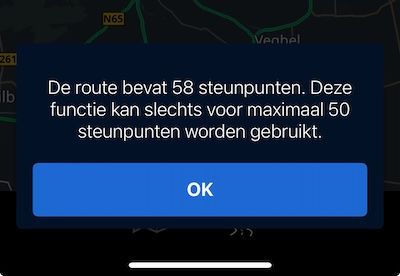
          IMG_2005.jpg

          1 Reply Last reply
          0
          • Michiel 14 Michiel 14

            I think by now the Connected app or Connected Navigator can use more than 50 points. Or am I missing something?

            Nick Hodge Offline
            Nick Hodge Offline
            Nick Hodge
            wrote on last edited by
            #26

            @Michiel-14 if you plot in MRA (or any other app) and set more than 50 โ€˜shaping pointsโ€™ it will not load how I set in my post

            Michiel 14 1 Reply Last reply
            0
            • Nick Hodge Nick Hodge

              @Michiel-14 if you plot in MRA (or any other app) and set more than 50 โ€˜shaping pointsโ€™ it will not load how I set in my post

              Michiel 14 Offline
              Michiel 14 Offline
              Michiel 14
              wrote on last edited by Michiel 14
              #27

              @Nick-Hodge @Jack-van-Tilburg Ok, dank voor de info!

              Hans van de Ven MR.MRA 1 Reply Last reply
              0
              • Michiel 14 Michiel 14

                @Nick-Hodge @Jack-van-Tilburg Ok, dank voor de info!

                Hans van de Ven MR.MRA Offline
                Hans van de Ven MR.MRA Offline
                Hans van de Ven MR.MRA
                Valued contributor
                wrote on last edited by Hans van de Ven MR.MRA
                #28

                @Michiel-14

                Save it as .itn and place the file in the route folder on the CRN and import the route

                Garmin Zumo XT3/XT2/XT/BMW Connected Ride Navigator/Tourstart/ MyRouteapp (The App)/...
                Een dag niet gelachen is een dag niet geleefd / Een route is net zo goed als deze uitgezet is.

                1 Reply Last reply
                0
                • M. Schrijver Offline
                  M. Schrijver Offline
                  M. Schrijver
                  Valued contributor
                  wrote on last edited by
                  #29

                  Or use the track. If the TomTom engine in the Connected Ride App works the same as in TomTom's own software. You do not need any skipping functionality.
                  The engine will always guide you back to the original route.

                  The biggest drawback of riding with a track is, not able to use waypoints. That can be a dealbreaker sometimes. You maybe can use POI as an alternative for waypoints
                  But the stability of the TomTom engine on track support is very hard to break.

                  (I use MRA Next only on Android Auto. Every comment, suggestion, etc will be based on my usage with Android Auto)

                  1 Reply Last reply
                  0
                  • Corjan Meijerink Corjan Meijerink

                    @Nick-Hodge this is of great help to others! Thanks ๐Ÿ™‚
                    Exporting to other apps like youโ€™ve shown is really one of the great features we developed in the app.

                    Shahed Rafique 0 Offline
                    Shahed Rafique 0 Offline
                    Shahed Rafique 0
                    wrote on last edited by
                    #30

                    @Corjan-Meijerink
                    Very helpful , can you confirm that the file should be saved as a GPX 1.1 file with tracks and waypoints being imported.

                    I am also using a BMW connected TFT screen.

                    Thanks

                    Nick Hodge 1 Reply Last reply
                    0
                    • Shahed Rafique 0 Shahed Rafique 0

                      @Corjan-Meijerink
                      Very helpful , can you confirm that the file should be saved as a GPX 1.1 file with tracks and waypoints being imported.

                      I am also using a BMW connected TFT screen.

                      Thanks

                      Nick Hodge Offline
                      Nick Hodge Offline
                      Nick Hodge
                      wrote on last edited by
                      #31

                      @Shahed-Rafique-0 This is a bit late to be replying, but yes, save as a GPX1.1 (Route and Track)

                      1 Reply Last reply
                      0
                      • King 06 King 06 referenced this topic on
                      • steve poole Offline
                        steve poole Offline
                        steve poole
                        wrote on last edited by
                        #32

                        nick, I'm planning a trip as you've described for next year. I would be interested to see the timings you allowed for each day, anything you would have changed, etc.

                        Thanks.

                        Nick Hodge 1 Reply Last reply
                        0
                        • steve poole steve poole

                          nick, I'm planning a trip as you've described for next year. I would be interested to see the timings you allowed for each day, anything you would have changed, etc.

                          Thanks.

                          Nick Hodge Offline
                          Nick Hodge Offline
                          Nick Hodge
                          wrote on last edited by Nick Hodge
                          #33

                          @steve-poole I have all the maps and the actual ridden tracks. It was a phenomenal ride over 28 days up Norway (via Holland, Germany, Denmark and Sweden, although these were just transit days). Norway during June for us was spectacular. Down Finland through Estonia, Latvia, Lithuania, Czechia, Poland, Belgium and France. 10,000km with two days off and a couple of short days. Email me for more info (nick at nickhodge dot co dot uk)

                          steve poole 2 Replies Last reply
                          0
                          • Nick Hodge Nick Hodge

                            @steve-poole I have all the maps and the actual ridden tracks. It was a phenomenal ride over 28 days up Norway (via Holland, Germany, Denmark and Sweden, although these were just transit days). Norway during June for us was spectacular. Down Finland through Estonia, Latvia, Lithuania, Czechia, Poland, Belgium and France. 10,000km with two days off and a couple of short days. Email me for more info (nick at nickhodge dot co dot uk)

                            steve poole Offline
                            steve poole Offline
                            steve poole
                            wrote on last edited by
                            #34

                            @Nick-Hodge thanks Nick. I'll send you an email in the morning.

                            1 Reply Last reply
                            0
                            • Nick Hodge Nick Hodge

                              @steve-poole I have all the maps and the actual ridden tracks. It was a phenomenal ride over 28 days up Norway (via Holland, Germany, Denmark and Sweden, although these were just transit days). Norway during June for us was spectacular. Down Finland through Estonia, Latvia, Lithuania, Czechia, Poland, Belgium and France. 10,000km with two days off and a couple of short days. Email me for more info (nick at nickhodge dot co dot uk)

                              steve poole Offline
                              steve poole Offline
                              steve poole
                              wrote on last edited by
                              #35

                              @Nick-Hodge mail sent with my contact details. Thank you.

                              1 Reply Last reply
                              0
                              • Cleo Cleo referenced this topic on
                              • Nick Hodge Nick Hodge

                                Been enjoying plotting routes for a trip from UK to Nordkapp and back home down Finland et al starting on 29th May, using my new Lifetime Gold Membership (Caveat: BMW Connected App uses TomTom maps, so you need Gold and to plot using those maps). I have a K1600GT where the new 10.25in TFT has 'map view' and the Connected App is nearly 100% functional with it, unlike with my last 3 GS(A)s.

                                I am also looking forward to MRA-app Next with Navigation for other vehicles, but currently I love being able to use a quality online tool to plot my routes accurately. The beauty of this too is the new simplicity of using the MRA phone app (iPhone in my case) to move the routes WITH WAY/VIA POINTS into the connected app. These waypoints are not exactly as they are set up in MRA. (They seem to take the 'default' TomTom name for the location of your plotted waypoint in MRA not any custom name you give it. NOTE: This has a further advantage when using the 'expand' function in MRA as the MRA default-named 'Waypoint' gets converted to something more meaningful. FURTHER NOTE: There is a fifty waypoint limit in the Connected App).

                                Below is the process after plotting the route, all on my phone using the two apps.

                                1. Open the MRA app and going through Route Lab>Routes, open your route.
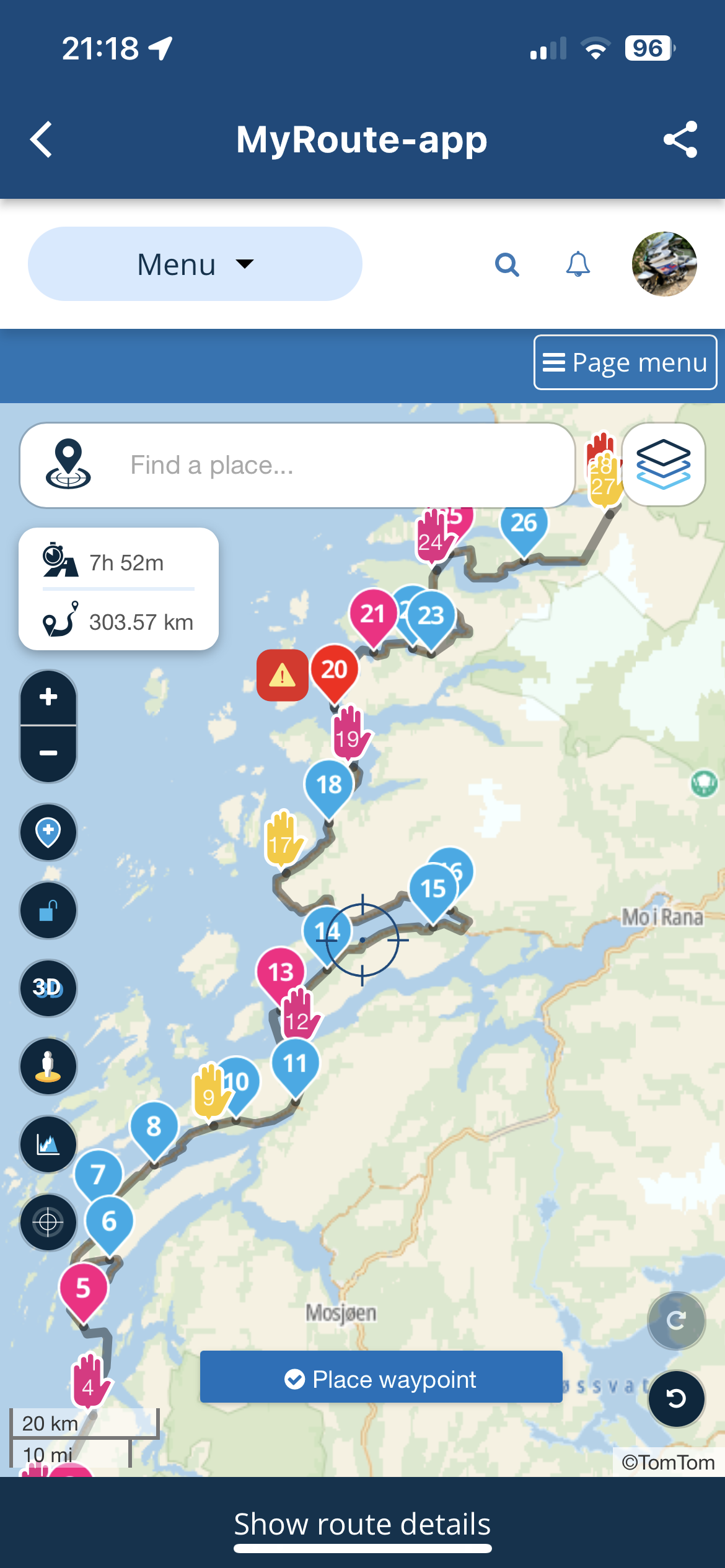
                                IMG_9334.PNG

                                1. Hit the 'Page menu' and select '.gpx 1.1 (route, track, POI)'
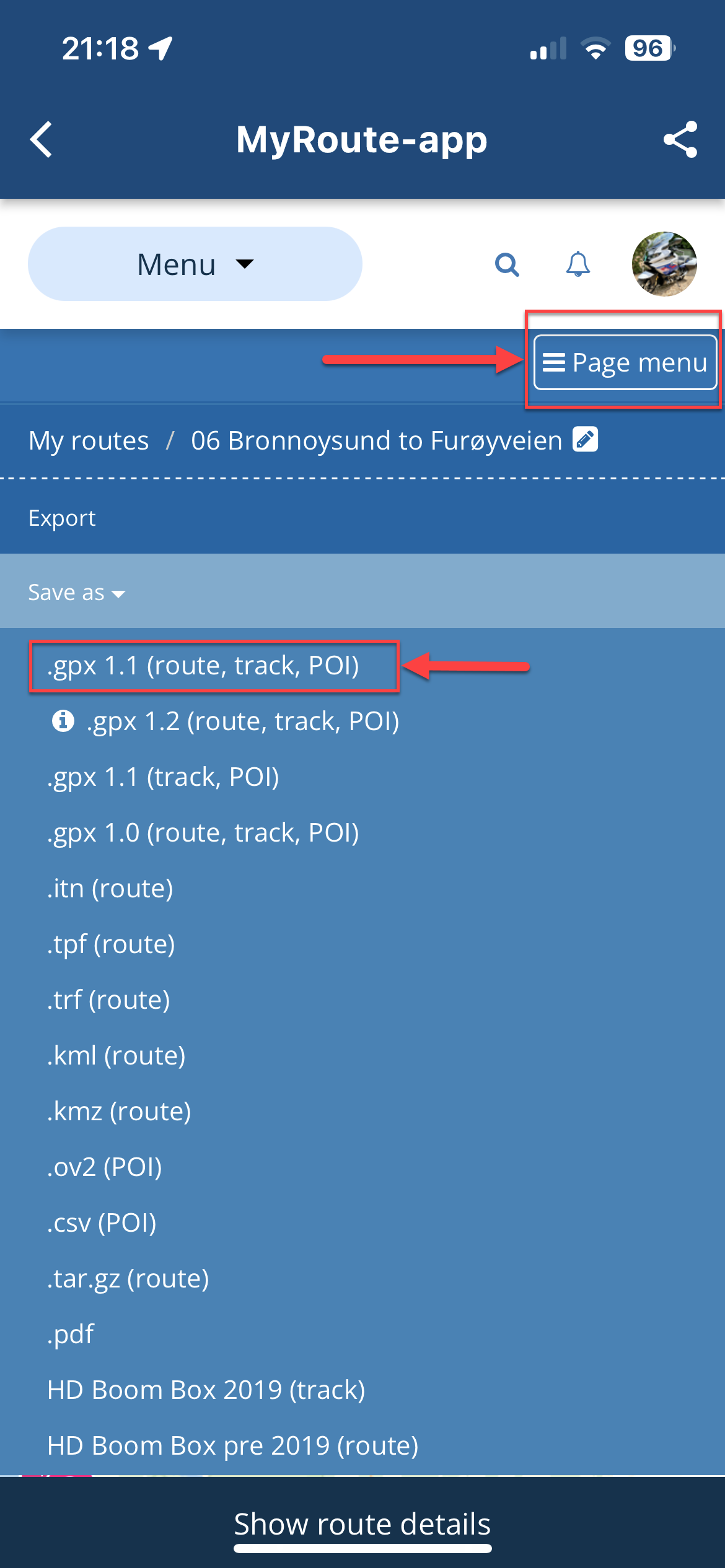
                                IMG_9335.PNG

                                1. This will prepare the file for export and present a dialog. Hit 'Export'
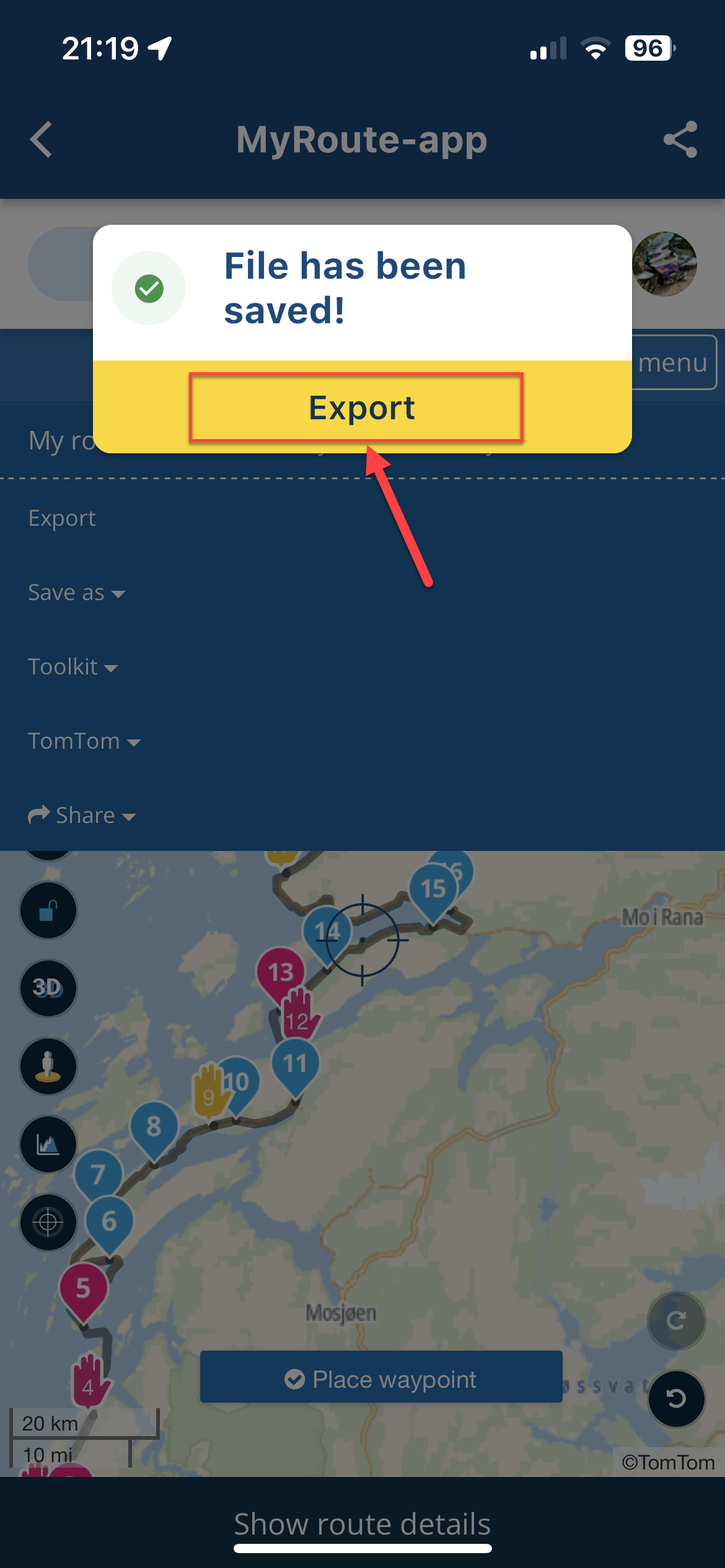
                                IMG_9336.PNG

                                1. This will display the 'options list'. Scroll fully right and select 'More'
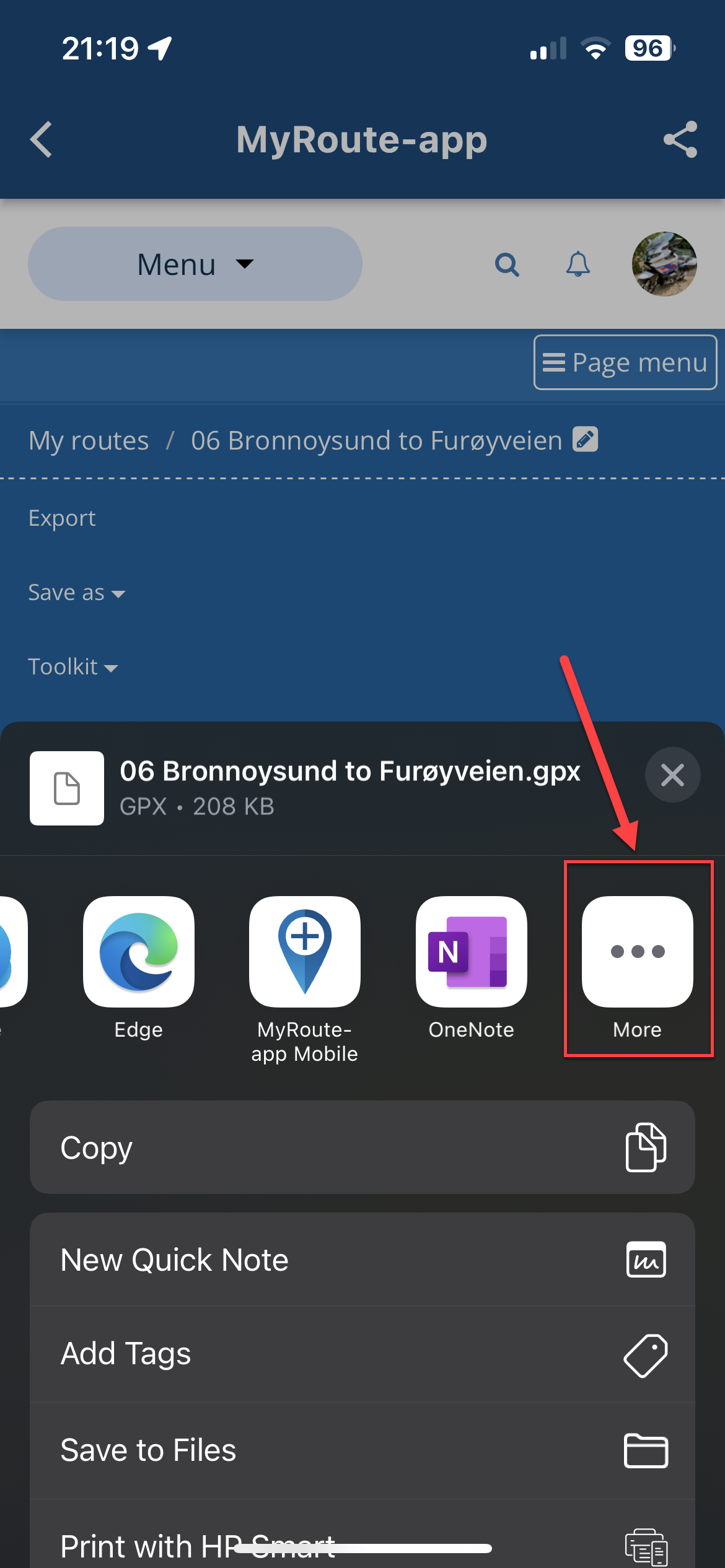
                                IMG_9337.PNG

                                1. From the list, navigate to 'Connected' and click that.
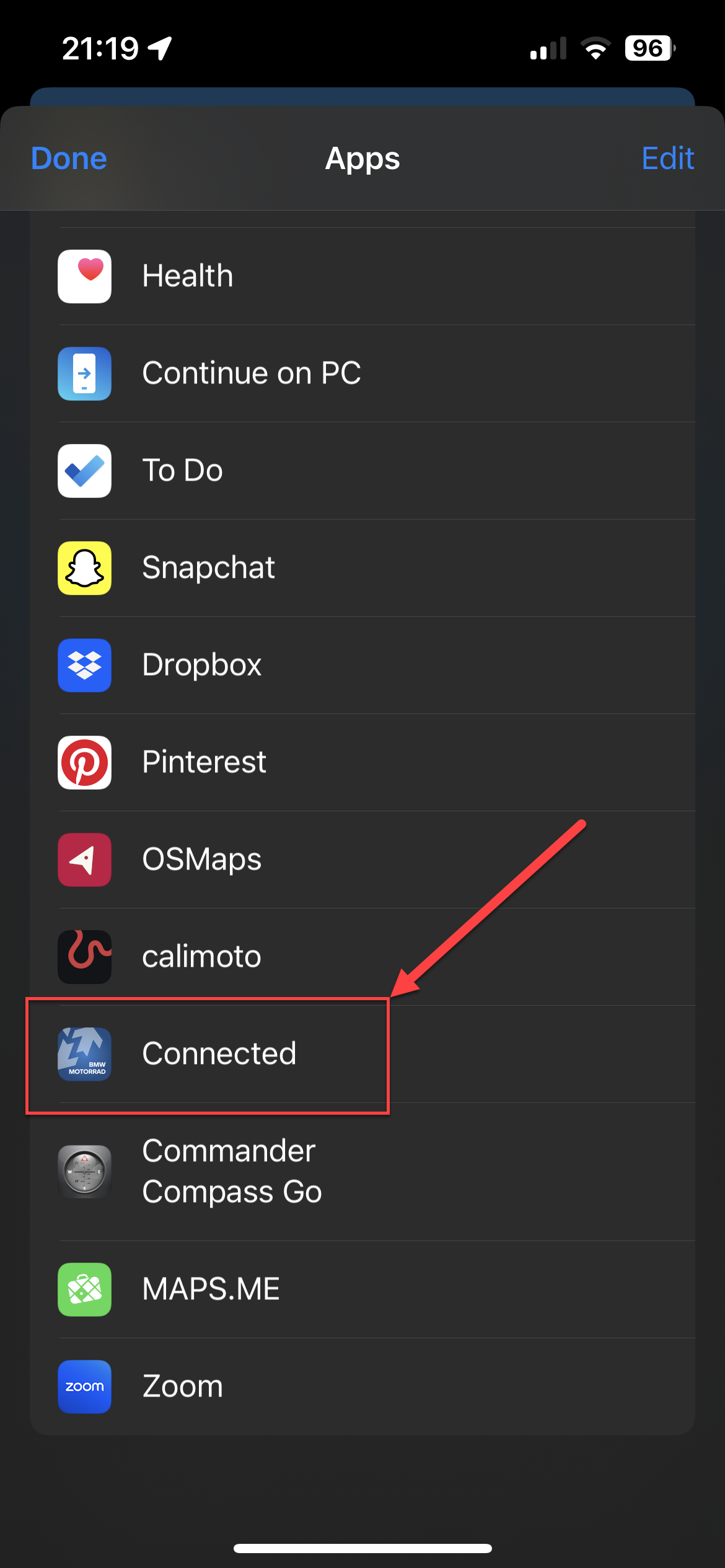
                                IMG_9338.PNG

                                1. This will load the two components of the data (Route and Track). You may get a third if you added something from the POI list in MRA. You can ignore this third one entirely. You will notice the track has many points (normally thousands), the route will have the same number of 'Support' points as the Way and Via points in your MRA route. Uncheck the track (and POI if you have a third), so you just have the 'Route' selected. Click 'Import'
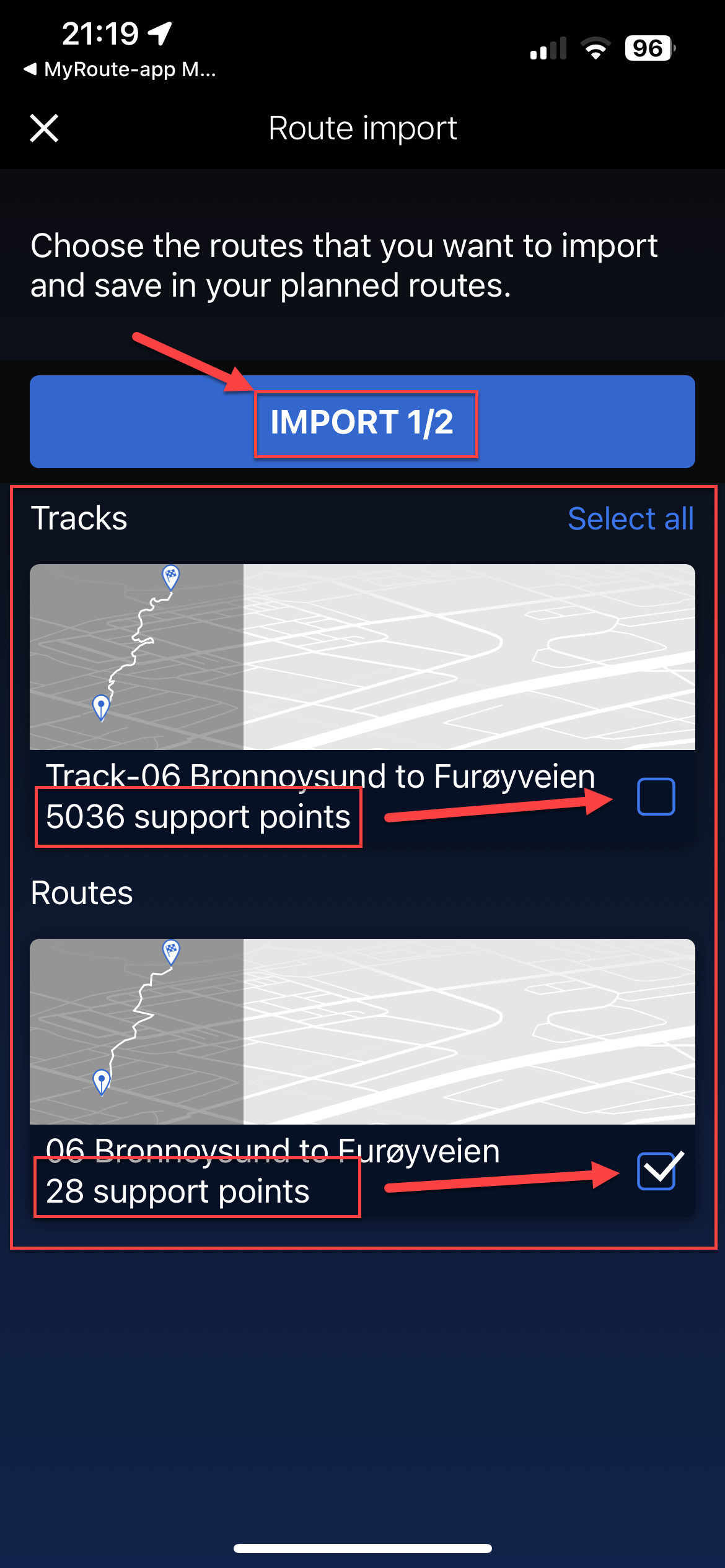
                                IMG_9339.PNG

                                1. This will import the route into the BMW Connected App as below, still showing 'Support Points'. Click on the route to open it.
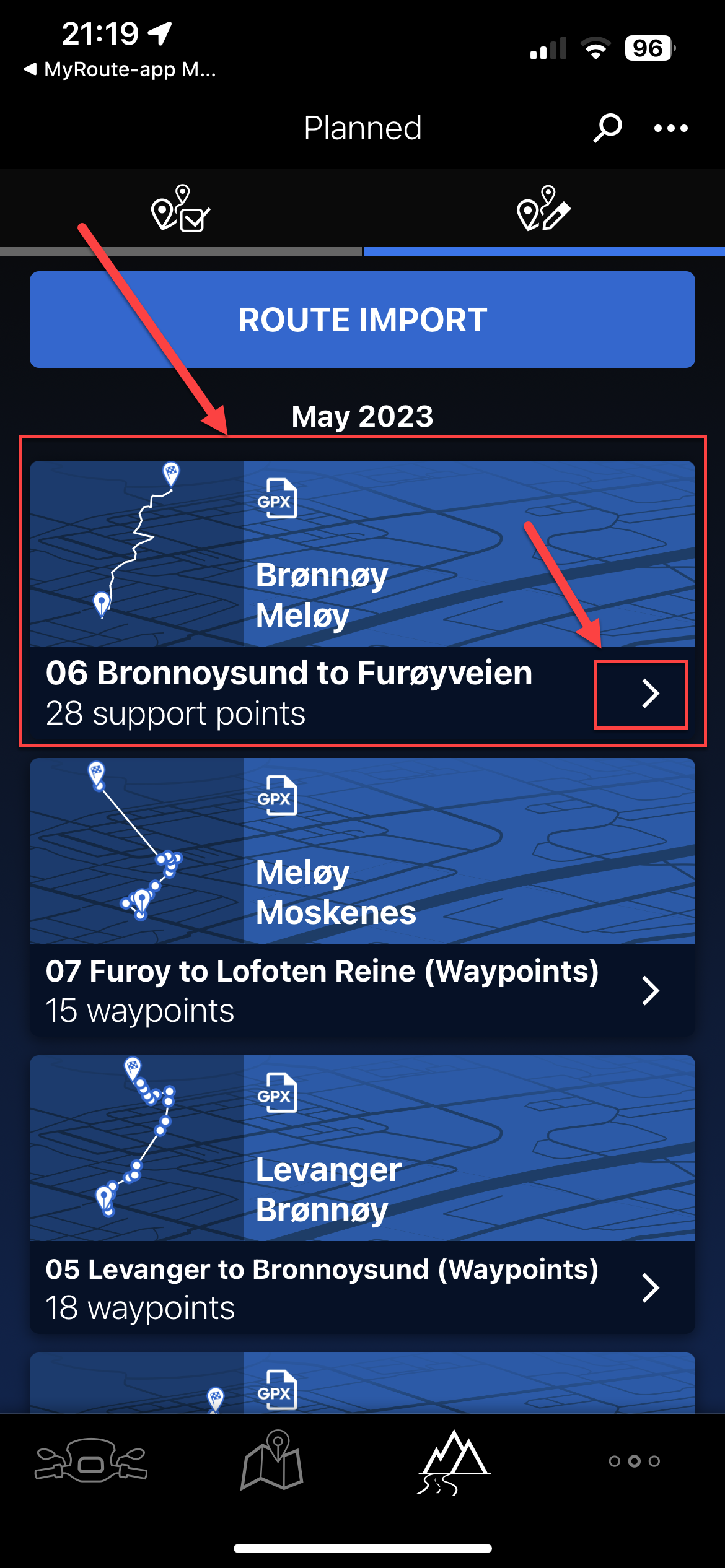
                                IMG_9340.PNG

                                1. This will show you a rough representation of the route but no waypoints will be shown. Hit the three buttons top right of this screen (...)
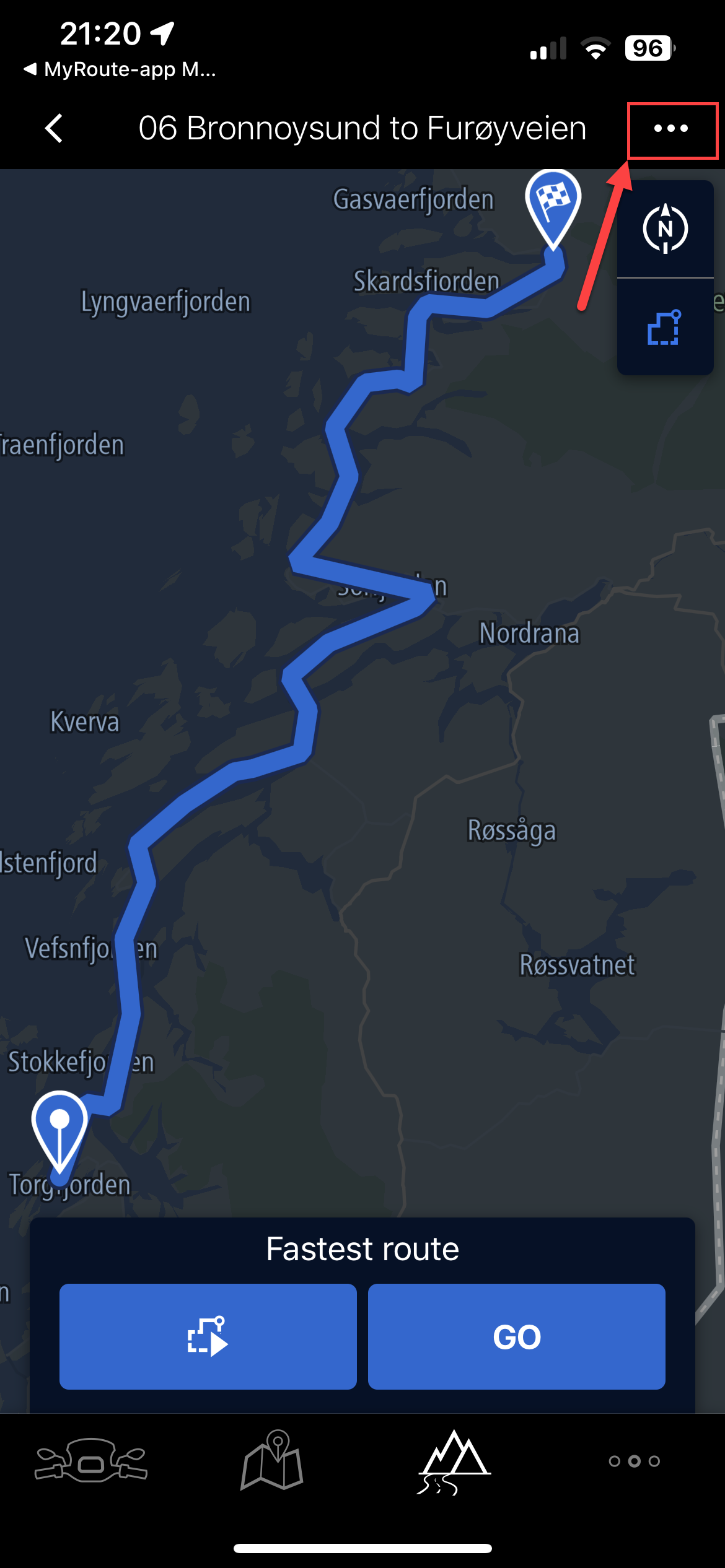
                                IMG_9341.PNG

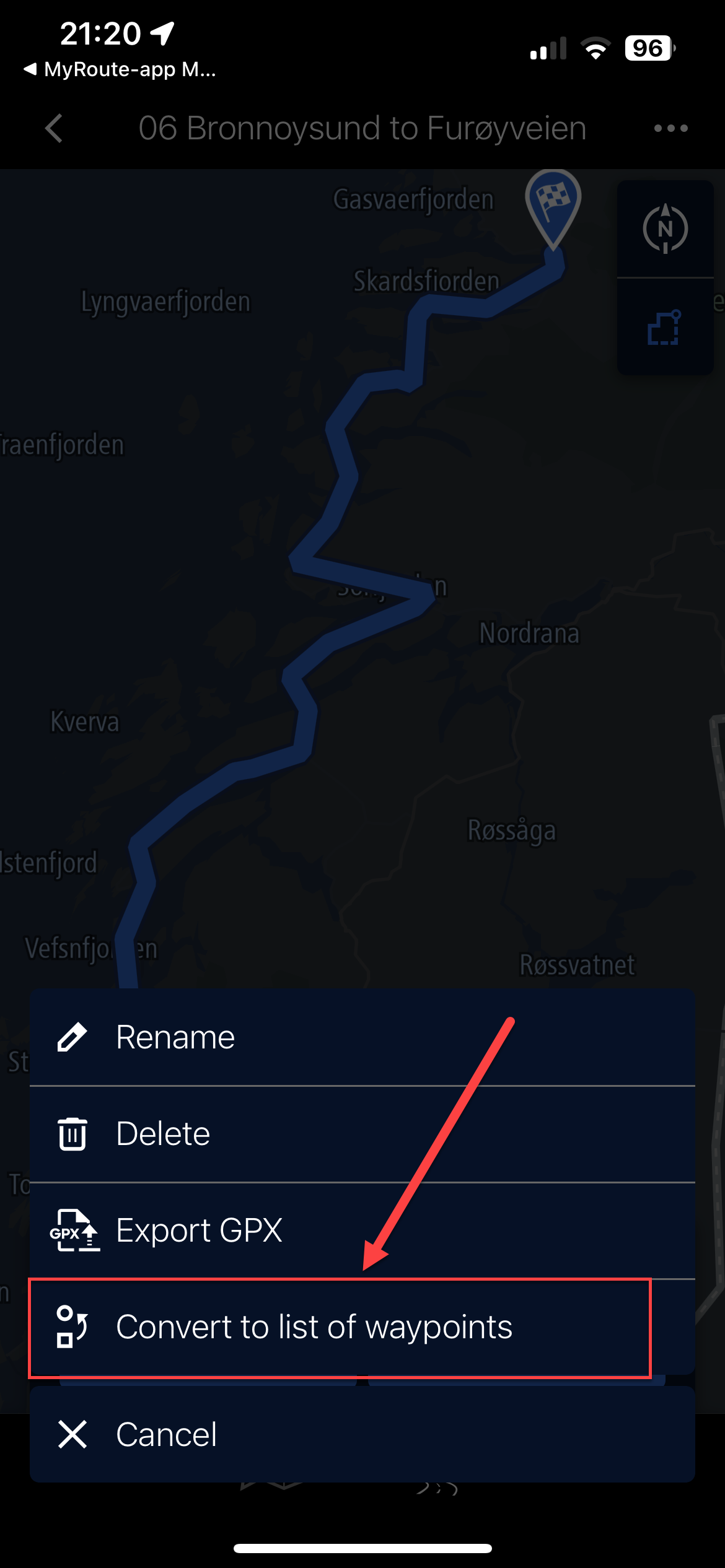
                                1. Select 'Convert to list of waypoints'

                                IMG_9342.PNG

                                1. This will literally plot single dot waypoints on the map in the connected app, with dots joining them. Hit the 'route' button. (as shown)
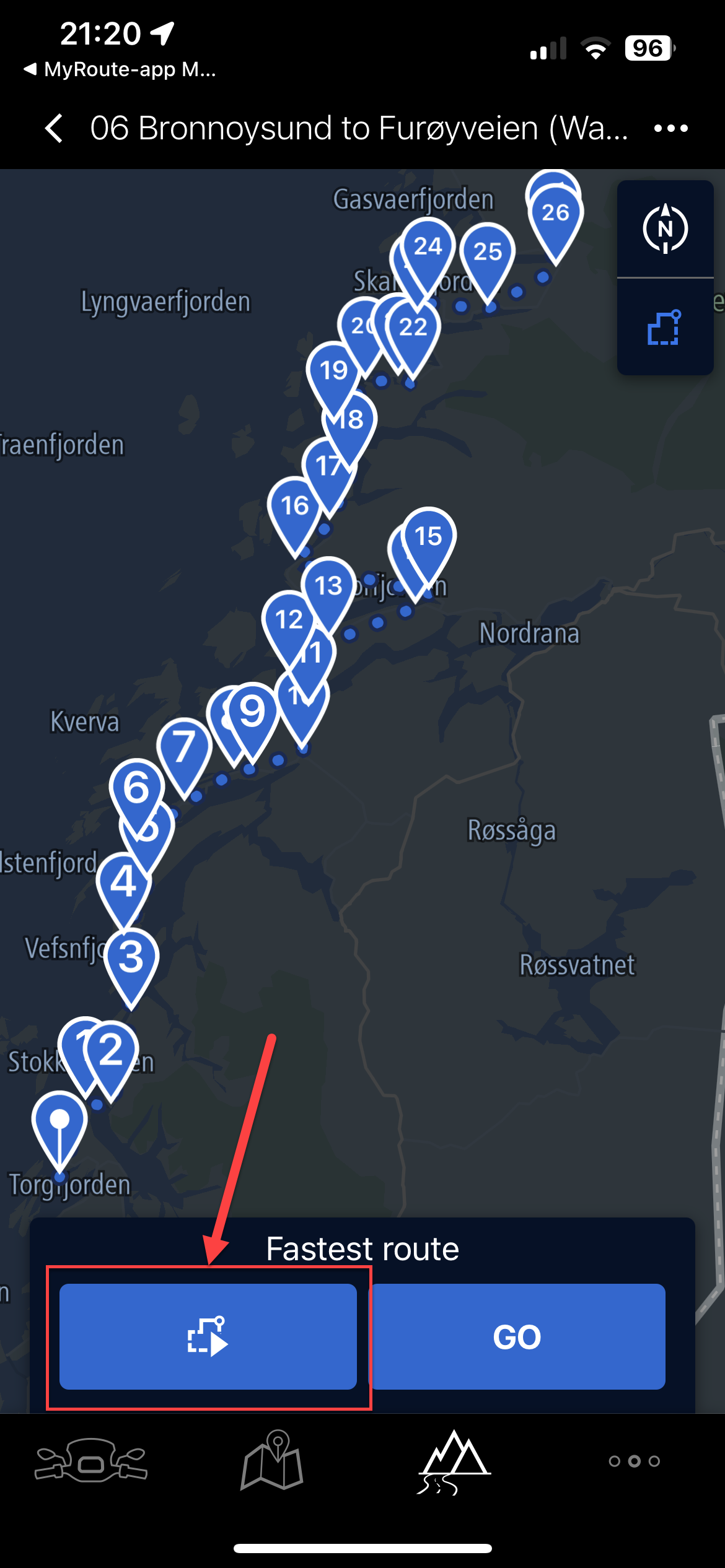
                                IMG_9343.PNG

                                1. It warns the current map will be discarded and replaced, select 'OK'
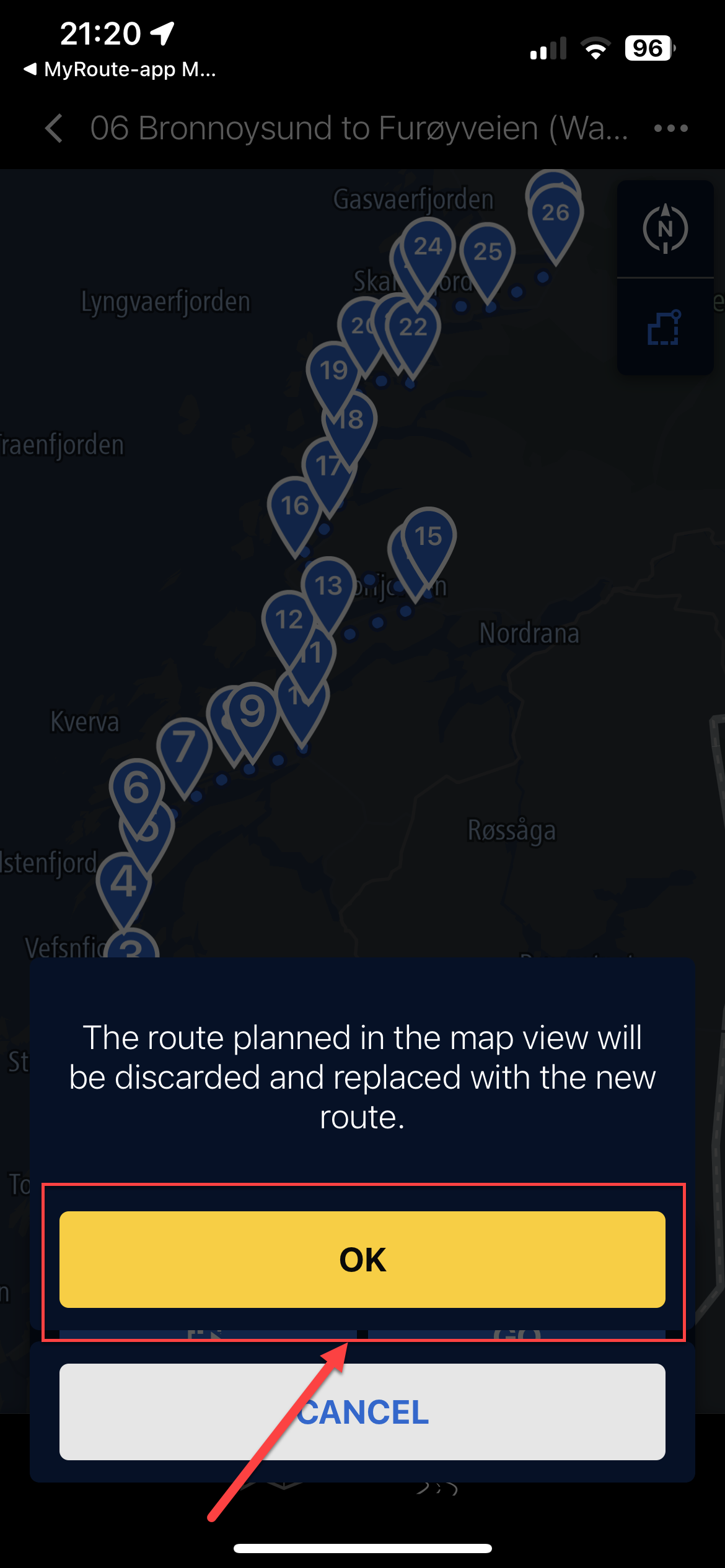
                                IMG_9344.PNG

                                1. If you are not near the start point, click 'From start point' and it'll plot the route from waypoint 1 to waypoint (max) on your imported route.
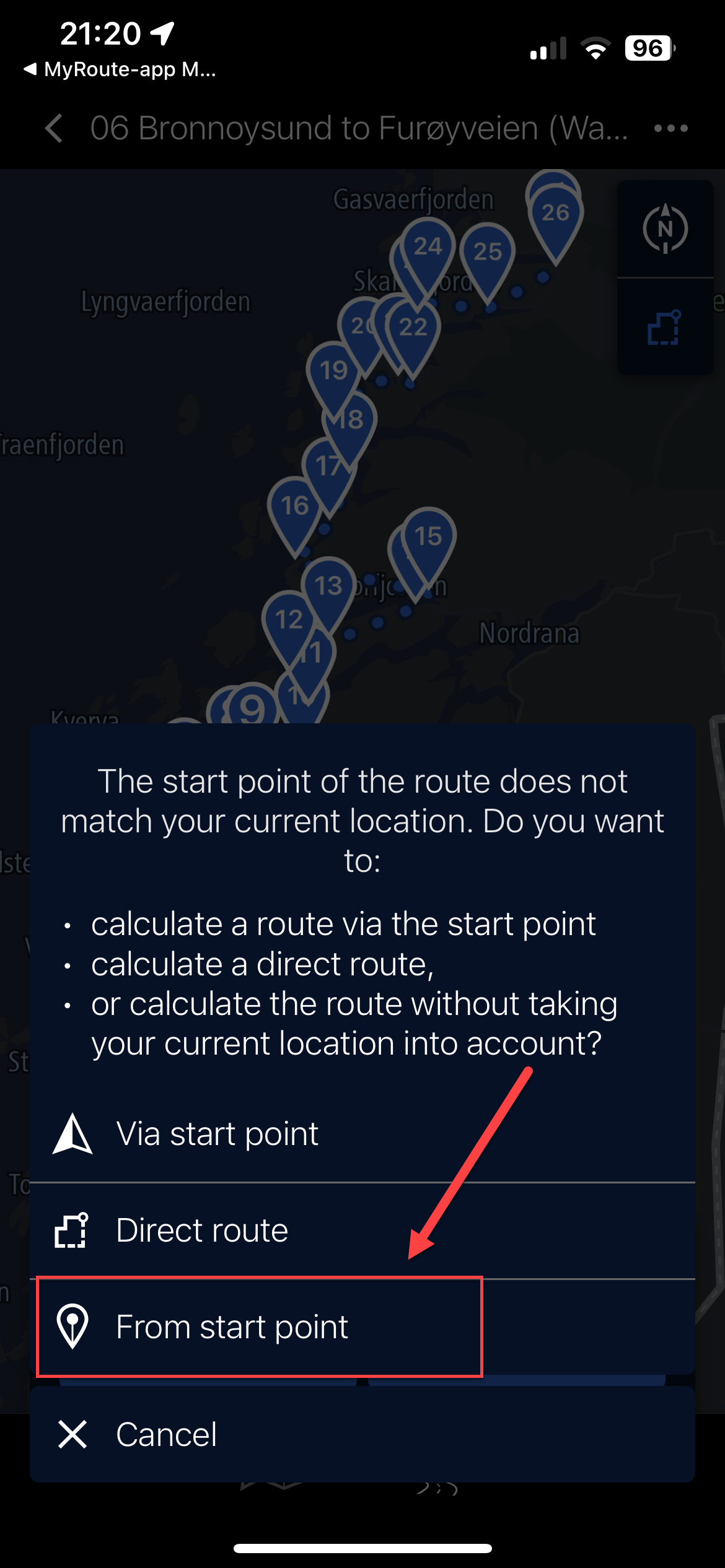
                                IMG_9345.PNG

                                1. Not sure if this is the clever point but the Connected app, using the same TomTom map points, grabs the internal waypoint (and name) from the data in the imported route and maps it. Making a full list of named waypoints matching your waypoints in MRA (not by name, but position). These all show as waypoints on the bike's TFT, so can be skipped, announce, etc.
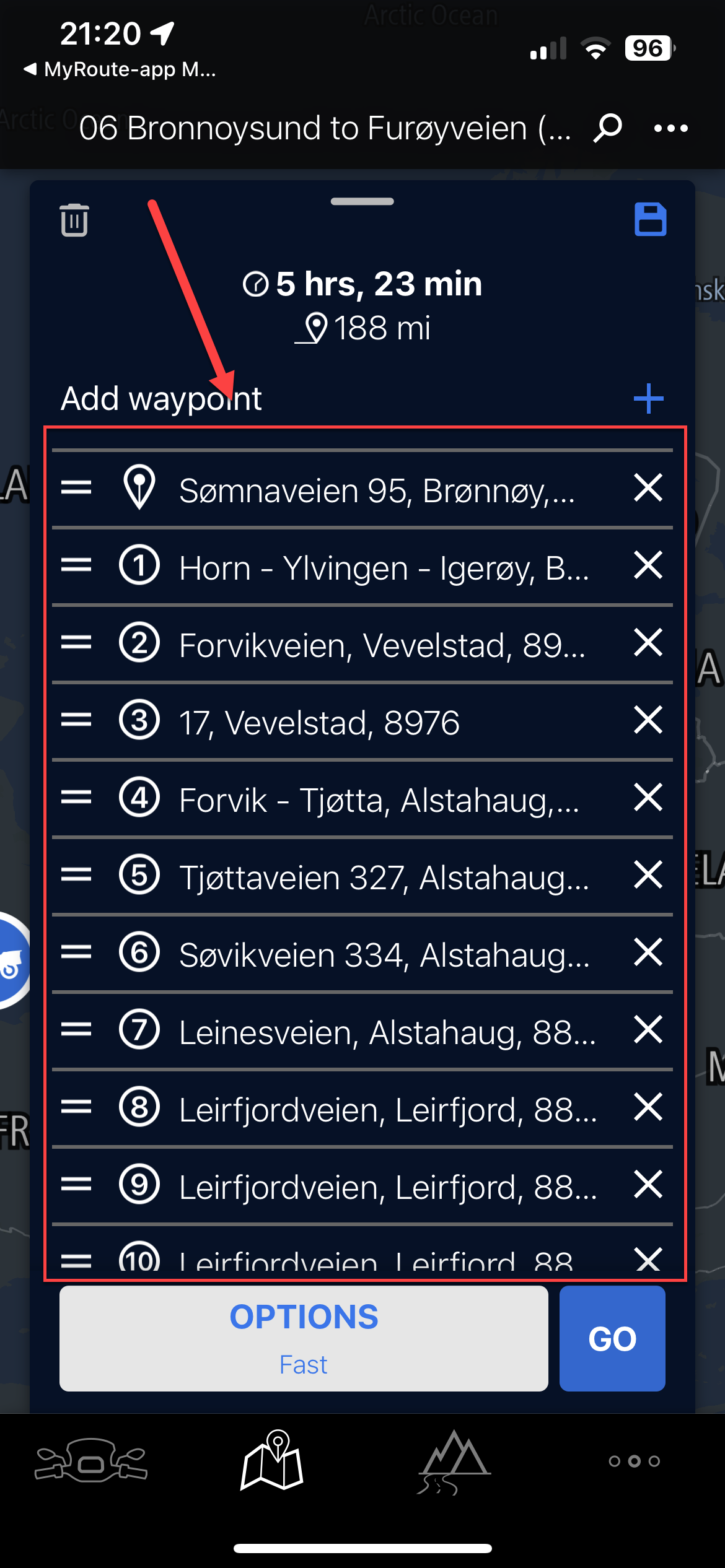
                                IMG_9346.PNG

                                1. The route has now been fully built in the Connected App.
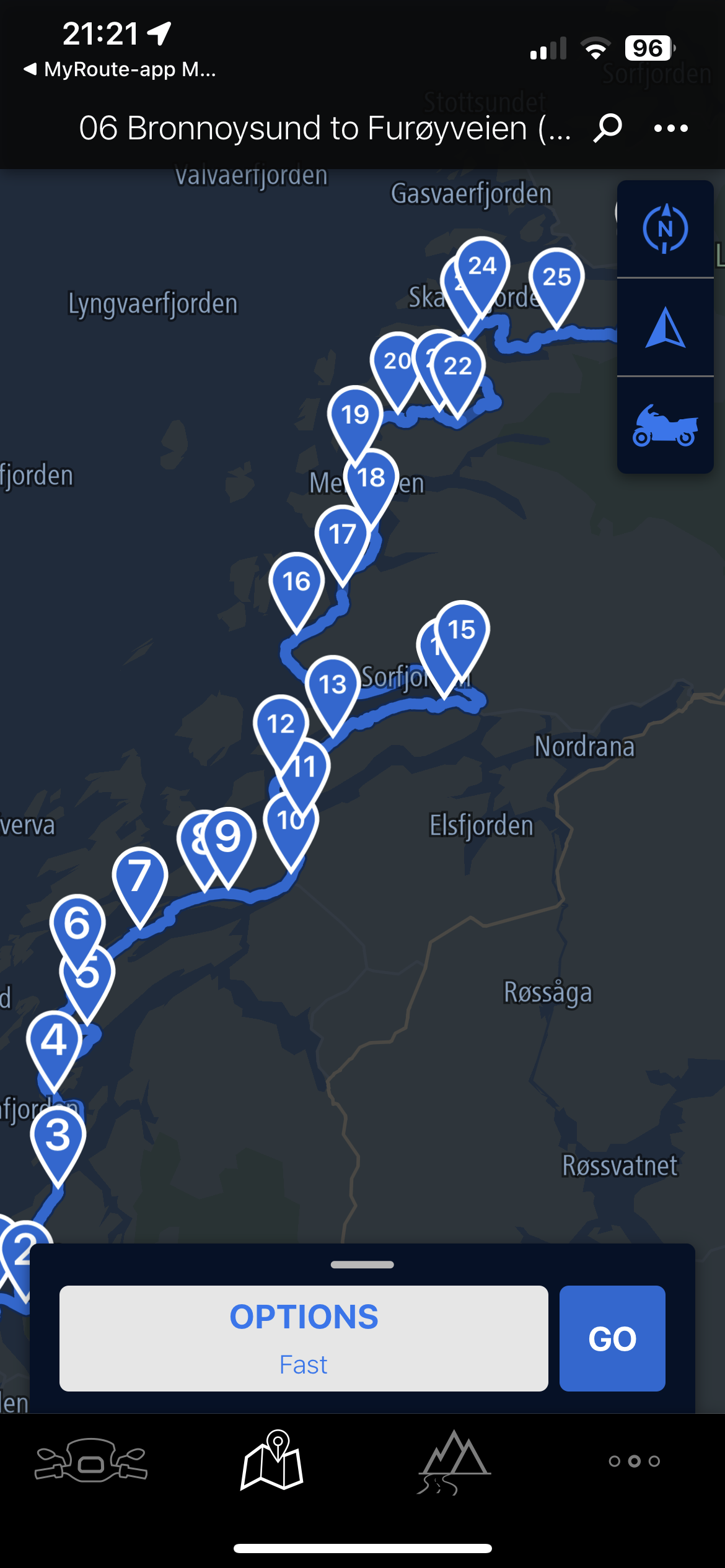
                                IMG_9347.PNG

                                1. The route has been saved as a copy and the word '(Waypoints)' has been added. You can keep the old one or delete it. Note too the thumbnail of the route is clearly shown with waypoints.
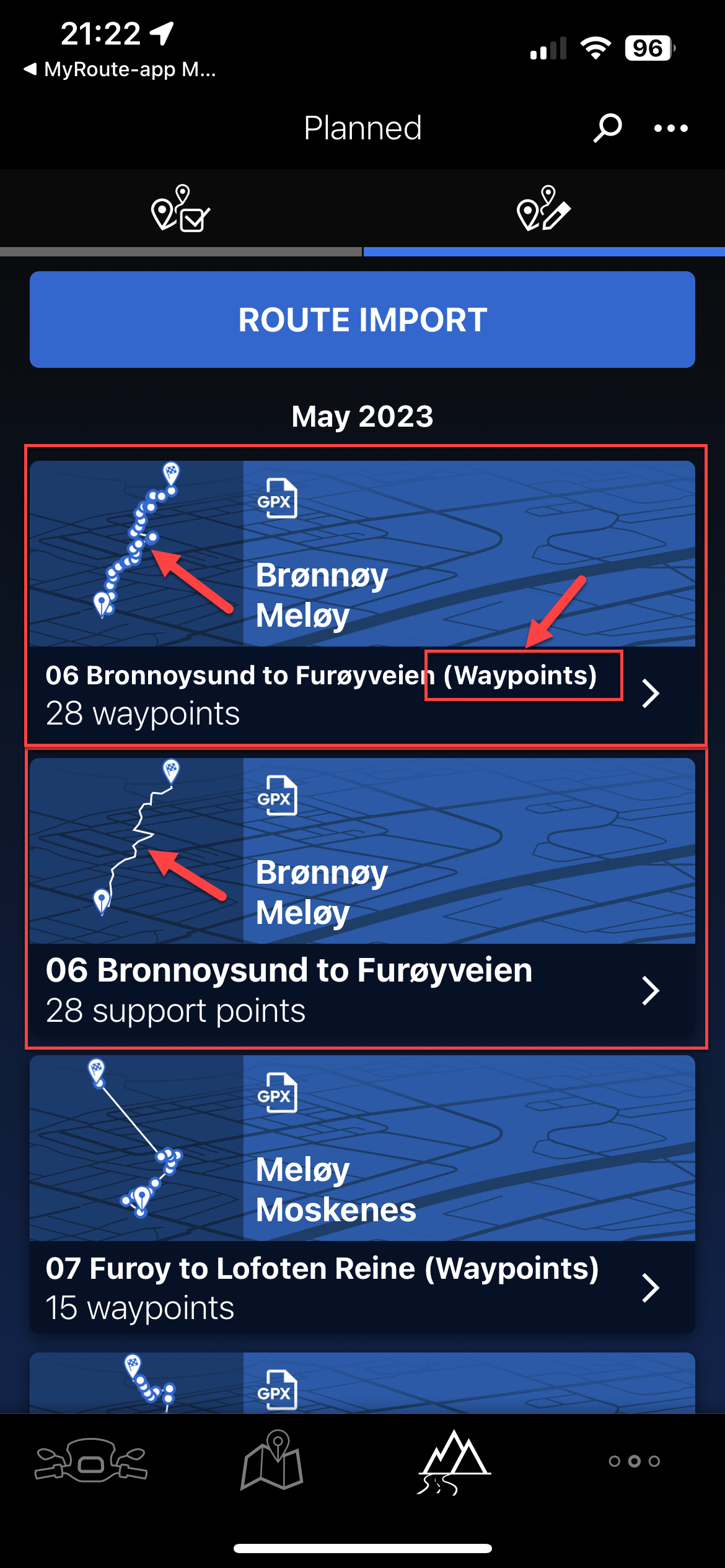
                                IMG_9348.PNG

                                Lastly, you can of course use the Track with thousands of points and the route will be true, but you will have no ability to see waypoints and therefore if any mid-route issues arise, you cannot really manipulate it (skip), so would have to just re-plot a new route in the app.

                                Hope this helps those using the same two tools and Ride Safe.

                                UPDATE: 31st August 2024 (Connected App Version 5.4.0 - now with a black icon)

                                The limit of 50 waypoints still applies but interestingly, if you add more through the 'Expand' functionality in MRA Route Planner (Gold feature) and import the route as above it seems to 'honour' those waypoints whilst not allowing you to 'convert to list of waypoints' I just tried this for a route from home to Edinburgh with 75 'way/support' points and no matter the setting I chose in the Connected app (shortest, winding, etc.) the route remained the same distance and time

                                Martin Proudlove Offline
                                Martin Proudlove Offline
                                Martin Proudlove
                                wrote on last edited by
                                #36

                                @Nick-Hodge Thank you, Great detail and very helpful.

                                1 Reply Last reply
                                0
                                • Phil Collins 0 Offline
                                  Phil Collins 0 Offline
                                  Phil Collins 0
                                  wrote on last edited by
                                  #37

                                  Neat. thanks for sharing. info is useful cheers. oh I'm using the aoocci 6 pro (program)... on my GSA. works a treat....๐Ÿ™‚

                                  0

                                  1 Reply Last reply
                                  0
                                  • Cleo Cleo referenced this topic on

                                  Hello! It looks like you're interested in this conversation, but you don't have an account yet.

                                  Getting fed up of having to scroll through the same posts each visit? When you register for an account, you'll always come back to exactly where you were before, and choose to be notified of new replies (either via email, or push notification). You'll also be able to save bookmarks and upvote posts to show your appreciation to other community members.

                                  With your input, this post could be even better ๐Ÿ’—

                                  Register Login
                                  Reply
                                  • Reply as topic
                                  Log in to reply
                                  • Oldest to Newest
                                  • Newest to Oldest
                                  • Most Votes


                                  • 1
                                  • 2
                                  ACTIVE USERS
                                  Nick Carthew
                                  Nick Carthew
                                  Con Hennekens
                                  Con Hennekens
                                  Corjan Meijerink
                                  Corjan Meijerink
                                  M. Schrijver
                                  M. Schrijver
                                  Hans van de Ven MR.MRA
                                  Hans van de Ven MR.MRA
                                  Sam Kramer
                                  Sam Kramer
                                  Jack van Tilburg
                                  Jack van Tilburg
                                  Phil Collins 0
                                  Phil Collins 0
                                  Martin Proudlove
                                  Martin Proudlove
                                  steve poole
                                  steve poole
                                  Nick Hodge
                                  Nick Hodge
                                  Shahed Rafique 0
                                  Shahed Rafique 0
                                  Michiel 14
                                  Michiel 14
                                  Wim Dekker
                                  Wim Dekker
                                  Boonants Chris
                                  Boonants Chris
                                  Declan Mc Glone
                                  Declan Mc Glone
                                  Scott Fountain
                                  Scott Fountain
                                  POPULAR TOPICS
                                  • Carpuride scherm vast
                                    De Ploey Georges
                                    De Ploey Georges
                                    3
                                    28
                                    1.3k

                                  • GPX Versions 1.1 vs 1.2 for Garmin Visually Explained
                                    John S Parry
                                    John S Parry
                                    7
                                    179
                                    14.6k

                                  • How can I change the verbal navigation directions from male to female?
                                    Brian McG
                                    Brian McG
                                    0
                                    5
                                    42

                                  • New update 5.2.1
                                    Peter Zehentreiter
                                    Peter Zehentreiter
                                    15
                                    19
                                    724

                                  • Linker in MRA kleurt blauw (alles geselecteerd)
                                    Travellexxie
                                    Travellexxie
                                    0
                                    13
                                    377

                                  • Apple Carplay - navigatie instructies zichtbaar, maar kaart niet??
                                    Nick Carthew
                                    Nick Carthew
                                    0
                                    3
                                    51

                                  • Camperroutes
                                    De Ploey Georges
                                    De Ploey Georges
                                    0
                                    4
                                    187

                                  • Problem with Route Animate/Video maker
                                    Marinus van Deudekom
                                    Marinus van Deudekom
                                    0
                                    2
                                    39

                                  MY GROUPS
                                  • Login

                                  • Login or register to search.
                                  • First post
                                    Last post
                                  0
                                  • Categories
                                  • Recent
                                  • Popular
                                  • Support
                                  • MyRoute-app