Skip to content
  • Categories
  • Recent
  • Popular
  • Support
  • MyRoute-app
Collapse
Brand Logo

MRA Community Forum

  1. Home
  2. General Discussion
  3. "Expand" not working...

"Expand" not working...

Scheduled Pinned Locked Moved General Discussion
21 Posts 5 Posters 4.9k Views 2 Watching
  • Oldest to Newest
  • Newest to Oldest
  • Most Votes
Reply
  • Reply as topic
Log in to reply
This topic has been deleted. Only users with topic management privileges can see it.
  • Laurence 2 Laurence 2

    @Hans-van-de-Ven-MRA-Master
    I remade the route and still same issue - won't expand for me.
    This is the link:

    https://www.myrouteapp.com/en/social/route/7387652?mode=share

    I started making this route by importing waypoints from a Mapsource GPX file. These appear in the MRA map as POI's. Then, I enable these POI's in Library. When linking them to make the route, I tick the box to make them into waypoints.

    Not sure if my procedure is correct. Anyway, this is where I suspect the problem with not expanding stems from - importing waypoints....

    Rob Verhoeff Offline
    Rob Verhoeff Offline
    Rob Verhoeff
    Alpha tester
    wrote on last edited by
    #10

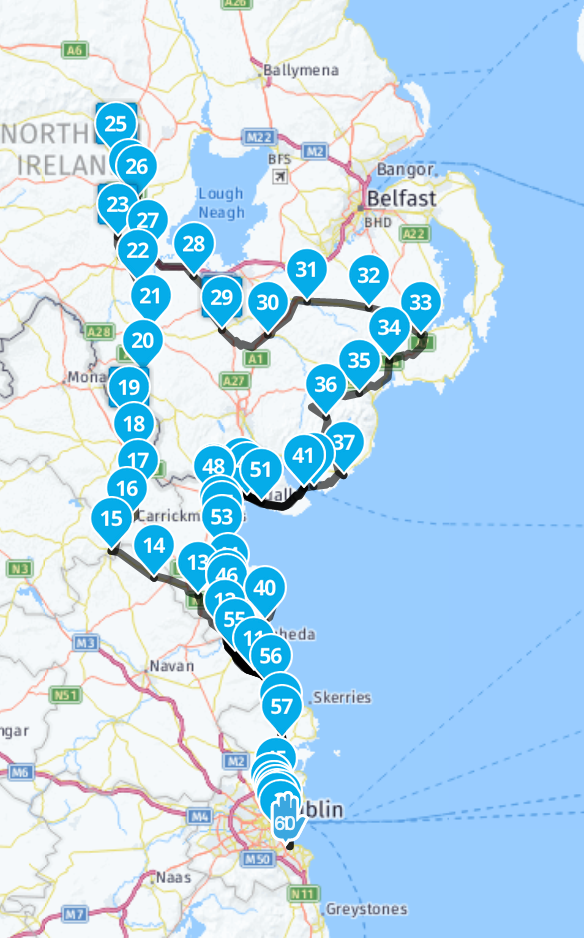
    @Laurence-2 and @Hans-van-de-Ven-MRA-Master I'm sure the original route isn't well put together. Shaping points are not all placed in the middle of the road. In addition, there are also parts of the route that you drive there and back. The program cannot handle that. I put extra shaping point in crucial places myself and then expanded it to 60 points. That works perfectly. I think it's user error.
    4f7bfedc-d6d7-4294-a252-10a0a0a1aa99-afbeelding.png

    🏍️ BMW K1600GT-P (2013) | Nolan N100-5 with Sena 30K
    📱 iOS on iPhone 13 & 16 (mounted on Quadlock or AliExpress extention on BMW-cradle)
    🚙 Apple CarPlay in VW T-Roc
    💻 Routelab on MacBook Air & iMac (Tahoe & Ventura)

    1 Reply Last reply
    0
    • Laurence 2 Laurence 2

      @Hans-van-de-Ven-MRA-Master
      I remade the route and still same issue - won't expand for me.
      This is the link:

      https://www.myrouteapp.com/en/social/route/7387652?mode=share

      I started making this route by importing waypoints from a Mapsource GPX file. These appear in the MRA map as POI's. Then, I enable these POI's in Library. When linking them to make the route, I tick the box to make them into waypoints.

      Not sure if my procedure is correct. Anyway, this is where I suspect the problem with not expanding stems from - importing waypoints....

      Hans van de Ven MR.MRA Offline
      Hans van de Ven MR.MRA Offline
      Hans van de Ven MR.MRA
      Valued contributor
      wrote on last edited by
      #11

      @Laurence-2
      When importing gpx files from other planners, always select the route-track option to import.
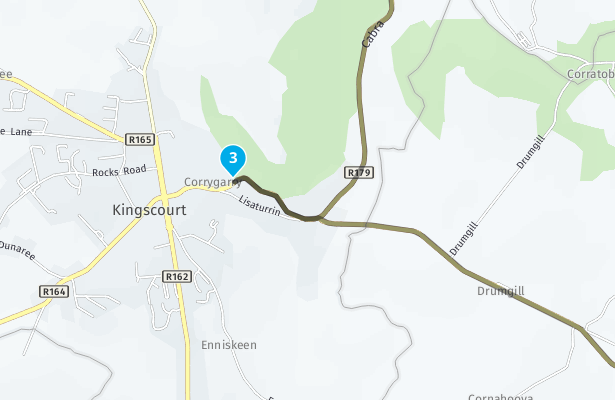
      When i look at your route, as @Rob-Verhoeff said, it isn't well put together
      407df2bb-05d2-46c2-ba9c-f837ded39b25-image.png

      Make sure that the routepoints are placed correct on the routeline

      Garmin Zumo XT3/XT2/XT/BMW Connected Ride Navigator/Tourstart/ MyRouteapp (The App)/...
      Een dag niet gelachen is een dag niet geleefd / Een route is net zo goed als deze uitgezet is.

      Laurence 2 1 Reply Last reply
      0
      • Hans van de Ven MR.MRA Hans van de Ven MR.MRA

        @Laurence-2
        When importing gpx files from other planners, always select the route-track option to import.
        When i look at your route, as @Rob-Verhoeff said, it isn't well put together
        407df2bb-05d2-46c2-ba9c-f837ded39b25-image.png

        Make sure that the routepoints are placed correct on the routeline

        Laurence 2 Offline
        Laurence 2 Offline
        Laurence 2
        wrote on last edited by
        #12

        @Hans-van-de-Ven-MRA-Master
        I appreciate the advice.
        The POI's are not all on roads, as they are photo points for a photo rally.
        I am not clear why MRA cannot manage this situation, but have to accept it.
        I moved from Zumo 660 + Mapsource to Zumo XT + MRA - let's say the jury is still out.

        Hans van de Ven MR.MRA 1 Reply Last reply
        0
        • Laurence 2 Laurence 2

          @Hans-van-de-Ven-MRA-Master
          I appreciate the advice.
          The POI's are not all on roads, as they are photo points for a photo rally.
          I am not clear why MRA cannot manage this situation, but have to accept it.
          I moved from Zumo 660 + Mapsource to Zumo XT + MRA - let's say the jury is still out.

          Hans van de Ven MR.MRA Offline
          Hans van de Ven MR.MRA Offline
          Hans van de Ven MR.MRA
          Valued contributor
          wrote on last edited by Hans van de Ven MR.MRA
          #13

          @Laurence-2
          MRA can handle it, but when a notmal routepoint is placed that way, we think it is off track.
          If point 3 is a photo stop, make a viapoint of it. Then you will be forced to visit that point. And you will see the flag in your XT.

          Garmin Zumo XT3/XT2/XT/BMW Connected Ride Navigator/Tourstart/ MyRouteapp (The App)/...
          Een dag niet gelachen is een dag niet geleefd / Een route is net zo goed als deze uitgezet is.

          Laurence 2 1 Reply Last reply
          1
          • Hans van de Ven MR.MRA Hans van de Ven MR.MRA

            @Laurence-2
            MRA can handle it, but when a notmal routepoint is placed that way, we think it is off track.
            If point 3 is a photo stop, make a viapoint of it. Then you will be forced to visit that point. And you will see the flag in your XT.

            Laurence 2 Offline
            Laurence 2 Offline
            Laurence 2
            wrote on last edited by
            #14

            @Hans-van-de-Ven-MRA-Master
            That is good advice thanks.
            I have to learn to use such POI's as a guide while creating actual waypoints nearby for the route purpose.

            The XT presents it's own challenges.... I miss the "please drive to highlighted route" instruction which the 550 / 660 provided when you want to join a route from which you have detoured. I still do not have a consistent solution to use for this on the road. Any advice would be appreciated.

            Laurence 2 1 Reply Last reply
            0
            • Laurence 2 Laurence 2

              @Hans-van-de-Ven-MRA-Master
              That is good advice thanks.
              I have to learn to use such POI's as a guide while creating actual waypoints nearby for the route purpose.

              The XT presents it's own challenges.... I miss the "please drive to highlighted route" instruction which the 550 / 660 provided when you want to join a route from which you have detoured. I still do not have a consistent solution to use for this on the road. Any advice would be appreciated.

              Laurence 2 Offline
              Laurence 2 Offline
              Laurence 2
              wrote on last edited by
              #15

              @Laurence-2
              Hello again,
              I have another route of 17 waypoints, made on MRA only, without anything imported.
              I cannot get the Expand function to work, I tried adding different numbers of waypoints (50, 100)
              Can anyone advise what is the issue preventing addition of waypoints in this way, please?

              Route link: https://www.myrouteapp.com/en/social/route/7392943?mode=share

              Thanks,
              LB

              Rob Verhoeff Lynchy67 2 Replies Last reply
              0
              • Laurence 2 Laurence 2

                @Laurence-2
                Hello again,
                I have another route of 17 waypoints, made on MRA only, without anything imported.
                I cannot get the Expand function to work, I tried adding different numbers of waypoints (50, 100)
                Can anyone advise what is the issue preventing addition of waypoints in this way, please?

                Route link: https://www.myrouteapp.com/en/social/route/7392943?mode=share

                Thanks,
                LB

                Rob Verhoeff Offline
                Rob Verhoeff Offline
                Rob Verhoeff
                Alpha tester
                wrote on last edited by Rob Verhoeff
                #16

                @Laurence-2 It's working for me! There are some point that have a critical position in your route such as 13 and 3. After moving point 13 and 3 I succedes in expending the route. Sometimes you see a little gap between two points. Move that point and than it will work. You have to carefully place the points. Not on a intersection, but a little further away.

                🏍️ BMW K1600GT-P (2013) | Nolan N100-5 with Sena 30K
                📱 iOS on iPhone 13 & 16 (mounted on Quadlock or AliExpress extention on BMW-cradle)
                🚙 Apple CarPlay in VW T-Roc
                💻 Routelab on MacBook Air & iMac (Tahoe & Ventura)

                Laurence 2 1 Reply Last reply
                1
                • Laurence 2 Laurence 2

                  @Laurence-2
                  Hello again,
                  I have another route of 17 waypoints, made on MRA only, without anything imported.
                  I cannot get the Expand function to work, I tried adding different numbers of waypoints (50, 100)
                  Can anyone advise what is the issue preventing addition of waypoints in this way, please?

                  Route link: https://www.myrouteapp.com/en/social/route/7392943?mode=share

                  Thanks,
                  LB

                  Lynchy67 Offline
                  Lynchy67 Offline
                  Lynchy67
                  Valued contributor
                  wrote on last edited by Lynchy67
                  #17

                  @Laurence-2

                  Using your Route directly I could not Expand it!
                  I have no clue why?
                  Maybe one of the Dev's can look at that?
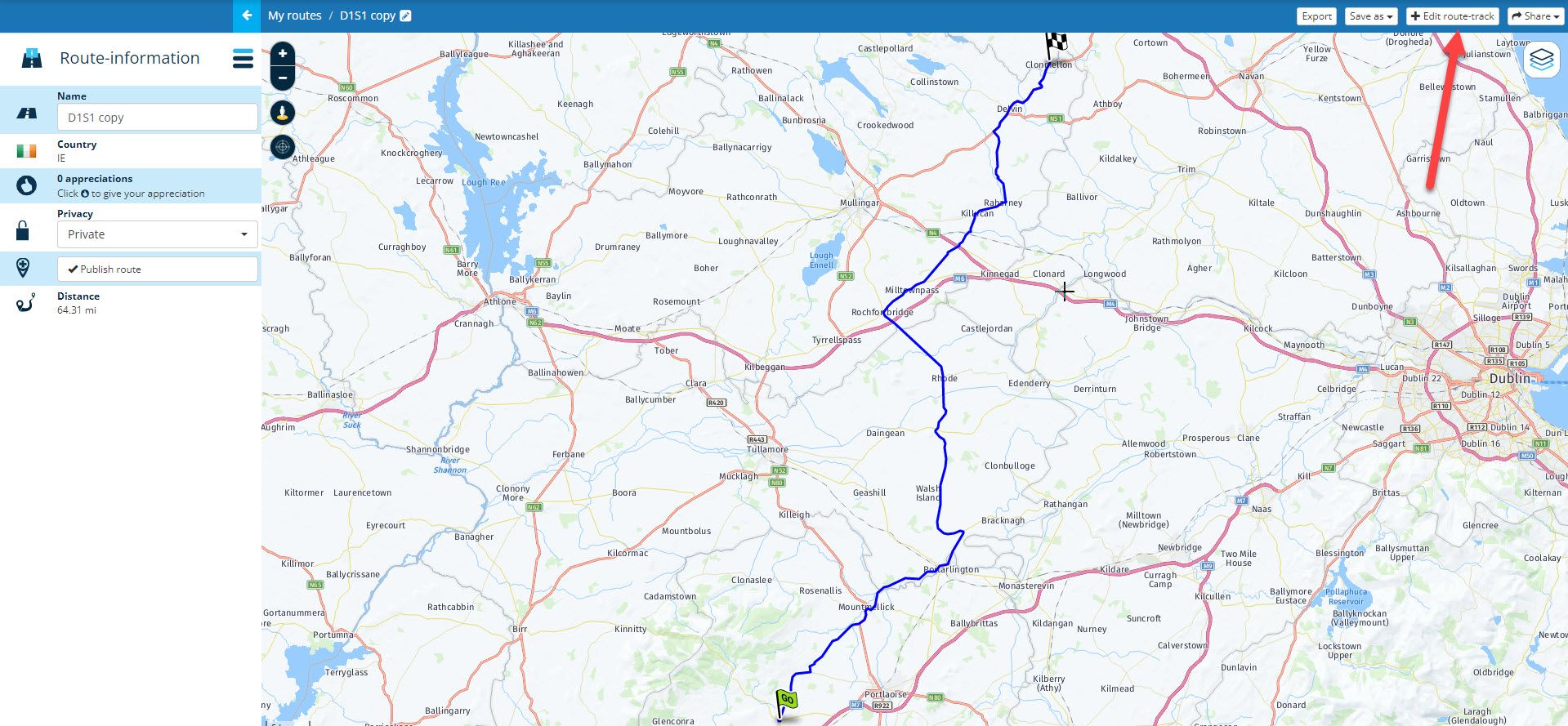
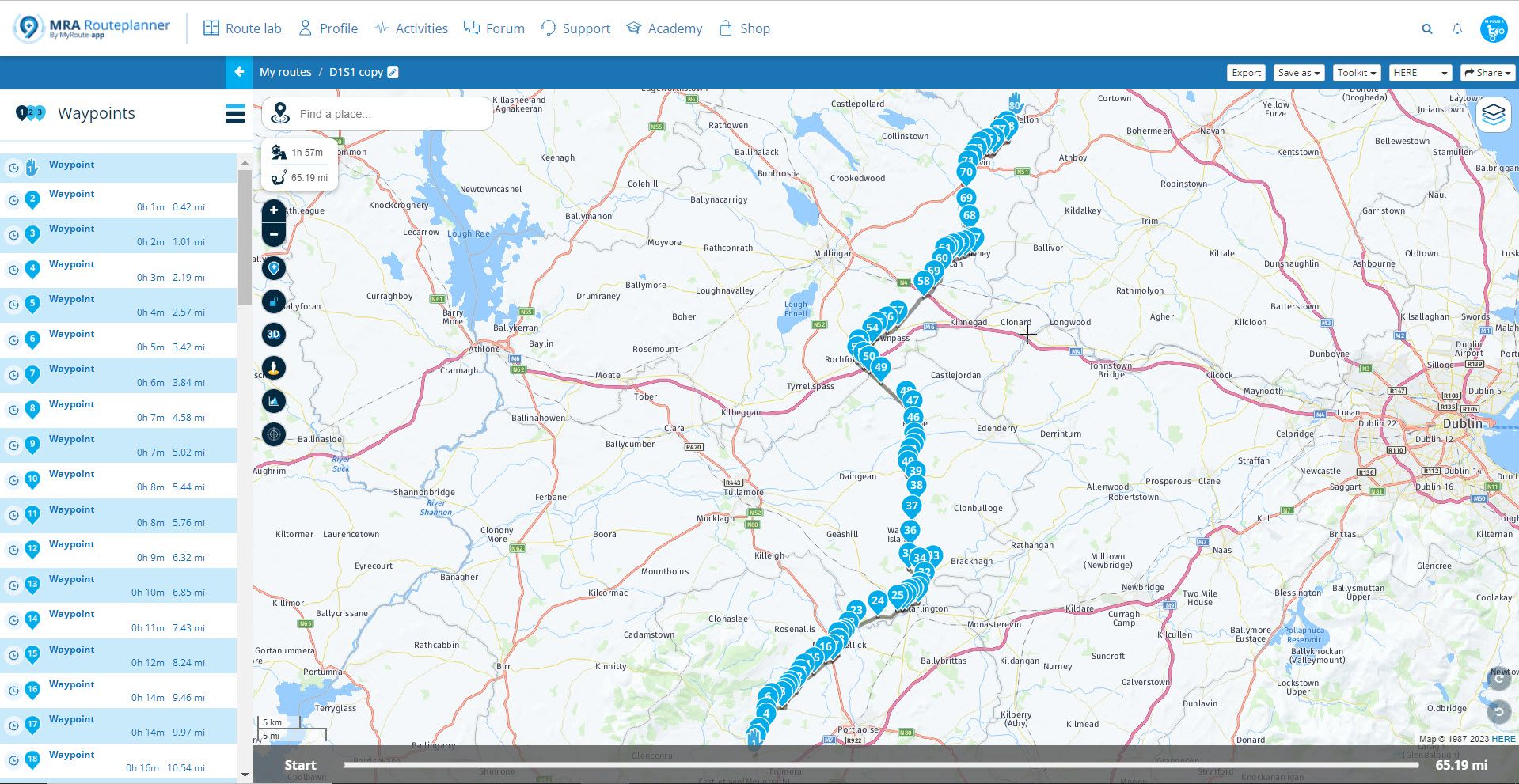
                  So I saved it as a GPX1.1 (Track, POI) then re-imported it as a Route-Track.
                  Expand 1.jpg

                  Then when I "Edit route-track" it works.
                  Expand 2.jpg

                  You don’t stop riding when you get old, you get old when you stop riding.

                  Laurence 2 1 Reply Last reply
                  0
                  • Rob Verhoeff Rob Verhoeff

                    @Laurence-2 It's working for me! There are some point that have a critical position in your route such as 13 and 3. After moving point 13 and 3 I succedes in expending the route. Sometimes you see a little gap between two points. Move that point and than it will work. You have to carefully place the points. Not on a intersection, but a little further away.

                    Laurence 2 Offline
                    Laurence 2 Offline
                    Laurence 2
                    wrote on last edited by
                    #18

                    @Rob-Verhoeff
                    Rob,
                    I did as you said:
                    Revised the waypoint locations to be away from junction, a little beyond the intersection and exactly on the route. I then was able to expand the route to 50 waypoints. This will be more secure for transfer to the XT and if I go to share the route.
                    So, now I know!
                    Thanks,
                    Laurence

                    1 Reply Last reply
                    0
                    • Lynchy67 Lynchy67

                      @Laurence-2

                      Using your Route directly I could not Expand it!
                      I have no clue why?
                      Maybe one of the Dev's can look at that?
                      So I saved it as a GPX1.1 (Track, POI) then re-imported it as a Route-Track.

                      Expand 1.jpg

                      Then when I "Edit route-track" it works.
                      Expand 2.jpg

                      Laurence 2 Offline
                      Laurence 2 Offline
                      Laurence 2
                      wrote on last edited by
                      #19

                      @Lynchy67
                      Hi Lynchy,
                      Thanks for that work-around, good to know!
                      Laurence

                      1 Reply Last reply
                      0
                      • simonharvestmill.co.uk Offline
                        simonharvestmill.co.uk Offline
                        simonharvestmill.co.uk
                        wrote on last edited by
                        #20

                        I'm having the same problem, I've used Espand many times with no hitch but now I am having the same issue
                        https://www.myrouteapp.com/en/social/route/7413027?mode=share

                        If it's relevanty this route was originally part of a single longer route and I split it. I suceesfully expanded the first half

                        Rob Verhoeff 1 Reply Last reply
                        0
                        • simonharvestmill.co.uk simonharvestmill.co.uk

                          I'm having the same problem, I've used Espand many times with no hitch but now I am having the same issue
                          https://www.myrouteapp.com/en/social/route/7413027?mode=share

                          If it's relevanty this route was originally part of a single longer route and I split it. I suceesfully expanded the first half

                          Rob Verhoeff Offline
                          Rob Verhoeff Offline
                          Rob Verhoeff
                          Alpha tester
                          wrote on last edited by
                          #21

                          @Simon-Wood I think your route looks a bit like a mess. What is the meaning of waypoint 4 between 12 and 13?
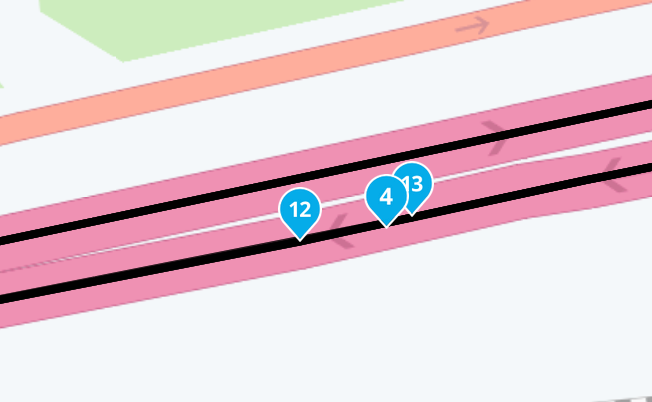
                          Scherm­afbeelding 2023-05-09 om 19.28.36.png

                          The other points ensure that a loop is constantly made. I understand that the expand function can't handle that.

                          🏍️ BMW K1600GT-P (2013) | Nolan N100-5 with Sena 30K
                          📱 iOS on iPhone 13 & 16 (mounted on Quadlock or AliExpress extention on BMW-cradle)
                          🚙 Apple CarPlay in VW T-Roc
                          💻 Routelab on MacBook Air & iMac (Tahoe & Ventura)

                          1 Reply Last reply
                          0

                          Hello! It looks like you're interested in this conversation, but you don't have an account yet.

                          Getting fed up of having to scroll through the same posts each visit? When you register for an account, you'll always come back to exactly where you were before, and choose to be notified of new replies (either via email, or push notification). You'll also be able to save bookmarks and upvote posts to show your appreciation to other community members.

                          With your input, this post could be even better 💗

                          Register Login
                          Reply
                          • Reply as topic
                          Log in to reply
                          • Oldest to Newest
                          • Newest to Oldest
                          • Most Votes


                          • 1
                          • 2
                          ACTIVE USERS
                          Rob Verhoeff
                          Rob Verhoeff
                          Hans van de Ven MR.MRA
                          Hans van de Ven MR.MRA
                          Lynchy67
                          Lynchy67
                          simonharvestmill.co.uk
                          simonharvestmill.co.uk
                          Laurence 2
                          Laurence 2
                          POPULAR TOPICS
                          • Carpuride scherm vast
                            De Ploey Georges
                            De Ploey Georges
                            3
                            28
                            1.2k

                          • How can I change the verbal navigation directions from male to female?
                            Brian McG
                            Brian McG
                            0
                            5
                            29

                          • Apple Carplay - navigatie instructies zichtbaar, maar kaart niet??
                            Nick Carthew
                            Nick Carthew
                            0
                            3
                            16

                          • Camperroutes
                            De Ploey Georges
                            De Ploey Georges
                            0
                            4
                            164

                          • GPX Versions 1.1 vs 1.2 for Garmin Visually Explained
                            Mzokk
                            Mzokk
                            7
                            174
                            14.0k

                          • Not a great route choice
                            Marinus van Deudekom
                            Marinus van Deudekom
                            0
                            2
                            32

                          • App probleem scenic route niet mogelijk
                            Philip Verbeek
                            Philip Verbeek
                            0
                            3
                            81

                          • (Android Auto) Zoom/Steuerung blendet aus und lässt sich nicht per Lenkerschalter reaktivieren.
                            0
                            1
                            5

                          MY GROUPS
                          • Login

                          • Login or register to search.
                          • First post
                            Last post
                          0
                          • Categories
                          • Recent
                          • Popular
                          • Support
                          • MyRoute-app