Skip to content
  • Categories
  • Recent
  • Popular
  • Support
  • MyRoute-app
Collapse
Brand Logo

MRA Community Forum

  1. Home
  2. [App-Beta] The MyRoute-app
  3. [App-Beta] Problems, Bugs and other Issues
  4. Android - Drop Down Menus and Keyboard

Android - Drop Down Menus and Keyboard

Scheduled Pinned Locked Moved [App-Beta] Problems, Bugs and other Issues
3 Posts 2 Posters 75 Views 1 Watching
  • Oldest to Newest
  • Newest to Oldest
  • Most Votes
Reply
  • Reply as topic
Log in to reply
This topic has been deleted. Only users with topic management privileges can see it.
  • Dave J 0
    Dave J 0
    Dave J 0
    Valued contributor
    wrote on last edited by
    #1

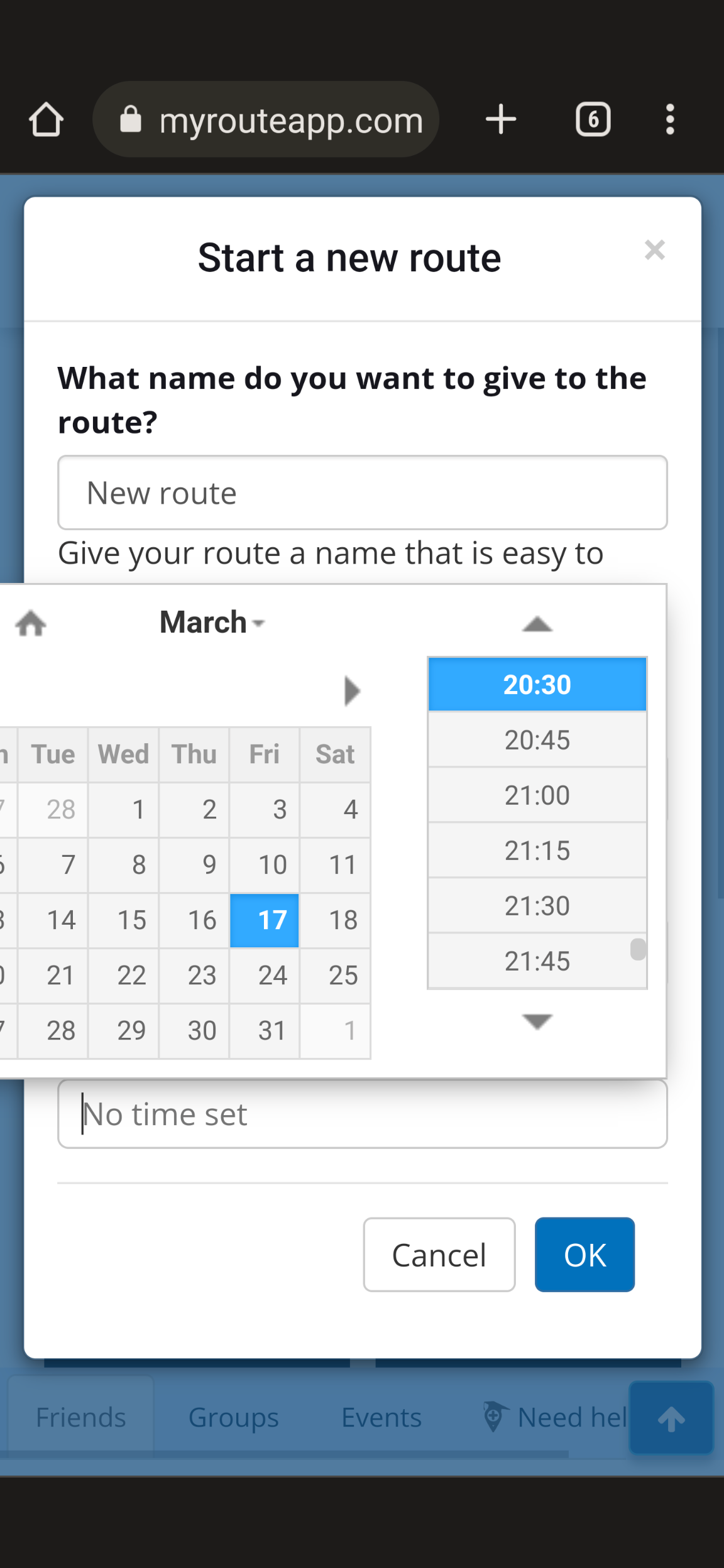
    @Corjan-Meijerink Just started testing on Android (as well as iOS previously) and found a strange behaviour with the drop down menus and the software keyboard overlay obscuring the drop down content.

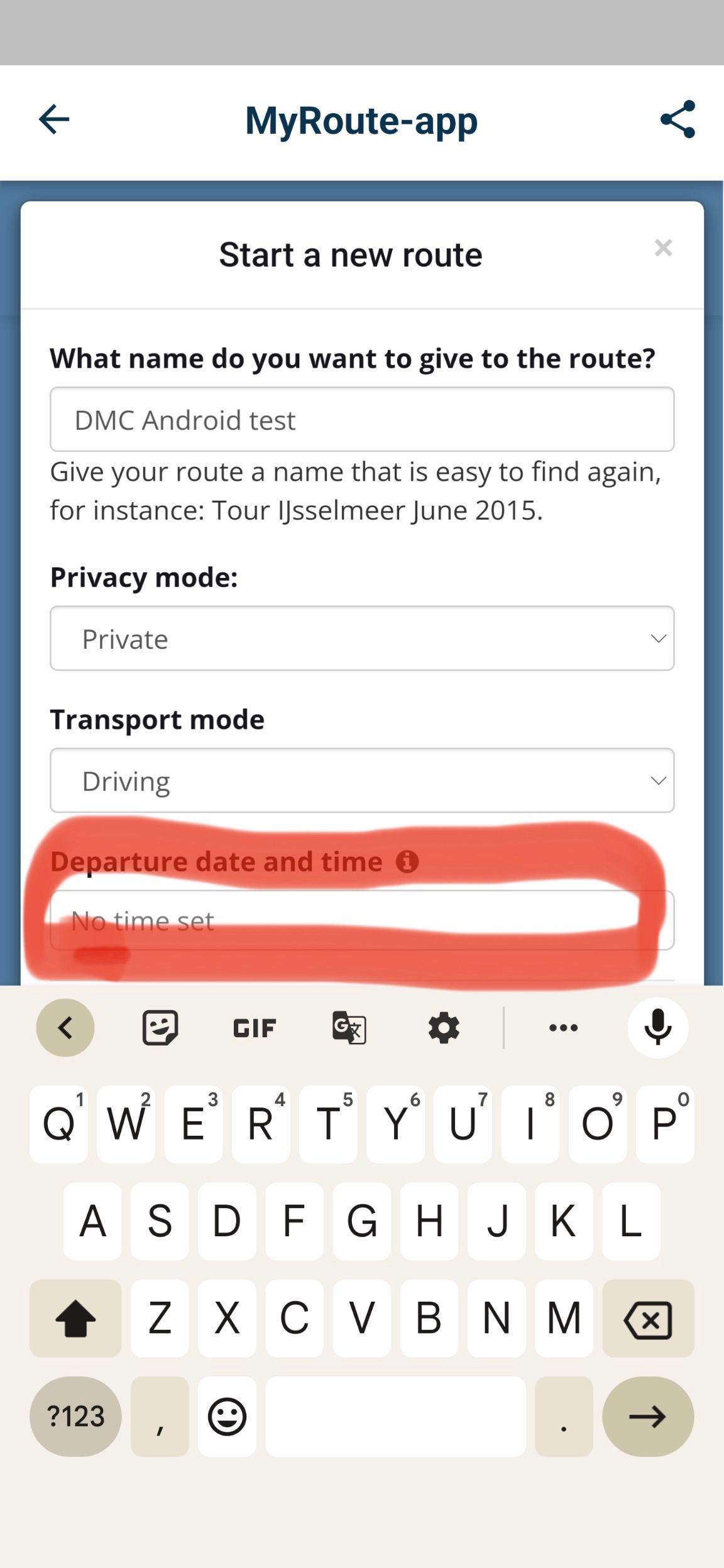
    With the first occurrence e when creating a route, the back/minimise left hand button on my Pixel 6 Pro (Android 13) will not remove the keyboard to show the drop down options at all:
    A788E647-362C-48CB-ACC2-28384BB4076F.jpeg

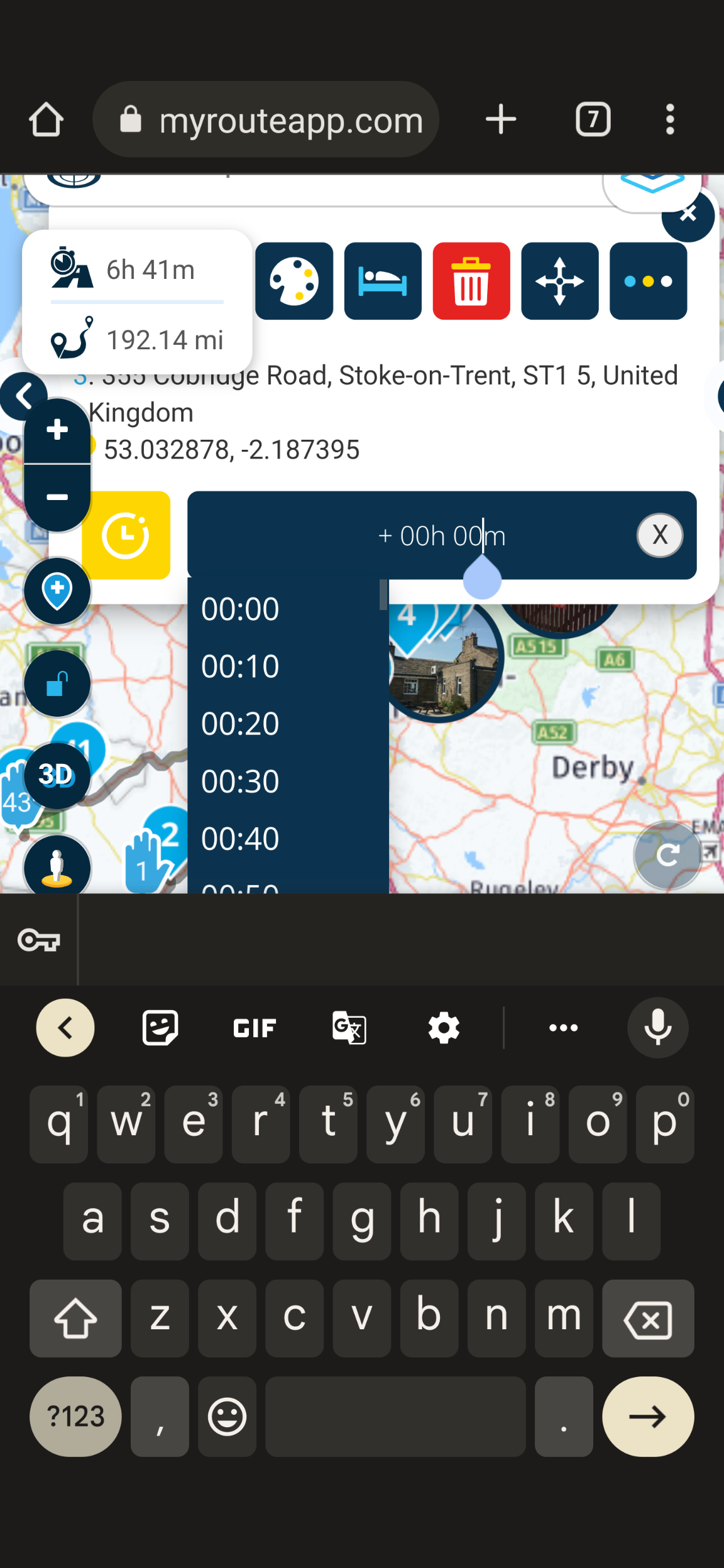
    When editing waypoint information the keyboard shown but the back/minimise left hand button will remove the keyboard:
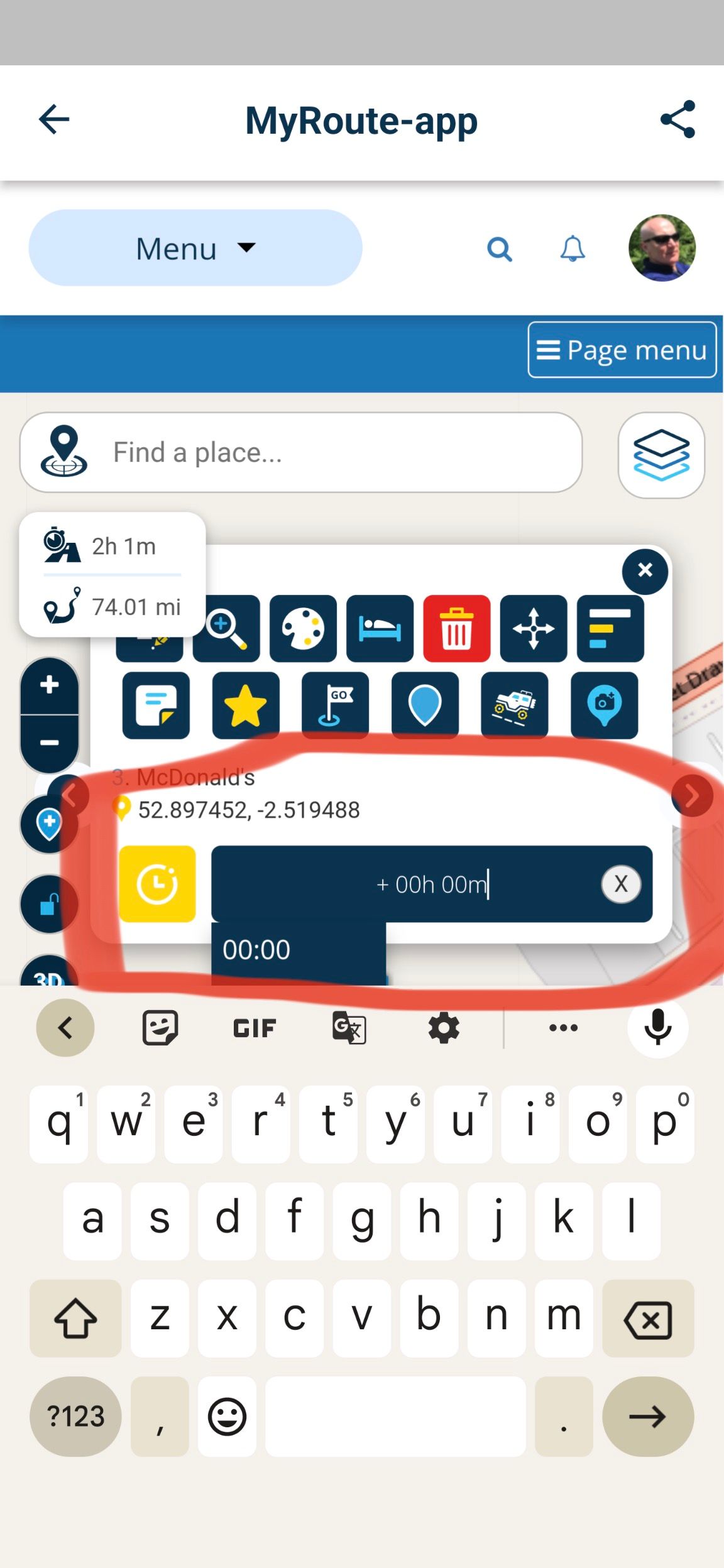
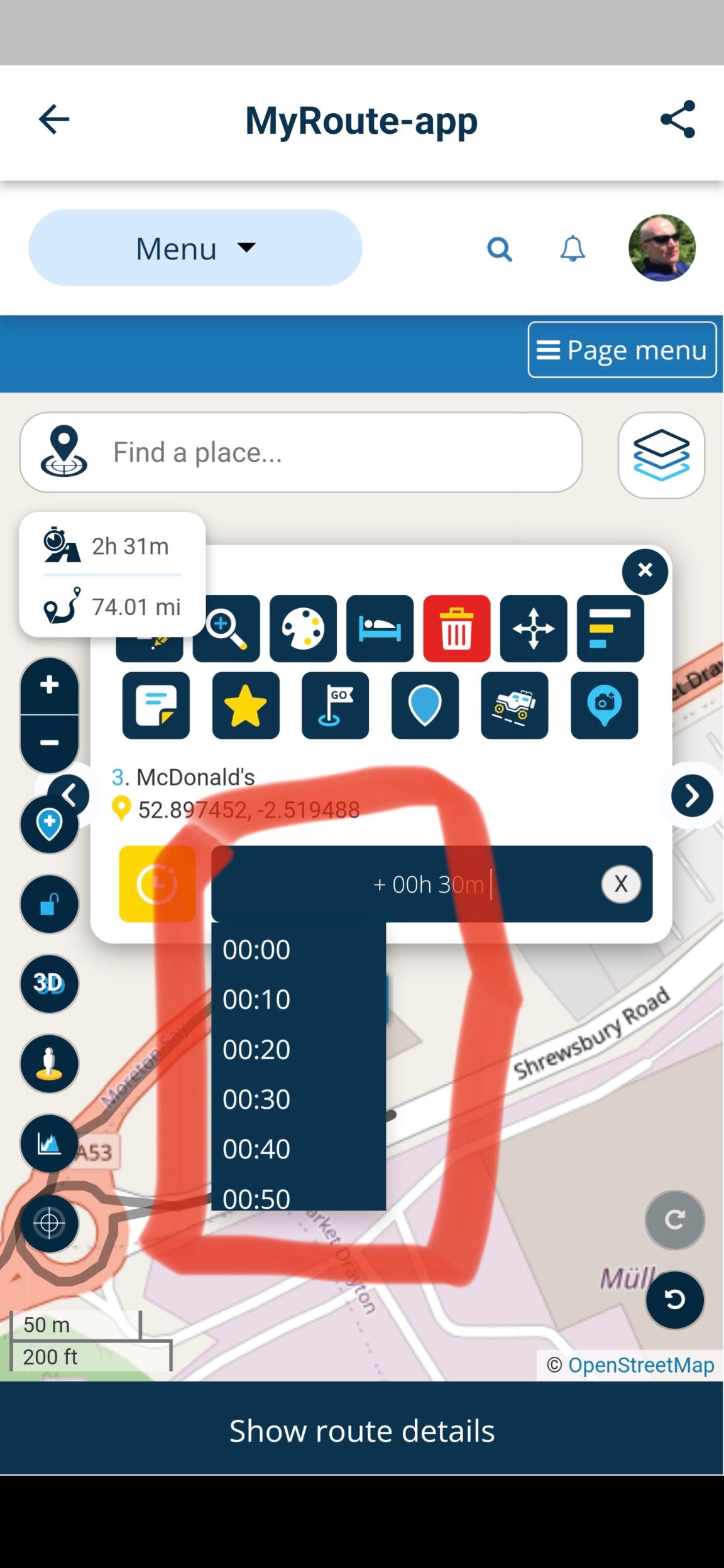
    B12649A8-7762-4C69-9A0E-4028D45EE63D.jpeg

    A960C151-40B8-4A5F-BCD5-472F6A10B32F.jpeg

    I would have expected the keyboard to not show in these instances when selecting the input box. Not sure if there are any others as this was my first quick test on Android today.

    Kind Regards. Help where I can.
    Ducati Multistrada V4 Rally
    iPhone 18 Pro
    CHIGEE AIO-6 LTE
    Google Pixel 6 Pro - mounted on SP Connect Plus
    Ex Garmin XT2 and XT1 as well as Ex TomTom Rider User

    Corjan Meijerink 1 Reply Last reply
    0
    • Dave J 0 Dave J 0

      @Corjan-Meijerink Just started testing on Android (as well as iOS previously) and found a strange behaviour with the drop down menus and the software keyboard overlay obscuring the drop down content.

      With the first occurrence e when creating a route, the back/minimise left hand button on my Pixel 6 Pro (Android 13) will not remove the keyboard to show the drop down options at all:

      A788E647-362C-48CB-ACC2-28384BB4076F.jpeg

      When editing waypoint information the keyboard shown but the back/minimise left hand button will remove the keyboard:

      B12649A8-7762-4C69-9A0E-4028D45EE63D.jpeg

      A960C151-40B8-4A5F-BCD5-472F6A10B32F.jpeg

      I would have expected the keyboard to not show in these instances when selecting the input box. Not sure if there are any others as this was my first quick test on Android today.

      Corjan Meijerink
      Corjan Meijerink
      Corjan Meijerink
      Developer
      wrote on last edited by
      #2

      @Dave-J-0 Interesting! Thanks for sharing, this looks like an issue with the website on Mobile devices. Can you confirm the issue also exists when using a browser on your Android (an not in the app)?

      Dave J 0 1 Reply Last reply
      0
      • Corjan Meijerink Corjan Meijerink

        @Dave-J-0 Interesting! Thanks for sharing, this looks like an issue with the website on Mobile devices. Can you confirm the issue also exists when using a browser on your Android (an not in the app)?

        Dave J 0
        Dave J 0
        Dave J 0
        Valued contributor
        wrote on last edited by
        #3

        @Corjan-Meijerink tried the Chrome browser and I can remove the keyboard with the back/minimise button. All works as expected in the browser:
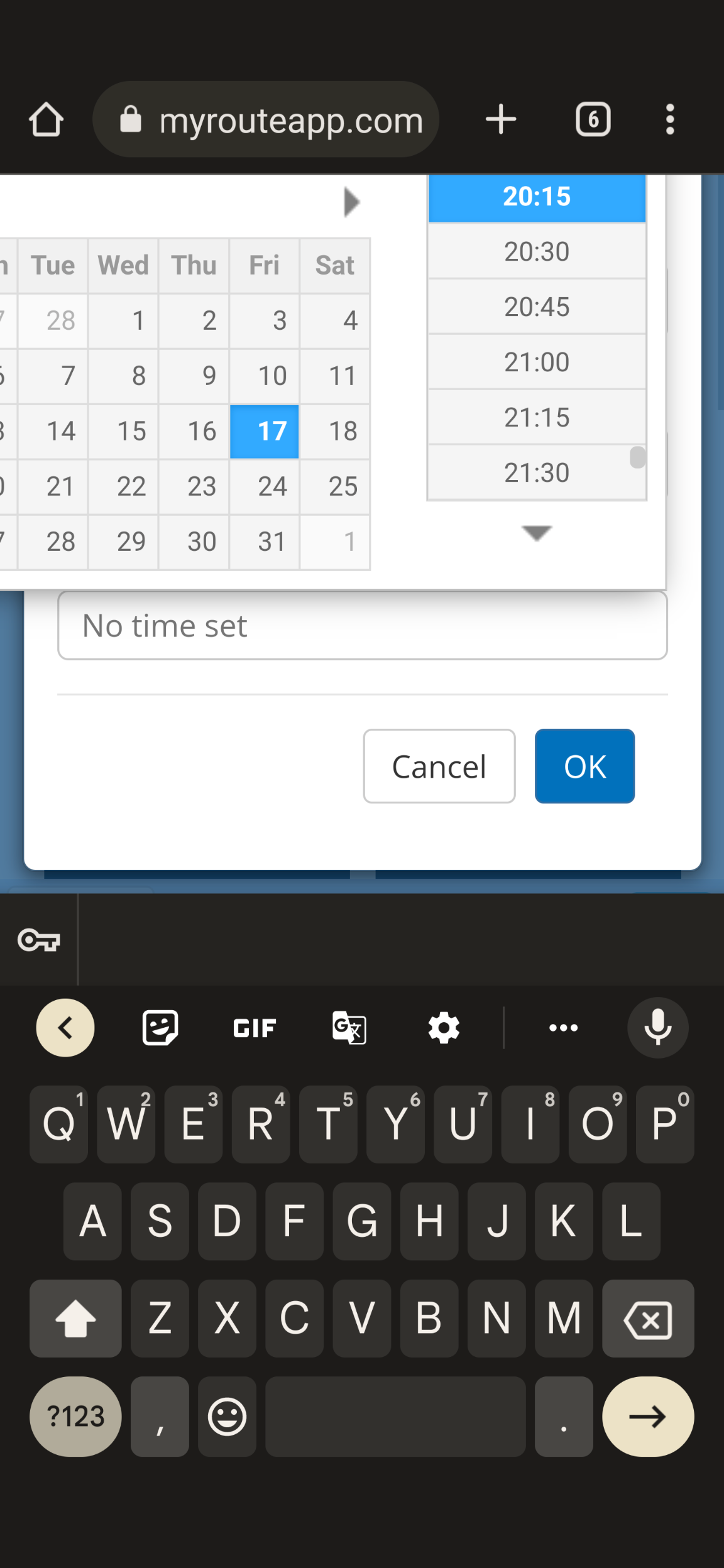
        Screenshot_20230317-201745.png
        Screenshot_20230317-202600.png
        Screenshot_20230317-202331.png

        Kind Regards. Help where I can.
        Ducati Multistrada V4 Rally
        iPhone 18 Pro
        CHIGEE AIO-6 LTE
        Google Pixel 6 Pro - mounted on SP Connect Plus
        Ex Garmin XT2 and XT1 as well as Ex TomTom Rider User

        1 Reply Last reply
        0

        Hello! It looks like you're interested in this conversation, but you don't have an account yet.

        Getting fed up of having to scroll through the same posts each visit? When you register for an account, you'll always come back to exactly where you were before, and choose to be notified of new replies (either via email, or push notification). You'll also be able to save bookmarks and upvote posts to show your appreciation to other community members.

        With your input, this post could be even better 💗

        Register Login
        Reply
        • Reply as topic
        Log in to reply
        • Oldest to Newest
        • Newest to Oldest
        • Most Votes


        ACTIVE USERS
        Corjan Meijerink
        Corjan Meijerink
        Dave J 0
        Dave J 0
        POPULAR TOPICS
        • Strange translation
          Stefan Hummelink
          Stefan Hummelink
          0
          15
          40

        • Add delete route button to library
          Corjan Meijerink
          Corjan Meijerink
          0
          9
          25

        • [EN] MyRoute-app Routeplanner Next (Beta)
          Con Hennekens
          Con Hennekens
          9
          113
          10.6k

        • Shared toggle switch
          LennyO
          LennyO
          0
          7
          27

        • Where is the "Routes" option?
          Con Hennekens
          Con Hennekens
          0
          9
          35

        • Undo/Redo tool is hidden
          b0hd1
          b0hd1
          0
          7
          13

        • Crazy routing
          Hubert Thoring
          Hubert Thoring
          0
          7
          26

        • A07 Shared Route Collaboration – Change Log?
          Corjan Meijerink
          Corjan Meijerink
          0
          6
          17

        MY GROUPS
        • Login

        • Login or register to search.
        • First post
          Last post
        0
        • Categories
        • Recent
        • Popular
        • Support
        • MyRoute-app