My Default My Screen layout has somehow changed
-

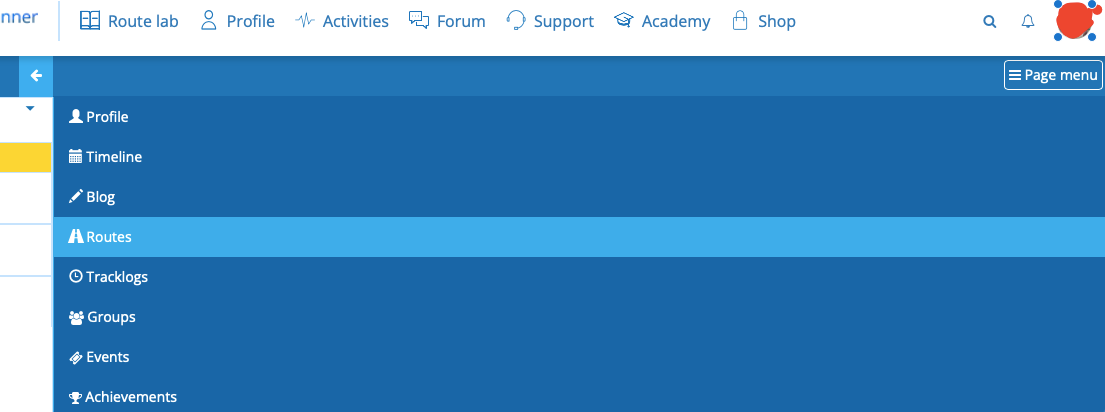
My Screen layout has somehow changed - used to have buttons I could click on on the top line of the blue screen, but they have been replaced by a Page Menu button, which when I click on it it displays what can be seen in the image. I'd like to put it back to default but have no idea how to do it. Anyone else had this or no how to fix?
-
My Screen layout has somehow changed - used to have buttons I could click on on the top line of the blue screen, but they have been replaced by a Page Menu button, which when I click on it it displays what can be seen in the image. I'd like to put it back to default but have no idea how to do it. Anyone else had this or no how to fix?

See dimensions in settings on your pc
-
@Hans-van-de-Ven-MRA-Master said in My Default My Screen layout has somehow changed:
See dimensions in settings on your pc
I have the same issue and do not understand this? What do I do?
-
@Hans-van-de-Ven-MRA-Master said in My Default My Screen layout has somehow changed:
See dimensions in settings on your pc
I have the same issue and do not understand this? What do I do?
Hi Mark, Adjust your screen resolution
-
@Hans-van-de-Ven-MRA-Master said in My Default My Screen layout has somehow changed:
See dimensions in settings on your pc
I have the same issue and do not understand this? What do I do?
@Mark-Raney
See below.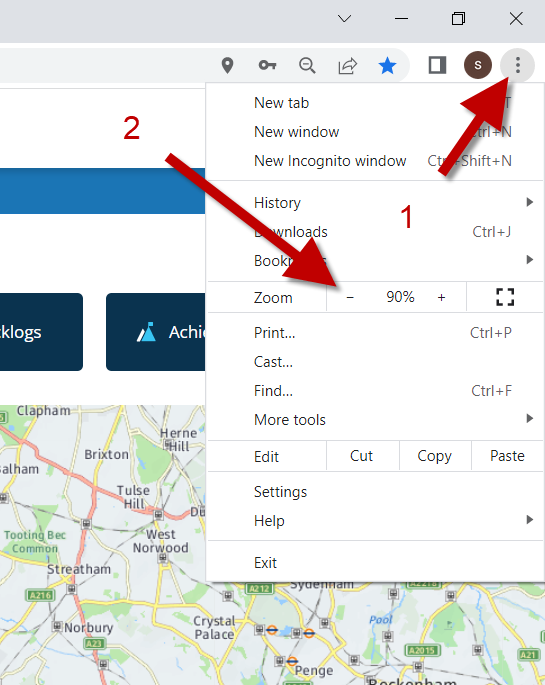
Hello! It looks like you're interested in this conversation, but you don't have an account yet.
Getting fed up of having to scroll through the same posts each visit? When you register for an account, you'll always come back to exactly where you were before, and choose to be notified of new replies (either via email, or push notification). You'll also be able to save bookmarks and upvote posts to show your appreciation to other community members.
With your input, this post could be even better 💗
Register Login-
 26115
26115
-
 0588
0588
-
04177
-
 0366
0366
-
4473
-
2274
-
 03117
03117