Skip to content
  • Categories
  • Recent
  • Popular
  • Support
  • MyRoute-app
Collapse
Brand Logo

MRA Community Forum

  1. Home
  2. General Discussion
  3. How do you make a copy of a route?

How do you make a copy of a route?

Scheduled Pinned Locked Moved General Discussion
9 Posts 7 Posters 3.0k Views
  • Oldest to Newest
  • Newest to Oldest
  • Most Votes
Reply
  • Reply as topic
Log in to reply
This topic has been deleted. Only users with topic management privileges can see it.
  • Gerry Urban Offline
    Gerry Urban Offline
    Gerry Urban
    wrote on last edited by
    #1

    I like to make a separate route for each day of my rides. I need to find a way to start a new day's route from the end of the previous day. I assume one way to do this would be to make a copy of one day's route, give the copy a new name, and then delete all the waypoints except the last one, which would be the first waypoint of the next day. So I need to know how to make the copy.

    Perhaps there is a better way?

    Nick Carthew Reinhard-32 2 Replies Last reply
    0
    • Gerry Urban Gerry Urban

      I like to make a separate route for each day of my rides. I need to find a way to start a new day's route from the end of the previous day. I assume one way to do this would be to make a copy of one day's route, give the copy a new name, and then delete all the waypoints except the last one, which would be the first waypoint of the next day. So I need to know how to make the copy.

      Perhaps there is a better way?
      Nick Carthew Offline
      Nick Carthew Offline
      Nick Carthew
      RouteXpert
      wrote on last edited by
      #2

      @Gerry-Urban Another way would be just start a new route. On a pc have the first day’s route open and then open the new route in a separate tab on your browser, it’s then easy to flick back and forward between the tabs to compare them.
      Or, you can copy the street address from the last route point and paste it into the search box of the new route.

      Always willing to help if I can.
      Triumph Tiger 1200 XRT called Tina.
      MRA Navigation Next and SilverFox BJ8

      Moritzka 1 Reply Last reply
      0
      • Gerry Urban Offline
        Gerry Urban Offline
        Gerry Urban
        wrote on last edited by
        #3

        Copying the last waypoint and pasting it in the new route sounds like a great idea, but I can't make it happen. If I right click on the last waypoint I get some choices about copying an image. If I insert any of these choices into the search box nothing happens.

        Nick Carthew 1 Reply Last reply
        0
        • Gerry Urban Gerry Urban

          I like to make a separate route for each day of my rides. I need to find a way to start a new day's route from the end of the previous day. I assume one way to do this would be to make a copy of one day's route, give the copy a new name, and then delete all the waypoints except the last one, which would be the first waypoint of the next day. So I need to know how to make the copy.

          Perhaps there is a better way?

          Reinhard-32 Offline
          Reinhard-32 Offline
          Reinhard-32
          wrote on last edited by Reinhard-32
          #4

          @Gerry-Urban said in How do you make a copy of a route?:

          I like to make a separate route for each day of my rides. I need to find a way to start a new day's route from the end of the previous day. I assume one way to do this would be to make a copy of one day's route, give the copy a new name, and then delete all the waypoints except the last one, which would be the first waypoint of the next day. So I need to know how to make the copy.

          Perhaps there is a better way?

          Try this: Create one long Route for more days. After that is done use the split function from the toolkit menue. The endpoint from route 1 is the starting point from route 2 ... and so on.

          Kindly regards
          Reinhard

          Montana 700i and Mac

          1 Reply Last reply
          0
          • Gerry Urban Gerry Urban

            Copying the last waypoint and pasting it in the new route sounds like a great idea, but I can't make it happen. If I right click on the last waypoint I get some choices about copying an image. If I insert any of these choices into the search box nothing happens.

            Nick Carthew Offline
            Nick Carthew Offline
            Nick Carthew
            RouteXpert
            wrote on last edited by
            #5

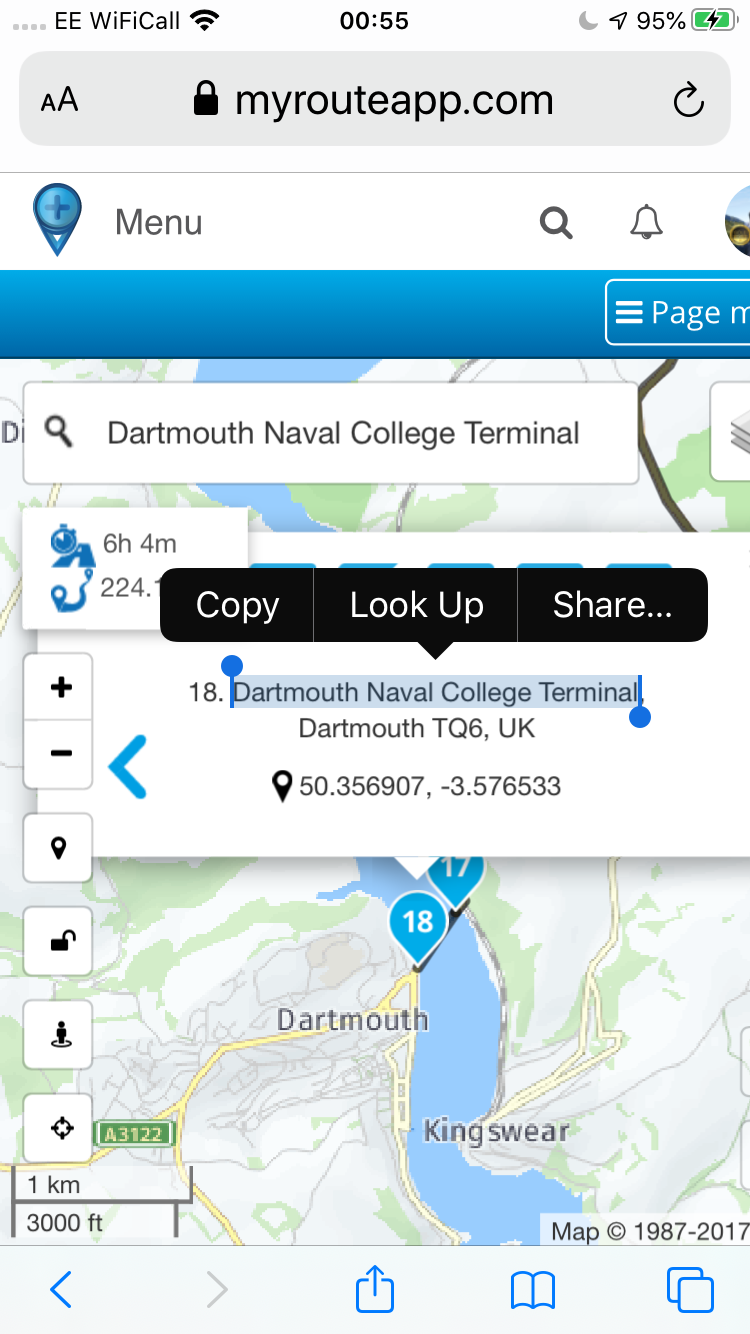
            @Gerry-Urban Highlight the portion of address and then right click copy and then right click paste in the search box of your new route.
            9DF5D2CA-09E4-4747-B38B-1AA8B442FFBD.png

            Always willing to help if I can.
            Triumph Tiger 1200 XRT called Tina.
            MRA Navigation Next and SilverFox BJ8

            Antonio Antunes 1 Reply Last reply
            0
            • Nick Carthew Nick Carthew

              @Gerry-Urban Highlight the portion of address and then right click copy and then right click paste in the search box of your new route.

              9DF5D2CA-09E4-4747-B38B-1AA8B442FFBD.png

              Antonio Antunes Offline
              Antonio Antunes Offline
              Antonio Antunes
              wrote on last edited by
              #6

              @Gerry-Urban Copy and past the location it will work as well ...

              1 Reply Last reply
              0
              • Nick Carthew Nick Carthew

                @Gerry-Urban Another way would be just start a new route. On a pc have the first day’s route open and then open the new route in a separate tab on your browser, it’s then easy to flick back and forward between the tabs to compare them.
                Or, you can copy the street address from the last route point and paste it into the search box of the new route.

                Moritzka Offline
                Moritzka Offline
                Moritzka
                wrote on last edited by
                #7

                @Nick-Carthew Thx for sharing this! Nevertheless question is to me how to copy a whole route in case I plan a tour and eg day 1 I would plan with 2 scenarios? Do I need to plan point by point again or is there a smart way to do so? Thx upfront!

                Jack van Tilburg 1 Reply Last reply
                0
                • Dae 0 Offline
                  Dae 0 Offline
                  Dae 0
                  wrote on last edited by Dae 0
                  #8

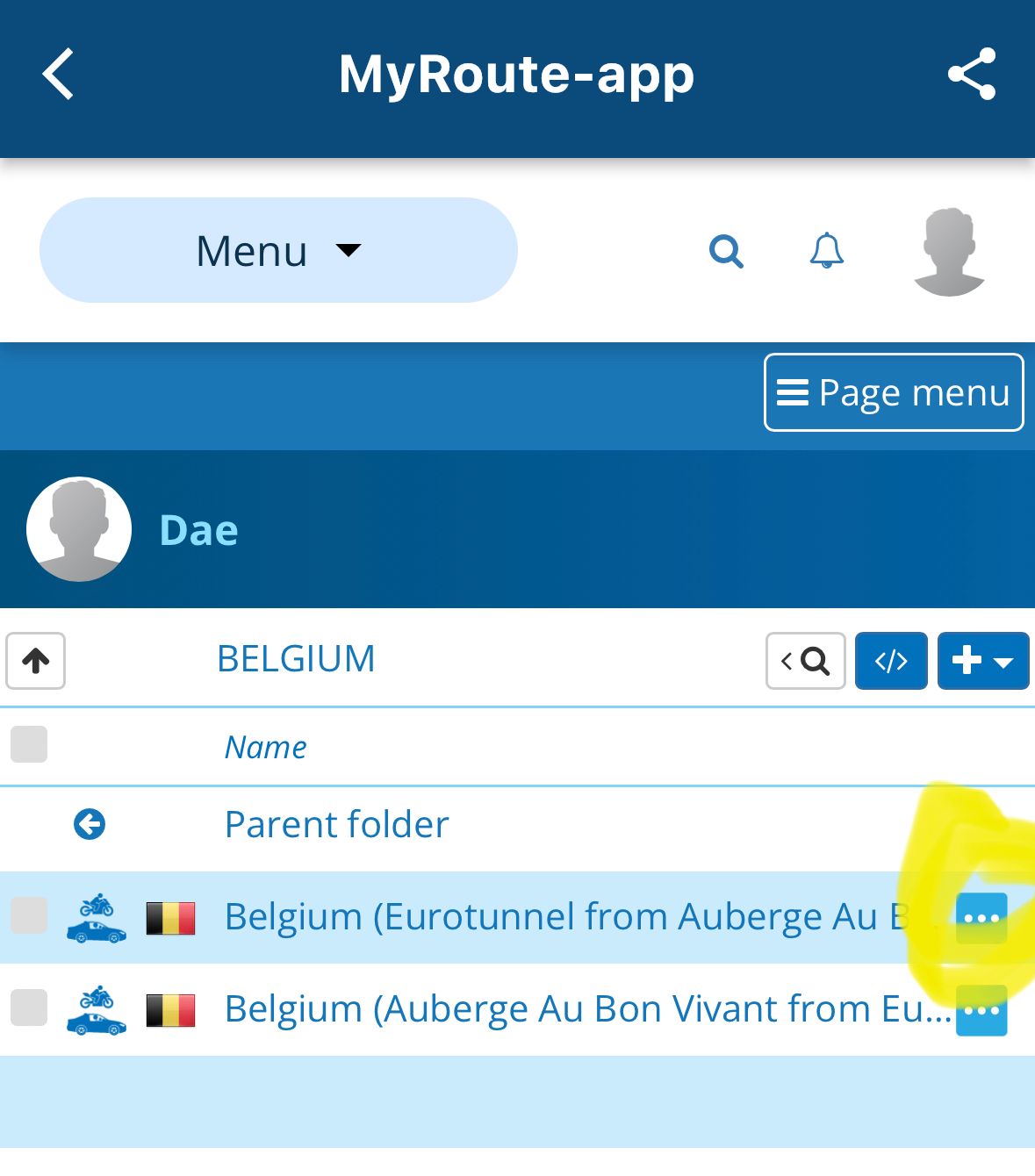
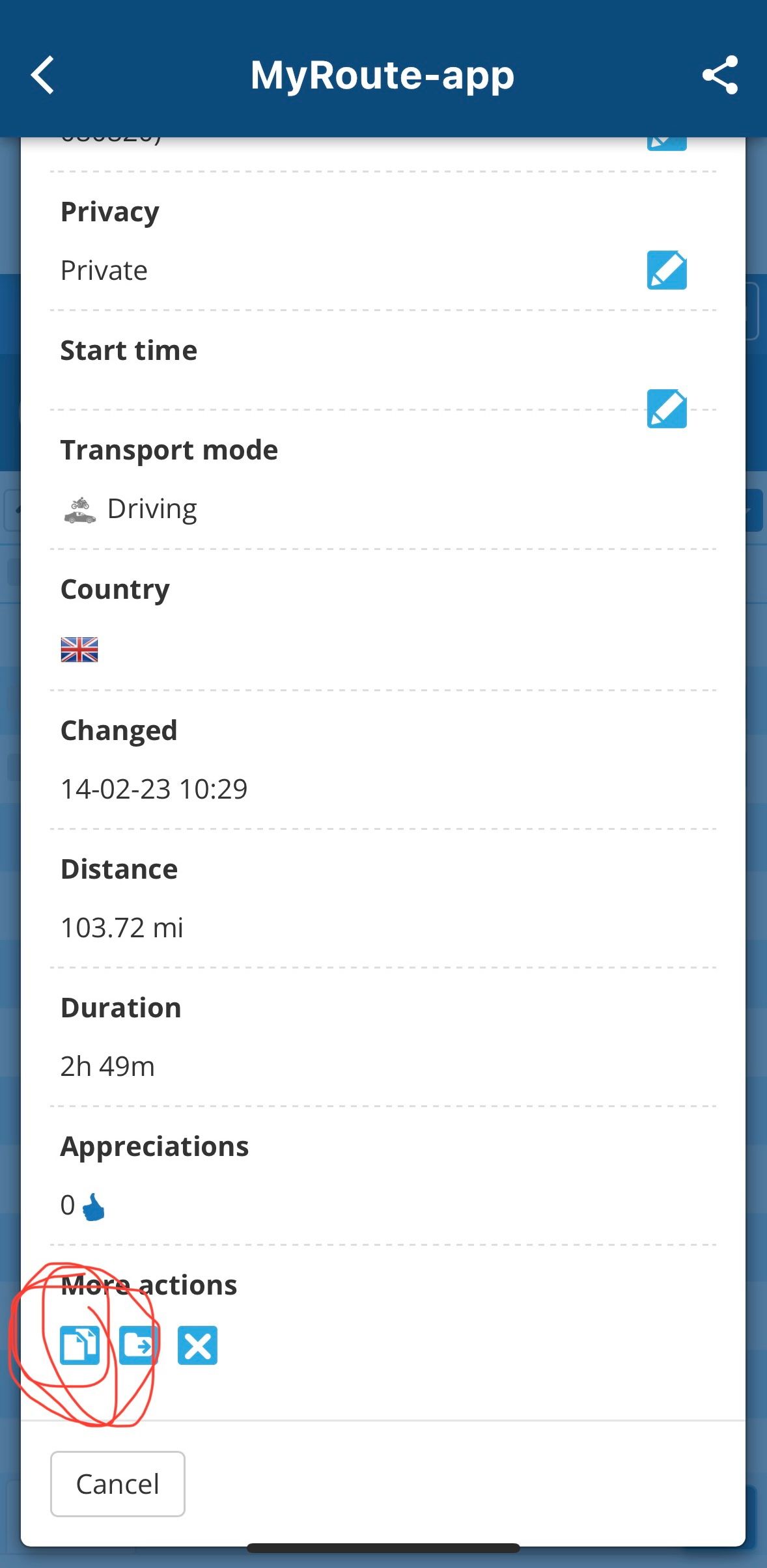
                  In the list of routes click the three dots. There’s then some icons at the bottom. The one on the left is duplicate route.

                  My wife has frequently commented that things need better “hover over” text or to be less hidden. MRA is great and can often do exactly what you need, just a shame you often spend ages looking for what you need 🤣

                  IMG_1963.jpeg
                  IMG_1962.jpeg

                  1 Reply Last reply
                  0
                  • Moritzka Moritzka

                    @Nick-Carthew Thx for sharing this! Nevertheless question is to me how to copy a whole route in case I plan a tour and eg day 1 I would plan with 2 scenarios? Do I need to plan point by point again or is there a smart way to do so? Thx upfront!

                    Jack van Tilburg Offline
                    Jack van Tilburg Offline
                    Jack van Tilburg
                    wrote on last edited by
                    #9

                    @Moritzka
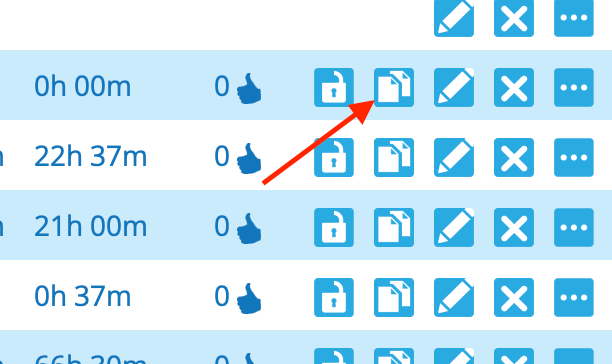
                    When you use the browser version of the MRA planner, you can copy the route in your personal library by clicking tis button:
                    copy.png

                    1 Reply Last reply
                    0

                    Hello! It looks like you're interested in this conversation, but you don't have an account yet.

                    Getting fed up of having to scroll through the same posts each visit? When you register for an account, you'll always come back to exactly where you were before, and choose to be notified of new replies (either via email, or push notification). You'll also be able to save bookmarks and upvote posts to show your appreciation to other community members.

                    With your input, this post could be even better 💗

                    Register Login
                    Reply
                    • Reply as topic
                    Log in to reply
                    • Oldest to Newest
                    • Newest to Oldest
                    • Most Votes


                    ACTIVE USERS
                    Nick Carthew
                    Nick Carthew
                    Reinhard-32
                    Reinhard-32
                    Dae 0
                    Dae 0
                    Jack van Tilburg
                    Jack van Tilburg
                    Antonio Antunes
                    Antonio Antunes
                    Moritzka
                    Moritzka
                    Gerry Urban
                    Gerry Urban
                    POPULAR TOPICS
                    • Paar onduidelijkheden.
                      MotorMies 0 0
                      MotorMies 0 0
                      1
                      15
                      145

                    • Wegwerkzaamheden worden niet goed toegepast
                      Con Hennekens
                      Con Hennekens
                      0
                      7
                      102

                    • Giving folders its own color
                      Travellexxie
                      Travellexxie
                      0
                      6
                      162

                    • Route app reageert niet
                      Erik Schouten
                      Erik Schouten
                      0
                      4
                      21

                    • Er gaat hier iets mis melding
                      Martijn 8d 0
                      Martijn 8d 0
                      0
                      11
                      218

                    • Update 5.2.1 - Android availability
                      Peter Zehentreiter
                      Peter Zehentreiter
                      2
                      6
                      197

                    • New update 5.2 - Avoid roadblocks, persistent map items, POI management and share
                      M. Schrijver
                      M. Schrijver
                      28
                      61
                      7.0k

                    • Update 5.2.1
                      Marinus van Deudekom
                      Marinus van Deudekom
                      0
                      3
                      99

                    MY GROUPS
                    • Login

                    • Login or register to search.
                    • First post
                      Last post
                    0
                    • Categories
                    • Recent
                    • Popular
                    • Support
                    • MyRoute-app