Shaping points placement for legacy routes - snap to road
-

Hi
With the new system dropped waypoints auto snap to the road which is great, is there a way to to check a legacy/imported route for waypoint placement and snap them to the road if they're not on it?
If not, could there be?
Thanks -

Thanks for the kind words about the auto-snap! You can already do this for an existing or imported route: open the route in the planner, click the
gear button on the mapthree dots in the sidebar and switch "Snap waypoints to road" off and then back on. When you switch it on, every waypoint of the open route moves onto the road in one go. A waypoint that sits more than 250 m from any road stays where it is, and you'll get a message listing which ones those are. If you don't like the result, Undo puts everything back. We agree this is hard to find, so we're looking at adding a clear "Snap all waypoints now" button. -
Thanks for the kind words about the auto-snap! You can already do this for an existing or imported route: open the route in the planner, click the
gear button on the mapthree dots in the sidebar and switch "Snap waypoints to road" off and then back on. When you switch it on, every waypoint of the open route moves onto the road in one go. A waypoint that sits more than 250 m from any road stays where it is, and you'll get a message listing which ones those are. If you don't like the result, Undo puts everything back. We agree this is hard to find, so we're looking at adding a clear "Snap all waypoints now" button.
@Corjan-Meijerink Hi Corjan,
The new planner is absolutely brilliant – many thanks for your fantastic work, the quick updates and the constant updates on what’s new.I have a question about the gear button that’s supposed to be on the map to activate the function for waypoints on the road.
Does a specific layout need to be open for this?
Perhaps I’ve been a bit overwhelmed by all the new features, but I can’t find the gear button on the map.
-
Oops
 I was looking at something else while typing this message.
I've edited it.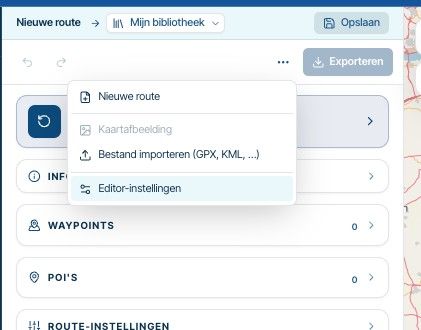
It's that button (the horizontal dots).
-
Oops
I was looking at something else while typing this message.
I've edited it.It's that button (the horizontal dots).
@Corjan-Meijerink Got it, thank you
Hello! It looks like you're interested in this conversation, but you don't have an account yet.
Getting fed up of having to scroll through the same posts each visit? When you register for an account, you'll always come back to exactly where you were before, and choose to be notified of new replies (either via email, or push notification). You'll also be able to save bookmarks and upvote posts to show your appreciation to other community members.
With your input, this post could be even better 💗
Register Login-
 1011111
-
 2463.0k
-
 5251.1k
-
 012296
-
0543
-
 0535
-
 0532
-
0444