Opening Route Direct from Android Auto Screen
-

When opening a route on the AA screen direct it does not give you an option to choose next waypoint (on the phone it automatically chooses waypoint 2, which is correct). On the AA screen it defaults to 1 (which in my case us my home/start) - this then considers the route complete before you're started.
-
When opening a route on the AA screen direct it does not give you an option to choose next waypoint (on the phone it automatically chooses waypoint 2, which is correct). On the AA screen it defaults to 1 (which in my case us my home/start) - this then considers the route complete before you're started.

@Andrew-Dickerson if you mean that you would like to choose between the start or the nearest shaping point. That you must set on your phone itself
-
For me the same issue - it's set on the phone to start with the nearest shaping point and use the current location.
But when I start it on my Carpuride it always wants to start with point 1 !You can skip route point - but can't see at the carpuride (android auto) how many point you have to skip!
It's absolutely frustrating!
-
For me the same issue - it's set on the phone to start with the nearest shaping point and use the current location.
But when I start it on my Carpuride it always wants to start with point 1 !You can skip route point - but can't see at the carpuride (android auto) how many point you have to skip!
It's absolutely frustrating!
-
For me the same issue - it's set on the phone to start with the nearest shaping point and use the current location.
But when I start it on my Carpuride it always wants to start with point 1 !You can skip route point - but can't see at the carpuride (android auto) how many point you have to skip!
It's absolutely frustrating!
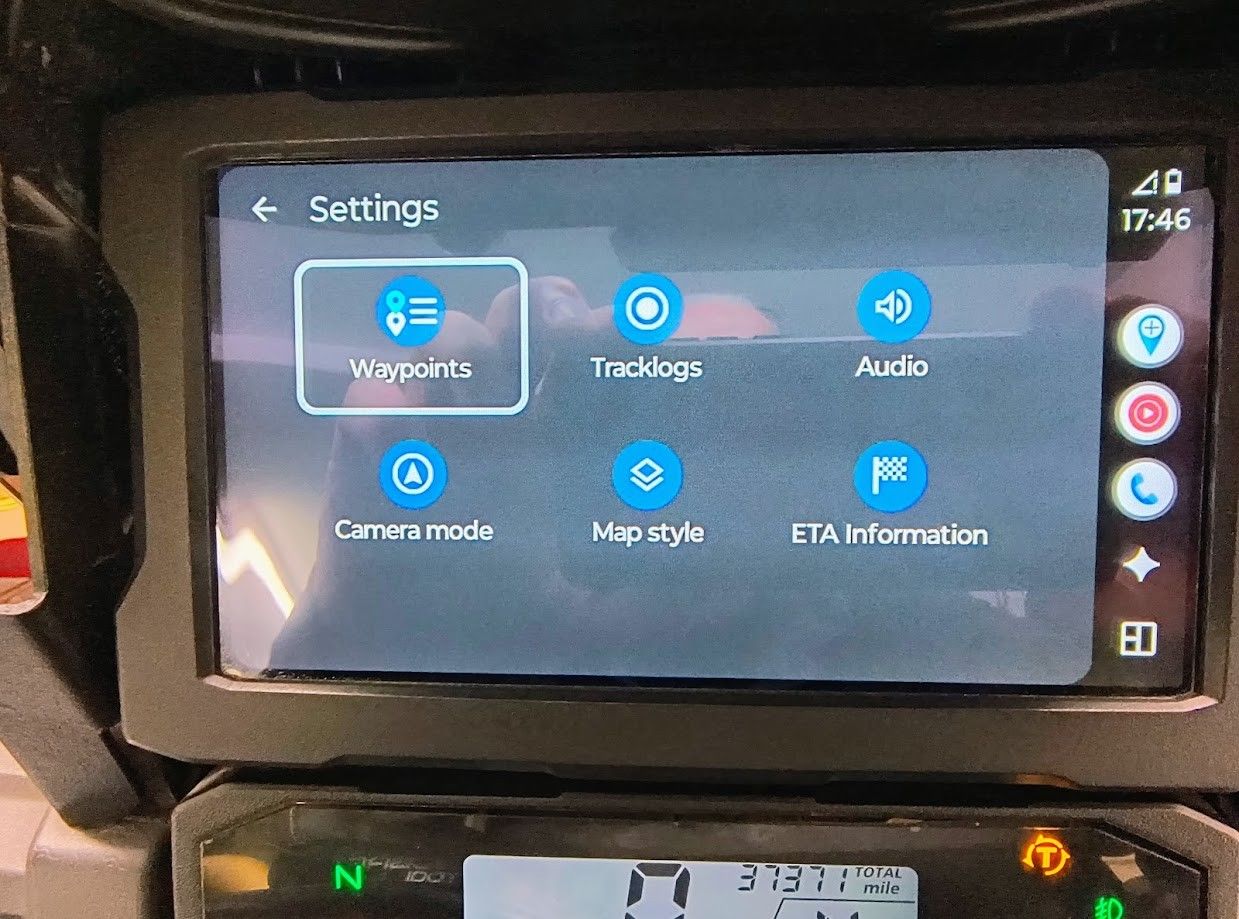
@Karl-Heinz-Schwendner look at what @mzokk posted and you can see a work around. In that way you can see the list of waypoints hence choosing the one you want
-

Better yet, do not start your route right at your house. Have the Waypoint #1 a few hundred feet along the intended route (I doubt you need navigation instructioins around your house or on your street...
 ). This way you will eliminate 2 issues at once:
- Missing a Start (which is a Via point) and be sent back
- Manual intervention to skip WP #1 or selecting any other place to start from.
Positive emotions are worth every penny ;)
-
Better yet, do not start your route right at your house. Have the Waypoint #1 a few hundred feet along the intended route (I doubt you need navigation instructioins around your house or on your street...
). This way you will eliminate 2 issues at once:- Missing a Start (which is a Via point) and be sent back
- Manual intervention to skip WP #1 or selecting any other place to start from.

Better yet, do not start your route right at your house. Have the Waypoint #1 a few hundred feet along the intended route (I doubt you need navigation instructioins around your house or on your street...
). This way you will eliminate 2 issues at once:- Missing a Start (which is a Via point) and be sent back
- Manual intervention to skip WP #1 or selecting any other place to start from.
Very important and correct the hint, because it is often done wrong and leads to problems if not observed
-
@Karl-Heinz-Schwendner look at what @mzokk posted and you can see a work around. In that way you can see the list of waypoints hence choosing the one you want
@Marinus-van-Deudekom thanks for the hint - but never heart the word gearwheel before for the settings icon

so it took a while to detect how toget to the waypoints.But now I think it's fine and a working workaround for this issue.

Hello! It looks like you're interested in this conversation, but you don't have an account yet.
Getting fed up of having to scroll through the same posts each visit? When you register for an account, you'll always come back to exactly where you were before, and choose to be notified of new replies (either via email, or push notification). You'll also be able to save bookmarks and upvote posts to show your appreciation to other community members.
With your input, this post could be even better 💗
Register Login-
01140
-
 11077
11077
-
 01154
01154
-
 11083
11083
-
0821
-
21160
-
 0733
0733
-
 0726
0726