
Allowing Highways
-
When I enter a destination on the MRA Android app and select the allow Highways option, the app will not navigate using highways (motorways as we call them in the UK. I have the Gold and MRA Navigation Next subscriptions.
The allow Highways options will be toggled off again when I check. I toggle it on, app still won't navigate using highways and when I look at the routing options again, allow Highways will be toggled off.
I really want to use satnav that will navigate via highways/motorways.
-
For use, I recommend reading the MRA manual. But to do this, you have to go to the web planner.
https://www.myrouteapp.com/support
The MRA Navi app routes on the highway if you want it, the settings may not contradict each other

-
When I enter a destination on the MRA Android app and select the allow Highways option, the app will not navigate using highways (motorways as we call them in the UK. I have the Gold and MRA Navigation Next subscriptions.
The allow Highways options will be toggled off again when I check. I toggle it on, app still won't navigate using highways and when I look at the routing options again, allow Highways will be toggled off.
I really want to use satnav that will navigate via highways/motorways.
@Mark-Williams-5-0 said:
The allow Highways options will be toggled off again when I check. I toggle it on, app still won't navigate using highways and when I look at the routing options again, allow Highways will be toggled off.This is definitely not normal behaviour if your just selecting "Destination" from the route options draw in the app & choosing a place to navigate too
It sounds like the "Avoidance Option - Highways" setting has become fixed rather than selectable
Have you tried toggling any of the other avoid options to see if they also reset?You could try force stopping the app to see if that resets anything or maybe try logging in/out of the app to see if that clears something
BlackView BV7100, Android 12
Navigate "Routes as Tracks" in Offline mode with Offline Maps
No Wifi, no internet, no interruptions, works well -
@Mark-Williams-5-0 said:
The allow Highways options will be toggled off again when I check. I toggle it on, app still won't navigate using highways and when I look at the routing options again, allow Highways will be toggled off.This is definitely not normal behaviour if your just selecting "Destination" from the route options draw in the app & choosing a place to navigate too
It sounds like the "Avoidance Option - Highways" setting has become fixed rather than selectable
Have you tried toggling any of the other avoid options to see if they also reset?You could try force stopping the app to see if that resets anything or maybe try logging in/out of the app to see if that clears something
@Brian-McG yes I even cleared the data and app cache. Also uninstalled reinstalled.
Thanks for taking the time to reply.
I sense I'll be using MRA for route planning for motorcycle tours but will have to stick with Waze if I just want navigation to a single destination. Shame as I paid for lifetime membership
-
@Brian-McG yes I even cleared the data and app cache. Also uninstalled reinstalled.
Thanks for taking the time to reply.
I sense I'll be using MRA for route planning for motorcycle tours but will have to stick with Waze if I just want navigation to a single destination. Shame as I paid for lifetime membership
@Mark-Williams-5-0 Hi, Mark!
If my understanding is correct, the "Destination" option is an implied "Scenic" route to various degrees that you can select. And om my Android it does not use Highways even when allowed.To just get to your destination (again could be controlled by avoidances), try using the option "MRA Routeplanner / Create new routes".
It uses Highways then. -
When I enter a destination on the MRA Android app and select the allow Highways option, the app will not navigate using highways (motorways as we call them in the UK. I have the Gold and MRA Navigation Next subscriptions.
The allow Highways options will be toggled off again when I check. I toggle it on, app still won't navigate using highways and when I look at the routing options again, allow Highways will be toggled off.
I really want to use satnav that will navigate via highways/motorways.
@Mark-Williams-5-0 I think we may be talking at cross purposes or different things as this is not adding up at all correctly for me & does not match what I see when I "enter a destination". You say.....
When I enter a destination on the MRA Android app and select the allow Highways option
For me this means a simple A > B route from your location to a destination
To do this I would select "Destination" from the route options draw,
Search for & then select my destination, followed by pressing the Navigate button & my route options would be shown
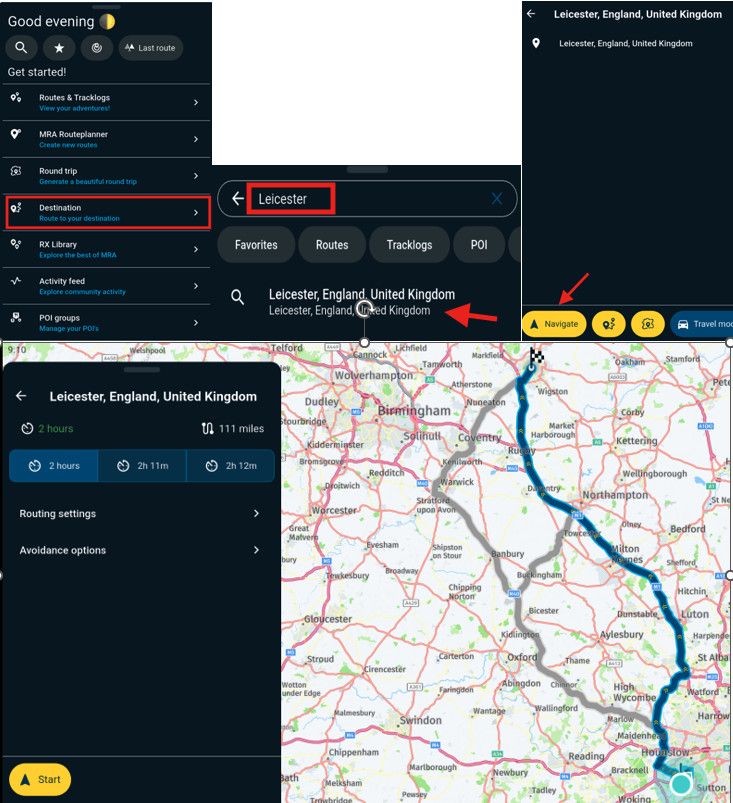
As you can see when select Leicester as my destination from west London it definitely allows me to use motorways / highways as it gives me the choice of routing via the M1 or M40
Under "Avoidance options" the "Highways" button is the default green as an allowed roadI think to help further you will need to explain your steps a bit more fully




Hello! It looks like you're interested in this conversation, but you don't have an account yet.
Getting fed up of having to scroll through the same posts each visit? When you register for an account, you'll always come back to exactly where you were before, and choose to be notified of new replies (either via email, or push notification). You'll also be able to save bookmarks and upvote posts to show your appreciation to other community members.
With your input, this post could be even better 💗
Register Login-
011140
-
0596
-
0355
-
0322
-
312290
-
08311
-
0359
-
06105


