How to navigate a track?
-
I'm a bit confused and wonder if development was running in a strange direction with "navigate route as track"...?
I know the sense of this, but my intention is, to get a gpx file which contains a track only and navigate by this.If I import such a file as Track or as Route-Track - the result is always the same - no matter which preferences I select: I get always a blue and a white line, if I start navigation with. That's annoying! I know, I should follow in this case the white line. But this forces unnecessary extra concentration!
The only mitigation I found is: select this Track or Route-Track for navigation, but start as "free ride"! Result: you will get only a blue line and you can navigate by clearly following the line (as usually for track navigation).Same issue is reported by @Martin Wilcke https://forum.myrouteapp.com/post/75062
Second issue: if gpx files contains waypoints <wpt> (POI), the import procedure operates that like stepchilds!
In case, gpx is imported as track, this points will never be imported!
In case, gpx is imported as Route-Track, this points will never be imported!
In case, gpx is imported as Route, this points will be imported as shaping points!
But why? The export procedure does it correctly. -
I'm a bit confused and wonder if development was running in a strange direction with "navigate route as track"...?
I know the sense of this, but my intention is, to get a gpx file which contains a track only and navigate by this.If I import such a file as Track or as Route-Track - the result is always the same - no matter which preferences I select: I get always a blue and a white line, if I start navigation with. That's annoying! I know, I should follow in this case the white line. But this forces unnecessary extra concentration!
The only mitigation I found is: select this Track or Route-Track for navigation, but start as "free ride"! Result: you will get only a blue line and you can navigate by clearly following the line (as usually for track navigation).Same issue is reported by @Martin Wilcke https://forum.myrouteapp.com/post/75062
Second issue: if gpx files contains waypoints <wpt> (POI), the import procedure operates that like stepchilds!
In case, gpx is imported as track, this points will never be imported!
In case, gpx is imported as Route-Track, this points will never be imported!
In case, gpx is imported as Route, this points will be imported as shaping points!
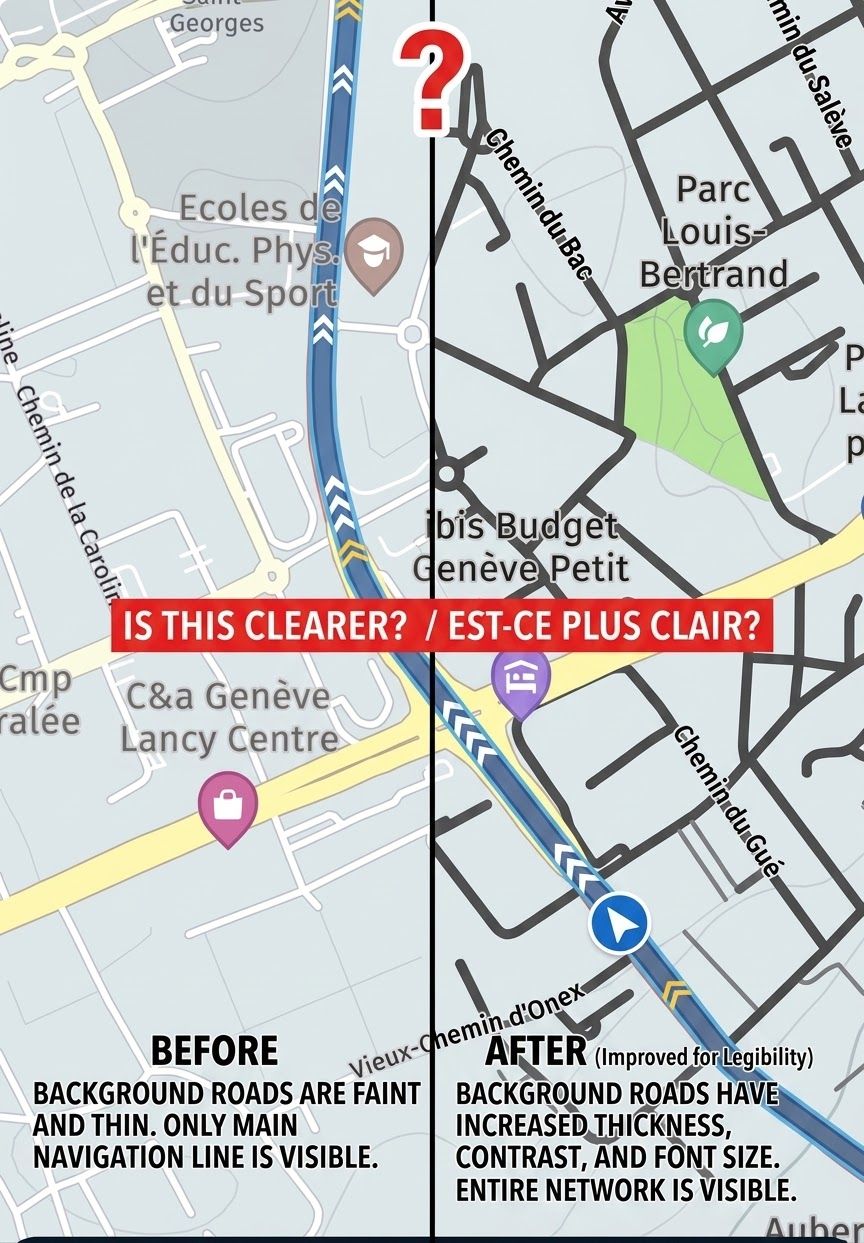
But why? The export procedure does it correctly.@Guzzist, like explained in that other thread, the feature "navigate route as track" has no influence on navigating an exported track-only GPX. It only has influence in routes created on the HERE map. If you open a track-only GPX, the white lines are the original track, and the blue one is where you will be navigated. It may seem odd that those are not always exactly equal, but that is due to HERE preferring roads if they are (very) close to a track when the track goes offroad (including unknown roads).
I have seen nothing in the other thread that is not explainable, except that OSM routes seem to have no or very coarse trackpoints included for the navigate route as track feature.
-
today i did test load track but select free ride. for me this is a almost perfect way to follow exact a track. ride a route as track always convert te blue line to roads that here knows and white line is not always easy to see.
as in second remark it would be great if a track can be created direct inside MRA planner. i think this is already ask a few times.
it would we also good if pio's that are saved in trackfile would show up op map. i will test this coming days if this works or not.
-
Please see this post: https://forum.myrouteapp.com/post/75367
-
Please see this post: https://forum.myrouteapp.com/post/75367
@Corjan-Meijerink said in How to navigate a track?:
Please see this post: https://forum.myrouteapp.com/post/75367
to what do you revere ?.
link to other post is not totaly the same.
today i did test pio but they are not taken or shown on map when on freeride but also on import on website the poi from a track are not imported.
Bouke
-
I'm a bit confused and wonder if development was running in a strange direction with "navigate route as track"...?
I know the sense of this, but my intention is, to get a gpx file which contains a track only and navigate by this.If I import such a file as Track or as Route-Track - the result is always the same - no matter which preferences I select: I get always a blue and a white line, if I start navigation with. That's annoying! I know, I should follow in this case the white line. But this forces unnecessary extra concentration!
The only mitigation I found is: select this Track or Route-Track for navigation, but start as "free ride"! Result: you will get only a blue line and you can navigate by clearly following the line (as usually for track navigation).Same issue is reported by @Martin Wilcke https://forum.myrouteapp.com/post/75062
Second issue: if gpx files contains waypoints <wpt> (POI), the import procedure operates that like stepchilds!
In case, gpx is imported as track, this points will never be imported!
In case, gpx is imported as Route-Track, this points will never be imported!
In case, gpx is imported as Route, this points will be imported as shaping points!
But why? The export procedure does it correctly.@Guzzist said in How to navigate a track?:
The export procedure does it correctly.
Right. You can export POIs as GPX <wpt>, but not the other way round by uploading or importing a route, route-track or tracklog.
The only way to get GPX <wpt> into MRA is by uploading them as POIs:
RouteLab > upload > POI@Guzzist said in How to navigate a track?:
In case, gpx is imported as Route, this points will be imported as shaping points!
I've never seen this before. Can you share a GPX example?
-
@Corjan-Meijerink said in How to navigate a track?:
Please see this post: https://forum.myrouteapp.com/post/75367
to what do you revere ?.
link to other post is not totaly the same.
today i did test pio but they are not taken or shown on map when on freeride but also on import on website the poi from a track are not imported.
Bouke
@Bouke-Ent said in How to navigate a track?:
poi from a track
If you're talking about a GPX file, there are no "POIs from a track" - there are POIs (<wpt>) and Tracks (<trk>) as separate elements.
You can import a Track as route-track (or tracklog) and you can import POIs - but not both in one go.
-
@Bouke-Ent said in How to navigate a track?:
poi from a track
If you're talking about a GPX file, there are no "POIs from a track" - there are POIs (<wpt>) and Tracks (<trk>) as separate elements.
You can import a Track as route-track (or tracklog) and you can import POIs - but not both in one go.
@Martin-Wilcke said in How to navigate a track?:
@Bouke-Ent said in How to navigate a track?:
poi from a track
If you're talking about a GPX file, there are no "POIs from a track" - there are POIs (<wpt>) and Tracks (<trk>) as separate elements.
You can import a Track as route-track (or tracklog) and you can import POIs - but not both in one go.
when export you have option track and poi. when i read in notepad i see track info and i see the poi info as wpt coordinates and poi name. so export is correct.
if i import it again in mra the track is correct but poi are not there.
did yesterday small test with mra next and same result.
for me it would be nice to drive on a track. in some countries OSM is better the HERE for small roads or path. with this option MRA Next use will be more flexibale for me. be able to add poi would be a very nice option to add extra information to track.
on my zumo xt it was easy to show track on map. but also there i was not able to get poi info on map.
i believe not many people will or would use this function but for me it would be nice..
i am now already happy with free ride as extra option to drive a track.. before i did swith over to osmand if osm find a path but here did not know roads.
-
@Corjan-Meijerink said in How to navigate a track?:
Please see this post: https://forum.myrouteapp.com/post/75367
to what do you revere ?.
link to other post is not totaly the same.
today i did test pio but they are not taken or shown on map when on freeride but also on import on website the poi from a track are not imported.
Bouke
@Bouke-Ent said in How to navigate a track?:
link to other post is not totaly the same.
No, it is not the same because you changed subject mid-thread here.
I am just an enthusiastic MRA user, and hope you will be one too!
Most motorcycle problems are caused by the nut that connects the handlebar to the saddle.
Check out RideSleepRepeat.eu, a biker community for sharing stays across Europe
-
@Bouke-Ent said in How to navigate a track?:
link to other post is not totaly the same.
No, it is not the same because you changed subject mid-thread here.
@Con-Hennekens said in How to navigate a track?:
@Bouke-Ent said in How to navigate a track?:
link to other post is not totaly the same.
No, it is not the same because you changed subject mid-thread here.
ok, then i read other in a other way. that is why i ask it.
i did not want to change this topic. in my believe topic was how to ride a track with one off the option to import track and ride it in free mode .
still because off this topic i found out this option of show track on screen in free ride. i did this before in bike mode but there was no speed.i will leave this topic and i want to give big thanks to TS to show me this option.
-
@Martin-Wilcke said in How to navigate a track?:
@Bouke-Ent said in How to navigate a track?:
poi from a track
If you're talking about a GPX file, there are no "POIs from a track" - there are POIs (<wpt>) and Tracks (<trk>) as separate elements.
You can import a Track as route-track (or tracklog) and you can import POIs - but not both in one go.
when export you have option track and poi. when i read in notepad i see track info and i see the poi info as wpt coordinates and poi name. so export is correct.
if i import it again in mra the track is correct but poi are not there.
did yesterday small test with mra next and same result.
for me it would be nice to drive on a track. in some countries OSM is better the HERE for small roads or path. with this option MRA Next use will be more flexibale for me. be able to add poi would be a very nice option to add extra information to track.
on my zumo xt it was easy to show track on map. but also there i was not able to get poi info on map.
i believe not many people will or would use this function but for me it would be nice..
i am now already happy with free ride as extra option to drive a track.. before i did swith over to osmand if osm find a path but here did not know roads.
@Bouke-Ent said in How to navigate a track?:
f i import it again in mra the track is correct but poi are not there.
The features for GPX import and export are different:
You can export a route, a track and POIs in one go by using "save as gpx1.1 (route, track, poi)".
But you can only import either route(s), track(s) or POIs from a GPX at a time.
Routes and tracks are imported to your Routes Library, while POIs appear in your POI Library (you have to create or open a route to get access to them).
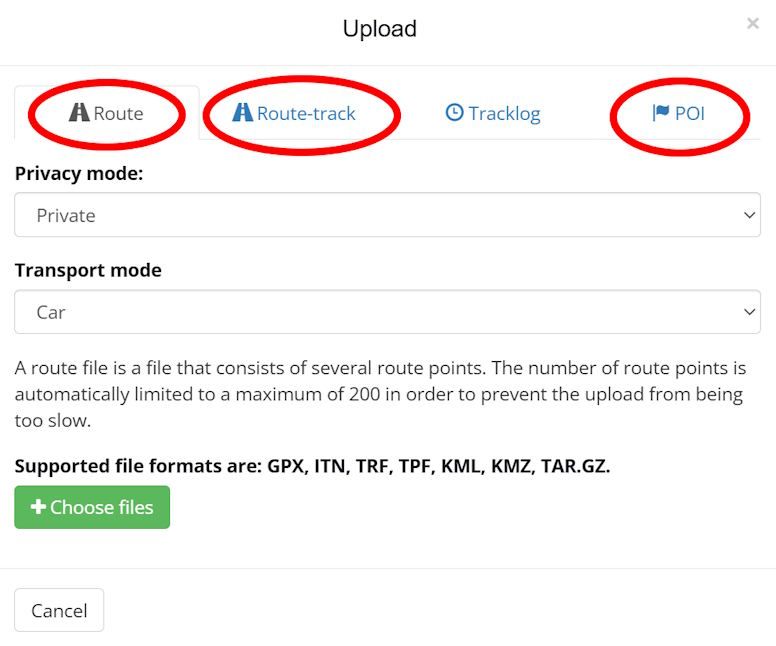
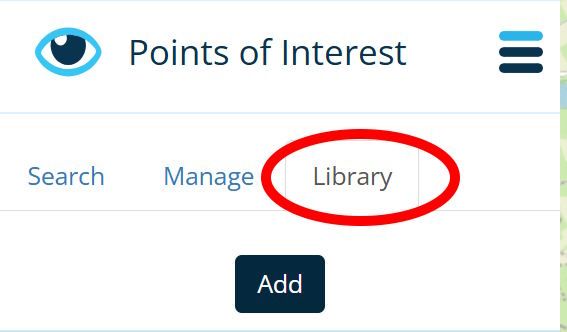
-
Hi everyone, this discussion is drifting in an unintended direction. May the header is misleading? My first post was simply meant to describe the situation, and ended with a simple question: why.
Of course, this was implied with the hope, that there would be a future development that treats imports and exports equally.By the way: I am very familiar with all the features of MRA Routeplanner, MRA Navigation and GPX standard.
The background to my question is this: at many prominent events, the organizers provide a GPX file containing one or more tracks. This ensures that all participants get the same result on their different navigation devices (since routes always turn out differently!).
The GPX file often includes additional necessary locations - which aren’t necessarily part of the track - but may also be situated somewhat off to the path. For example: checkpoints, bivouacs, gas- or water sources, etc.These were established when the GPX format was created in the last century by the company TopoGrafix - and exists in the same way until today.
If you look into a GPX file that contains such points, they stand alone and are not related to a route or track. They are called waypoints and are labeled as <wpt>.
In opposit: if a point is needed to calculate a route, then this point is called routepoint and labeled <rtept>.
If a point is needed to draw a track, this point is called trackpoint and labeled <trkpt>.Yes, we may wonder why they were called waypoints if they had nothing to do with the route nor the track.
Unfortunately, many navigation devices still cause confusion today because they use the terms inconsistently.In MyRouteApp, these waypoints <wpt> are called Points Of Interest (POI). And yes, MyRouteApp contains an extensive library of such POIs that can be used in route planning. You can even enter manually single custom POIs, also import lists of POIs.
So MyRouteApp can handle this in a variety of ways.
This really leaves the question open - why the import routine for GPX files can’t handle this and display them together with the imported route or track.
Quite a few other apps can do this.I know that I can import the contents of a GPX file into MyRouteApp in several steps and then merge them. But that’s an unnecessary amount of work (and prone to errors), for example, on the eve of a rally when you’re under time pressure.
Not sure about, but it looks like, all the technical basics are there in MyRouteApp - only the idea or the willing to use it for further development is missing...
-
perfect how you write it. i have the same question but maybe i was taking over.
i also realy want to know if wpt in a track file will be taken by MRA planner and MRA Next. it would be a great option. other options that are told here are in my eyes to difficult to do. beter is to import all information form gpx file and then ask what you want to import. only trackpoints or also wpt point with info (poi).
-
perfect how you write it. i have the same question but maybe i was taking over.
i also realy want to know if wpt in a track file will be taken by MRA planner and MRA Next. it would be a great option. other options that are told here are in my eyes to difficult to do. beter is to import all information form gpx file and then ask what you want to import. only trackpoints or also wpt point with info (poi).
@Bouke-Ent said in How to navigate a track?:
wpt in a track file
wpts are not part of a track file; that's a common misunderstanding. Unlike VIA points, that are part of a route, there is no link between wpts and tracks in any way even if they are part of the same GPX file.
-
@Bouke-Ent said in How to navigate a track?:
wpt in a track file
wpts are not part of a track file; that's a common misunderstanding. Unlike VIA points, that are part of a route, there is no link between wpts and tracks in any way even if they are part of the same GPX file.
@Martin-Wilcke said in How to navigate a track?:
@Bouke-Ent said in How to navigate a track?:
wpt in a track file
wpts are not part of a track file; that's a common misunderstanding. Unlike VIA points, that are part of a route, there is no link between wpts and tracks in any way even if they are part of the same GPX file.
wpt in a gpx means a single not to route or track point. when export a track and poi file in MRA a poi gets wpt in gpx file.
TopoGrafix
- stand alone and are not related to a route or track. They are called waypoints and are labeled as <wpt>.
- a point is needed to calculate a route, then this point is called routepoint and labeled <rtept>.
- trackpoint and labeled <trkpt>.
-
@Martin-Wilcke said in How to navigate a track?:
@Bouke-Ent said in How to navigate a track?:
wpt in a track file
wpts are not part of a track file; that's a common misunderstanding. Unlike VIA points, that are part of a route, there is no link between wpts and tracks in any way even if they are part of the same GPX file.
wpt in a gpx means a single not to route or track point. when export a track and poi file in MRA a poi gets wpt in gpx file.
TopoGrafix
- stand alone and are not related to a route or track. They are called waypoints and are labeled as <wpt>.
- a point is needed to calculate a route, then this point is called routepoint and labeled <rtept>.
- trackpoint and labeled <trkpt>.
Yep, I know

-
That's the major difference between MyRouteApp and DMD:
MyRouteApp is very good in street routing; not sure if developer is willing to enhance it also for track operation in future. By the given solid foundation in on-road routing, it will be difficult to build on that with off-road routing (track navigation) on top. And: it looks like the interoperability with other apps isn't in focus.DMD is excellent in offroad routing (track navigation) and offers all stuff you can imagine could be important for it. No wonder about, it can inform you p.e. about distance to a <wpt> which is close to the track.
Nowadays, the developer is going to include also onroad routing (route planning). But this is just in the beginning and far away from MyRouteApp level!This discussion here shows, there are MyRouteApp users which are interested to get things like:
if there are <wpt> in a gpx file additionally - they should be handed as well. Of course they can be imported, but that's not enough. Because currently they can be "added" only to routes but not to tracks.Both user groups forces both developers, to enhance the underdeveloped part of the apps. Not sure how many time it will need for enhancement. But we are lucky: we can run both apps parallel on a Android device - feed by same gpx file. So, it's easy to switch between the apps just what is best for the situation

-
@Bouke-Ent said in How to navigate a track?:
wpt in a track file
wpts are not part of a track file; that's a common misunderstanding. Unlike VIA points, that are part of a route, there is no link between wpts and tracks in any way even if they are part of the same GPX file.
@Martin-Wilcke said in How to navigate a track?:
wpts are not part of a track file; that's a common misunderstanding.
Actually, that is the common misunderstanding.
Waypoints do not have to be on the track, but that does not mean they are not part of it. In navigation going back long before motorbikes were invented, a turn point was commonly defined by following a specified heading until a given waypoint (distinguishing feature usually off the track) was observed on a specified bearing. So yes, when importing a track, it is important to import any specified waypoints defined in the track file. Whether MRA uses them as part of its calculations is irrelevant. You must accept that if they were important enough to the creator of the track to be included in the file, then they are probably just as important to the user of the track.
-
@Martin-Wilcke said in How to navigate a track?:
wpts are not part of a track file; that's a common misunderstanding.
Actually, that is the common misunderstanding.
Waypoints do not have to be on the track, but that does not mean they are not part of it. In navigation going back long before motorbikes were invented, a turn point was commonly defined by following a specified heading until a given waypoint (distinguishing feature usually off the track) was observed on a specified bearing. So yes, when importing a track, it is important to import any specified waypoints defined in the track file. Whether MRA uses them as part of its calculations is irrelevant. You must accept that if they were important enough to the creator of the track to be included in the file, then they are probably just as important to the user of the track.
I'm talking about GPX, specifically its structure and semantics.
A GPX file (implementation) or GPX container (model) might have multiple tracks and waypoints. All these elements are at the same level; they are not nested or linked in any way. Whatever the creator's intention was, you can't tell from looking at a GPX which waypoint belongs to which track. If you want to do so, you need some clues, rules, guessing - whatever.
That's why some Apps (e.g., DMD) prefer to import a GPX as a bundle to keep the content cohesive.
MRA, however, takes a different approach: you have to import tracks and waypoints in individual steps into different RouteLab areas. In particular, you don't end up with waypoints appearing in a route-track's "manage" tab in the "POI" section - that's what this thread is about, and that's what @guzzist is asking for.
@Paul-Smith-3 said in How to navigate a track?:
So yes, when importing a track, it is important to import any specified waypoints defined in the track file.
While still talking about GPX: there is no "track file", and there never was.
-
I blieve, we have the same understanding, but may using other words to explain - or translation does it not in best sense.
MRA does it in it's own way and sepereates data in stricktly separated areas:
- Tracklogs - which sould collect only own logged travels (as tracks)
- Routes - which collects own or received routes and received tracks (here called Route-Tracks)
- POI - which collects Points of Interests (in gpx standard named as <wpt>
For the moment, I will not discuss this.
But I'm asking towards development: based on given build in MRA - if a gpx is going to be imported (which contains a route <rte> and <wpt>. Can we get a solution:
- to import in one hit the <rte> into the area "Routes" (as route) - and the <wpt> into the area "Routes" / Section "Point of Interest" / tab "Manage"?
- to Import in one hit the <trk> into area "Routes" (as Route-Track) - and the <wpt> into the area "Routes" / Section "Point of Interest" / tab "Manage"?
But yes, I see: this will change a paradigma in MRA, because until now Route-Tracks can't have Points of Interest.
And I consider: what if a gpx file does contain both <rte> and <trk> - and if there are also <wpt> in?
I believe we need 2 import actions: one for Route and another for Route-Track. Or it could be automated, to get both in one hit - because this is the case in current MRA build if there are 2 routes or 2 tracks in one gpx file to be imported (it creates that separated).
And I also consider: in this case, a gpx file does contain <rte> and <trk> and <wpt>. To which one sould be the imported <wpt> belong to? To the Route, to the Route-Track, or to both?
I prefer to both, because if to one of them it's not necessary to get the <wpt> - it's more easy to delete them (one by one), as to enter them (one by one) with search of position afterwards.Yes, other Apps can show more than one track in the same map; MRA doesn't. But I think, there is no need to change this in MRA also.
I can imagine, this would not be a big effort, but a "masterpiece" - which resolves the problems we are discussing here and makes many users happy. And brings MRA again a step vorward in relation to DMD
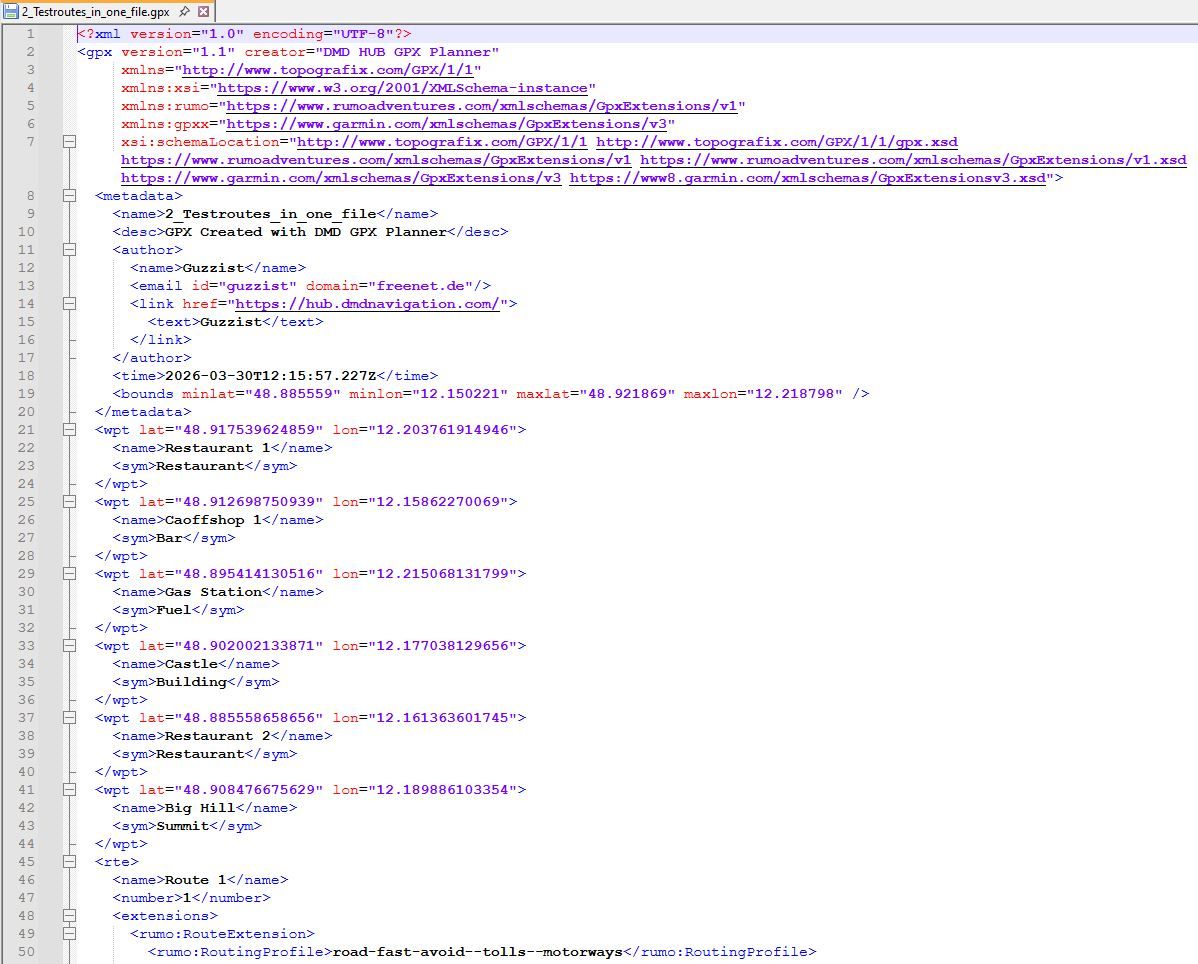
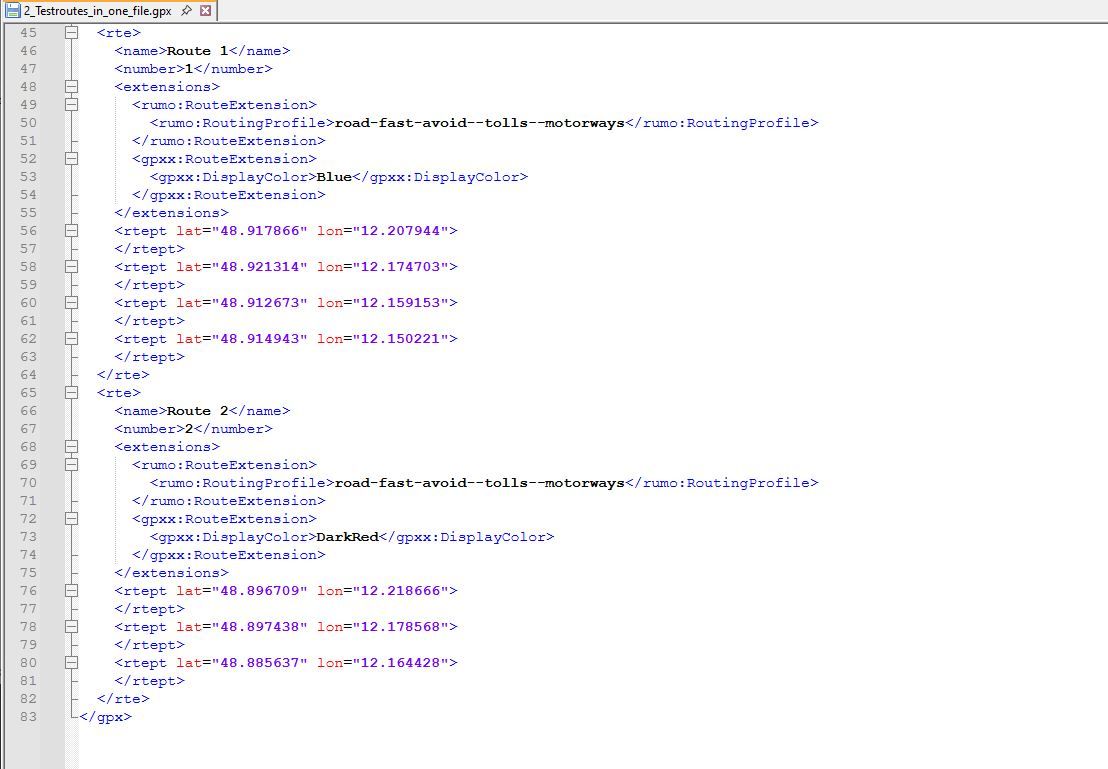
I know, many users are there, who will love it - but the "louder" ones are those with Carplay issues...Bay the way: DMD does also exactly was gpx standard is: showing groupwise content of a a gpx file. All routes <rte>, all tracks <trk>, all waypoints <wpt>. But they don't belong to each other; they are only in one file.
The only belongings are trackpoints <trkpt> which belongs to tracks <trk>.
And routepoints <rtept> which belongs to <rte>.
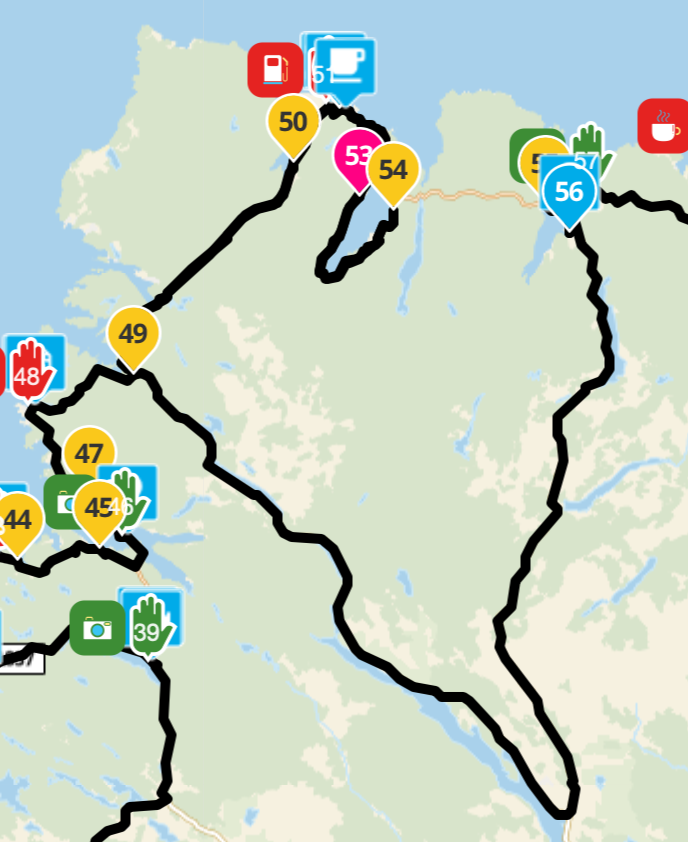
(see attached images)
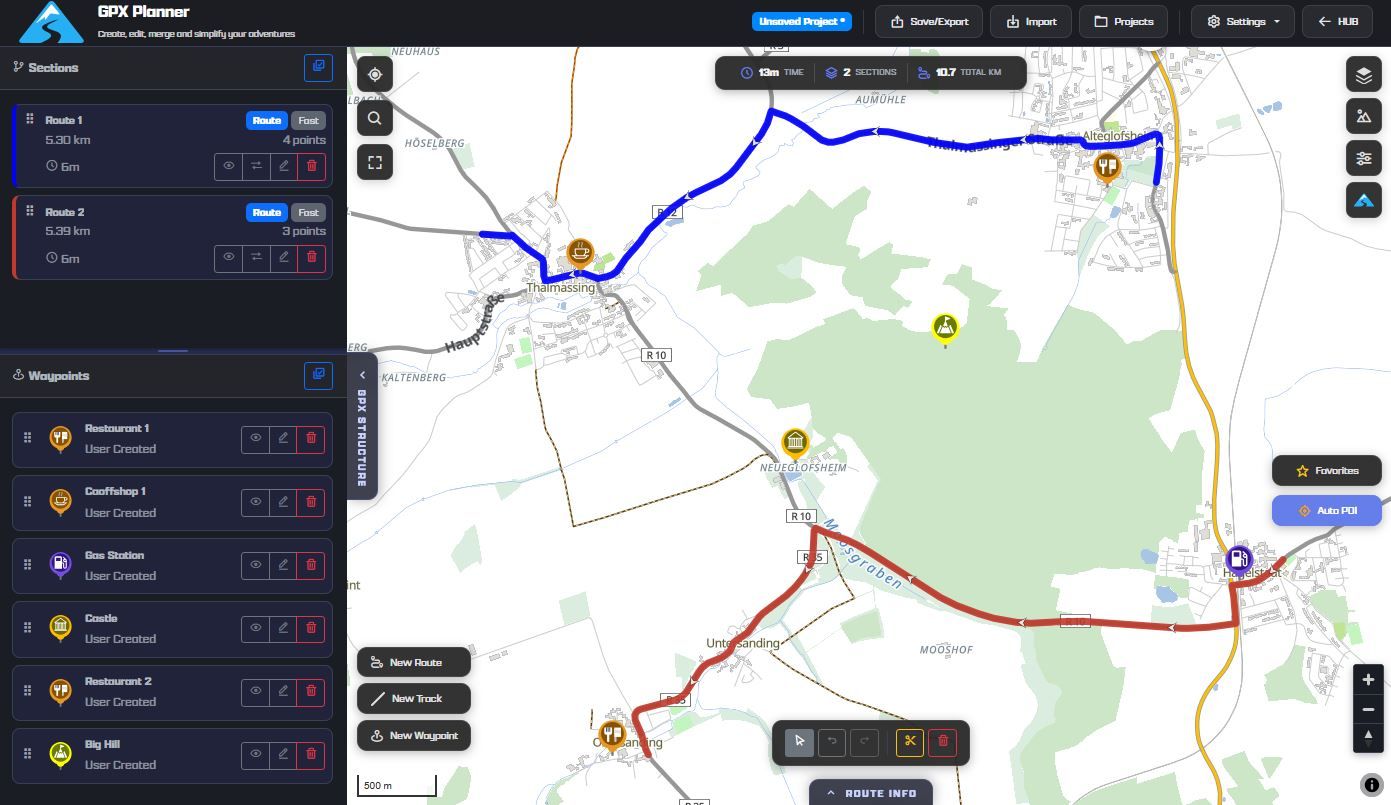
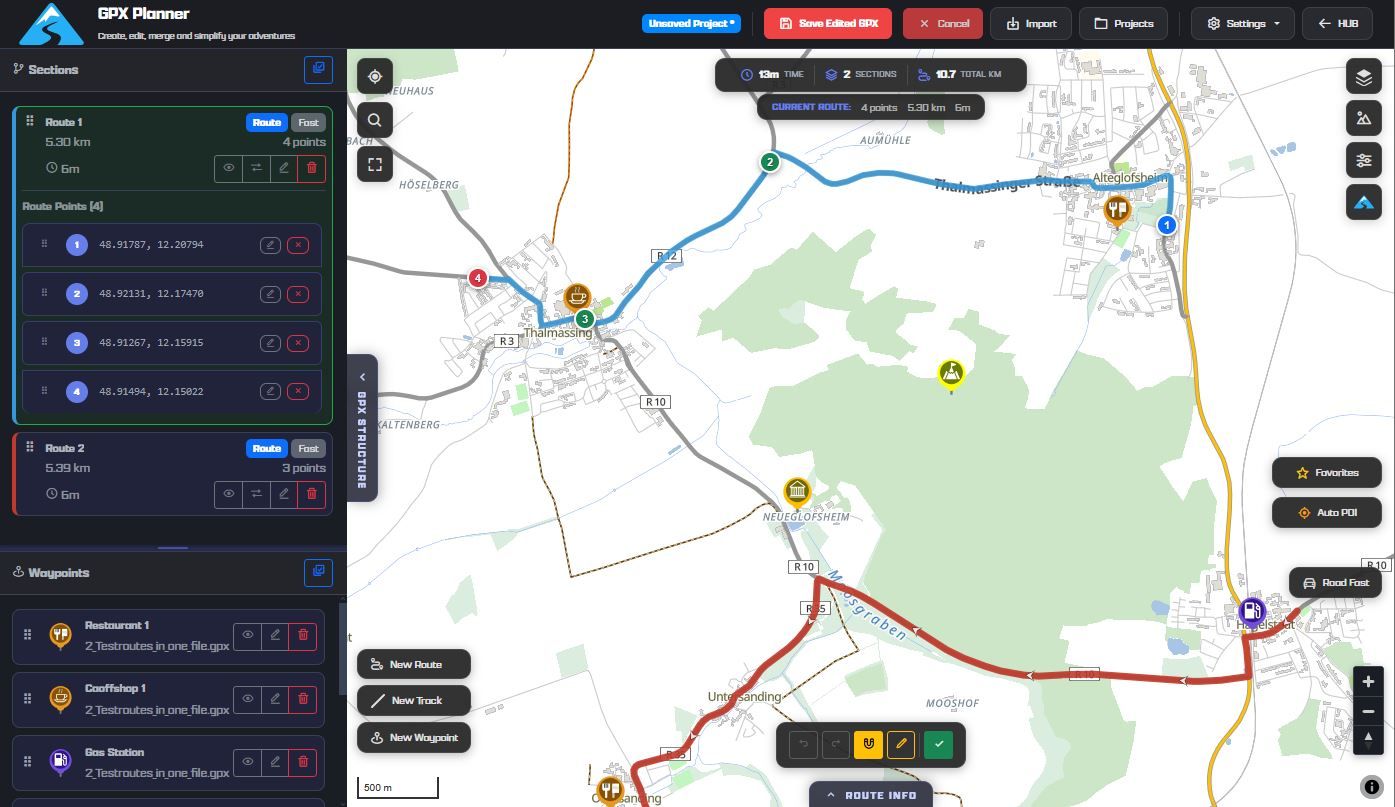
Nothing is impossible ;-)
In past: GARMIN Zumo 210->GARMIN Zumo 395->GARMIN XT=> now: DMD T865-X + MyRoute-App, LocusMaps, OsmAnd.
In past: GARMIN MapSource ->GARMIN BaseCamp->Tyre->Kurviger->Calimoto=> now: MRA-Routplanner.


Hello! It looks like you're interested in this conversation, but you don't have an account yet.
Getting fed up of having to scroll through the same posts each visit? When you register for an account, you'll always come back to exactly where you were before, and choose to be notified of new replies (either via email, or push notification). You'll also be able to save bookmarks and upvote posts to show your appreciation to other community members.
With your input, this post could be even better 💗
Register Login
-
 312217
-
 112341
-
 09320
09320
-
0362
-
0383
-
 04129
04129
-
 09190
09190