Unable to stop navigation
-
@Herman-Veldhuizen How often do you press stop because you find it annoying?
Con has already mentioned all the advantages. If it bothers you, you can let the navigation run during a break, and the double confirmation at the end of the route shouldn't be considered annoying.
Referring to other apps that do things differently... I think it's good that there are different apps that work in different ways and have different features, so everyone can choose the app that suits them best.
@Peter-Zehentreiter Well I never felt the need to pause the navigation. So stop (end) is the only thing I needed so far. I use it to e.g. restart a navigation with different settings or to select another route to navigate.
-
@Peter-Zehentreiter Well I never felt the need to pause the navigation. So stop (end) is the only thing I needed so far. I use it to e.g. restart a navigation with different settings or to select another route to navigate.
@Herman-Veldhuizen, many people did feel that need and explicitly asked for this feature. Personally, I usually just force close the app, by a swipe up.
I am just an enthusiastic MRA user, and hope you will be one too!
Most motorcycle problems are caused by the nut that connects the handlebar to the saddle.
Check out RideSleepRepeat.eu, a biker community for sharing stays across Europe
-
@Herman-Veldhuizen, many people did feel that need and explicitly asked for this feature. Personally, I usually just force close the app, by a swipe up.
@Con-Hennekens I am not asking to take away the pause but to reduce the number of clicks.
-
@Con-Hennekens I am not asking to take away the pause but to reduce the number of clicks.
@Herman-Veldhuizen, you do not need to do any extra click, you can leave that resume box untouched and just enter the routes menu to select another route.
I am just an enthusiastic MRA user, and hope you will be one too!
Most motorcycle problems are caused by the nut that connects the handlebar to the saddle.
Check out RideSleepRepeat.eu, a biker community for sharing stays across Europe
-
@Herman-Veldhuizen, you do not need to do any extra click, you can leave that resume box untouched and just enter the routes menu to select another route.
@Con-Hennekens yes but its still confusing as the dialog is still there after having selected another route. The dialog hides the opening page of the new route. At least on my android phone.
-
@Herman-Veldhuizen You seem to be making a very simple process incredibly complicated.
You decide to stop somewhere and tap the 3 dots to open the navigation menu, you tap Stop navigation and then you are asked to confirm this by tapping a large Confirm button. The confirm button is there to safeguard any wrong taps that could be made when wearing gloves. The app is now in a paused state, you can swipe up and close the app if you want to. You can now watch YouTube videos, play a game of solitaire on your phone and when you’re ready to continue your journey, you open the app and the screen shows you a choice - Resume navigation - you can tap No or Navigate. What part of this simple process do you want to eliminate?Always willing to help if I can.
Triumph Tiger 1200 XRT called Tina.
MRA Navigation Next and SilverFox BJ8 -
@Herman-Veldhuizen You seem to be making a very simple process incredibly complicated.
You decide to stop somewhere and tap the 3 dots to open the navigation menu, you tap Stop navigation and then you are asked to confirm this by tapping a large Confirm button. The confirm button is there to safeguard any wrong taps that could be made when wearing gloves. The app is now in a paused state, you can swipe up and close the app if you want to. You can now watch YouTube videos, play a game of solitaire on your phone and when you’re ready to continue your journey, you open the app and the screen shows you a choice - Resume navigation - you can tap No or Navigate. What part of this simple process do you want to eliminate?@Nick-Carthew
Beeeline does it the other way around: Resume dialog first, confirm second. Still the same amount of clicks to end a navigation (one less because the stop is on the main window instead of behind the ...) but one click less when you want to pause the navigation.
I find it less annoying.https://drive.google.com/file/d/1erEEZwpurqkWfC-ZN-xj5qj8hiqrlbbq/view?usp=drivesdk
in the video i show the resume first (play) followed by the end.
-
Since Version 5.x of MyRouteApp Navigation Next, I have been having difficulty ending navigation:
If I'm going to stop a navigation, there comes a first popup with question: "Stop navigation" with button "comfirm". This is in top area of the screen, and I can press button "confirm" also with gloves.
After confirming, the main screen appears, with a second popup question: "Resume navigation?" with buttons "no" and "navigate".
- Why question twice?
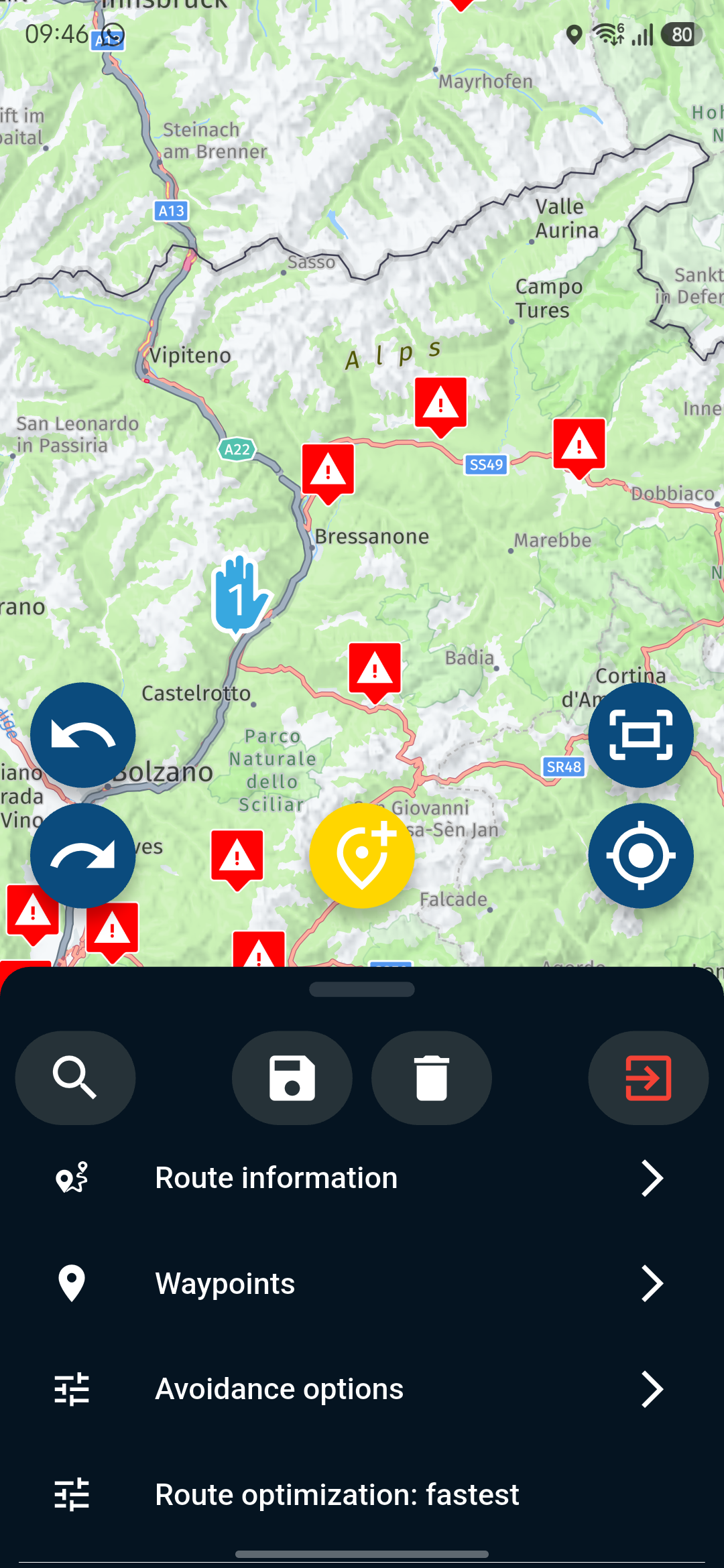
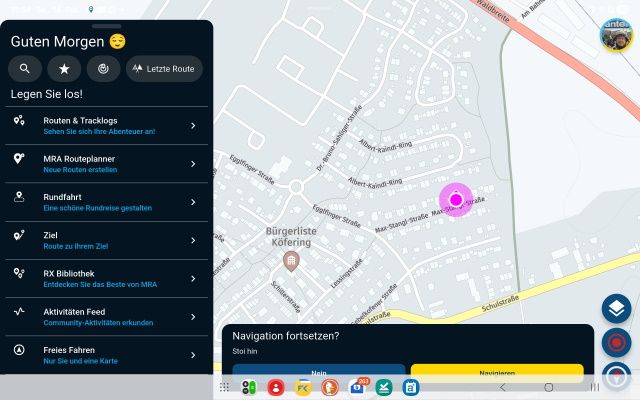
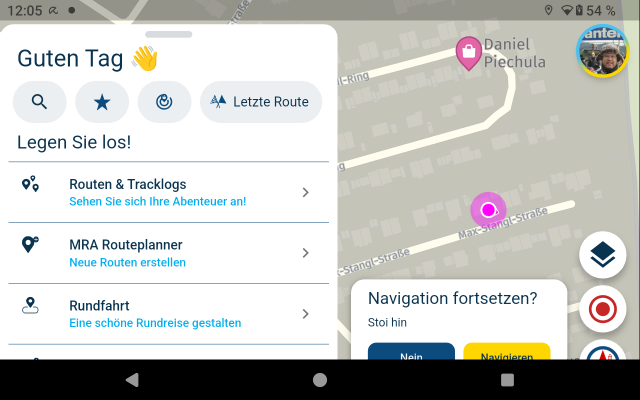
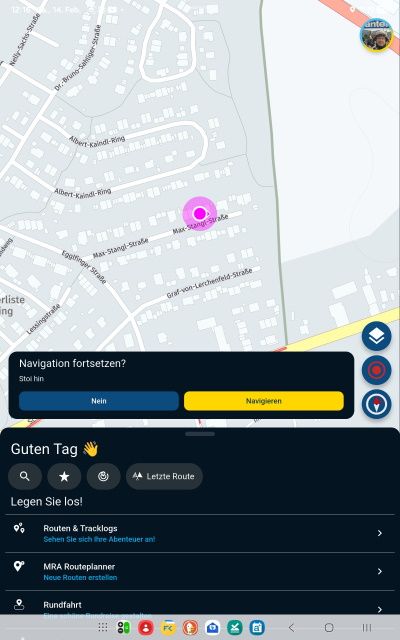
- Regardless, of whether you have used full-screen moder in settings, or not - the second qestion "Resume navigation" with buttons will be covered by device bottom menue:
Check with Samsung Galaxy Tab S8 (Android 16) in landscape format:
Check with DMD T865-X (Android 14) in landscape format:
For both devices, if they are used in portrait format - ther is no issue:
Please move question boxes up, so, the device bottom menue will not cover it, and users can hit the buttons securely, also with gloves.
-
@Nick-Carthew
Beeeline does it the other way around: Resume dialog first, confirm second. Still the same amount of clicks to end a navigation (one less because the stop is on the main window instead of behind the ...) but one click less when you want to pause the navigation.
I find it less annoying.https://drive.google.com/file/d/1erEEZwpurqkWfC-ZN-xj5qj8hiqrlbbq/view?usp=drivesdk
in the video i show the resume first (play) followed by the end.
@Herman-Veldhuizen Thank you, I am grateful to you for sharing your video but I am also aware that each navigation device has it's own method of carrying out similar procedures and I find nothing wrong or over complicated or confusing with the way that MRA Navigation Next choses to pause, resume or stop a route.
Always willing to help if I can.
Triumph Tiger 1200 XRT called Tina.
MRA Navigation Next and SilverFox BJ8 -
@Herman-Veldhuizen Thank you, I am grateful to you for sharing your video but I am also aware that each navigation device has it's own method of carrying out similar procedures and I find nothing wrong or over complicated or confusing with the way that MRA Navigation Next choses to pause, resume or stop a route.
@Nick-Carthew thats fine but i dont think that one can argue with the fact that a click less is a good thing in general.
-
@Nick-Carthew thats fine but i dont think that one can argue with the fact that a click less is a good thing in general.
@Herman-Veldhuizen said in Unable to stop navigation:
@Nick-Carthew thats fine but i dont think that one can argue with the fact that a click less is a good thing in general.
I have enough time for an extra tap

-
Please stop the off topic discussion - as I'm processing the feedback of the original topic I want to keep the thread open but the discussion is not about the feature (which I'm happy about and won't change any time soon)





Hello! It looks like you're interested in this conversation, but you don't have an account yet.
Getting fed up of having to scroll through the same posts each visit? When you register for an account, you'll always come back to exactly where you were before, and choose to be notified of new replies (either via email, or push notification). You'll also be able to save bookmarks and upvote posts to show your appreciation to other community members.
With your input, this post could be even better 💗
Register Login
-
 312217
-
 112341
-
 09320
09320
-
0362
-
0383
-
 04128
04128
-
 09190
09190