New beta! 5.0.3 (447)
-
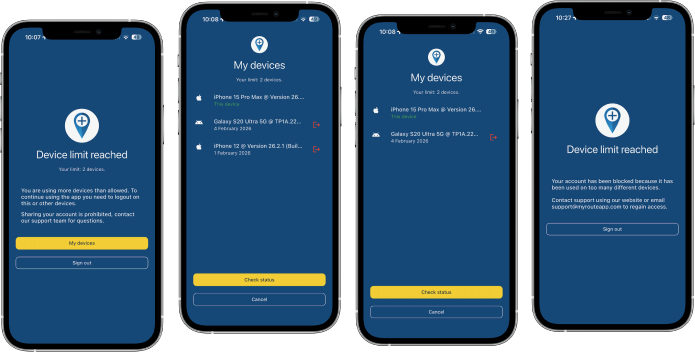
Just noticed the devices issue. I’m lifetime member, MRA in iPhone 16 and iPad. Connected to my Harley, I received message that I need a navigation next subscription to use it. Now I try to disconnect from iPad… anyway they are only TWO devices!! (If web browser connections from PC are allowed)
Update: after deleted app from iPad, so I have only on iPhone, the CarPlay connected with iPhone goes well. Tried connecting to Audi and to Harley.
So… problem is when I have app logged on 2 devices? -
@Rob-Verhoeff said in New beta! 5.0.3 (447):
@Bouke-Ent said in New beta! 5.0.3 (447):
hopelijk krijg ik nu niet tig meldingen.
Je heb een limiet van drie apparaten waarvan er twee tegelijkertijd ingelogd kunnen zijn. Wissel jij vaker van toestel dan van sokken? Pas als je met het derde apparaat wilt navigeren dan krijg je op dat apparaat de melding om je af te melden van één van je andere apparaten. En dat vergt bijna geen extra handelingen...
Der Begriff „Abmelden“ ist irreführend, denn mit der einen Funktion „s.Bild“ Symbol rechts wie ein „Ausgang“ wird nicht abgemeldet sondern nur das Gerät ausgetragen und damit auf das 3. Gerät gewechselt…
Wenn man dann den Status abfragt ist die App an diesem Gerät freigegeben!!!The term "log out" is misleading, because with the one function "s.picture" symbol on the right like an "output" is not logged out but only the device is logged out and thus on the 3rd Device changed...
If you then ask for the status, the app is released on this device!!!
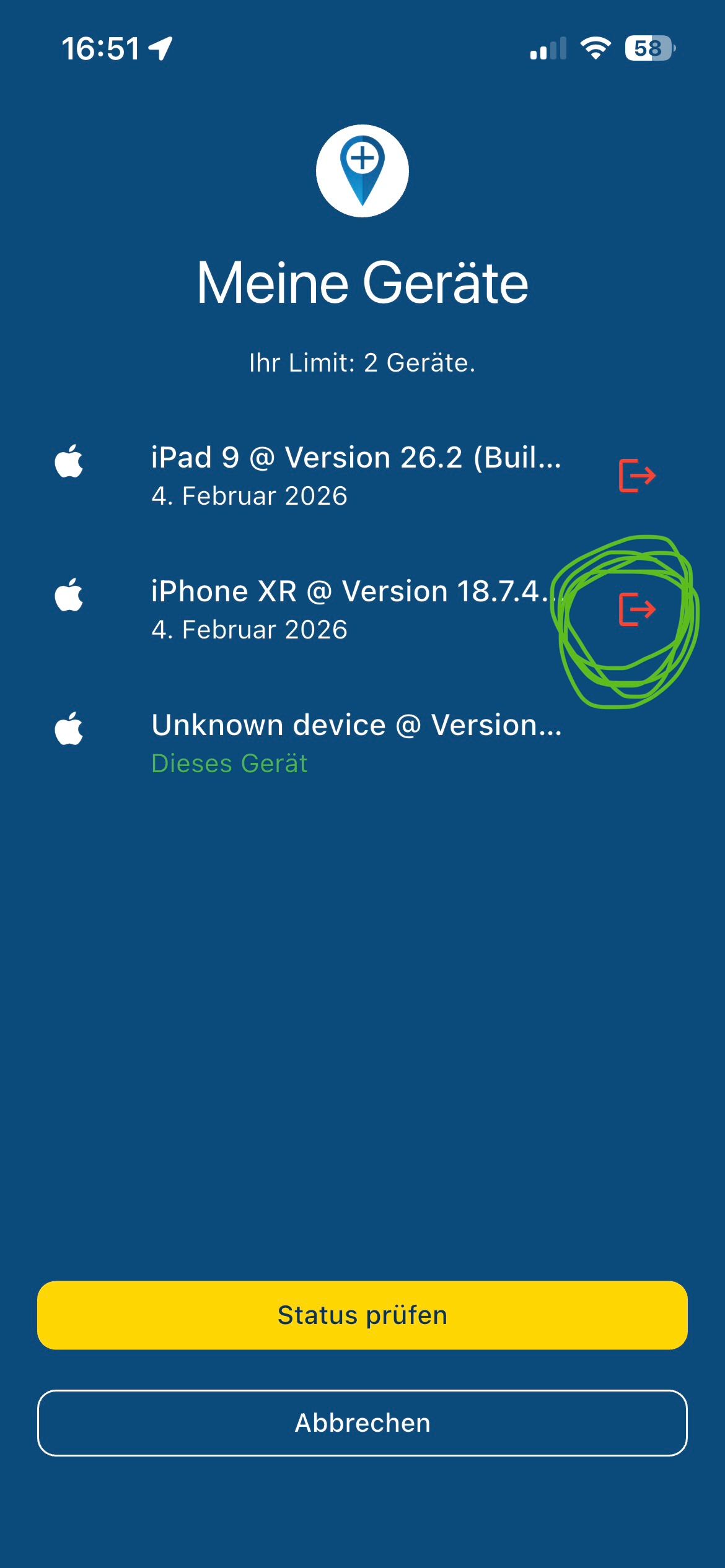
@Hubert-Thoring where may I see this screen?? I’m looking out from app but I cannot find where to see my devices logged…
-
@Hubert-Thoring where may I see this screen?? I’m looking out from app but I cannot find where to see my devices logged…
@Cristiano-Repetti said in New beta! 5.0.3 (447):
@Hubert-Thoring where may I see this screen?? I’m looking out from app but I cannot find where to see my devices logged…
This only comes with the second / third device in the app application...
It's not possible to check, but it would be helpful...
-
If you open the app on your phone and you don’t see a warning about the devices, that’s definitely not the issue.
Try restarting the app completely and reconnecting again to CarPlay.
-
could someone answer a query for me. the answer may be obvious, but thought i would ask.
as I have previously mentioned earlier in the thread, I am a supporter of device restriction, as it stops freeloaders.That said, it doesn’t really affect me personally. I only use an iPhone with a CarPlay device, plus a rugged Android tablet for multi-day tours, and I only ever use one or the other, never both at same time, anyhow,
my question is.
does a CarPlay unit (specifically a Carpuride 702) count as an extra device? My understanding is that you’re only logged in on the phone itself, not the CarPlay device. -
@paul69 : It only affects the devices on which the app is installed, so your CarPlay device is not affected because the content of the phone is played on the CarPlay device. Have fun!
-
Een groepsabonnement zou natuurlijk welkom zijn.
-
could someone answer a query for me. the answer may be obvious, but thought i would ask.
as I have previously mentioned earlier in the thread, I am a supporter of device restriction, as it stops freeloaders.That said, it doesn’t really affect me personally. I only use an iPhone with a CarPlay device, plus a rugged Android tablet for multi-day tours, and I only ever use one or the other, never both at same time, anyhow,
my question is.
does a CarPlay unit (specifically a Carpuride 702) count as an extra device? My understanding is that you’re only logged in on the phone itself, not the CarPlay device.@paul69 what @Hubert-Thoring says is correct.
CarPlay / Android Auto is not an extra device. -
I'm a bit irritated, be ause I'm not familiar enough with AA/CP. Until now, I thought that these devices merely "mirror the monitor" of the connected mobile phone (wireless or wired). So, Corjan's last answer faces into my understanding.
But currently @Con-Hennekens replies to me, I should not call such devices as "mirror".
So, does this mean, on some AA/CP models apps can be installed?
Or in other words: is my understanding correct - does the new rule only counts a device, if "Navigation Next" is really installed on a device? -
I would say every device that has its own installed MRA app on the system is counted. A CP or AA solution as a pure mirroring of the mobile phone display is not counted...
-
I'm a bit irritated, be ause I'm not familiar enough with AA/CP. Until now, I thought that these devices merely "mirror the monitor" of the connected mobile phone (wireless or wired). So, Corjan's last answer faces into my understanding.
But currently @Con-Hennekens replies to me, I should not call such devices as "mirror".
So, does this mean, on some AA/CP models apps can be installed?
Or in other words: is my understanding correct - does the new rule only counts a device, if "Navigation Next" is really installed on a device?@Guzzist yes, the app only counts installed devices. Meaning it’s an Android or iOS device.
Not calling Android Auto / CarPlay a mirroring device is preferred because it does not actually mirror your screen. It’s a whole different interface with its own rules / features. Whereas a mirroring device just copies the screen of your phone with all those features.
But not very relevant for the discussion.
No, CP / AA does not count as a device
-
I'm a bit irritated, be ause I'm not familiar enough with AA/CP. Until now, I thought that these devices merely "mirror the monitor" of the connected mobile phone (wireless or wired). So, Corjan's last answer faces into my understanding.
But currently @Con-Hennekens replies to me, I should not call such devices as "mirror".
So, does this mean, on some AA/CP models apps can be installed?
Or in other words: is my understanding correct - does the new rule only counts a device, if "Navigation Next" is really installed on a device?This post is deleted! -
I'm a bit irritated, be ause I'm not familiar enough with AA/CP. Until now, I thought that these devices merely "mirror the monitor" of the connected mobile phone (wireless or wired). So, Corjan's last answer faces into my understanding.
But currently @Con-Hennekens replies to me, I should not call such devices as "mirror".
So, does this mean, on some AA/CP models apps can be installed?
Or in other words: is my understanding correct - does the new rule only counts a device, if "Navigation Next" is really installed on a device?@Guzzist Si se le puede instalar aplicaciones no es un CP/AA, es un dispositivo Android o Apple.
Aunque también hay aparatos mixtos CP/AA + android (linkifun MT23, por ejemplo).
En todo caso la regla es fácil. Si instalas, suma como equipo adicional, si no instalas, no.Saludos.
-
I'm a bit irritated, be ause I'm not familiar enough with AA/CP. Until now, I thought that these devices merely "mirror the monitor" of the connected mobile phone (wireless or wired). So, Corjan's last answer faces into my understanding.
But currently @Con-Hennekens replies to me, I should not call such devices as "mirror".
So, does this mean, on some AA/CP models apps can be installed?
Or in other words: is my understanding correct - does the new rule only counts a device, if "Navigation Next" is really installed on a device?@Guzzist AA Needs your phone in erachter of that device. No phone no possibility to use MRA. That’s why AA is not seen as an extra device so doesn’t country in the number Off devices for your MRA account
-
@paul69 what @Hubert-Thoring says is correct.
CarPlay / Android Auto is not an extra device.@Corjan-Meijerink said in New beta! 5.0.3 (447):
@Hubert-Thoring says is correct.
CarPlay / Android Auto is not an extra device.thanks both for the reply and clarification
-
I'm a bit irritated, be ause I'm not familiar enough with AA/CP. Until now, I thought that these devices merely "mirror the monitor" of the connected mobile phone (wireless or wired). So, Corjan's last answer faces into my understanding.
But currently @Con-Hennekens replies to me, I should not call such devices as "mirror".
So, does this mean, on some AA/CP models apps can be installed?
Or in other words: is my understanding correct - does the new rule only counts a device, if "Navigation Next" is really installed on a device?@Guzzist said in New beta! 5.0.3 (447):
Or in other words: is my understanding correct - does the new rule only counts a device, if "Navigation Next" is really installed on a device?
Yes that's exactly what it is. AA/CP devices usually do not run the software, your phone runs it, to be displayed on on your screen. I hate the term "mirror" for it, since, the GUI is not identical to the native app's GUI, and comes with some restrictions. But the app is indeed run by the phone.
To make it even more complex, SOME (mostly car) head units actually do run Android natively and you can install apps on it. In those cases, of course, it is seen as an independant device running the MRA app. but if you need to connect your phone in order to use AA or CP, it is NOT an independant device, and you can use as many AA/CP devices from your phone as you like.
-
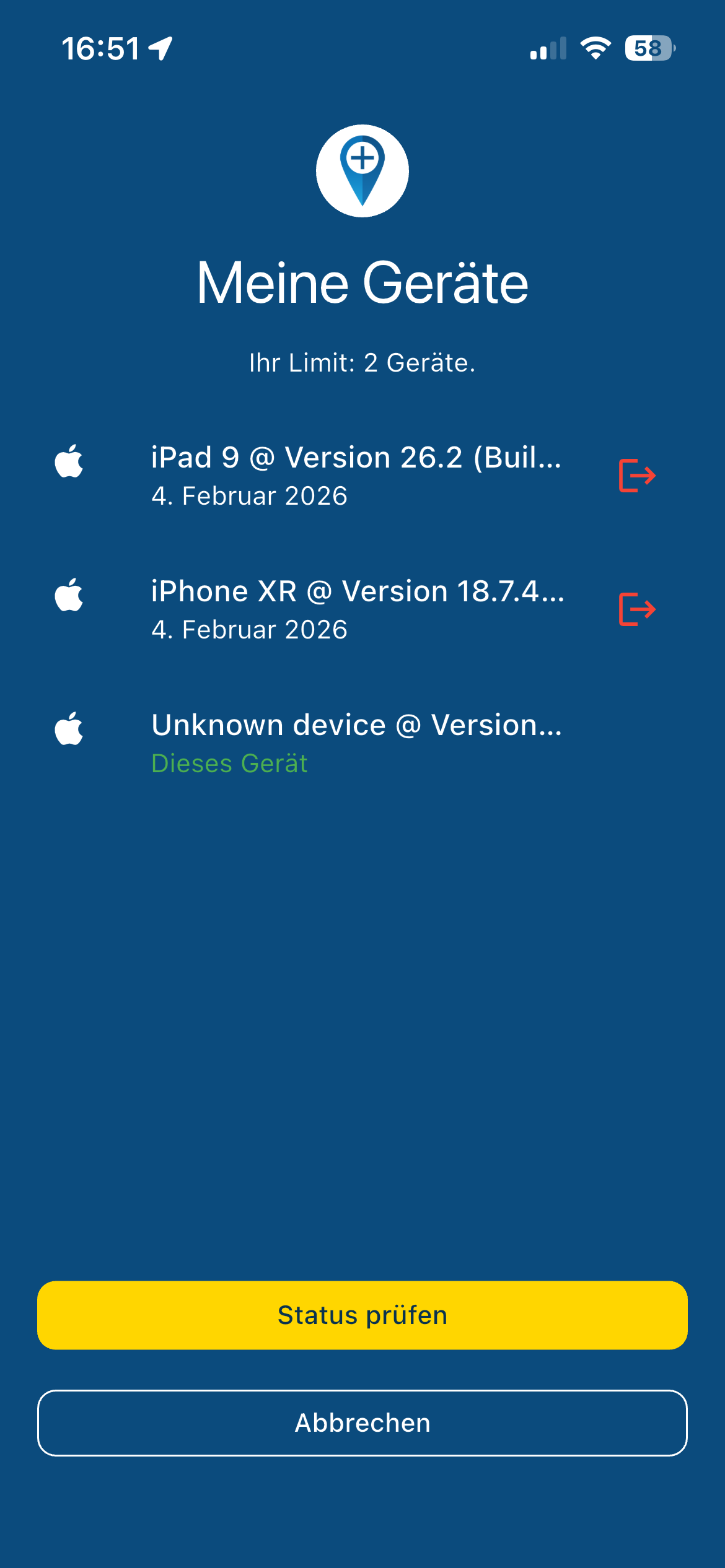
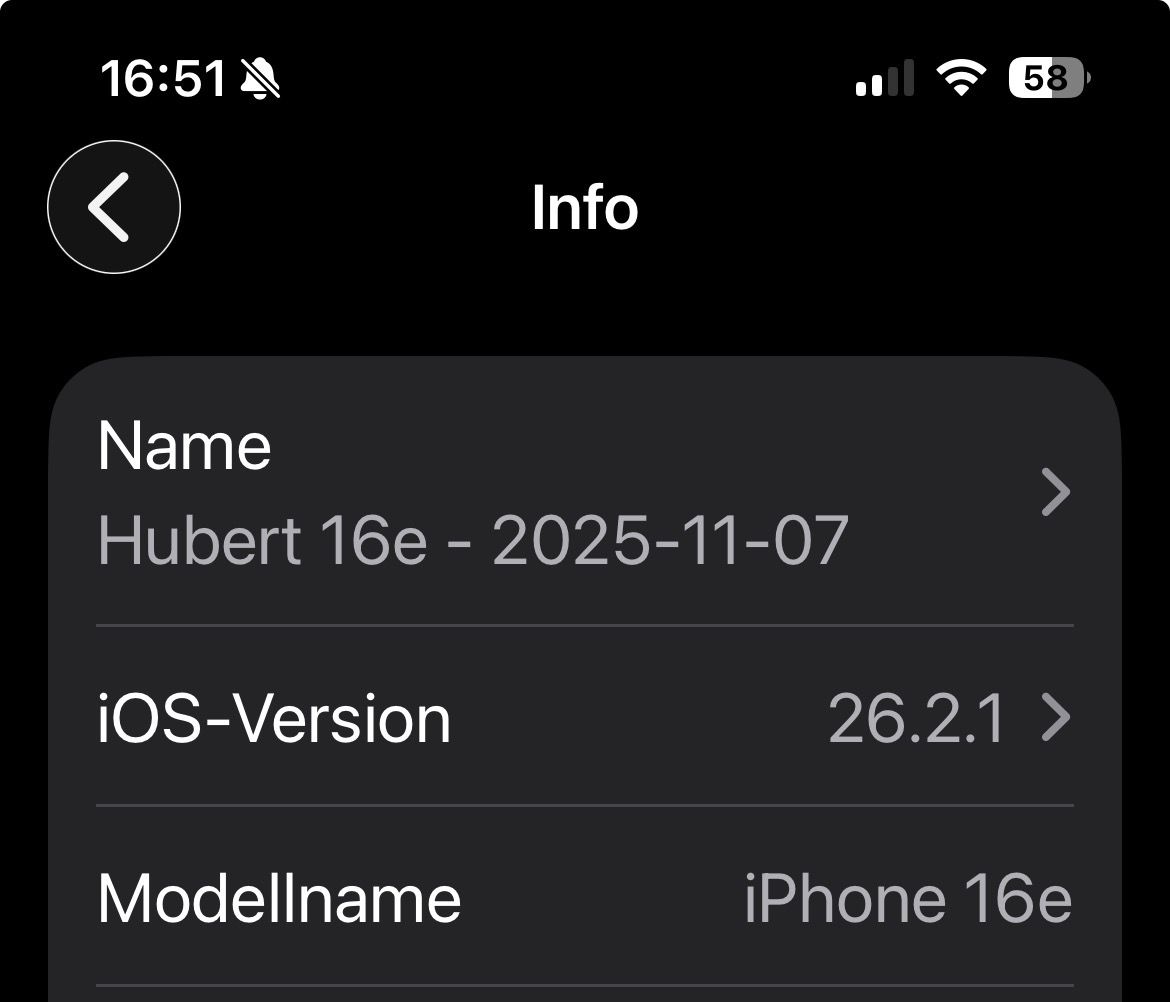
Die Übernahme des Modell Namen des „iPhone 16e“ erfolgt nicht, es funktioniert nur bei dem iPad und iPhone Xr. Das iPhone 16e (26.2.1) und iPad (26.2.) das iPad werde ich auf Update (26.2.1) bringen, danach noch einmal testen

Das 16e ist das hier gelistet „Unknown device“ Gerät ….
Gibt es einen Grund dafür ?
@Hubert-Thoring said in New beta! 5.0.3 (447):
Die Übernahme des Modell Namen des „iPhone 16e“ erfolgt nicht, es funktioniert nur bei dem iPad und iPhone Xr. Das iPhone 16e (26.2.1) und iPad (26.2.) das iPad werde ich auf Update (26.2.1) bringen, danach noch einmal testen
Fixed in the definitive version.
Was an issue specific for this device. -
 Travellexxie referenced this topic on
-
Ik ben op mijn Laptop, Iphone 15 en Carpe Iter aangemeld maar ondanks dat laat de iPhone maar één apparaat zien. Dat is begrijpelijk want alleen de iPhone heeft toegang tot testflight en de CI is Android en heeft geen Testflight optie.
HEt valt me op dat niet de juiste versie van de iPhone IOS getoond.
Deze staat op 26.2.1 terwijl 26.3 geïnstalleerd is.iPhone 15,
Carpuride W702 Pro
Sena 20S EVO headset
Harley Davidson Road King M8 -
Ik ben op mijn Laptop, Iphone 15 en Carpe Iter aangemeld maar ondanks dat laat de iPhone maar één apparaat zien. Dat is begrijpelijk want alleen de iPhone heeft toegang tot testflight en de CI is Android en heeft geen Testflight optie.
HEt valt me op dat niet de juiste versie van de iPhone IOS getoond.
Deze staat op 26.2.1 terwijl 26.3 geïnstalleerd is.@Albert-van-den-Elsen klinkt verder prima. Over die versie zou ik me vooral geen zorgen maken.










Hello! It looks like you're interested in this conversation, but you don't have an account yet.
Getting fed up of having to scroll through the same posts each visit? When you register for an account, you'll always come back to exactly where you were before, and choose to be notified of new replies (either via email, or push notification). You'll also be able to save bookmarks and upvote posts to show your appreciation to other community members.
With your input, this post could be even better 💗
Register Login




-
 0142.5k
-
 07114
07114
-
07177
-
 0474
0474
-
09704
-
 010211
-
 010567
-
010286