Additional waypoints automatically generated in MRA Navigation
-

Hi,
I have noticed a recent change in behaviour when navigating routes that I have created in MRA Routeplanner.
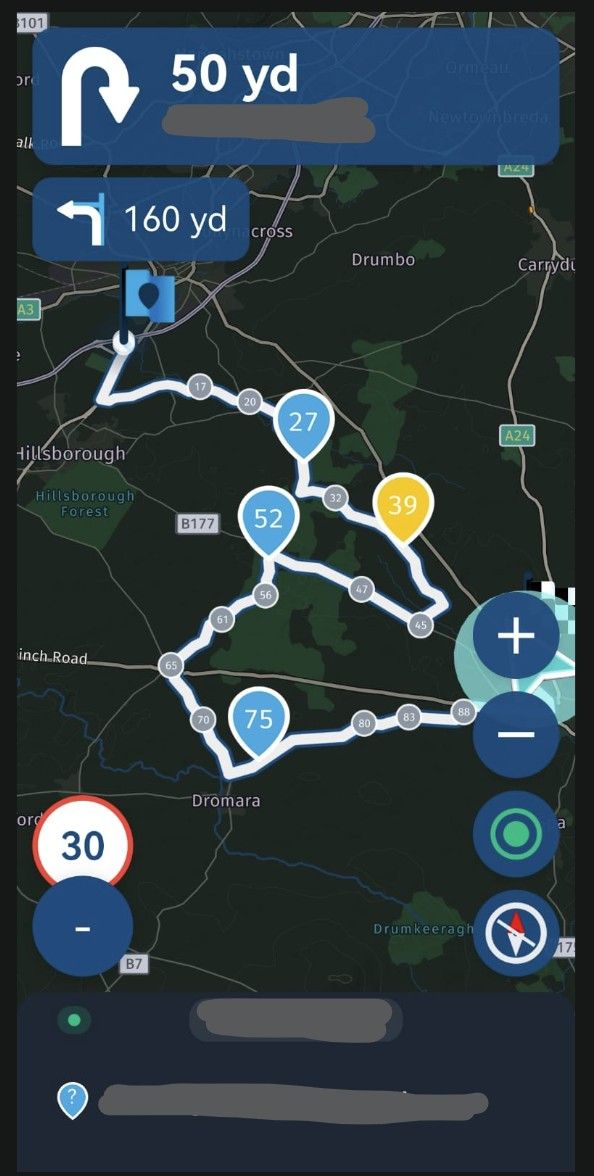
A route that I created with just 8 waypoints now displays over 75 waypoints in the navigation app, including numerous small grey points. Please see the attached screenshot.
I use MRA Navigation on an Android mobile.
I'm not sure what these additional waypoints are or why they are being generated.
Is there a way to switch these off so that only my original waypoints are displayed when navigating?
Thanks
-

Adjusted in the next update

-
Hi,
I have noticed a recent change in behaviour when navigating routes that I have created in MRA Routeplanner.
A route that I created with just 8 waypoints now displays over 75 waypoints in the navigation app, including numerous small grey points. Please see the attached screenshot.
I use MRA Navigation on an Android mobile.
I'm not sure what these additional waypoints are or why they are being generated.
Is there a way to switch these off so that only my original waypoints are displayed when navigating?
Thanks

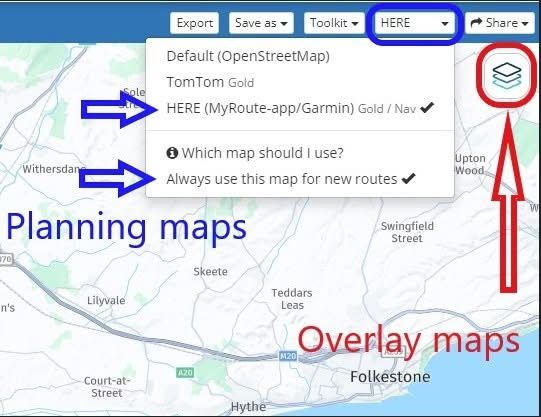
@Stephen-Cecil-1-0 This is because you are not planning your routes using the HERE planning map. The app uses the HERE map and will add additional grey route points to try to match your planned route to the HERE map. It is always advisable to use the HERE planning map to create your routes.
Hello! It looks like you're interested in this conversation, but you don't have an account yet.
Getting fed up of having to scroll through the same posts each visit? When you register for an account, you'll always come back to exactly where you were before, and choose to be notified of new replies (either via email, or push notification). You'll also be able to save bookmarks and upvote posts to show your appreciation to other community members.
With your input, this post could be even better 💗
Register Login-
08109
-
 0865
-
06116
-
09215
-
0412
-
 59111
-
0317
-
0333