Skip to content
  • Categories
  • Recent
  • Popular
  • Support
  • MyRoute-app
Collapse
Brand Logo

MRA Community Forum

  1. Home
  2. MRA Routeplanner Next Beta
  3. [Web-Beta] Problems, Bugs and other Issues
  4. Can not move WP

Can not move WP

Scheduled Pinned Locked Moved [Web-Beta] Problems, Bugs and other Issues
3 Posts 3 Posters 11 Views 2 Watching
  • Oldest to Newest
  • Newest to Oldest
  • Most Votes
Reply
  • Reply as topic
Log in to reply
This topic has been deleted. Only users with topic management privileges can see it.
  • Jörgen
    Jörgen
    Jörgen
    Valued contributor
    wrote last edited by
    #1

    Hi,

    just created a route by marking my location (see blue circle).

    1. Question how can I switch off this circle?
    2. My starting point is inside this circle; after I finish my route, I cannot move the starting point anymore.
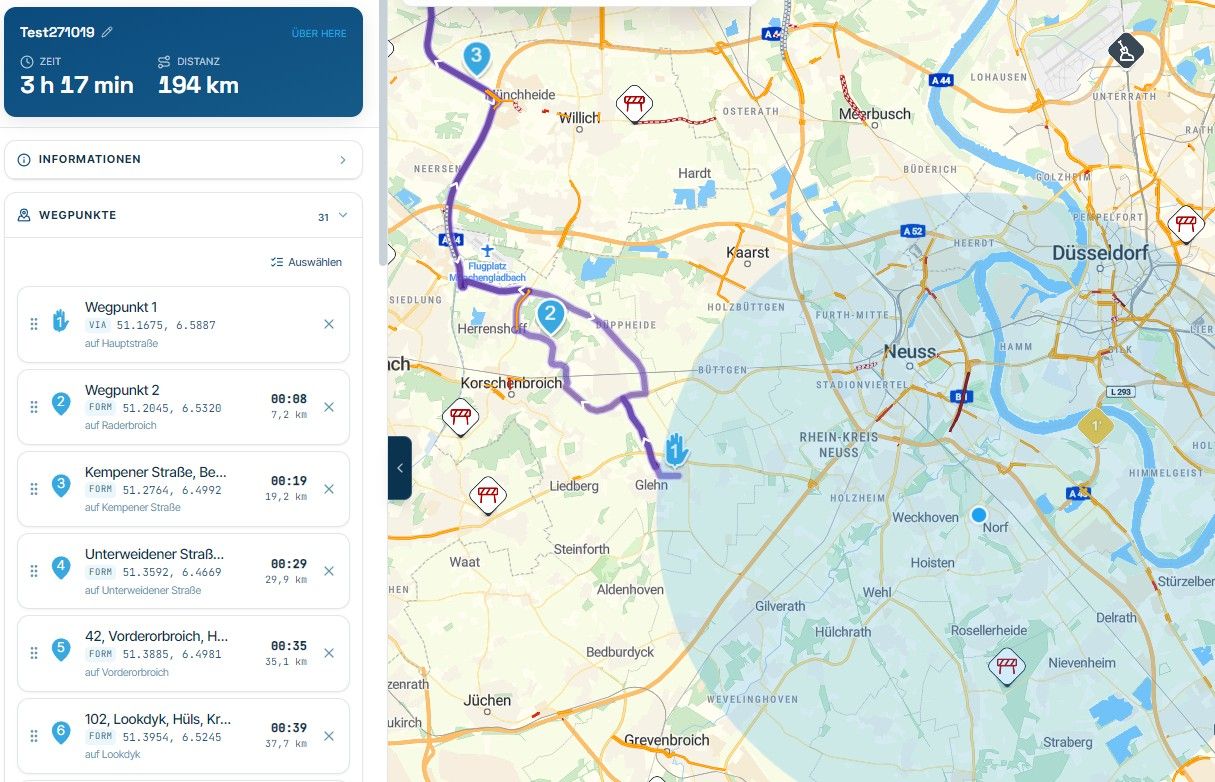
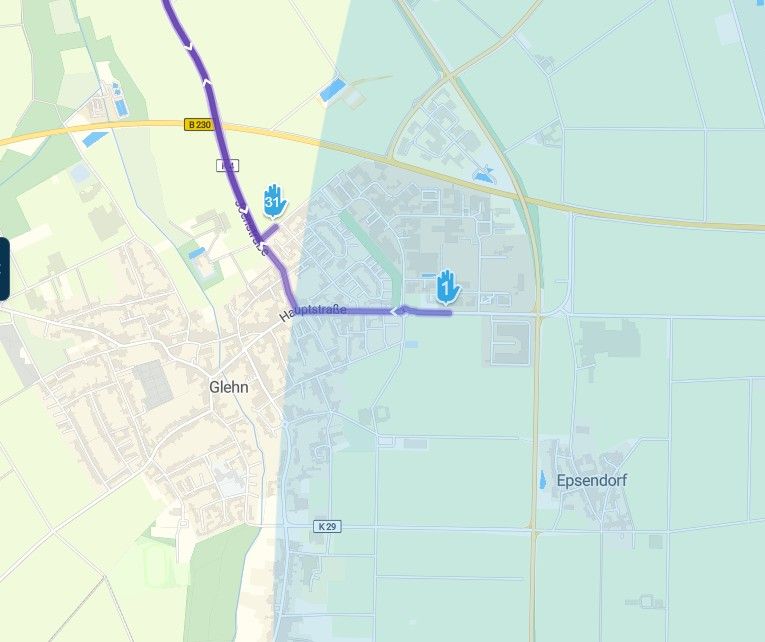
    image.jpeg

    image.jpeg

    There is no detection when I move the mouse pointer over this point.

    After saving the route, close and open, the start point can still not be moved.
    The blue circle is gone.
    The icon shows a reaction now, but that's all.

    Hardware
    iPhone 12 pro (iOS 26.2.1)
    iPad (7.Gen.) 18.7.3
    Oukitel RT3 Pro (Andr. 14)
    Wireless CarPlay mit (Elebest C650)
    Wired CarPlay (SEAT Arona - 2021)
    MRA Workshops in Deutsch sind hier zu finden

    MotoCon 1 Reply Last reply
    0
    • Jörgen Jörgen

      Hi,

      just created a route by marking my location (see blue circle).

      1. Question how can I switch off this circle?
      2. My starting point is inside this circle; after I finish my route, I cannot move the starting point anymore.

      image.jpeg

      image.jpeg

      There is no detection when I move the mouse pointer over this point.

      After saving the route, close and open, the start point can still not be moved.
      The blue circle is gone.
      The icon shows a reaction now, but that's all.

      MotoCon
      MotoCon
      MotoCon
      Alpha tester
      wrote last edited by
      #2

      @Jörgen, it is your current location indicator...
      You can enable/disable this indicator with this icon:

      image.jpeg

      I am just an enthusiastic MRA user, and hope you will be one too!

      Most motorcycle problems are caused by the nut that connects the handlebar to the saddle.

      Check out RideSleepRepeat.eu, a biker community for sharing stays across Europe

      1 Reply Last reply
      1
      • Hubert Thoring
        Hubert Thoring
        Hubert Thoring
        Valued contributor
        wrote last edited by
        #3

        @jörgen It also helps to set the location release for the browser used, so that the planner can access it.

        VG Hubert
        Beta Test "Next App" dazu die Hardware .
        iPad 9. Gen iOS 27.0.1/ iPhone 16e iOS 27.0.1/ Navi iPhone Xr iOS 18.7.10 / PC mit MS Win11 /❗️MyRoute-App im Cradel und Remotek-One❗️ Info zu MRA & Remotek One

        1 Reply Last reply
        0

        Hello! It looks like you're interested in this conversation, but you don't have an account yet.

        Getting fed up of having to scroll through the same posts each visit? When you register for an account, you'll always come back to exactly where you were before, and choose to be notified of new replies (either via email, or push notification). You'll also be able to save bookmarks and upvote posts to show your appreciation to other community members.

        With your input, this post could be even better 💗

        Register Login
        Reply
        • Reply as topic
        Log in to reply
        • Oldest to Newest
        • Newest to Oldest
        • Most Votes


        ACTIVE USERS
        Hubert Thoring
        Hubert Thoring
        MotoCon
        MotoCon
        Jörgen
        Jörgen
        POPULAR TOPICS
        • Rangen
          Pim van Dongen
          Pim van Dongen
          1
          7
          41

        • Great new tool for animated video maps
          Corjan Meijerink
          Corjan Meijerink
          0
          7
          158

        • Lock route editing
          Lluis Arasanz
          Lluis Arasanz
          0
          18
          50

        • Positioning club Membership Locations every new planned route
          OGRIII
          OGRIII
          0
          7
          182

        • Informatie Routeplanner Next
          Hubert Thoring
          Hubert Thoring
          0
          5
          38

        • Updated beta! 6.0.0 (526) - An absolute masterpiece
          CD130
          CD130
          13
          27
          358

        • F012 Tracklog folder / routes folder / how is it going right now?
          Hubert Thoring
          Hubert Thoring
          0
          5
          13

        • Bug with Avatar on profile
          Hubert Thoring
          Hubert Thoring
          0
          5
          22

        MY GROUPS
        • Login

        • Login or register to search.
        • First post
          Last post
        0
        • Categories
        • Recent
        • Popular
        • Support
        • MyRoute-app