MRA 6.0.0 515 – Removal of the "Navigate routes as tracks" option and problems with outdated road closures in HERE
-

In my region (southwestern Lower Austria), HERE map data has recently been frequently showing outdated road closures. Sometimes roads remain marked as closed for months, even years, even though they have reopened.
Navigate as a track was a useful solution because it allowed me to follow my originally planned route without taking unnecessary detours due to inaccurate road closure information in HERE.
In version 6.0.0 515, I can no longer find this option.
I have found a temporary workaround: I activate the "Show original route" option in the navigation app and follow it manually when I am certain that the road is actually open. The downside of this solution is that MRA constantly recalculates the route and provides navigation instructions, which can be quite confusing.
And this solution only works as long as the web planner has up-to-date information and allows the desired route in the first place. If the web planner also accesses outdated road closures, I'm currently unaware of any way to ignore incorrect road closures.
My questions for the developers:
In version 6.0.0, is there a way to navigate a planned route independently of HERE's road closure information, as was previously possible with track navigation?
If not, could you envision introducing a feature that allows users to deliberately disable individual road closures (i.e., the opposite of the existing option to create custom road closures)? Of course, this carries the risk of encountering a closed road – but the responsibility for that would lie with the user.
-
In my region (southwestern Lower Austria), HERE map data has recently been frequently showing outdated road closures. Sometimes roads remain marked as closed for months, even years, even though they have reopened.
Navigate as a track was a useful solution because it allowed me to follow my originally planned route without taking unnecessary detours due to inaccurate road closure information in HERE.
In version 6.0.0 515, I can no longer find this option.
I have found a temporary workaround: I activate the "Show original route" option in the navigation app and follow it manually when I am certain that the road is actually open. The downside of this solution is that MRA constantly recalculates the route and provides navigation instructions, which can be quite confusing.
And this solution only works as long as the web planner has up-to-date information and allows the desired route in the first place. If the web planner also accesses outdated road closures, I'm currently unaware of any way to ignore incorrect road closures.
My questions for the developers:
In version 6.0.0, is there a way to navigate a planned route independently of HERE's road closure information, as was previously possible with track navigation?
If not, could you envision introducing a feature that allows users to deliberately disable individual road closures (i.e., the opposite of the existing option to create custom road closures)? Of course, this carries the risk of encountering a closed road – but the responsibility for that would lie with the user.

navigate a planned route independently of HERE's road closure information
Edit: Oops, my message below is valid only for 6.0.0. - 526, not for 515 yet. Sorry!

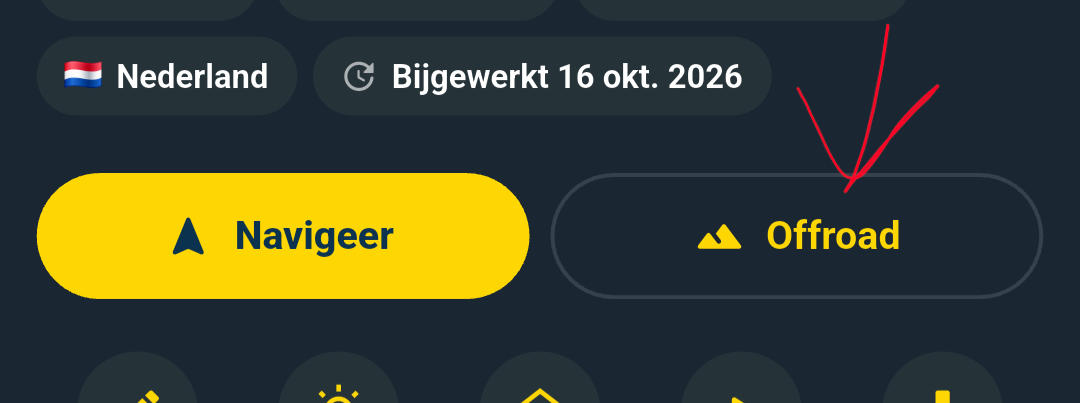
You might find what you seek by using the "Offroad" navigation type which is also offered with a button next to the "Navigate" button.
In offroad "mode" so to speak, you do not get any recalculations and the app tries to keep you on the route as good as possible. When diverging from the route, you see a "xxx distance from route" notification instead of a instruction and recalculations will NOT be performed.
Please note that the engine that does this, tries to approach the original route as good as it can, but it may mean that not every "maneuver" is translated into a explicit instruction.
Simply try it out.

-

@stefan-hummelink I think this button/function is not yet available in version 515.
-

Off is not on 515
-
navigate a planned route independently of HERE's road closure information
Edit: Oops, my message below is valid only for 6.0.0. - 526, not for 515 yet. Sorry!
You might find what you seek by using the "Offroad" navigation type which is also offered with a button next to the "Navigate" button.
In offroad "mode" so to speak, you do not get any recalculations and the app tries to keep you on the route as good as possible. When diverging from the route, you see a "xxx distance from route" notification instead of a instruction and recalculations will NOT be performed.
Please note that the engine that does this, tries to approach the original route as good as it can, but it may mean that not every "maneuver" is translated into a explicit instruction.
Simply try it out.
@Stefan-Hummelink sur la version 515 , il n'y a pas "OffRoad"
Hello! It looks like you're interested in this conversation, but you don't have an account yet.
Getting fed up of having to scroll through the same posts each visit? When you register for an account, you'll always come back to exactly where you were before, and choose to be notified of new replies (either via email, or push notification). You'll also be able to save bookmarks and upvote posts to show your appreciation to other community members.
With your input, this post could be even better 💗
Register Login-
 012186
-
 17363.5k
-
0623
-
 05124
05124
-
 0527
0527
-
0418
-
 0478
0478
-
0417