Overlapping routes
-
I have searched but found nothing. Does anyone have any tips to overcome when you loop on a route and cross the road you took earlier the same day - when you first get to that point both routes are dark blue and it is difficult to know which direction to take in the heat of the moment.
Is there any way to have the current road/route (maybe the next 5 km?) a dark blue and the rest of the days route (5 km onwards) a lighter blue.
This way when you arrive at this point it will be obvious which road to take.
This has happened twice this week for me and I have taken the wrong roads - doh!
Cheers, Tom
-
It's not a new issue - I've encountered that before, and reported/inquired on it - didn't seem to go anywhere. It is a recipe for disaster on a well planned route in a very unkown area. Ended up missing some of the best rides because of it. Hopefully it gets some attention.
-
OK, maybe this topic needs moving to Suggestions for Corjan and team!?
-

Surly the next direction instruction in the top left of the screen tells you which direction to take.
-
If only it were that easy Nick! Today I approached a small roundabout where I was supposed to take the 3rd exit, and then later in the day come back and take the 2nd exit (very close to the 3rd exit). It was not possible to differentiate which exit I needed to take, I was frantically trying to zoom in, and the GPS was not updating quick enough. This is in northern Italy where they seem to count turnings off roundabouts in to private car parks as exits, so it’s not easy to count the exits either. I took the wrong exit.
-
Surly the next direction instruction in the top left of the screen tells you which direction to take.

Yes, this is wright. And if you have time to "read" the screen is not a problem.
But, the same on situations with no time, you need only a visual guidance to follow. Then, is when you become upset and takes bad direction. Masking route line ahead 5km. or other amount, can be good to not be upset.
Also, I noted another issue regarding these instructions:
- when entering to a roudabout, White instruction on screen shows only how to enter. The instruction to exit is shown once you’re inside roundabout… and normally you can’t look the screen.
- on some intersections, by example turn wright and in 10 meters turn left, those instructions are showed one by one and is difficult to follow on fast look
I don’t know how easy or difficult is to show 2 or 3 next directions on white arrow.
Regards
-
I have searched but found nothing. Does anyone have any tips to overcome when you loop on a route and cross the road you took earlier the same day - when you first get to that point both routes are dark blue and it is difficult to know which direction to take in the heat of the moment.
Is there any way to have the current road/route (maybe the next 5 km?) a dark blue and the rest of the days route (5 km onwards) a lighter blue.
This way when you arrive at this point it will be obvious which road to take.
This has happened twice this week for me and I have taken the wrong roads - doh!
Cheers, Tom

@Tom-Grzelinski the method I use is to place a shaping or via point (it does not matter which) a little distance after each junction that I pass through along the route
if your paying any sort of attention you should know roughly the number of the next point your heading tooso when I approach a junction with a crossover for the first time I should see 2 points, one with a lower number that makes sense for me to be heading towards now & one with a much higher number that will make sense for me to be heading for when I approach the junction for the second time
it is a simple solution that works very well for me especially when combined with the dynamic view that zooms in & out automatically at junctions
-
Thanks Brian. My route has a lot of waypoints already, so not sure I want to add more, but I take your point. How do you get the dynamic view to work? I’m sure I had this a few days ago, but today it was definitely not zooming in at junctions which was making this problem worse.
-

Hi, the next version V6 contains arrows on the route line for the direction. This should help to see in which direction to drive.
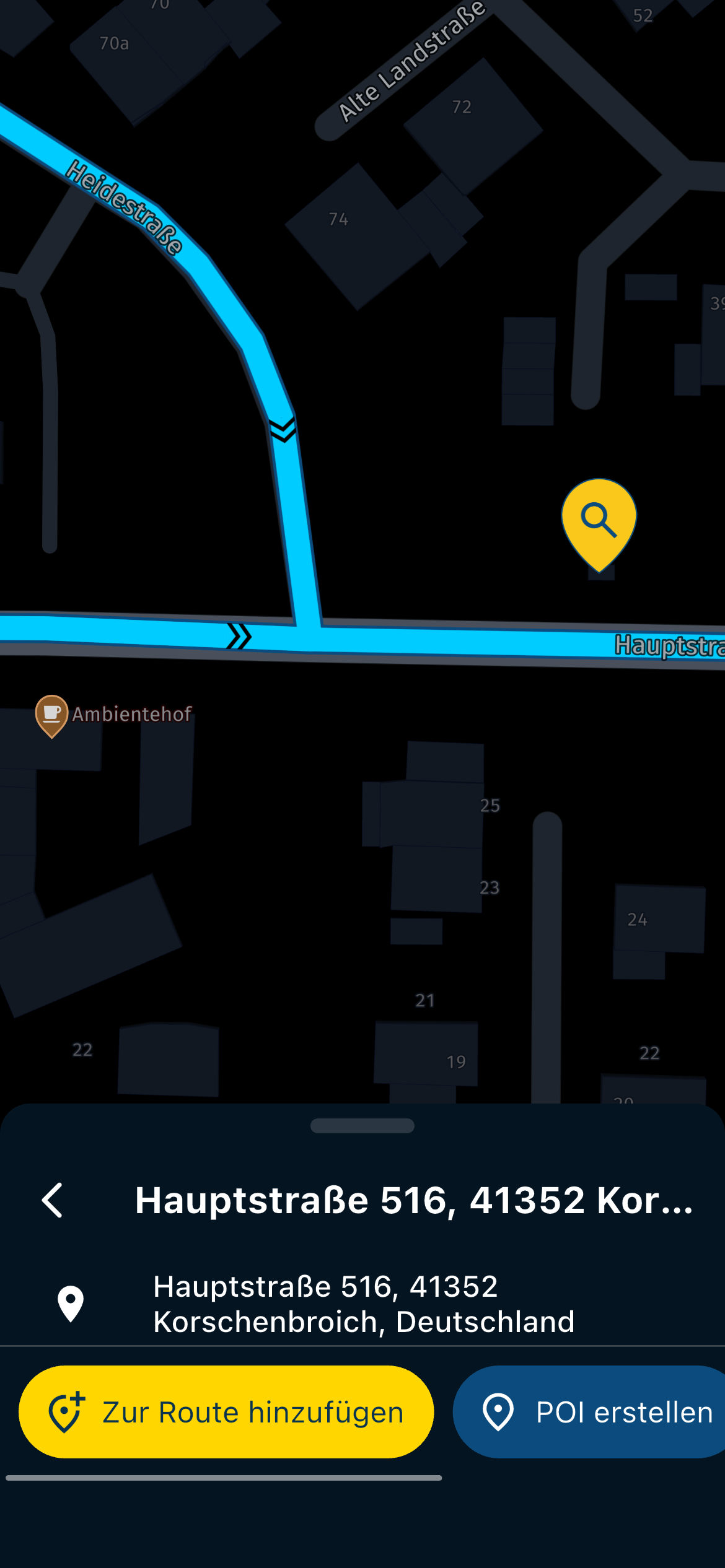
Sorry night version screen.
Hardware
iPhone 12 pro (iOS 26.2.1)
iPad (7.Gen.) 18.7.3
Oukitel RT3 Pro (Andr. 14)
Wireless CarPlay mit (Elebest C650)
Wired CarPlay (SEAT Arona - 2021)
MRA Workshops in Deutsch sind hier zu finden -
Thanks Brian. My route has a lot of waypoints already, so not sure I want to add more, but I take your point. How do you get the dynamic view to work? I’m sure I had this a few days ago, but today it was definitely not zooming in at junctions which was making this problem worse.
@Tom-Grzelinski press the compass symbol, it cycles through the 3 different modes
more of an explanation here https://forum.myrouteapp.com/post/68182BlackView BV7100, Android 12
Navigate "Routes as Tracks" in Offline mode with Offline Maps
No Wifi, no internet, no interruptions, works well -
@Tom-Grzelinski press the compass symbol, it cycles through the 3 different modes
more of an explanation here https://forum.myrouteapp.com/post/68182
@Brian-McG That explains one problem. I was having to manually zoom in and it was not going back to normal navigating view, so I kept having to press the compass to get it back. In doing so I obviously inadvertently changed the view mode. Thanks

-
Hi, the next version V6 contains arrows on the route line for the direction. This should help to see in which direction to drive.
Sorry night version screen.
@Jörgen Thanks, I look forward to testing this and hope it works for this problem. I am a bit skeptical whether these arrows will be visible enough when approaching a roundabout at speed and dealing with Italian traffic!
-
@Tom-Grzelinski the method I use is to place a shaping or via point (it does not matter which) a little distance after each junction that I pass through along the route
if your paying any sort of attention you should know roughly the number of the next point your heading tooso when I approach a junction with a crossover for the first time I should see 2 points, one with a lower number that makes sense for me to be heading towards now & one with a much higher number that will make sense for me to be heading for when I approach the junction for the second time
it is a simple solution that works very well for me especially when combined with the dynamic view that zooms in & out automatically at junctions

@Tom-Grzelinski the method I use is to place a shaping or via point (it does not matter which) a little distance after each junction that I pass through along the route
if your paying any sort of attention you should know roughly the number of the next point your heading tooso when I approach a junction with a crossover for the first time I should see 2 points, one with a lower number that makes sense for me to be heading towards now & one with a much higher number that will make sense for me to be heading for when I approach the junction for the second time
it is a simple solution that works very well for me especially when combined with the dynamic view that zooms in & out automatically at junctions
De nummers 123 etc. de ronde lichtblaue bolletje met nummer worden vaak niet altijd weergegeven op de route alleen de blauwe lijn.
Naar het vervolg punt heb ook het probleem met kruisingen en rotondes links rechts of rechtdoor waar je allemaal blauwe lijnen route ziet.
In de blauw lijn route slecht zichtbaar geel zie je 2 kleine peiltjes wat de rij richting aangeeft wat haast niet te zien is en de kans dat je tegen de route inrijdt zeer irritand gaat vaak mis in groepsverband.
Ook dat een route elkaar overlapt op een punt van de route bepaalde richting op zoals een lus in de route dan kom je weer bij de zelde kruising of rotonde of slpitsing op de route, maar je moet de andere kant op om de route te vervolgen.
Dan de poup venter links boven geeft ook niet altijd duidelijk aan welke kant op, dan de snelweg met veel wegen welke afslag zit geen rijbaan sortering op dan wel een goede popup scherm welke afslag A1 A12 etc. zoals wat in google maps weer geeft richting rijbaan volgen en welke route lijn je moet volgen ook niet duidelijk
De kleuren algemeen en teks in kleur vaak slecht leesbaar met blauwe achtergrond met geel of rode teks bijv. zoals de gele piltjes in de blauwe rote dat leest heel slecht wegens de kleur de kleur blauw zegt ook veel als achter grond wat vaak lastig lezen is net als een grijze lichte tekst op een wit achtergrond bijv. op de motor moet het wel goed leesbaar zijn dan wel de aanduiding aangezien je op bepalde afstand van het scherm zit.
We gaan het zien in versie 6 volgend jaar hoeveel er verbeterd is of niet kan ook nog, en op welk vlak. -
@jeroen-ekkel-c It would be nice if everyone wrote in English, so please do the same.
-

There's always a white arrow in the blue route line at places where you turn, exit a roundabout, or otherwise change direction. That's why I don't understand the problem...
I am just an enthusiastic MRA user, and hope you will be one too!
Most motorcycle problems are caused by the nut that connects the handlebar to the saddle.
Check out RideSleepRepeat.eu, a biker community for sharing stays across Europe
-
There's always a white arrow in the blue route line at places where you turn, exit a roundabout, or otherwise change direction. That's why I don't understand the problem...
@Con-Hennekens
I'll check it again but white arrow, on roundabouts, only shows where to enter while you're approaching to roundabout, and, when you're inside it, shows when to exit.
Personally, I prefer the white arrow shows all in same time: Where to enter and where to exit.
Looking screen while you're inside roundabout is not the best you can do.This can be applied also to those turns than are too close one from two.
Regards,
Lluis Arasanz
- BMW F750GS
MotoMediaLink HW Interface for BMW's WonderWheel device - Samsung A14 with Beta MyRoute-App (primary bike use)
Tasker and MMLink SW for Android App Control - iPhone 14 with Beta MyRoute-App (personal and primary CP use)
- BMW F750GS
-
@Con-Hennekens
I'll check it again but white arrow, on roundabouts, only shows where to enter while you're approaching to roundabout, and, when you're inside it, shows when to exit.
Personally, I prefer the white arrow shows all in same time: Where to enter and where to exit.
Looking screen while you're inside roundabout is not the best you can do.This can be applied also to those turns than are too close one from two.
Regards,
I prefer the white arrow shows all in same time: Where to enter and where to exit.
I don't know if that's possible, but of course that would be preferable indeed!
I am just an enthusiastic MRA user, and hope you will be one too!
Most motorcycle problems are caused by the nut that connects the handlebar to the saddle.
Check out RideSleepRepeat.eu, a biker community for sharing stays across Europe
-
I prefer the white arrow shows all in same time: Where to enter and where to exit.
I don't know if that's possible, but of course that would be preferable indeed!
@Con-Hennekens @lluis-arasanz This would work for me too, as long as the white arrows are big enough to see at a glance. The white arrows need to be visible as soon as the roundabout/junction appears at the top of the screen i.e. way before you get there.
Side question - do the white arrows change in size with the width of the route line? I ask as I have my route line set to x0.50.
Porsche 911 and VW Transporter T6.1 running CarPlay.
iPhone 17 Pro running Waze and MRA.
MRA Routeplanner on web via Mac -
@Con-Hennekens @lluis-arasanz This would work for me too, as long as the white arrows are big enough to see at a glance. The white arrows need to be visible as soon as the roundabout/junction appears at the top of the screen i.e. way before you get there.
Side question - do the white arrows change in size with the width of the route line? I ask as I have my route line set to x0.50.
@Tom-Grzelinski, I don't know, it's an easy check I guess. Please let us know

I am just an enthusiastic MRA user, and hope you will be one too!
Most motorcycle problems are caused by the nut that connects the handlebar to the saddle.
Check out RideSleepRepeat.eu, a biker community for sharing stays across Europe
-
@Tom-Grzelinski, I don't know, it's an easy check I guess. Please let us know
@Con-Hennekens Sorry Con, not everyone lives on MRA App! I have now finished my trip and not able to easily check this. However, I think I misunderstood – are the white arrows being referred to the ones at top left of the screen, or are you and Lluis saying the white arrows appear on the blue route line on the map?
Whatever the outcome, I would like for MRA to be easier to quickly see at a glance which road to take when routes overlap (as described in my original post).
I am not convinced the small black arrows @Jörgen showed would be easy to see at a glance – in the screenshot he shared it would make sense (to me) that the lower arrows should be on the right side of the junction, not the left. Approaching at speed and with vibrations I think you could easily turn the wrong way with a glance at this screenshot.
@Corjan-Meijerink Maybe Corjan can consider this as it is not only me that experiences this problem.
FYI, I use MRA Routeplanner for probably 9 months of the year to plan my next tour, but I only use MRA App once a year, for the tour (~2 weeks). I am happy to learn from all of you. All I am doing is reporting problems that I experience, that may help improve MRA.
Porsche 911 and VW Transporter T6.1 running CarPlay.
iPhone 17 Pro running Waze and MRA.
MRA Routeplanner on web via Mac
Hello! It looks like you're interested in this conversation, but you don't have an account yet.
Getting fed up of having to scroll through the same posts each visit? When you register for an account, you'll always come back to exactly where you were before, and choose to be notified of new replies (either via email, or push notification). You'll also be able to save bookmarks and upvote posts to show your appreciation to other community members.
With your input, this post could be even better 💗
Register Login-
023136
-
 118149
-
015115
-
 01192
01192
-
0934
-
3986
-
2883
-
-1873