How to plan correctly
-

I have a question regarding route planning and travel times.
Recently, I planned a motorcycle day trip using the MRA Web Planner (with the HERE map archetype). The planner estimated a total travel time of 7 hours. However, when I started my trip in the morning and loaded the route into the MRA Navigation Next app, the display showed a travel time of 8 hours right from the start.
I am trying to understand where this 1-hour difference comes from.-
Is this discrepancy purely due to live traffic conditions being factored into the navigation app but not the planner?
-
Does the navigation app calculate different average speeds for motorcycles compared to the web planner?
What settings or steps do I need to adjust in the MRA Web Planner to ensure that the estimated travel time matches the navigation app as closely as possible before I head out?
-
-
I have a question regarding route planning and travel times.
Recently, I planned a motorcycle day trip using the MRA Web Planner (with the HERE map archetype). The planner estimated a total travel time of 7 hours. However, when I started my trip in the morning and loaded the route into the MRA Navigation Next app, the display showed a travel time of 8 hours right from the start.
I am trying to understand where this 1-hour difference comes from.-
Is this discrepancy purely due to live traffic conditions being factored into the navigation app but not the planner?
-
Does the navigation app calculate different average speeds for motorcycles compared to the web planner?
What settings or steps do I need to adjust in the MRA Web Planner to ensure that the estimated travel time matches the navigation app as closely as possible before I head out?

@Christian-Feurstein in the web planner stops etc are included in the total time. In the app nog
Honda Goldwing GL1500,
Honda Silverwing GL 650
DMD2 T865X 8 inch Android tablet using MRA next for navigation
Garmin XT sold
Samsung S24FE mounted on a Quadlock and using Android Auto in my car -
-
@Christian-Feurstein in the web planner stops etc are included in the total time. In the app nog

@Marinus-van-Deudekom. The app calculated time is longer than the planner so I don't think stop times apply in this case.
-
I have a question regarding route planning and travel times.
Recently, I planned a motorcycle day trip using the MRA Web Planner (with the HERE map archetype). The planner estimated a total travel time of 7 hours. However, when I started my trip in the morning and loaded the route into the MRA Navigation Next app, the display showed a travel time of 8 hours right from the start.
I am trying to understand where this 1-hour difference comes from.-
Is this discrepancy purely due to live traffic conditions being factored into the navigation app but not the planner?
-
Does the navigation app calculate different average speeds for motorcycles compared to the web planner?
What settings or steps do I need to adjust in the MRA Web Planner to ensure that the estimated travel time matches the navigation app as closely as possible before I head out?

@Christian-Feurstein if you are using the app to navigate by Route rather than Track & you have the Traffic setting > Traffic Aware Calculation enabled it is quite possible that the extra hour is due to this
Did you notice any change in the total mileage for the route?
It is quite possible your Route was changed to avoid a road closure & the detour may have added a large loop that added the extra time -
-
I am able to reproduce this issue with my planned route. So I have checked your question regarding the distance and it is keeping exact the same amount of km when starting the navigation. Today the navigation of the 7h route tells me 7h46min duration. The difference seems to occur probably due to traffic ...
-
I am able to reproduce this issue with my planned route. So I have checked your question regarding the distance and it is keeping exact the same amount of km when starting the navigation. Today the navigation of the 7h route tells me 7h46min duration. The difference seems to occur probably due to traffic ...
@Christian-Feurstein said:
The difference seems to occur probably due to traffic ...How were you able to deduce the issue was due to traffic?
If you turn off the "Traffic Aware Calculation" does the estimated time stay the same as the planner?BlackView BV7100, Android 12
Navigate "Routes as Tracks" in Offline mode with Offline Maps
No Wifi, no internet, no interruptions, works well -
@Christian-Feurstein said:
The difference seems to occur probably due to traffic ...How were you able to deduce the issue was due to traffic?
If you turn off the "Traffic Aware Calculation" does the estimated time stay the same as the planner?
@Brian-McG yes. When turning off "Traffic aware calculation" the navigation time is the same as the planner time.
So we discovered the reason for the time difference but there is still the question: is there anything I can do in the planner to get the same traveltime as the navigation calculates with activated "traffic aware calculation"? -
That is offcourse not possible. The trafficaware calculation is realtime. The planner is not realtime. I.e you plan a route tonight and ride it the coming weekend
-
To keep it short and simple: no. Even when the tour has already started, conditions can and will change. Imagine a heavy rain and you would have to stop for an hour or so. That has nothing to do with traffic, yet the navigation time will change.
I would recommend the following: plan stops accurately (e.g. 10 minutes for a photo stop, 5 minutes for refuelling, 30 minutes for lunch break, etc. and enter them in the planner - those figures are just for example). In the end, add another hour for "unforseen" delays and in my humble opinion, you will be fine.

-
That is offcourse not possible. The trafficaware calculation is realtime. The planner is not realtime. I.e you plan a route tonight and ride it the coming weekend
@M.-Schrijver why isn't it possible to have the planner with the same traffic information as the navigation? Is there a reason for "that is offcourse not possible"?
-
To keep it short and simple: no. Even when the tour has already started, conditions can and will change. Imagine a heavy rain and you would have to stop for an hour or so. That has nothing to do with traffic, yet the navigation time will change.
I would recommend the following: plan stops accurately (e.g. 10 minutes for a photo stop, 5 minutes for refuelling, 30 minutes for lunch break, etc. and enter them in the planner - those figures are just for example). In the end, add another hour for "unforseen" delays and in my humble opinion, you will be fine.
@Erdna that is exactly what I don`t want to do. In my MRA experience the total route time the MRA navigation is calculating fits very good to the time I really need. That is the reason why I am asking if this time calculation could be done in the planner as well.
-
Roadworks is possible (it is available in the planner) but traffic related delays not.
Because you do not know if there are any traffic related delays on your route when you plan the route. You do not plan a route in realtime behind your PC -
You plan right now. There´s little traffic. Route says 8 hours.
You start on Friday at 9:00 anywhere and at 14:00 all around let´s say Munich there is stop & go and you´re there right then. Maybe in addition a car accident prevents going off a higher ranked road. Does not happen often, but it does. Now you´re up at x+ hours... that you did not consider in advance.
-
Roadworks is possible (it is available in the planner) but traffic related delays not.
Because you do not know if there are any traffic related delays on your route when you plan the route. You do not plan a route in realtime behind your PC
@M.-Schrijver where can I activate roadworks in the planner? Thanks in advance ...
-
You plan right now. There´s little traffic. Route says 8 hours.
You start on Friday at 9:00 anywhere and at 14:00 all around let´s say Munich there is stop & go and you´re there right then. Maybe in addition a car accident prevents going off a higher ranked road. Does not happen often, but it does. Now you´re up at x+ hours... that you did not consider in advance.
@Erdna What you are telling is crystal clear to me. But why isnt it possible to get the same expected duration in the moment I have opened the route in the MRA planner as I get from the navigaton app? Is it technically impossible for the planner to calculate with the current traffic conditions?
btw: it seems my originally questions are already answered.

-
time difference is due to traffic conditions
-
planner is not able to consider traffic conditions
-
-
Roadworks are always active when planning on the Here map. But not visible by default
Open the "layer" and at the bottom you'll find "Traffic"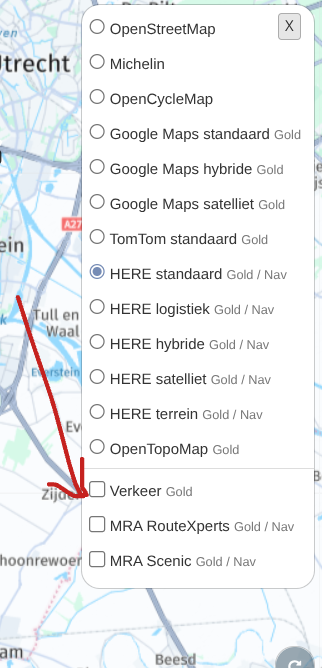
(I use MRA Next only on Android Auto. Every comment, suggestion, etc will be based on my usage with Android Auto)
-
Roadworks are always active when planning on the Here map. But not visible by default
Open the "layer" and at the bottom you'll find "Traffic"
@M.-Schrijver Yes, I'm familiar with that checkbox. However, I couldn't detect any change in route time between activated and deactivated. With the checkbox activated, the map simply displays the current traffic volume on the roads using corresponding colors.

-
It does not enable/disable it. Only the visible changes. If I'm correct you can enable/disable roadworks with the option "seasonal closure".
Hello! It looks like you're interested in this conversation, but you don't have an account yet.
Getting fed up of having to scroll through the same posts each visit? When you register for an account, you'll always come back to exactly where you were before, and choose to be notified of new replies (either via email, or push notification). You'll also be able to save bookmarks and upvote posts to show your appreciation to other community members.
With your input, this post could be even better 💗
Register Login-
 117121
-
 01392
01392
-
 01184
01184
-
01055
-
0743
-
0749
-
0624
-
 0618
0618