inconsistent travel times
-

Most likely you've put in some extra on one of the waypoints
-
Hello
Why does my smartphone always add thirty minutes to my travel time compared to my PC? I've checked, I haven't inserted any stops at my waypoints...
Thanks for your help
@Pierre-c Extra time is added because of traffic.
-
In top of that the time in the planning mode is usually different from the time during navigation
-

@marinus-van-deudekom @nick-carthew
That does not explain why in @pierre-c routes always 30 minutes are added up as he mentions.
Adding an extra waypoint should not matter i think. Having 10 or 20 waypints on your route should not add extra time. Travle time i belevie is calculated betwene the first and last waypoint.
Traffic should not matter either. If a route takes (as example) 30 minutes and you end up stuck in a traffic jam, your travel time between starting point and end point still remains 30 minutes. It's only the realtime what is adding up.
And he mentions that there is a difference between his mobile and his computer.
-
@marinus-van-deudekom @nick-carthew
That does not explain why in @pierre-c routes always 30 minutes are added up as he mentions.
Adding an extra waypoint should not matter i think. Having 10 or 20 waypints on your route should not add extra time. Travle time i belevie is calculated betwene the first and last waypoint.
Traffic should not matter either. If a route takes (as example) 30 minutes and you end up stuck in a traffic jam, your travel time between starting point and end point still remains 30 minutes. It's only the realtime what is adding up.
And he mentions that there is a difference between his mobile and his computer.
@nomko Travel time is dynamic when navigating, it constantly changes the closer you get to your destination. If you encounter traffic the travel time will adjust.
-
@marinus-van-deudekom @nick-carthew
That does not explain why in @pierre-c routes always 30 minutes are added up as he mentions.
Adding an extra waypoint should not matter i think. Having 10 or 20 waypints on your route should not add extra time. Travle time i belevie is calculated betwene the first and last waypoint.
Traffic should not matter either. If a route takes (as example) 30 minutes and you end up stuck in a traffic jam, your travel time between starting point and end point still remains 30 minutes. It's only the realtime what is adding up.
And he mentions that there is a difference between his mobile and his computer.
@nomko without having a look at such a route its just guessing and I would like to give an answer given the facts
-

The estimated travel time is increased by thirty minutes when I start navigation, and this time doesn't change during the journey. Traffic isn't a factor; and I'm driving in the countryside, where there's no traffic. The only thing that could interfere is having the route in "Auto" mode on the smartphone and "Motorcycle" on the PC. I've checked, and that's not the case...
-

Do you have, by any chance, ferries on your trip?
-
The estimated travel time is increased by thirty minutes when I start navigation, and this time doesn't change during the journey. Traffic isn't a factor; and I'm driving in the countryside, where there's no traffic. The only thing that could interfere is having the route in "Auto" mode on the smartphone and "Motorcycle" on the PC. I've checked, and that's not the case...
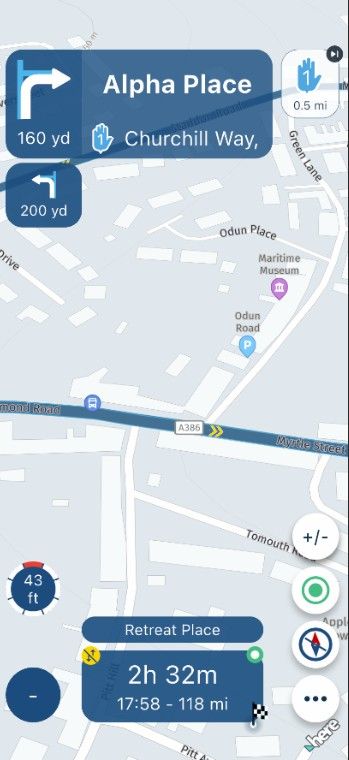
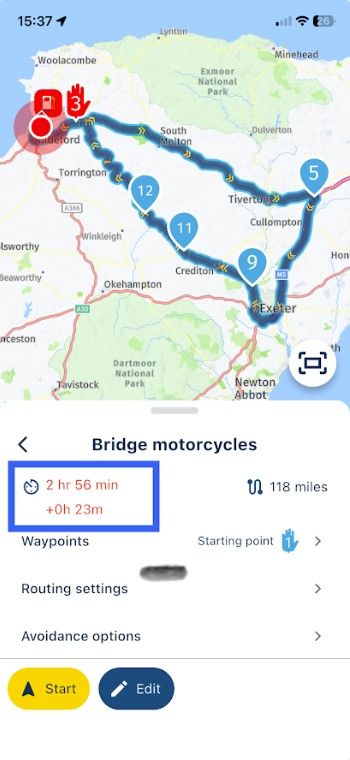
I have a route in my library titled Bridge motorcycles, the distance is 117 miles with an estimated time of 2 hours 30 minutes. When I open the route for navigation I am shown the exact same distance and time, after I tap navigate the time is 2 minutes longer. I expect this as I am navigating offline. If I now switch to online you will see by the time in the blue box that an additional 23 minutes have been added to account for traffic delays.
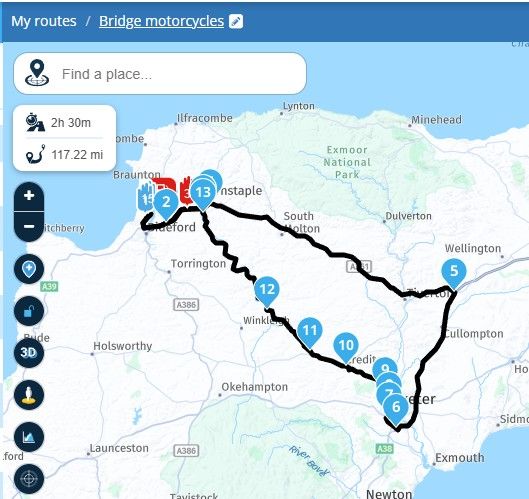
........
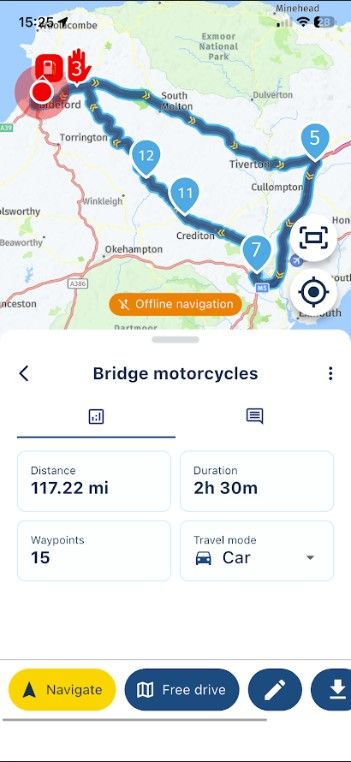
........
......
-
The estimated travel time is increased by thirty minutes when I start navigation, and this time doesn't change during the journey. Traffic isn't a factor; and I'm driving in the countryside, where there's no traffic. The only thing that could interfere is having the route in "Auto" mode on the smartphone and "Motorcycle" on the PC. I've checked, and that's not the case...

@Pierre-c would you possibly be able to share a route where you consistently get the added time & could you check if the distance is the same at the start of the navigation as is calculated on the web planner?
I agree with what @nick-carthew is saying & this is how things should work
MRA does behave as such most of the time but occasionally it has glitches or edge cases so it would be good/helpful if someone could check your route
Hello! It looks like you're interested in this conversation, but you don't have an account yet.
Getting fed up of having to scroll through the same posts each visit? When you register for an account, you'll always come back to exactly where you were before, and choose to be notified of new replies (either via email, or push notification). You'll also be able to save bookmarks and upvote posts to show your appreciation to other community members.
With your input, this post could be even better 💗
Register Login-
 17335.5k
-
 0763
0763
-
 0450
0450
-
 125272
-
216132
-
 07199
07199
-
711115
-
0213