
Creating routes on HERE versus TomTom
-
I have a ZUMO XT. I am trying to create a route on the HERE map. In some places, it does not pick the fastest route from one formation point to another. However, when I select the TomTom map, it does. How do I solve this?
@Hans-Rutten MRA will already execute the algorithm. You might have to put in more shaping points to make sure the route will go over the roads you want it to
-
Just a thought...
When you switch between engines (Here vs Tom Tom) they keep their own set of Toolkit Avoidances.
Check to see if they differ.@Lenny-O said:
When you switch between engines (Here vs Tom Tom) they keep their own set of Toolkit Avoidances.
Check to see if they differ.Thy are not different
@Marinus-van-Deudekom I did already, but didn't work
-
Just a thought...
When you switch between engines (Here vs Tom Tom) they keep their own set of Toolkit Avoidances.
Check to see if they differ.@Lenny-O said:
Just a thought...
When you switch between engines (Here vs Tom Tom) they keep their own set of Toolkit Avoidances.
Check to see if they differ.You don't switch from enginres onm MRA, just from the map (source) you're using. The options under MRA are mostly the same.
-
I have a ZUMO XT. I am trying to create a route on the HERE map. In some places, it does not pick the fastest route from one formation point to another. However, when I select the TomTom map, it does. How do I solve this?
I have a ZUMO XT. I am trying to create a route on the HERE map. In some places, it does not pick the fastest route from one formation point to another. However, when I select the TomTom map, it does. How do I solve this?
There are differneces between HERE and TomTom (and also between these two and OpenStreetMap) in the way they handle the fastes route or the shortest route,
-
I have a Garmin Zumo XT(1) and i am using HERE under MRA when creating routes. The only reason for this is, that the Garmin Map is basically the HERE map with a Garmin overlay on top of it meaning Garmin added some stuff of their own on top of the HERE map.
So yes, you should use HERE on MRA for this reason (XT uses HERE). -
Turn off route recalculation in your Zumo XT. That will help you avoid a lot of trouble!
-
Check this setting:
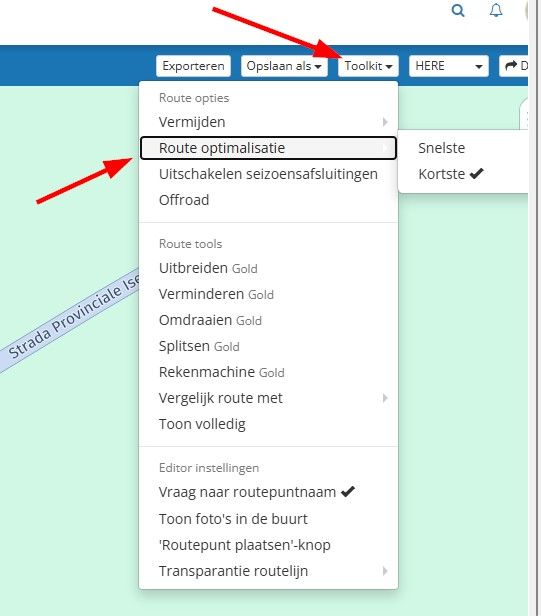
and this setting:
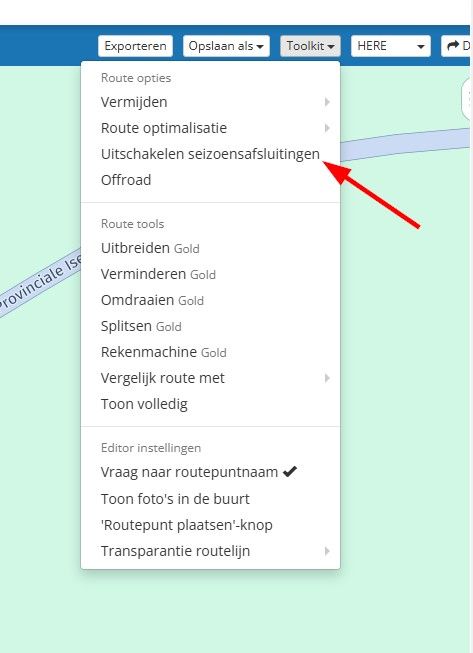
It is best to enable this feature. -
-
I have a ZUMO XT. I am trying to create a route on the HERE map. In some places, it does not pick the fastest route from one formation point to another. However, when I select the TomTom map, it does. How do I solve this?
@Hans-Rutten the short answer is if you have an MRA Gold subscription to use the "Compare" tool
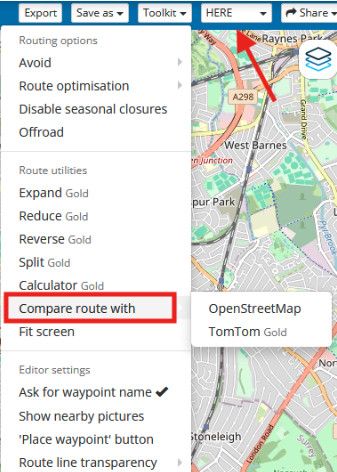
In the above picture the algorithm being used to calculate the route is the Here algorithm & it can be "Compare" to the OpenStreetMap or TomTom route calculators
the long answer .............. is that the routing algorithms that calculate the route for Here & TomTom are different, as is the underlying map data that the algorithms use to calculate the path of the route
The larger the distance between any 2 points you place, the larger the number of possible different paths the algorithms can choose from & the greater the number of differences in the underlying maps (the average speeds on the roads) that the algorithms can also choose from
In the picture below the route is a simple 2 points placed 66 miles apart & each of the different algorithms, Here (black line), OpenStreetMap (blue line) & TomTom (red line) calculate routes completely differently because of the difference in the algorithms & underlying data in their maps
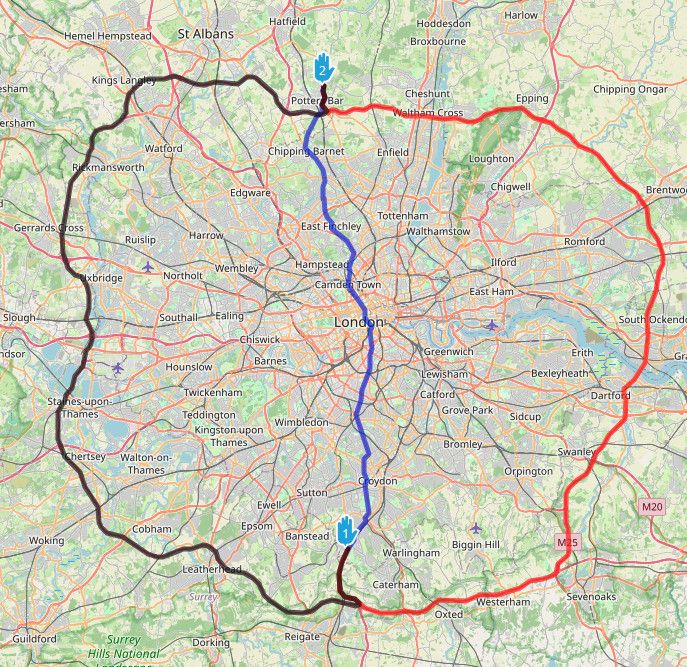
The same effect can happen when 2 points are placed closer together, 5 miles or even 1 mile apart
IF there are different possible paths for the algorithms to choose from between 2 points it is possible for the paths to have different underlying data & the algorithms can calculate different routesThe way to solve this is to "constrain" the route so that there are not 2 different paths for the algorithms to choose from
This is done by adding extra points, normally shaping points, to force the route onto the preferred path of your choice.
In the example I am using with 66 miles between points, adding an extra point constrains both OpenStreetMap & the TomTom algorithms to choosing a route via the west of London
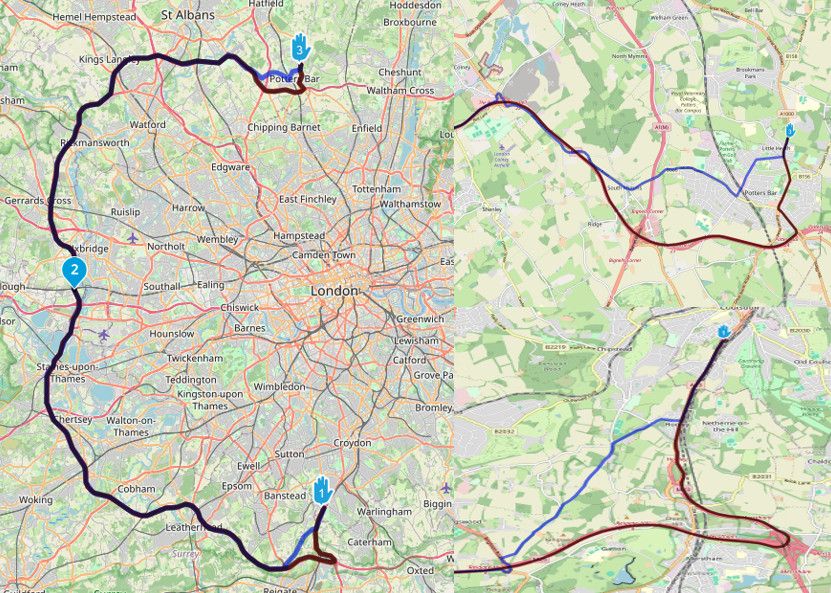
At the beginning & end of the route the OpenStreetMap route calculation is still different to that of the Here & TomTom routes because there are still multiple different optional paths for the algorithms to use even at this shorter distance
Additional points would need to be added to more completely constrain the algorithms onto the same roads & make all 3 algorithms use the same routeThe above example with 66 miles between points, in an area like the south of the UK where there is a large network of roads, is extreme (or lazy) & is bound to cause problems with different routes being calculated, it is only an example to illustrate the issue.
Normally you would place points a lot closer together depending on the density of the road network & the number of possible different path options between pointsIf you are sharing your routes with friends that use navigation systems other than MRA, it is a good idea to make sure your routes are tightly constrained i.e. you add a lot of additional points to prevent the algorithms on the other navigation systems calculating a route via a different alternative path
-
Dear Brian, thanks for your reply, but I have enough shaping points and tried to add a few more at the location where the problem lies. But the problem persists. I hope the screenshots provide more clarity. On my ZUMO, I usually want the track under my route! I don't know if it matters, but I work on a Mac!
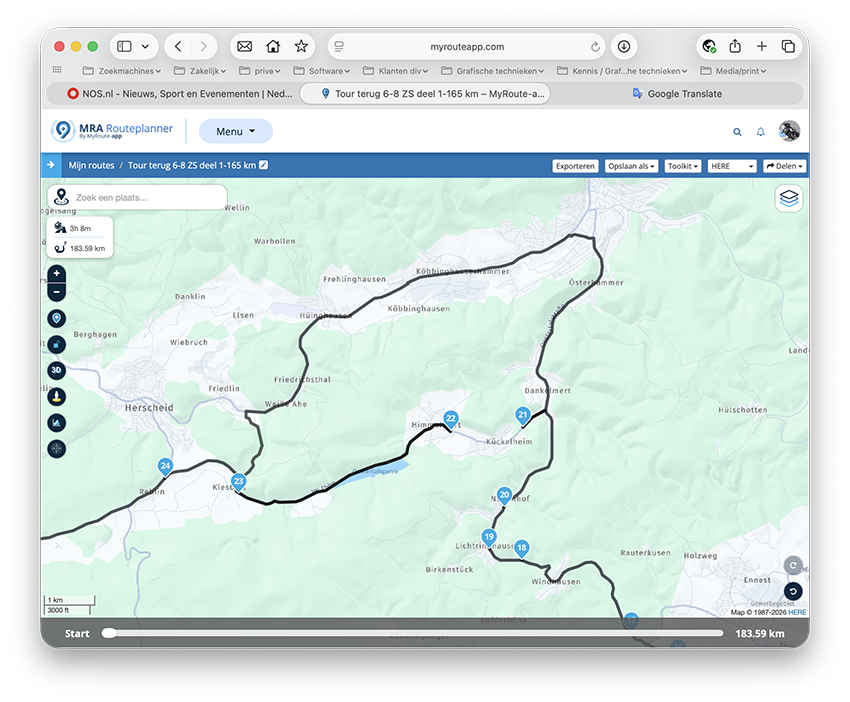
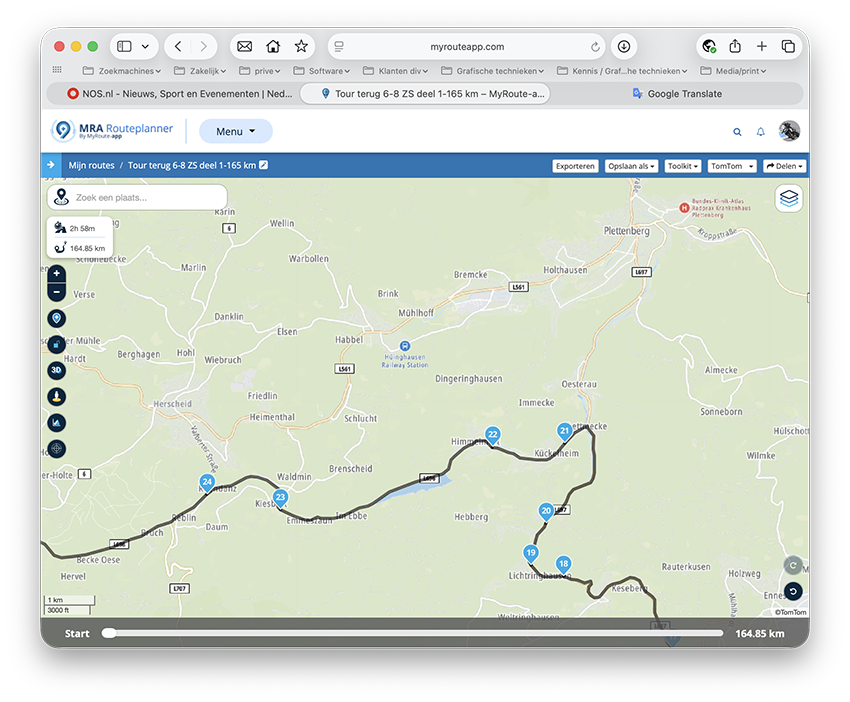
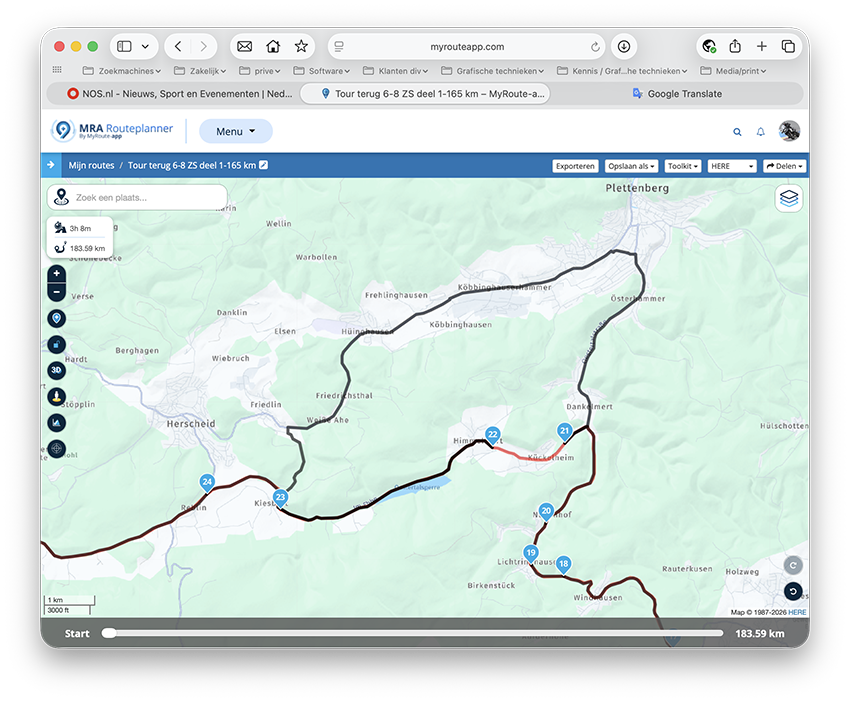
-
Dear Brian, thanks for your reply, but I have enough shaping points and tried to add a few more at the location where the problem lies. But the problem persists. I hope the screenshots provide more clarity. On my ZUMO, I usually want the track under my route! I don't know if it matters, but I work on a Mac!
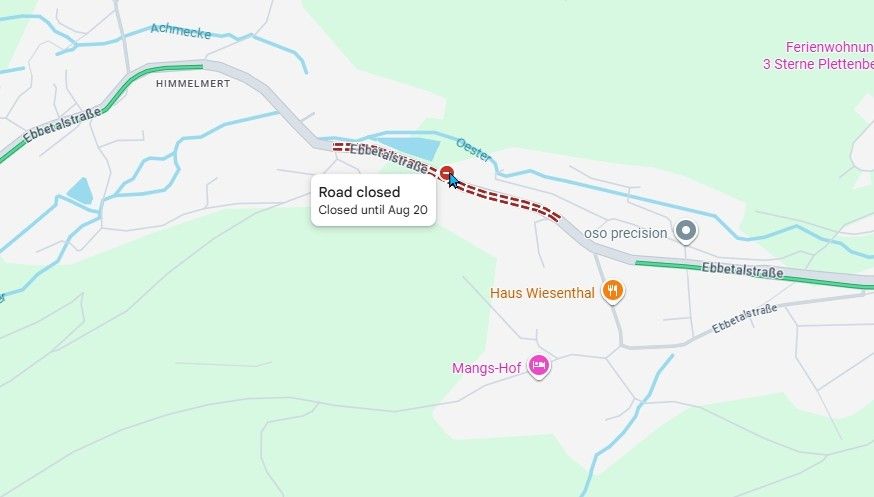
@Hans-Rutten According to Google maps, that section of road is closed until August 20.
-
Dear Brian, thanks for your reply, but I have enough shaping points and tried to add a few more at the location where the problem lies. But the problem persists. I hope the screenshots provide more clarity. On my ZUMO, I usually want the track under my route! I don't know if it matters, but I work on a Mac!
@Hans-Rutten as @nick-carthew says there appears to be a road closure which you can see on the Here map in MRA if you zoom in
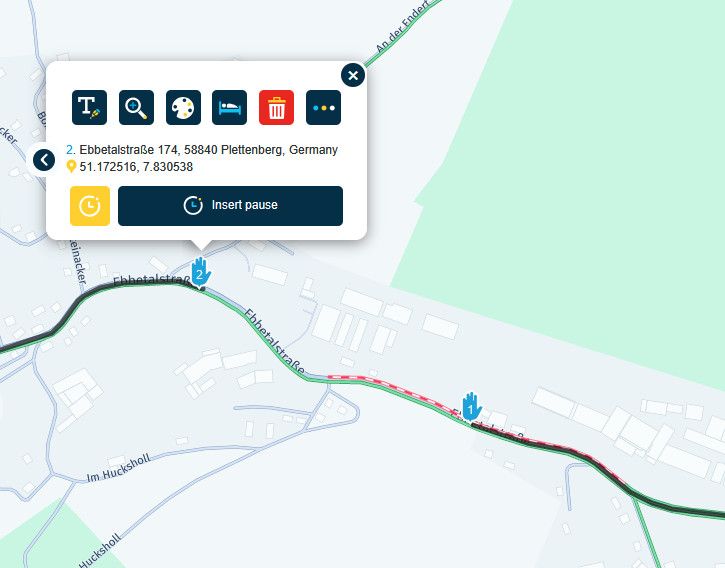
If you find that the route will not pass through a certain section of road the way I test is to make a new route for just that section of road. I then move the start & end points closer together to find where the obstruction/problem lies
You can also toggle on/off the enable/disable "Seasonal Closure" option in the "Toolkit" to help figure out if it is a road closureBlackView BV7100, Android 12
Navigate "Routes as Tracks" in Offline mode with Offline Maps
No Wifi, no internet, no interruptions, works well -
@Hans-Rutten as @nick-carthew says there appears to be a road closure which you can see on the Here map in MRA if you zoom in
If you find that the route will not pass through a certain section of road the way I test is to make a new route for just that section of road. I then move the start & end points closer together to find where the obstruction/problem lies
You can also toggle on/off the enable/disable "Seasonal Closure" option in the "Toolkit" to help figure out if it is a road closure@Brian-McG After checking with the MRA Traffic layer I position a route point close to where the problem is and then copy the route point coordinates. I then paste the coordinates into Google Maps making sure the Google traffic layer is on. Google Maps are probably the most up to date online maps available to us although I have noted a few errors before (no one is perfect) the good thing with Google maps is they invariably give a date for the closure.
-
"Disable season closures" is the best option here, especially since I'm riding this route on September 6th!



Hello! It looks like you're interested in this conversation, but you don't have an account yet.
Getting fed up of having to scroll through the same posts each visit? When you register for an account, you'll always come back to exactly where you were before, and choose to be notified of new replies (either via email, or push notification). You'll also be able to save bookmarks and upvote posts to show your appreciation to other community members.
With your input, this post could be even better 💗
Register Login-
 020334
-
 011118
-
 19107
19107
-
 115795
-
 0463
0463
-
 06190
06190
-
 05152
05152