Skip to content
  • Categories
  • Recent
  • Popular
  • Support
  • MyRoute-app
Collapse
Brand Logo

MRA Community Forum

  1. Home
  2. MyRoute-app Routeplanner
  3. [Web] Problems, Bugs and other Issues
  4. Multiple markers placed, no route produced.

Multiple markers placed, no route produced.

Scheduled Pinned Locked Moved [Web] Problems, Bugs and other Issues
4 Posts 3 Posters 81 Views 1 Watching
  • Oldest to Newest
  • Newest to Oldest
  • Most Votes
Reply
  • Reply as topic
Log in to reply
This topic has been deleted. Only users with topic management privileges can see it.
  • Andrew Wright 1 0undefined Offline
    Andrew Wright 1 0undefined Offline
    Andrew Wright 1 0
    wrote last edited by
    #1

    Hi. I have started a route for a European tour. However I got to day 4 (so far Gloucestershire - Calais - Kogenhiem) and the software has stopped calculating a route. Any ideas? Thanks.

    Nick Carthewundefined Bouke Entundefined 2 Replies Last reply
    0
    • Andrew Wright 1 0undefined Andrew Wright 1 0

      Hi. I have started a route for a European tour. However I got to day 4 (so far Gloucestershire - Calais - Kogenhiem) and the software has stopped calculating a route. Any ideas? Thanks.

      Nick Carthewundefined Offline
      Nick Carthewundefined Offline
      Nick Carthew
      RouteXpert
      wrote last edited by
      #2

      @Andrew-Wright-1-0 I suspect that you are using the planning map from OpenStreetMap (OSM). The OSM map doesn’t like long routes. Either split your route into individual daily routes or change the planning map.

      Always willing to help if I can.
      Triumph Tiger 1200 XRT called Tina.
      MRA Navigation Next and SilverFox BJ8

      Nick Carthewundefined 1 Reply Last reply
      0
      • Nick Carthewundefined Nick Carthew

        @Andrew-Wright-1-0 I suspect that you are using the planning map from OpenStreetMap (OSM). The OSM map doesn’t like long routes. Either split your route into individual daily routes or change the planning map.

        Nick Carthewundefined Offline
        Nick Carthewundefined Offline
        Nick Carthew
        RouteXpert
        wrote last edited by
        #3

        It is important to use the correct planning map for your navigation device.

        Each planning map comes with its own set of algorithms embedded within the map data to calculate which roads to use.

        The algorithms are unique to each planning map.

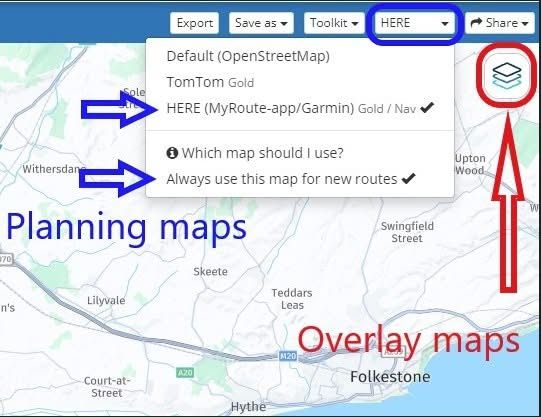
        After choosing the planning map you can also click Always use this map for new routes to set that map as your default planning map.

        From now on all new routes will be created using the chosen planning map.

        My screenshot below shows the planning map from HERE is selected and also the option to Always use this map for new routes.

        The overlay maps are separate to the planning maps and have no effect on route calculations.
        Think of them as clear sheets with extra information that you place over the top of the planning map.
        The planning map underneath does all of the route calculations.

        So with the planning map selected you can then use any of the overlay maps.
        If you do not see the same blue menu bar with the planning maps that is shown in my screenshot, click Page menu first and then all of the same options will be available to you.
        863820c3-ab46-4fb5-a499-d72f58a7354d-image.jpeg

        Always willing to help if I can.
        Triumph Tiger 1200 XRT called Tina.
        MRA Navigation Next and SilverFox BJ8

        1 Reply Last reply
        1
        • Andrew Wright 1 0undefined Andrew Wright 1 0

          Hi. I have started a route for a European tour. However I got to day 4 (so far Gloucestershire - Calais - Kogenhiem) and the software has stopped calculating a route. Any ideas? Thanks.

          Bouke Entundefined Offline
          Bouke Entundefined Offline
          Bouke Ent
          wrote last edited by
          #4

          @Andrew-Wright-1-0 said:

          Hi. I have started a route for a European tour. However I got to day 4 (so far Gloucestershire - Calais - Kogenhiem) and the software has stopped calculating a route. Any ideas? Thanks.

          i made a overview route with 10k km.

          but there are limits like max point and how you use routing and exeption. like no highways and shortest. they limit range.

          also arround 200 points is max.

          better is to make route every day and then keep it under 150 point.

          1 Reply Last reply
          0

          Hello! It looks like you're interested in this conversation, but you don't have an account yet.

          Getting fed up of having to scroll through the same posts each visit? When you register for an account, you'll always come back to exactly where you were before, and choose to be notified of new replies (either via email, or push notification). You'll also be able to save bookmarks and upvote posts to show your appreciation to other community members.

          With your input, this post could be even better 💗

          Register Login
          Reply
          • Reply as topic
          Log in to reply
          • Oldest to Newest
          • Newest to Oldest
          • Most Votes


          ACTIVE USERS
          Nick Carthewundefined
          Nick Carthew
          Bouke Entundefined
          Bouke Ent
          Andrew Wright 1 0undefined
          Andrew Wright 1 0
          POPULAR TOPICS
          • Skipping a Via point...
            Herman Veldhuizenundefined
            Herman Veldhuizen
            0
            16
            289

          • Choice for starting point of a route
            Nick Carthewundefined
            Nick Carthew
            0
            19
            310

          • Library sync error
            Albert van den Elsenundefined
            Albert van den Elsen
            0
            5
            87

          • CarPlay route selection functionality
            Nick Carthewundefined
            Nick Carthew
            0
            4
            65

          • Multiple markers placed, no route produced.
            Bouke Entundefined
            Bouke Ent
            0
            4
            81

          • CPMC B6/B7
            iain.gardengmail.comundefined
            iain.gardengmail.com
            0
            6
            211

          • how can I make Next speak the waypoints and notes to me?
            supergundefined
            superg
            0
            2
            22

          • MyRoute-App - worst navigation experience ever
            Guzzistundefined
            Guzzist
            1
            76
            38.8k

          MY GROUPS
          • Login

          • Login or register to search.
          • First post
            Last post
          0
          • Categories
          • Recent
          • Popular
          • Support
          • MyRoute-app