Route ging prima; nog wel twee wensen!
-

(for English see below!)
Gisteren voor het eerst met de laatste update (462)een prachtige rit gereden van bijna 300 kilometer. Onderweg een paar maal bewust van de route afgeweken en er weer naar terug gereden. Alles ging probleemloos, geen enkele hapering. Ook in Duitsland waar voorheen nog problemen waren met berekeningen ging het nu ook allemaal vloeiend. Geen offline modus nodig gehad. De koppeling met Android Auto lijkt nu perfect te werken. De voorlaatste keer had ik met draadloos opladen het probleem dat de geschatte accuduur en lading afnam. Nu maar weer bedraad gereden. Aan het einde van de rit was de accu nog steeds vol. En de telefoon was niet noemenswaardig heet.
Mijn complimenten voor het ontwikkelteam!Wel misschien nog twee kleine wensen;
Als je langere tijd even stil staat veranderd de geschatte aankomst tijd niet. Deze blijft staan op het tijdstip waarop het stond toen je stopte.
Als je daarna weer gaat rijden verspringt deze tijd ineens met het aantal minuten dat je gestopt was. Mooier zou zijn als deze tijd door zou blijven lopen tijdens het stilstaan en ophoogt met het aantal minuten dat je staat. Ik hoop dat dat mogelijk is.Een tweede wens is de nieuwe lijst met routepunten; Is het mogelijk om daar (in AA) ook de afstand van de huidige locatie tot die routepunten te tonen?
Dan nog een bugje;
Als ik vanuit het instellingen menu de app verlaat en deze daarna weer open dan krijg ik de kaart in beeld die bijna het gehele scherm overlapt. Als je goed kijkt zie je nog net een stukje van het menu onder in het scherm (zie pijl op de afbeelding). Je moet dan een of meerdere malen op het pijl puntje terug (rechts onder) drukken om weer in het normale scherm te komen!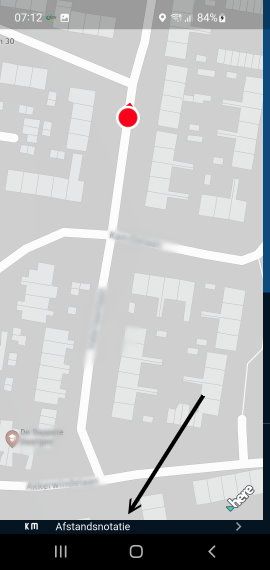
Yesterday, I took a wonderful drive of nearly 300 kilometers for the first time with the latest update (462). Along the way, I deliberately deviated from the route a few times and then got back on track. Everything went smoothly—not a single glitch. Even in Germany, where there used to be issues with navigation calculations, everything now worked seamlessly. I didn’t need offline mode. The connection with Android Auto now seems to work perfectly. The last time I used wireless charging, I had the problem that the estimated battery life and charge level decreased. So this time I drove with a wired connection again. At the end of the ride, the battery was still full. And the phone wasn’t noticeably hot.
My compliments to the development team!Though I do have two small requests:
If you stop for an extended period, the estimated arrival time doesn’t update. It stays at the time it was when you stopped.
When you start driving again, this time suddenly jumps by the number of minutes you were stopped. It would be better if this time continued to run while you’re stationary and increased by the number of minutes you’re stopped. A hope this will be possibleA second request is the new list of route points; is it possible to also show the distance from the current location to those route points there (in AA)?
Then I found a little bug;
When I exit the app from the settings menu and then open it again, the map appears on the screen, covering almost the entire display. If you look closely, you can just barely see a small part of the menu at the bottom of the screen (see arrow in the image). You then have to tap the back arrow (bottom right) one or more times to return to the normal screen!met een R1250RT met TFT
en BMW Connected Ride App(die dus nog steeds niet voldoet!) ; M.R.A. in combinatie met de Carpuride W702 (voor Android op de Motor!), de Garmin Zumo XT als backup en een Samsung Galaxy S24 -
(for English see below!)
Gisteren voor het eerst met de laatste update (462)een prachtige rit gereden van bijna 300 kilometer. Onderweg een paar maal bewust van de route afgeweken en er weer naar terug gereden. Alles ging probleemloos, geen enkele hapering. Ook in Duitsland waar voorheen nog problemen waren met berekeningen ging het nu ook allemaal vloeiend. Geen offline modus nodig gehad. De koppeling met Android Auto lijkt nu perfect te werken. De voorlaatste keer had ik met draadloos opladen het probleem dat de geschatte accuduur en lading afnam. Nu maar weer bedraad gereden. Aan het einde van de rit was de accu nog steeds vol. En de telefoon was niet noemenswaardig heet.
Mijn complimenten voor het ontwikkelteam!Wel misschien nog twee kleine wensen;
Als je langere tijd even stil staat veranderd de geschatte aankomst tijd niet. Deze blijft staan op het tijdstip waarop het stond toen je stopte.
Als je daarna weer gaat rijden verspringt deze tijd ineens met het aantal minuten dat je gestopt was. Mooier zou zijn als deze tijd door zou blijven lopen tijdens het stilstaan en ophoogt met het aantal minuten dat je staat. Ik hoop dat dat mogelijk is.Een tweede wens is de nieuwe lijst met routepunten; Is het mogelijk om daar (in AA) ook de afstand van de huidige locatie tot die routepunten te tonen?
Dan nog een bugje;
Als ik vanuit het instellingen menu de app verlaat en deze daarna weer open dan krijg ik de kaart in beeld die bijna het gehele scherm overlapt. Als je goed kijkt zie je nog net een stukje van het menu onder in het scherm (zie pijl op de afbeelding). Je moet dan een of meerdere malen op het pijl puntje terug (rechts onder) drukken om weer in het normale scherm te komen!Yesterday, I took a wonderful drive of nearly 300 kilometers for the first time with the latest update (462). Along the way, I deliberately deviated from the route a few times and then got back on track. Everything went smoothly—not a single glitch. Even in Germany, where there used to be issues with navigation calculations, everything now worked seamlessly. I didn’t need offline mode. The connection with Android Auto now seems to work perfectly. The last time I used wireless charging, I had the problem that the estimated battery life and charge level decreased. So this time I drove with a wired connection again. At the end of the ride, the battery was still full. And the phone wasn’t noticeably hot.
My compliments to the development team!Though I do have two small requests:
If you stop for an extended period, the estimated arrival time doesn’t update. It stays at the time it was when you stopped.
When you start driving again, this time suddenly jumps by the number of minutes you were stopped. It would be better if this time continued to run while you’re stationary and increased by the number of minutes you’re stopped. A hope this will be possibleA second request is the new list of route points; is it possible to also show the distance from the current location to those route points there (in AA)?
Then I found a little bug;
When I exit the app from the settings menu and then open it again, the map appears on the screen, covering almost the entire display. If you look closely, you can just barely see a small part of the menu at the bottom of the screen (see arrow in the image). You then have to tap the back arrow (bottom right) one or more times to return to the normal screen!
@white.mouse fijn om te lezen! Daar doen we het voor

Ik neem je suggesties mee.
Over het bugje, dat kan je al oplossen.
Kies op het startscherm de kaartlaag instellingen > helemaal onderaan geavanceerde instellingen (voor een oude Android) > aanpassen maar -
dank je wel. Maar welke van de 4 gegeven mogelijkheden zou de trick doen?
met een R1250RT met TFT
en BMW Connected Ride App(die dus nog steeds niet voldoet!) ; M.R.A. in combinatie met de Carpuride W702 (voor Android op de Motor!), de Garmin Zumo XT als backup en een Samsung Galaxy S24 -
dank je wel. Maar welke van de 4 gegeven mogelijkheden zou de trick doen?
@white.mouse als je de bovenste instelling op de rechter zit, zal het wel al opgelost zijn.
Anders de onderste ook aanpassen. -
thanks


Hello! It looks like you're interested in this conversation, but you don't have an account yet.
Getting fed up of having to scroll through the same posts each visit? When you register for an account, you'll always come back to exactly where you were before, and choose to be notified of new replies (either via email, or push notification). You'll also be able to save bookmarks and upvote posts to show your appreciation to other community members.
With your input, this post could be even better 💗
Register Login-
 01344
01344
-
0979
-
114181
-
 0954
0954
-
09106
-
 010204
-
0823
-
 3645
3645