Skip to content
  • Categories
  • Recent
  • Popular
  • Support
  • MyRoute-app
Collapse
Brand Logo

MRA Community Forum

  1. Home
  2. MRA Routeplanner Next Beta
  3. [Web-Beta] Problems, Bugs and other Issues
  4. Snelmenu / Quick menu

Snelmenu / Quick menu

Scheduled Pinned Locked Moved [Web-Beta] Problems, Bugs and other Issues
3 Posts 2 Posters 9 Views
  • Oldest to Newest
  • Newest to Oldest
  • Most Votes
Reply
  • Reply as topic
Log in to reply
This topic has been deleted. Only users with topic management privileges can see it.
  • TorqueRider
    TorqueRider
    TorqueRider
    wrote last edited by
    #1

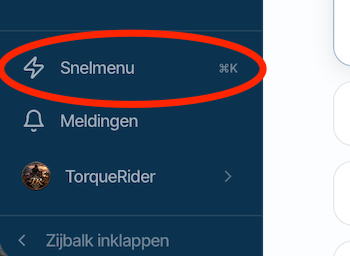
    De aanwezigheid van het <Snelmenu> was mij eigenlijk helemaal ontgaan. En ik denk dat dit ná de introductie van Next toegevoegd is en ik die melding gemist heb.
    Ondanks alle briljante nieuwe functies in Next kreeg ik op een zeker moment het gevoel dat het mij allemaal een beetje te veel werd. Alles is anders en de meeste functies moeten ik naar zoeken.
    Ik werd er een beetje zat van 😉
    Maar dat <Snelmenu> maakt het mij toch weer makkelijker.

    I had actually completely overlooked the existence of the <Quick menu>. I suspect it was added after the introduction of Next, and I must have missed the announcement.
    Despite all the brilliant new features in Next, at a certain point, it all started to feel a bit overwhelming. Everything is different, and I have to search for most of the functions.
    I was getting a bit fed up with it 😉
    But that <Quick menu> really makes things easier again.
    Scherm­afbeelding 2026-11-06 om 12.21.07.png

    1 Reply Last reply
    0
    • Marcel Versluis
      Marcel Versluis
      Marcel Versluis
      wrote last edited by
      #2

      Vanaf ieder scherm kun je dit activeren door de letter G in te typen, vanuit daar kun je razendsnel naar een ander Programma item.

      You can activate this from any screen by typing the letter G; from there, you can quickly navigate to another program item.

      BMW R1300GS Adventure | BMW Connected Ride Navigator | Carplay | MRA Gold | MRA Next

      TorqueRider 1 Reply Last reply
      0
      • Marcel Versluis Marcel Versluis

        Vanaf ieder scherm kun je dit activeren door de letter G in te typen, vanuit daar kun je razendsnel naar een ander Programma item.

        You can activate this from any screen by typing the letter G; from there, you can quickly navigate to another program item.

        TorqueRider
        TorqueRider
        TorqueRider
        wrote last edited by
        #3

        @Marcel-Versluis
        Het typen van de letter G brengt je naar een beknopt menu.
        Gebruik je Command-k dan heb je het volledige menu.
        (Waarbij Command-k de Mac versie is. De windows combi ken ik niet Misschien kun jij die noemen?)

        Typing the letter G takes you to a concise menu.
        Using Command-K gives you the full menu.
        (Note that Command-K is the Mac version; I am not familiar with the Windows equivalent.)

        1 Reply Last reply
        0

        Hello! It looks like you're interested in this conversation, but you don't have an account yet.

        Getting fed up of having to scroll through the same posts each visit? When you register for an account, you'll always come back to exactly where you were before, and choose to be notified of new replies (either via email, or push notification). You'll also be able to save bookmarks and upvote posts to show your appreciation to other community members.

        With your input, this post could be even better 💗

        Register Login
        Reply
        • Reply as topic
        Log in to reply
        • Oldest to Newest
        • Newest to Oldest
        • Most Votes


        ACTIVE USERS
        TorqueRider
        TorqueRider
        Marcel Versluis
        Marcel Versluis
        POPULAR TOPICS
        • ETA icon not displayed in Android Auto
          Òscar
          Òscar
          0
          20
          284

        • Routes not syncing to the mobile app
          Corjan Meijerink
          Corjan Meijerink
          0
          13
          49

        • waar vind ik de bestaande POI'S
          Marinus van Deudekom
          Marinus van Deudekom
          0
          11
          45

        • How to export GPX files to Zumo XT without recalculation
          HABVEN aka MrMRA
          HABVEN aka MrMRA
          2
          20
          1.5k

        • Allow the last entered point to be set as a via point
          Corjan Meijerink
          Corjan Meijerink
          0
          8
          32

        • Restriction on scenic length?
          Marinus van Deudekom
          Marinus van Deudekom
          0
          8
          114

        • Avoiding roads with extreme gradients
          Corrado Miniati
          Corrado Miniati
          0
          7
          27

        • Statistieken
          Marinus van Deudekom
          Marinus van Deudekom
          0
          7
          44

        MY GROUPS
        • Login

        • Login or register to search.
        • First post
          Last post
        0
        • Categories
        • Recent
        • Popular
        • Support
        • MyRoute-app