Continuous freezing on Android Auto
-

Lately, I've been trying to use the browser more frequently for my daily commutes, but it crashes constantly.
Curiously, it seems to happen much more often when I select a favorite destination than when I simply navigate a route. I know it might sound absurd, but that’s my impression.
Yesterday afternoon, during a 15 km drive home, it froze three times.
I had to give up and use Google Maps instead.Best regards
Creator and administrator of the largest MRA groups.
- https://t.me/MRa_by_b0hd1
- https://www.myrouteapp.com/group/messages/7007
- YouTube: @demco17
- Ex-routexpert, current beta tester and MRA expert. Creator of tutorials, manuals, and MRA user trainer.
-
Lately, I've been trying to use the browser more frequently for my daily commutes, but it crashes constantly.
Curiously, it seems to happen much more often when I select a favorite destination than when I simply navigate a route. I know it might sound absurd, but that’s my impression.
Yesterday afternoon, during a 15 km drive home, it froze three times.
I had to give up and use Google Maps instead.Best regards

@b0hd1 witch version of the app are you using because in the latest that problem was solved
Honda Goldwing GL1500,
Honda Silverwing GL 650
DMD2 T865X 8 inch Android tablet using MRA next for navigation
Garmin XT sold
Samsung S24FE mounted on a Quadlock and using Android Auto in my car -
@b0hd1 witch version of the app are you using because in the latest that problem was solved
@Marinus-van-Deudekom 5.0.2 - 442. It seems it's not 100% resolved yet.
Creator and administrator of the largest MRA groups.
- https://t.me/MRa_by_b0hd1
- https://www.myrouteapp.com/group/messages/7007
- YouTube: @demco17
- Ex-routexpert, current beta tester and MRA expert. Creator of tutorials, manuals, and MRA user trainer.
-
@Marinus-van-Deudekom 5.0.2 - 442. It seems it's not 100% resolved yet.
@b0hd1 Did you save your logfile and send it to Corjan?
Honda Goldwing GL1500,
Honda Silverwing GL 650
DMD2 T865X 8 inch Android tablet using MRA next for navigation
Garmin XT sold
Samsung S24FE mounted on a Quadlock and using Android Auto in my car -
@b0hd1 Did you save your logfile and send it to Corjan?
@Marinus-van-Deudekom I’ve saved it, but I guess it's up to Corjan to decide whether I should send it or not..
 "
" -

Feel free to create a support ticket with the logs any time

All feedback is useful
-
Feel free to create a support ticket with the logs any time
All feedback is useful
@Corjan-Meijerink I'm correcting the sensations: it doesn't just fail when going to a favorite point, but also when following a route designed in the planner.
I'm sending both files now: the one from Sunday night and the one from all day today. -
Feel free to create a support ticket with the logs any time
All feedback is useful
@Corjan-Meijerink Hi, I'm sending you the log files by email. I can't open a ticket.
Creator and administrator of the largest MRA groups.
- https://t.me/MRa_by_b0hd1
- https://www.myrouteapp.com/group/messages/7007
- YouTube: @demco17
- Ex-routexpert, current beta tester and MRA expert. Creator of tutorials, manuals, and MRA user trainer.
-
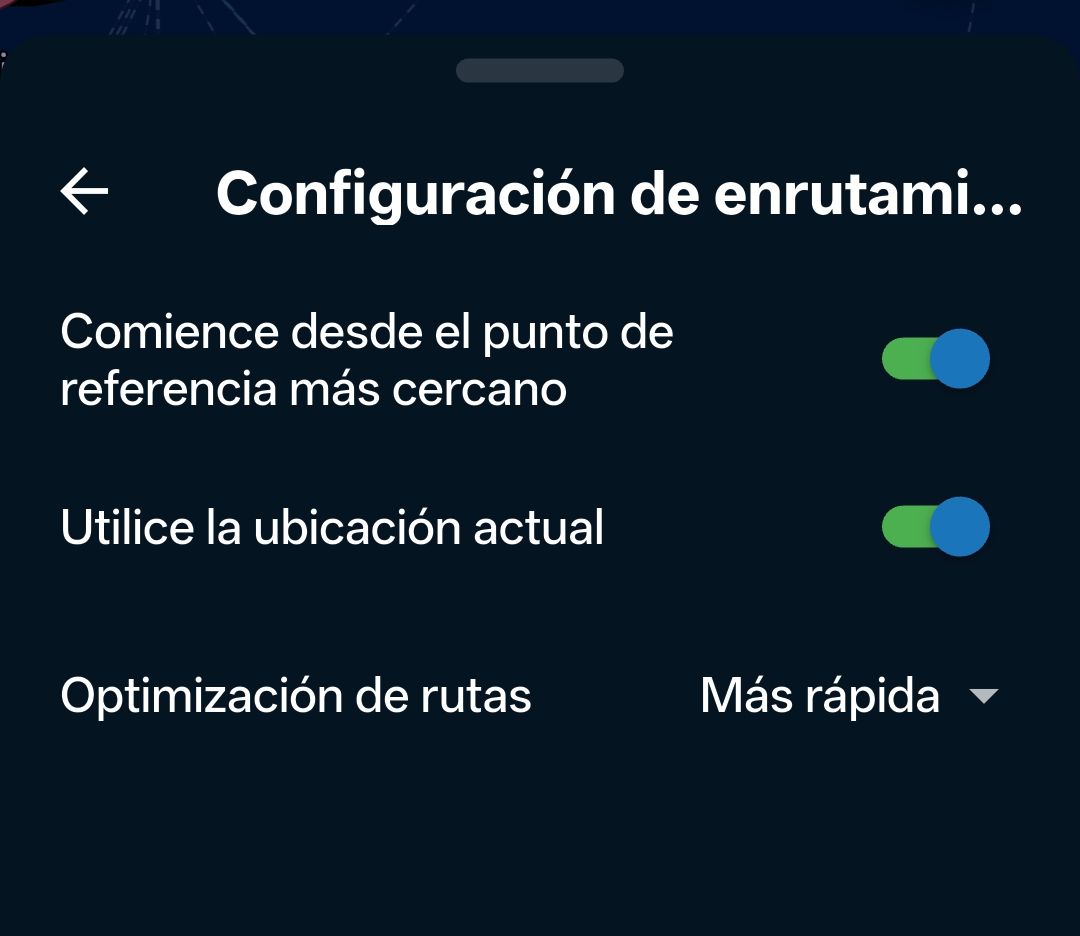
Another route two days ago. 440 km. It froze several times. I had to disconnect Wi-Fi to stop the connection with Android Auto and close the app from my smartphone. So I had to stop driving, take out my smartphone, etc., etc. Also, if I restarted the route from Android Auto, it began at point 1, not the nearest one. Again, I had to stop driving, take out my smartphone, and skip the points... Because if you've already passed 40 points and have to do it one by one from Android Auto, it's madness. You should be able to choose the starting point from Android Auto...
I've had to go back to using Osmand as my backup navigation system after several years of not needing it. The navigation system on Android is very stable and reliable, but Android Auto has many shortcomings.
And I've decided to make the final migration to Android Auto. I hope it's not a bad choice...
-

I think it's important for developers to prioritize AA/CP because many of us use these types of systems, and their use will only increase. Before releasing a beta version, it would be essential to ensure the app's basic functionality is working correctly.
I share my colleague's opinion and also believe that restarting the route from the nearest waypoint is a fundamental feature that should be functional. -
I think it's important for developers to prioritize AA/CP because many of us use these types of systems, and their use will only increase. Before releasing a beta version, it would be essential to ensure the app's basic functionality is working correctly.
I share my colleague's opinion and also believe that restarting the route from the nearest waypoint is a fundamental feature that should be functional.
@bluetuz, I was under the impression that AA/CP starts a route at the nearest point if that was the last setting used in the app, is that not correct? I am not in a position to test that right now.
I am just an enthusiastic MRA user, and hope you will be one too!
Most motorcycle problems are caused by the nut that connects the handlebar to the saddle.
Check out RideSleepRepeat.eu, a biker community for sharing stays across Europe
-
@bluetuz, I was under the impression that AA/CP starts a route at the nearest point if that was the last setting used in the app, is that not correct? I am not in a position to test that right now.
@Con-Hennekens That's how it's supposed to work, but it doesn't. And having to restart navigation so many times is really inconvenient.
-

Hi all,
After 5 days use on 2400 km trip alon 5 days, I have severals things to comment.
- Android Auto connected via Wireless, is very bad. It hangs, becomes freeze on AA Screen and after kill MyRoute-app on phone, I must disconnect AA completely.
- Android Auto used by cable connection seems to be more stable but some problems are present.
- CarPlay is more stable than AA, but also there are items to resolve or change.
The list of problems, for both, AA & CP, are:
- App freezes (CP & AA) on some time, and screen is not refreshed. On phone is normal and working. I must kill phone app and restart AA/CP connection to work again.
- If I stop car (refueling, take a break, etc.) and I do not do anything on phone side, when I return to car and start system I note different behaviors:
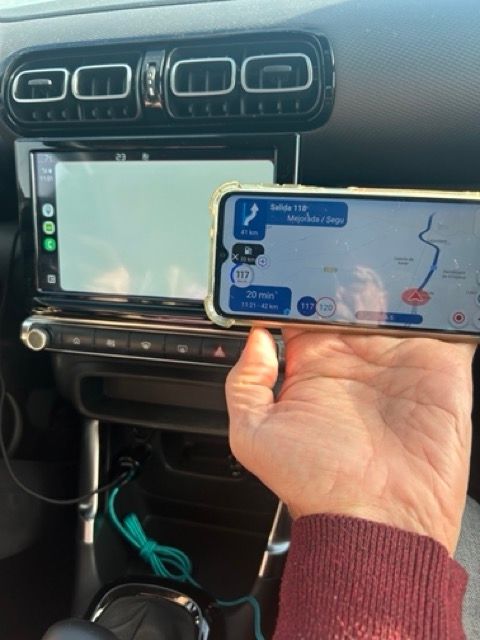
- Car Side lost map. There are some indications on screen, but no route path, no map, no voice indications. On phone, is normal:
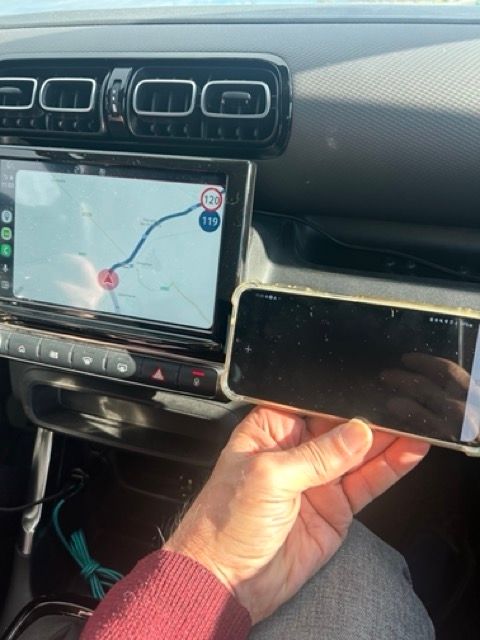
- Car Side displays map, but no indications, but freezed and phone side app is "black". photo of this:
- In both cases, I must kill all and restart.
- Car Side lost map. There are some indications on screen, but no route path, no map, no voice indications. On phone, is normal:
- If I lost data connection, normally it freezes. I have last maps downloadued. Also, in fo data conection, it can't start a route, with message "No route found". So I must wait to go outside parking to start navigation.
- To start route from nearest point, I must doit from phone. On CP/AA, it start from starting point.
My impression is CP / AA needs more work to be fully working. Also one of this hangs I sent Beta report thought IOS App.
Also, I noted some points to make app better on CP/AA:
-
On CP/AA I can't see Waypoints list, so is not possible to select one to go there.
-
I do not know in which point I'm going: No number , no indications, nothing on CP/AA screen, even when there are space for that:
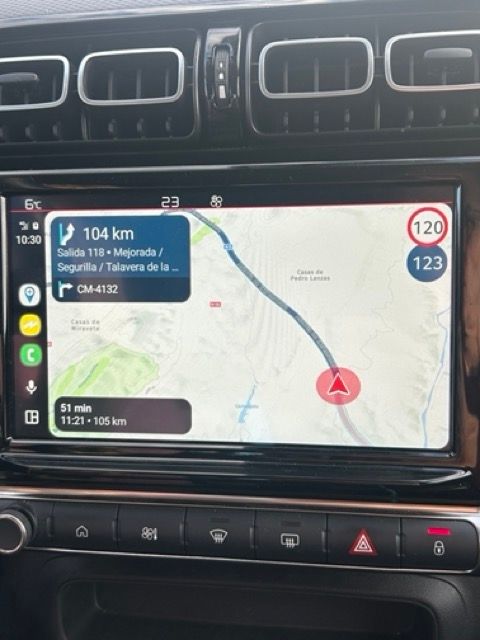
The space between 22nd indication" and "time to next point" i perfect for that
Also, an icon on "time to next point" indicating next viapoint, next stop or end of route will be useful. -
About bluetooth delay configuration, works fine.
-
Some times I noted two indications overlapping, so first one does not finish.
Zoom: Is there a brief article that explains how it works? I noted it is not well adjusted to speed or road type, so in Hihgways is good, until I arrive to exit, that zoom in so that I lost way to exit. Perhaps more gradual to do zoom in...
And in curvy roads, zooms out so that I can't see how next curve is, because I see a lot of road.And on next used on phone, I'd use a A to B route and add some stops but:
- stops allways add at End. What if I want to add someone in the middle? I need to redo all.
- I could see a list of point, but there are no interchangeable.
- Points are always a "Stop point" I can't select one of them as a Via Point
- Whike bavigating, after I reach one point 2, it dissapears (ok) but point 3 becomes new point 2, and so on. This is confusing.
Also could be interesting to save logs locally on phone to select then and send to support. We do not know how are managed by app and if after every app kill there are some info that becomes lost for support.
CP/AA device: Citroën C3 Aircross
Iphone 14 with IOS 26,2
Samsung A14 with Android 14.
MyRouteapp versión 5.0.2 - 422 Beta releaseThat's all by the moment...
Happy new year and make it the best for Next.
Best regards
Lluis Arasanz
- BMW F750GS
MotoMediaLink HW Interface for BMW's WonderWheel device - Samsung A14 with Beta MyRoute-App (primary bike use)
Tasker and MMLink SW for Android App Control - iPhone 14 with Beta MyRoute-App (personal and primary CP use)
-
Hi all,
After 5 days use on 2400 km trip alon 5 days, I have severals things to comment.
- Android Auto connected via Wireless, is very bad. It hangs, becomes freeze on AA Screen and after kill MyRoute-app on phone, I must disconnect AA completely.
- Android Auto used by cable connection seems to be more stable but some problems are present.
- CarPlay is more stable than AA, but also there are items to resolve or change.
The list of problems, for both, AA & CP, are:
- App freezes (CP & AA) on some time, and screen is not refreshed. On phone is normal and working. I must kill phone app and restart AA/CP connection to work again.
- If I stop car (refueling, take a break, etc.) and I do not do anything on phone side, when I return to car and start system I note different behaviors:
- Car Side lost map. There are some indications on screen, but no route path, no map, no voice indications. On phone, is normal:
- Car Side displays map, but no indications, but freezed and phone side app is "black". photo of this:
- In both cases, I must kill all and restart.
- Car Side lost map. There are some indications on screen, but no route path, no map, no voice indications. On phone, is normal:
- If I lost data connection, normally it freezes. I have last maps downloadued. Also, in fo data conection, it can't start a route, with message "No route found". So I must wait to go outside parking to start navigation.
- To start route from nearest point, I must doit from phone. On CP/AA, it start from starting point.
My impression is CP / AA needs more work to be fully working. Also one of this hangs I sent Beta report thought IOS App.
Also, I noted some points to make app better on CP/AA:
-
On CP/AA I can't see Waypoints list, so is not possible to select one to go there.
-
I do not know in which point I'm going: No number , no indications, nothing on CP/AA screen, even when there are space for that:
The space between 22nd indication" and "time to next point" i perfect for that
Also, an icon on "time to next point" indicating next viapoint, next stop or end of route will be useful. -
About bluetooth delay configuration, works fine.
-
Some times I noted two indications overlapping, so first one does not finish.
Zoom: Is there a brief article that explains how it works? I noted it is not well adjusted to speed or road type, so in Hihgways is good, until I arrive to exit, that zoom in so that I lost way to exit. Perhaps more gradual to do zoom in...
And in curvy roads, zooms out so that I can't see how next curve is, because I see a lot of road.And on next used on phone, I'd use a A to B route and add some stops but:
- stops allways add at End. What if I want to add someone in the middle? I need to redo all.
- I could see a list of point, but there are no interchangeable.
- Points are always a "Stop point" I can't select one of them as a Via Point
- Whike bavigating, after I reach one point 2, it dissapears (ok) but point 3 becomes new point 2, and so on. This is confusing.
Also could be interesting to save logs locally on phone to select then and send to support. We do not know how are managed by app and if after every app kill there are some info that becomes lost for support.
CP/AA device: Citroën C3 Aircross
Iphone 14 with IOS 26,2
Samsung A14 with Android 14.
MyRouteapp versión 5.0.2 - 422 Beta releaseThat's all by the moment...
Happy new year and make it the best for Next.
Best regards
@Lluis-Arasanz That's right. I agree with you. While air conditioning/configuration is the future (or already the present in all cars and many motorcycles, as well as external systems), I also think it has too many problems for everyday use. Let's hope it can be improved little by little.
-
@Corjan-Meijerink Hi, I'm sending you the log files by email. I can't open a ticket.
@Corjan-Meijerink Did you receive the files by email?
Creator and administrator of the largest MRA groups.
- https://t.me/MRa_by_b0hd1
- https://www.myrouteapp.com/group/messages/7007
- YouTube: @demco17
- Ex-routexpert, current beta tester and MRA expert. Creator of tutorials, manuals, and MRA user trainer.
-
@Corjan-Meijerink Did you receive the files by email?
@b0hd1 Yes! Unfortunately no real causes found yet.
In general since update v5 the Android Auto stability has been improved a lot.Not just me saying that but the amount of tickets we were able to close after contact with the customers is significant.
The logs (which can be biased) also show improvements.
So what exactly is not working here, is hard to discover. -
@b0hd1 Yes! Unfortunately no real causes found yet.
In general since update v5 the Android Auto stability has been improved a lot.Not just me saying that but the amount of tickets we were able to close after contact with the customers is significant.
The logs (which can be biased) also show improvements.
So what exactly is not working here, is hard to discover.
@Corjan-Meijerink Well, this news of yours really discourages me from continuing to use MRA as a navigation system. As you saw in @Lluis-Arasanz 's message, it's quite unstable, and that becomes very annoying on a route. I hope you can find solutions soon. CarPlay/Android Auto are here to stay, and little by little, all vehicles are adopting them.
Hello! It looks like you're interested in this conversation, but you don't have an account yet.
Getting fed up of having to scroll through the same posts each visit? When you register for an account, you'll always come back to exactly where you were before, and choose to be notified of new replies (either via email, or push notification). You'll also be able to save bookmarks and upvote posts to show your appreciation to other community members.
With your input, this post could be even better 💗
Register Login-
 01222
01222
-
 0817
0817
-
078
-
 0724
0724
-
 0629
0629
-
1518
-
0410
-
0419