Skip to content
  • Categories
  • Recent
  • Popular
  • Support
  • MyRoute-app
Collapse
Brand Logo

MRA Community Forum

  1. Home
  2. The MyRoute-app
  3. [App] Announcements
  4. Android only update! (4.4.1)

Android only update! (4.4.1)

Scheduled Pinned Locked Moved [App] Announcements
28 Posts 10 Posters 7.8k Views 2 Watching
  • Oldest to Newest
  • Newest to Oldest
  • Most Votes
Reply
  • Reply as topic
Log in to reply
This topic has been deleted. Only users with topic management privileges can see it.
  • ginoginoundefined ginogino

    @Marinus-van-Deudekom said in Android only update! (4.4.1):

    @ginogino maybe you can put in a service ticket and include the log file.

    Thanks, I didn't know how to extract the log file. I'll open a ticket reporting the error.

    Con Hennekensundefined Online
    Con Hennekensundefined Online
    Con Hennekens
    Alpha tester
    wrote on last edited by Con Hennekens
    #16

    @ginogino, to be honest, if the app skipped to 9 and you still followed the original route to 8, there really is no error. Having no turn by turn instructions is what happens if you disable recalculation and leave the blue line. Of course you can ask why the app skipped 8. Could it be an accidental touch on the phone's display?

    I am just an enthusiastic MRA user, and hope you will be one too!

    Most motorcycle problems are caused by the nut that connects the handlebar to the saddle.

    Streetpilot 2610 / Zumo 660 / Zumo 395 / Motorola Thinkphone + MRA app

    ginoginoundefined 1 Reply Last reply
    1
    • Con Hennekensundefined Con Hennekens

      @ginogino, to be honest, if the app skipped to 9 and you still followed the original route to 8, there really is no error. Having no turn by turn instructions is what happens if you disable recalculation and leave the blue line. Of course you can ask why the app skipped 8. Could it be an accidental touch on the phone's display?

      ginoginoundefined Offline
      ginoginoundefined Offline
      ginogino
      wrote on last edited by
      #17

      @Con-Hennekens said in Android only update! (4.4.1):

      @ginogino, to be honest, if the app skipped to 9 and you still followed the original route to 8, there really is no error.

      There was no problem because I knew perfectly well the road I had selected when I planned the motorcycle tour, but instead I worry when I have to take roads that I don't know well or that I'm doing for the first time.

      1 Reply Last reply
      0
      • Marinus van Deudekomundefined Marinus van Deudekom

        @ginogino said in Android only update! (4.4.1):

        I had chosen to get to waypoint 9 via waypoint 8, I took the right direction for me, not for the app, which would have taken me to waypoint 8, then to waypoint 9, and then on.

        Do you mean that you've kept on going on the route that you planned or did you like @Con-Hennekens stated diviate a bit in Rezzoaglio.
        If I look at your route there should not have been any reason why the app would try to get you to skipp shapingpoint 8. No roadblocks or seasonal blocking.
        I don't know why you would disable recalculation.
        As I look at you route I would have put in more shapingpoints to prevent unexpected deviation of your route.
        I would certainly put shapingpoint 7 a bit more in the direction of 8
        8cabaf71-4886-475e-98b6-4cbf441576d6-image.png
        Now it's almost on the crossing where things went wrong for you.
        Have you enabled the white original route in your settings. That way you can see when you're about to deviate from your route.

        JP dundefined Offline
        JP dundefined Offline
        JP d
        wrote on last edited by JP d
        #18

        @Marinus-van-Deudekom said in Android only update! (4.4.1):

        I would certainly put shapingpoint 7 a bit more in the direction of 8

        Exactly always ensure your waypoints are a good distance from a junction, intersection, roundabout or adjacent road. If you use the (expand) add waypoints option you have to check every single one.

        I've also had MRA take me left onto a single track lane shortcut even though my friend's MRA was showing straight ahead which was the correct way.

        I didn't have (show original route) turned on which would have helped but previously the white line (show original route) didn't follow the road correctly so I turned it off. Looks like it has been fixed now but I'll find out for sure on my trip on the 20th.

        ginoginoundefined Brian McGundefined 2 Replies Last reply
        0
        • JP dundefined JP d

          @Marinus-van-Deudekom said in Android only update! (4.4.1):

          I would certainly put shapingpoint 7 a bit more in the direction of 8

          Exactly always ensure your waypoints are a good distance from a junction, intersection, roundabout or adjacent road. If you use the (expand) add waypoints option you have to check every single one.

          I've also had MRA take me left onto a single track lane shortcut even though my friend's MRA was showing straight ahead which was the correct way.

          I didn't have (show original route) turned on which would have helped but previously the white line (show original route) didn't follow the road correctly so I turned it off. Looks like it has been fixed now but I'll find out for sure on my trip on the 20th.

          ginoginoundefined Offline
          ginoginoundefined Offline
          ginogino
          wrote on last edited by
          #19

          @JP-d said in Android only update! (4.4.1):

          @Marinus-van-Deudekom said in Android only update! (4.4.1):

          If you use the (expand) add waypoints option you have to check every single one.

          I used to use the "expand" function, until I realized it was introducing a lot of errors, and I haven't used it since.

          Marinus van Deudekomundefined 1 Reply Last reply
          0
          • ginoginoundefined ginogino

            @JP-d said in Android only update! (4.4.1):

            @Marinus-van-Deudekom said in Android only update! (4.4.1):

            If you use the (expand) add waypoints option you have to check every single one.

            I used to use the "expand" function, until I realized it was introducing a lot of errors, and I haven't used it since.

            Marinus van Deudekomundefined Offline
            Marinus van Deudekomundefined Offline
            Marinus van Deudekom
            RouteXpert
            wrote on last edited by
            #20

            @ginogino I would not use the expand waypoint function but simply add a couple manually

            Honda Goldwing GL1500,
            Honda Silverwing GL 650
            DMD2 T865X 8 inch Android tablet using MRA next for navigation
            Garmin XT sold
            Samsung S24FE mounted on a Quadlock and using Android Auto in my car

            1 Reply Last reply
            0
            • JP dundefined JP d

              @Marinus-van-Deudekom said in Android only update! (4.4.1):

              I would certainly put shapingpoint 7 a bit more in the direction of 8

              Exactly always ensure your waypoints are a good distance from a junction, intersection, roundabout or adjacent road. If you use the (expand) add waypoints option you have to check every single one.

              I've also had MRA take me left onto a single track lane shortcut even though my friend's MRA was showing straight ahead which was the correct way.

              I didn't have (show original route) turned on which would have helped but previously the white line (show original route) didn't follow the road correctly so I turned it off. Looks like it has been fixed now but I'll find out for sure on my trip on the 20th.

              Brian McGundefined Offline
              Brian McGundefined Offline
              Brian McG
              wrote on last edited by
              #21

              @JP-d said in Android only update! (4.4.1):

              I didn't have (show original route) turned on which would have helped but previously the white line (show original route) didn't follow the road correctly so I turned it off. Looks like it has been fixed now but I'll find out for sure on my trip on the 20th.

              not sure if it is the same issue you are refering to but just so you know before your trip there is still an issue with the "original route" line not exactly "following the road" if you are navigating in offline mode

              there are a couple of workarounds, details are here https://forum.myrouteapp.com/post/66551
              BlackView BV7100, Android 12
              Normaly navigate Routes in Offline mode with Offline Maps

              JP dundefined 1 Reply Last reply
              0
              • Brian McGundefined Brian McG

                @JP-d said in Android only update! (4.4.1):

                I didn't have (show original route) turned on which would have helped but previously the white line (show original route) didn't follow the road correctly so I turned it off. Looks like it has been fixed now but I'll find out for sure on my trip on the 20th.

                not sure if it is the same issue you are refering to but just so you know before your trip there is still an issue with the "original route" line not exactly "following the road" if you are navigating in offline mode

                there are a couple of workarounds, details are here https://forum.myrouteapp.com/post/66551

                JP dundefined Offline
                JP dundefined Offline
                JP d
                wrote on last edited by JP d
                #22

                @Brian-McG You're right mate! My mistake I had forgotten to turn WiFi and Data off πŸ€¦πŸ»β€β™‚οΈ.

                I navigate with my old phone (no SIM) using offline maps.

                So you're saying if I open a route offline and then click on the (pen) πŸ–‹οΈ edit route icon, then go to (Menu) scroll down and select (Navigate) the white line original route would follow the blue navigation line correctly?

                Thanks for your reply 🍻

                Brian McGundefined 1 Reply Last reply
                0
                • JP dundefined JP d

                  @Brian-McG You're right mate! My mistake I had forgotten to turn WiFi and Data off πŸ€¦πŸ»β€β™‚οΈ.

                  I navigate with my old phone (no SIM) using offline maps.

                  So you're saying if I open a route offline and then click on the (pen) πŸ–‹οΈ edit route icon, then go to (Menu) scroll down and select (Navigate) the white line original route would follow the blue navigation line correctly?

                  Thanks for your reply 🍻

                  Brian McGundefined Offline
                  Brian McGundefined Offline
                  Brian McG
                  wrote on last edited by
                  #23

                  @JP-d that sounds about right

                  you can test it at home & see the white line not fitting correctly
                  I think it is easier to see on longer routes with more points as somewhere MRA are limiting the number of track points for the track calculation, so longer routes deviate away more from the road

                  the other work around is start the navigation while your old phone is still connected to the hotel wifi then the white line is calculated correctly as it is online & MRA allows more points for the track caclulation
                  then go offline & close the wifi

                  BlackView BV7100, Android 12
                  Normaly navigate Routes in Offline mode with Offline Maps

                  1 Reply Last reply
                  1
                  • Bansheesundefined Offline
                    Bansheesundefined Offline
                    Banshees
                    wrote on last edited by
                    #24

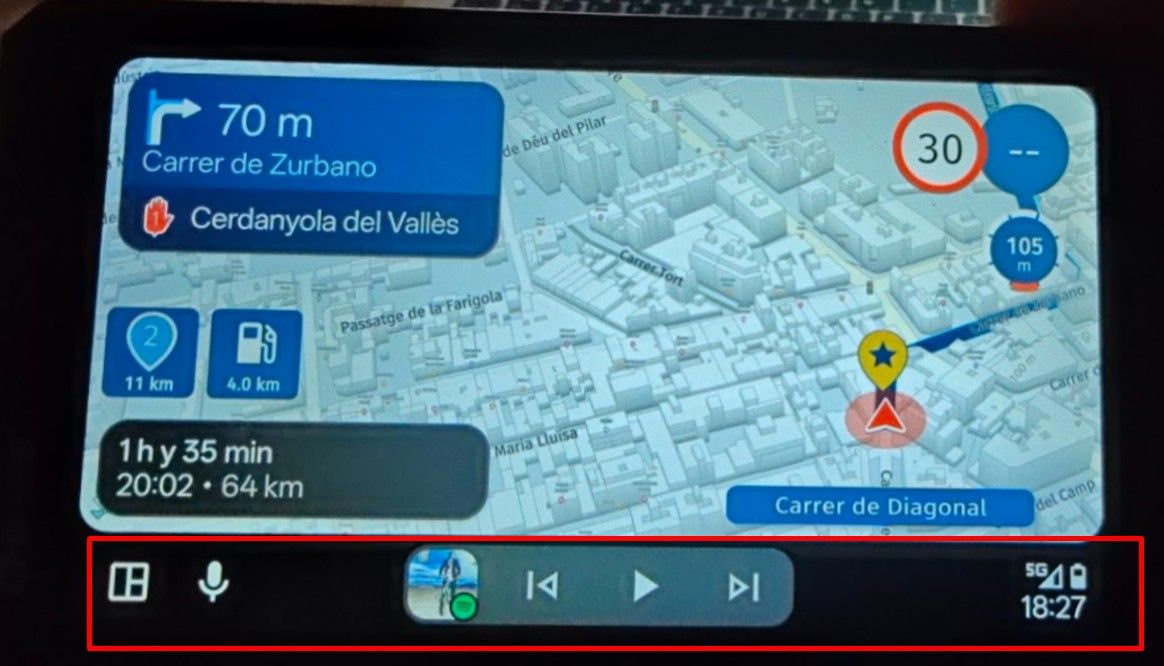
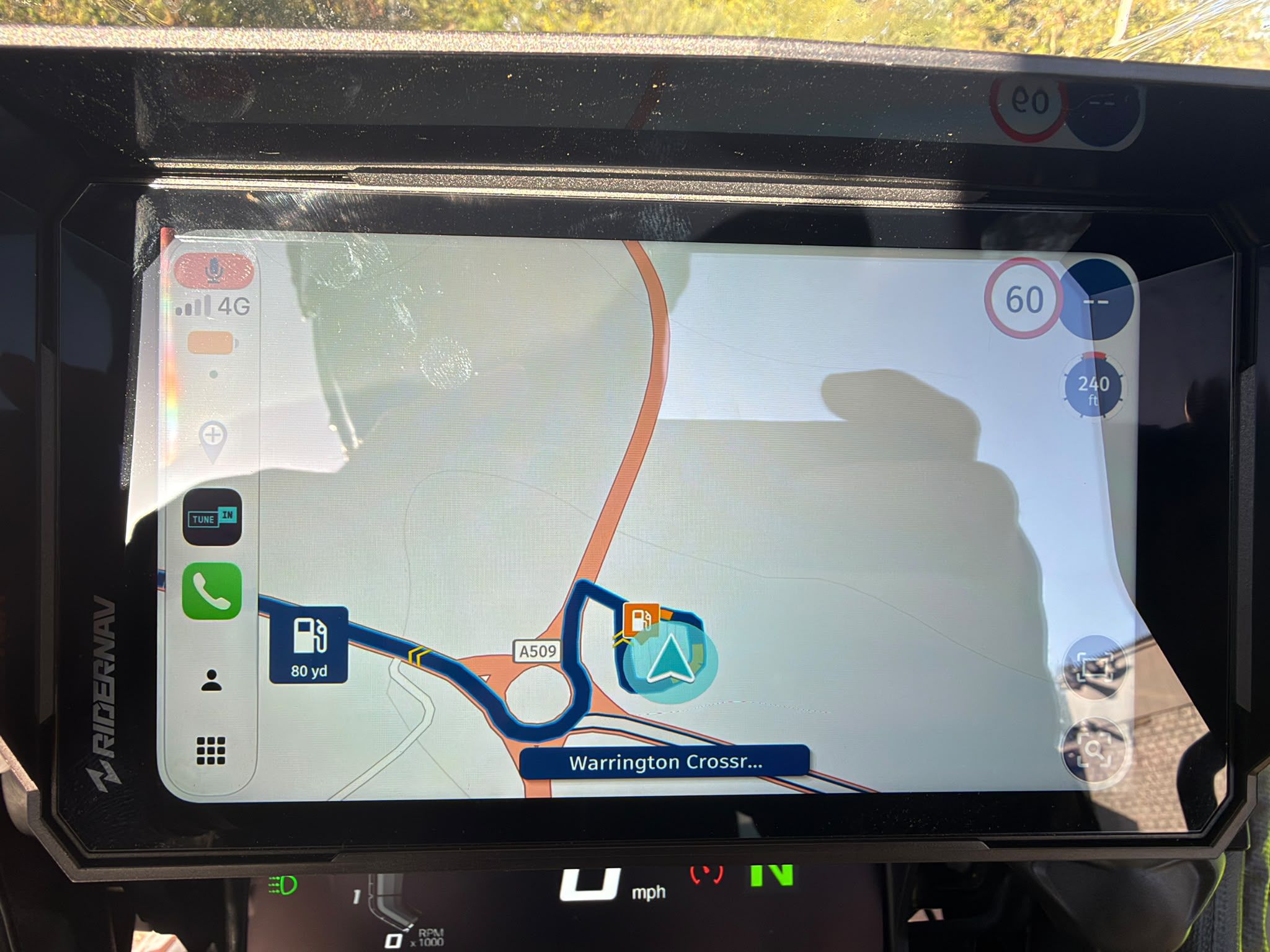
                    The latest update made the bouton barely distinguished when riding, on Android Auto.

                    I know where is the zoom and the POI option (to remove one waypoint while driving). But i can't see correctly the bouton.

                    \\\|///
                    \\ - - //
                    ( @ @ )
                    -oOOo-()-oOOo---------------------------------------------
                    Banshees
                    MRA Gold & Nav - Life
                    --------------Oooo-----------------------------------------
                    oooO ( )
                    ( ) ) /
                    \ ( (
                    /
                    \_)

                    Marinus van Deudekomundefined 1 Reply Last reply
                    1
                    • Bansheesundefined Banshees

                      The latest update made the bouton barely distinguished when riding, on Android Auto.

                      I know where is the zoom and the POI option (to remove one waypoint while driving). But i can't see correctly the bouton.

                      Marinus van Deudekomundefined Offline
                      Marinus van Deudekomundefined Offline
                      Marinus van Deudekom
                      RouteXpert
                      wrote on last edited by
                      #25

                      @Banshees maybe you can share a screenshot

                      Honda Goldwing GL1500,
                      Honda Silverwing GL 650
                      DMD2 T865X 8 inch Android tablet using MRA next for navigation
                      Garmin XT sold
                      Samsung S24FE mounted on a Quadlock and using Android Auto in my car

                      1 Reply Last reply
                      0
                      • Thomas Neumeyerundefined Offline
                        Thomas Neumeyerundefined Offline
                        Thomas Neumeyer
                        wrote on last edited by
                        #26

                        Hi, just out of curiosity. When is the next big update planned? Any teaser available?

                        Regards

                        Thomas

                        Corjan Meijerinkundefined 1 Reply Last reply
                        0
                        • Thomas Neumeyerundefined Thomas Neumeyer

                          Hi, just out of curiosity. When is the next big update planned? Any teaser available?

                          Regards

                          Thomas

                          Corjan Meijerinkundefined Offline
                          Corjan Meijerinkundefined Offline
                          Corjan Meijerink
                          Developer
                          wrote on last edited by
                          #27

                          @Thomas-Neumeyer it’s in beta since yesterday!
                          Expected release end of the month.

                          1 Reply Last reply
                          0
                          • Thomas Neumeyerundefined Offline
                            Thomas Neumeyerundefined Offline
                            Thomas Neumeyer
                            wrote on last edited by
                            #28

                            Cool, thank you Corjan.

                            1 Reply Last reply
                            0
                            Reply
                            • Reply as topic
                            Log in to reply
                            • Oldest to Newest
                            • Newest to Oldest
                            • Most Votes


                            • 1
                            • 2
                            ACTIVE USERS
                            Con Hennekensundefined
                            Con Hennekens
                            Marinus van Deudekomundefined
                            Marinus van Deudekom
                            Corjan Meijerinkundefined
                            Corjan Meijerink
                            JP dundefined
                            JP d
                            Brian McGundefined
                            Brian McG
                            richtea999undefined
                            richtea999
                            ginoginoundefined
                            ginogino
                            RetiredWingManundefined
                            RetiredWingMan
                            Thomas Neumeyerundefined
                            Thomas Neumeyer
                            Bansheesundefined
                            Banshees
                            POPULAR TOPICS
                            • Unable to calculate route
                              Lex.Kloet.RXundefined
                              Lex.Kloet.RX
                              0
                              34
                              436

                            • Nuovo Utente
                              Peter Zehentreiterundefined
                              Peter Zehentreiter
                              0
                              2
                              22

                            • MRA Routeplanner, Zumo XT and a list of waypoints
                              undefined
                              0
                              1
                              21

                            • Wishes to the MyRoute App screen
                              undefined
                              0
                              1
                              43

                            • Update 5.0.2 - Free drive
                              Erik 35undefined
                              Erik 35
                              29
                              20
                              811
                            MY GROUPS
                            • Login

                            • Login or register to search.
                            • First post
                              Last post
                            0
                            • Categories
                            • Recent
                            • Popular
                            • Support
                            • MyRoute-app