Skip to content
  • Categories
  • Recent
  • Popular
  • Support
  • MyRoute-app
Collapse
Brand Logo

MRA Community Forum

  1. Home
  2. The MyRoute-app
  3. [App] Problems, Bugs and other Issues
  4. Cannot change map view

Cannot change map view

Scheduled Pinned Locked Moved [App] Problems, Bugs and other Issues
4 Posts 3 Posters 1.2k Views 3 Watching
  • Oldest to Newest
  • Newest to Oldest
  • Most Votes
Reply
  • Reply as topic
Log in to reply
This topic has been deleted. Only users with topic management privileges can see it.
  • Tom Grzelinski Offline
    Tom Grzelinski Offline
    Tom Grzelinski
    wrote on last edited by
    #1

    I have just returned from a 2500 mile trip and no matter what I did, or changed, the navigation view was always directly overhead and at a zoom level that was too close. I kept having to pinch the map to zoom out to see the upcoming junctions.

    I wanted an overhead angled / perspective view, with the camera slightly behind the pointer, looking forward in to the distance… as you normally have on a sat nav! I am sure MRA used to have this?

    I am running MRA 4.4.1 on iOS 18.5 on iPhone 16 Pro.

    For me, the settings are confusing in the app. I am sure there used to be three options for map views - overhead, angled and one other. I cannot find these now.

    In Settings > Screen Layout, there is nothing.

    In Settings > Map Layer, there are two sliders, Default Zoom Correction and Tilt Correction. I think these should change the view, but they do nothing for me.

    I am happy to be educated on this, but for me nothing I did changed the navigation view. Is this a bug in 4.4.1?

    Cheers,
    Tom

    Porsche 911 and VW Transporter T6.1 running CarPlay.
    iPhone 17 Pro running Waze and MRA.
    MRA Routeplanner on web via Mac

    Nick Carthew 1 Reply Last reply
    0
    • Tom Grzelinski Tom Grzelinski

      I have just returned from a 2500 mile trip and no matter what I did, or changed, the navigation view was always directly overhead and at a zoom level that was too close. I kept having to pinch the map to zoom out to see the upcoming junctions.

      I wanted an overhead angled / perspective view, with the camera slightly behind the pointer, looking forward in to the distance… as you normally have on a sat nav! I am sure MRA used to have this?

      I am running MRA 4.4.1 on iOS 18.5 on iPhone 16 Pro.

      For me, the settings are confusing in the app. I am sure there used to be three options for map views - overhead, angled and one other. I cannot find these now.

      In Settings > Screen Layout, there is nothing.

      In Settings > Map Layer, there are two sliders, Default Zoom Correction and Tilt Correction. I think these should change the view, but they do nothing for me.

      I am happy to be educated on this, but for me nothing I did changed the navigation view. Is this a bug in 4.4.1?

      Cheers,
      Tom

      Nick Carthew Offline
      Nick Carthew Offline
      Nick Carthew
      RouteXpert
      wrote on last edited by
      #2

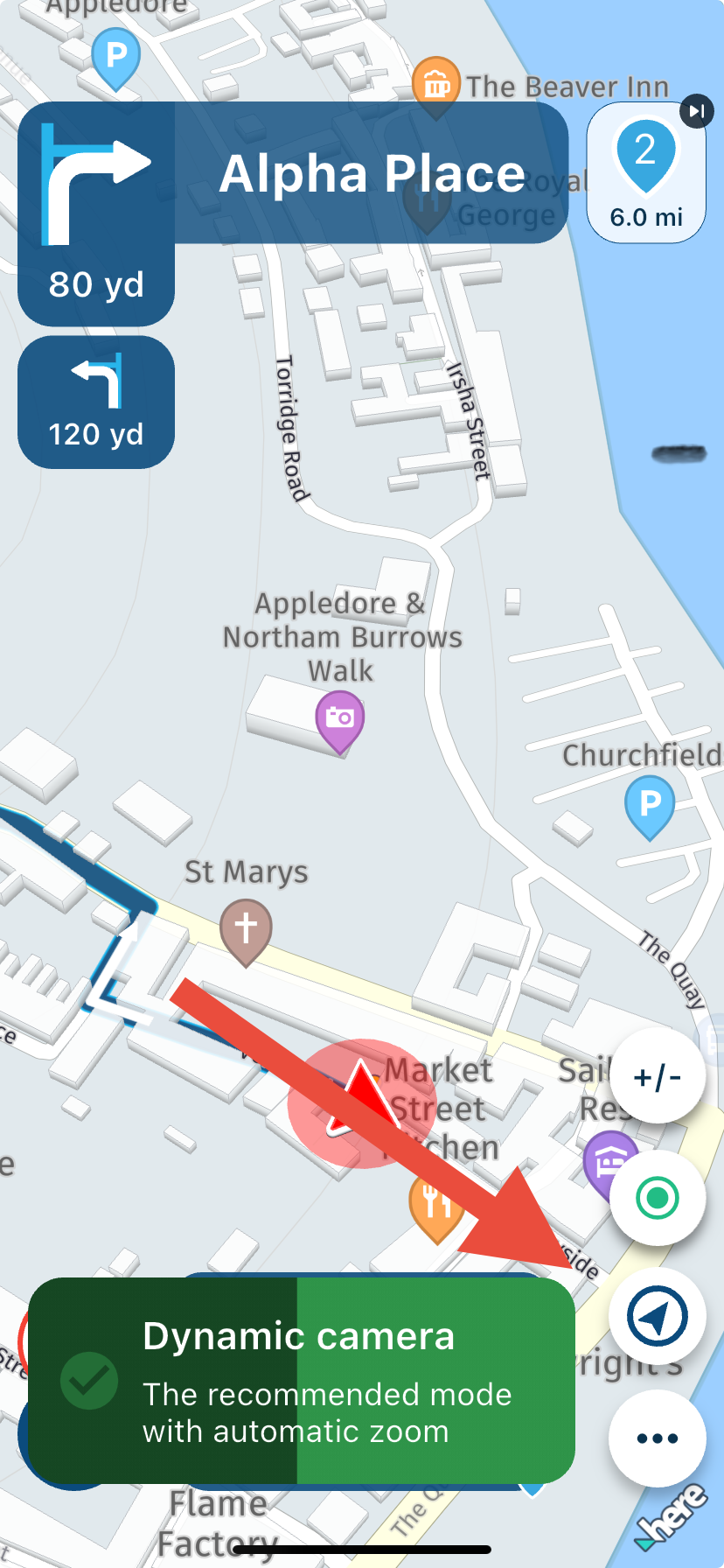
      @Tom-Grzelinski Tap the compass icon. A message will appear as you scroll through the 3 different camera views.
      76c62930-04d0-4064-b33f-92502c9c93db-image.png

      Always willing to help if I can.
      Triumph Tiger 1200 XRT called Tina.
      MRA Navigation Next and SilverFox BJ8

      1 Reply Last reply
      0
      • Tom Grzelinski Offline
        Tom Grzelinski Offline
        Tom Grzelinski
        wrote on last edited by
        #3

        Thanks Nick. Obviously, this was not obvious to me! Seeing a compass usually means to re-orientate the view to face North.

        I wish I’d logged on and asked this during the trip.

        As always, thank you 👍

        Porsche 911 and VW Transporter T6.1 running CarPlay.
        iPhone 17 Pro running Waze and MRA.
        MRA Routeplanner on web via Mac

        1 Reply Last reply
        1
        • Aiello antonino Offline
          Aiello antonino Offline
          Aiello antonino
          wrote on last edited by Aiello antonino
          #4

          I, on the other hand, noticed a different thing on the iPhone 16, if you put the Michelin map everything seems more zoomed in and I don't understand why...

          1 Reply Last reply
          0

          Hello! It looks like you're interested in this conversation, but you don't have an account yet.

          Getting fed up of having to scroll through the same posts each visit? When you register for an account, you'll always come back to exactly where you were before, and choose to be notified of new replies (either via email, or push notification). You'll also be able to save bookmarks and upvote posts to show your appreciation to other community members.

          With your input, this post could be even better 💗

          Register Login
          Reply
          • Reply as topic
          Log in to reply
          • Oldest to Newest
          • Newest to Oldest
          • Most Votes


          ACTIVE USERS
          Nick Carthew
          Nick Carthew
          Aiello antonino
          Aiello antonino
          Tom Grzelinski
          Tom Grzelinski
          POPULAR TOPICS
          • GPX Versions 1.1 vs 1.2 for Garmin Visually Explained
            Simon James Hancock
            Simon James Hancock
            7
            139
            8.8k

          • The compas direction on the elevation circle is wrong
            Stanisław
            Stanisław
            0
            16
            189

          • Afstand en tijd tussen routepunten
            Albert Jan Gombert
            Albert Jan Gombert
            1
            17
            229

          • Hi Folks
            Marinus van Deudekom
            Marinus van Deudekom
            0
            4
            10

          • route niet zichtbaar op audi scherm
            Rob Verhoeff
            Rob Verhoeff
            0
            5
            76

          • Auto skip many waypoints by itself while I was on route. [5.2.0 - 474]
            paul69
            paul69
            0
            26
            889

          • Embedding daily routes into a whole trip route file - How do I do this?
            Travellexxie
            Travellexxie
            0
            7
            118

          • Zumo XT3/Tread
            nomko
            nomko
            0
            2
            45

          MY GROUPS
          • Login

          • Login or register to search.
          • First post
            Last post
          0
          • Categories
          • Recent
          • Popular
          • Support
          • MyRoute-app