Skip to content
  • Categories
  • Recent
  • Popular
  • Support
  • MyRoute-app
Collapse
Brand Logo

MRA Community Forum

  1. Home
  2. MyRoute-app Routeplanner
  3. [Web] Problems, Bugs and other Issues
  4. Adding shaping points confirmation dialog

Adding shaping points confirmation dialog

Scheduled Pinned Locked Moved [Web] Problems, Bugs and other Issues
3 Posts 2 Posters 1.0k Views 2 Watching
  • Oldest to Newest
  • Newest to Oldest
  • Most Votes
Reply
  • Reply as topic
Log in to reply
This topic has been deleted. Only users with topic management privileges can see it.
  • Steve Jarrell
    Steve Jarrell
    Steve Jarrell
    Valued contributor
    wrote on last edited by Steve Jarrell
    #1

    I am helping my brother setup his MRA online planner and app and I have come across something that I haven't seen before and I don't know how to configure.

    Every time he creates or moves a shaping (or via) point a dialog pops up asking for confirmation of what he wants to call it. I've been using MRA for several years now and have never seen this dialog pop up in this case. It really slows you down and is really annoying. If I want to change the text it's very easy to do, but that very much the exception and not the rule.

    How do I turn this "feature" off where the dialog box doesn't pop up every time a shaping point is added or moved?

    Thanks,

    Steve

    Steve Jarrell
    Western North Carolina US

    Lifetime Routeplanner Gold & Navigation Next
    2025 BMW R1300GS
    2025 Can-Am Spyder
    DMD T865-X 8" Tablet
    Garmin XT3

    HABVEN aka MrMRA 1 Reply Last reply
    0
    • Steve Jarrell Steve Jarrell

      I am helping my brother setup his MRA online planner and app and I have come across something that I haven't seen before and I don't know how to configure.

      Every time he creates or moves a shaping (or via) point a dialog pops up asking for confirmation of what he wants to call it. I've been using MRA for several years now and have never seen this dialog pop up in this case. It really slows you down and is really annoying. If I want to change the text it's very easy to do, but that very much the exception and not the rule.

      How do I turn this "feature" off where the dialog box doesn't pop up every time a shaping point is added or moved?

      Thanks,

      Steve

      HABVEN aka MrMRA
      HABVEN aka MrMRA
      HABVEN aka MrMRA
      Valued contributor
      wrote on last edited by
      #2

      @Steve-Jarrell

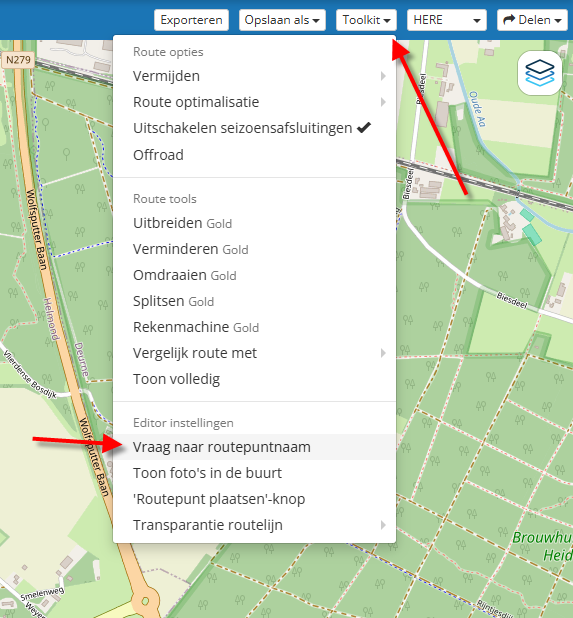
      Hi Steve, go to the toolbox and uncheck "Ask routepoint name"
      d0047e16-f3b7-4954-a446-ac17e6bcf4bd-image.png

      BMW BMW Connected Ride Navigator/Garmin Zumo XT3/XT2/XT//Tourstart/ MyRouteapp (The App)/...
      Een dag niet gelachen is een dag niet geleefd / Een route is net zo goed als deze uitgezet is.

      Steve Jarrell 1 Reply Last reply
      0
      • HABVEN aka MrMRA HABVEN aka MrMRA

        @Steve-Jarrell

        Hi Steve, go to the toolbox and uncheck "Ask routepoint name"
        d0047e16-f3b7-4954-a446-ac17e6bcf4bd-image.png

        Steve Jarrell
        Steve Jarrell
        Steve Jarrell
        Valued contributor
        wrote on last edited by
        #3

        @Hans-van-de-Ven-MR-MRA Thank you! I looked right at it multiple times and didn't see it. I guess it's the same condition that I have when I look right at something in the refrigerator and can't see it. My wife calls it "refrigerator blindness" so I guess I also have "MRA blindness"! 🙂

        I really appreciate it!

        /steve

        Steve Jarrell
        Western North Carolina US

        Lifetime Routeplanner Gold & Navigation Next
        2025 BMW R1300GS
        2025 Can-Am Spyder
        DMD T865-X 8" Tablet
        Garmin XT3

        1 Reply Last reply
        3

        Hello! It looks like you're interested in this conversation, but you don't have an account yet.

        Getting fed up of having to scroll through the same posts each visit? When you register for an account, you'll always come back to exactly where you were before, and choose to be notified of new replies (either via email, or push notification). You'll also be able to save bookmarks and upvote posts to show your appreciation to other community members.

        With your input, this post could be even better 💗

        Register Login
        Reply
        • Reply as topic
        Log in to reply
        • Oldest to Newest
        • Newest to Oldest
        • Most Votes


        ACTIVE USERS
        HABVEN aka MrMRA
        HABVEN aka MrMRA
        Steve Jarrell
        Steve Jarrell
        POPULAR TOPICS
        • A12 Group Trip – How Does It Work? ... Beta Planner and Next App
          Hubert Thoring
          Hubert Thoring
          0
          18
          24

        • Missing info from CarPlay
          superg
          superg
          0
          4
          105

        • Just curious about POI group
          Lluis Arasanz
          Lluis Arasanz
          0
          4
          24

        • Incorrect Android Auto display on 6-inch screens
          b0hd1
          b0hd1
          0
          3
          27

        • Move routes between my library and a club of mine
          b0hd1
          b0hd1
          0
          3
          8

        • File en omrijden
          Robineke
          Robineke
          0
          5
          83

        • Geen pictogram van een motor
          Rob Verhoeff
          Rob Verhoeff
          0
          2
          130

        • Routenplaner on iPad
          Risto Motorcycling
          Risto Motorcycling
          0
          7
          601

        MY GROUPS
        • Login

        • Login or register to search.
        • First post
          Last post
        0
        • Categories
        • Recent
        • Popular
        • Support
        • MyRoute-app