
Changing maps
-
I have a route in street maps ( the map I need for my motorcycle) and when I convert it to here map( for iPhone) it changes the route so me and my wife have different routes to follow. This does not work. What good is planning a route if it changes when I change maps?

use the compare tool, you can find it in the toolkit.
Garmin Zumo XT3/XT2/XT/BMW Connected Ride Navigator/Tourstart/ MyRouteapp (The App)/...
Een dag niet gelachen is een dag niet geleefd / Een route is net zo goed als deze uitgezet is. -
use the compare tool, you can find it in the toolkit.

@Hans-van-de-Ven-MR-MRA I’m not looking to compare different routes. I’m wanting to take the route I meticulously planed on open streets (my Yamaha motorcycle gps) and have my wife see it in Here map(iphone nav next app). When you change the map, it changes the entire planned route.
-
@Hans-van-de-Ven-MR-MRA I’m not looking to compare different routes. I’m wanting to take the route I meticulously planed on open streets (my Yamaha motorcycle gps) and have my wife see it in Here map(iphone nav next app). When you change the map, it changes the entire planned route.

@michael-rello said in Changing maps:
When you change the map, it changes the entire planned route.
Well, that ain't so difficult to understand and it makes complete sense. Both Maps deliver a different routing algorithm to create the route that is being shaped with your shaping points/via points. Since these algorithms act differently, the end result is also different!
@Hans-van-de-Ven-MR-MRA could have added that in order to achieve what you like, you have to make sure both routing algorithms in OSM and HERE are in fact creating your intended route in the same way. Therefore you need to enable the "Compare route with HERE" functionality in the Toolkit menu. Doing so makes, creates two route lines, one for OSM and one for HERE and it immediately shows the differences between both algorithms and you can successively move the waypoints so that both routes are identical (routelines overlap)! It must be noted though, that although you can give it a try, it is very much impossible to make a scenic route completely identical between OSM and Here, you may always have some minute differences. Getting TomTom and HERE to be identical is easier than OSM and HERE or OSM and TomTom, simply because OSM somehow has a very distinct map database...
Also take into account that both algorithms have different settings in the toolkit menu. HERE for instance also has "Seasonal closures" which OSM has not. One must considered all these things for success...
-
@Hans-van-de-Ven-MR-MRA I’m not looking to compare different routes. I’m wanting to take the route I meticulously planed on open streets (my Yamaha motorcycle gps) and have my wife see it in Here map(iphone nav next app). When you change the map, it changes the entire planned route.
@michael-rello it still keeps the mail hwy roads but her won’t go down the twisty mountain road passes( which are the roads I want to travel on motorcycle trips
-
@michael-rello said in Changing maps:
When you change the map, it changes the entire planned route.
Well, that ain't so difficult to understand and it makes complete sense. Both Maps deliver a different routing algorithm to create the route that is being shaped with your shaping points/via points. Since these algorithms act differently, the end result is also different!
@Hans-van-de-Ven-MR-MRA could have added that in order to achieve what you like, you have to make sure both routing algorithms in OSM and HERE are in fact creating your intended route in the same way. Therefore you need to enable the "Compare route with HERE" functionality in the Toolkit menu. Doing so makes, creates two route lines, one for OSM and one for HERE and it immediately shows the differences between both algorithms and you can successively move the waypoints so that both routes are identical (routelines overlap)! It must be noted though, that although you can give it a try, it is very much impossible to make a scenic route completely identical between OSM and Here, you may always have some minute differences. Getting TomTom and HERE to be identical is easier than OSM and HERE or OSM and TomTom, simply because OSM somehow has a very distinct map database...
Also take into account that both algorithms have different settings in the toolkit menu. HERE for instance also has "Seasonal closures" which OSM has not. One must considered all these things for success...
@Stefan-Hummelink so how do I share a planed rout so that she can follow it, without having to completely plan it 2 different times on 2 different maps? (FYI I am a gold and nav next lifetime member)Sorry for the delay, it won’t let me post my replies for 2 minutes in between
-
@Stefan-Hummelink so how do I share a planed rout so that she can follow it, without having to completely plan it 2 different times on 2 different maps? (FYI I am a gold and nav next lifetime member)Sorry for the delay, it won’t let me post my replies for 2 minutes in between
@michael-rello thank you I’ll try that. Again sorry, while I am waiting to send my reply. You are already giving me the answer
-
@Stefan-Hummelink so how do I share a planed rout so that she can follow it, without having to completely plan it 2 different times on 2 different maps? (FYI I am a gold and nav next lifetime member)Sorry for the delay, it won’t let me post my replies for 2 minutes in between
@michael-rello said in Changing maps:
2 different times on 2 different maps
Huh? No, Simply enable the "Compare route with HERE" in the toolkit menu, and your route which is currently planned and calculated in the OSM map, is also instantly routed in the HERE map, and two routelines appear. One for OSM and one for HERE. Adjust the waypoints such that both routelines overlap, and Bob's your uncle.
See below where my main selected map is Here, while I've set the compare to OSM and I now have two routelines.
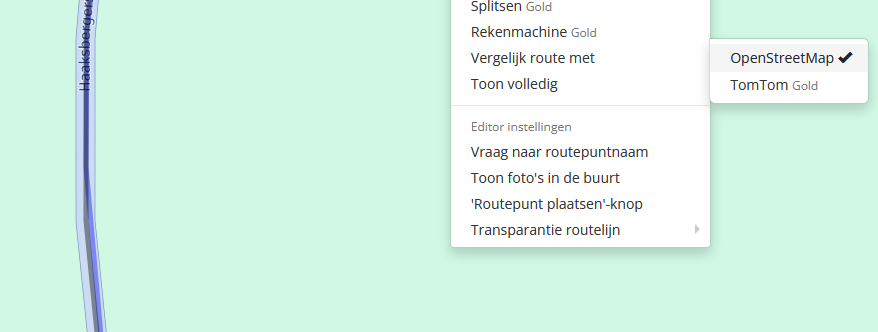
"VERGELIJK ROUTE MET" means "Compare route with"...
-
@michael-rello it still keeps the mail hwy roads but her won’t go down the twisty mountain road passes( which are the roads I want to travel on motorcycle trips

@michael-rello said in Changing maps:
@michael-rello it still keeps the mail hwy roads but her won’t go down the twisty mountain road passes( which are the roads I want to travel on motorcycle trips
Another option that you have is you could share your route in this thread then someone will adjust it so that you and your wife have the same route. Make sure that the privacy is set to public, click the Share button and then the Link button and then copy the URL and paste it in a reply.
-
@michael-rello thank you I’ll try that. Again sorry, while I am waiting to send my reply. You are already giving me the answer

@michael-rello, It is not about planning 2 routes on 2 maps, it's making 1 route equal amongst multiple maps. If that is too much of a hassle for you, you should concentrate on one map and and drive the track on the other device. You will lose the waypoints though, but your track will follow the route exactly.
-
@Hans-van-de-Ven-MR-MRA I’m not looking to compare different routes. I’m wanting to take the route I meticulously planed on open streets (my Yamaha motorcycle gps) and have my wife see it in Here map(iphone nav next app). When you change the map, it changes the entire planned route.

@michael-rello said in Changing maps:
@Hans-van-de-Ven-MR-MRA I’m not looking to compare different routes. I’m wanting to take the route I meticulously planed on open streets my Yamaha motorcycle gps) and have my wife see it in Here map(iphone nav next app). When you change the map, it changes the entire planned route.
Shaping points are VITAL to force any route to take certain roads.
Otherwise, the "other software" will not follow the same route to get to destination.Different software may not respect the shaping points you created with another application.
Have you tried creating the route with MyRoute-app then exporting it to your Yamaha GPS?
For me, that works amazingly well exporting MyRoute-app (website) to Garmin Zumo. It is possible one of the export options will work for your Yamaha GPS.
Hello! It looks like you're interested in this conversation, but you don't have an account yet.
Getting fed up of having to scroll through the same posts each visit? When you register for an account, you'll always come back to exactly where you were before, and choose to be notified of new replies (either via email, or push notification). You'll also be able to save bookmarks and upvote posts to show your appreciation to other community members.
With your input, this post could be even better 💗
Register Login-
 51034.2k
-
 05119
05119
-
9984.2k
-
14101
-
 09275
09275
-
03108
-
 026962
-
 0391
0391

