Inserting Waypoints
-

Re: Inserting a waypoint on an established route
This is the one part of MyRoute-App that is really giving me trouble and I could use some advice.
The difficulty relates specifically to adding a waypoint between two existing waypoints. There are two parts to this post...
-
On my computer, it is easy enough to place the mouse cursor over the existing route, pause briefly until the new waypoint icon appears, and then click to insert a waypoint. That works fine and is ideal if I want to adjust the route slightly at that point by dragging the newly inserted waypoint. When it doesn't work fine is when I want to insert the waypoint at a location NOT near the existing route (something that would require dragging a newly inserted waypoint across much greater (often out of view) areas of the map.
-
On my iOS devices (iPhone and iPad - the devices I have with me when I'm traveling the routes I create and which are used more often than a computer for route creation), there is no cursor to hover over an existing route. The only way I can insert a waypoint is to zoom WAY in on a route and then tap on the route and hope I hit it exactly with my fingertip. Often I don't and I end up with a waypoint that is at the end of my route. I then have to tap on it, delete it, and try again. Sometimes I get lucky and a new waypoint is created between existing waypoints, but often this is a trial-and-error process that takes a few attempts. And when it works, I'm now back to the problem above where I need to zoom way out and drag this new waypoint to my desired point (often only an approximate location because I've had to zoom so far out on the map).
It seems as thought there should be some sort of "insert" mode that allows me to tap a route segment and then tap wherever I'd like to place the new waypoint, allowing MyRoute-App to then recalculate that section of the route from one end of the selected route segment, through the new waypoint, and then to the other end of the selected route segment.
Or, perhaps I'm just totally doing this wrong!

Any advice (or links to instructions that clarify how this should be done) would be appreciated!
Thank you!
[And let me just add, as a user of a crazy array of mapping tools and devices, MyRoute-App is the only solution that really has things figured out! This set of tools is far better than any of the alternatives I have researched and used. THANK YOU!]
-
-
Re: Inserting a waypoint on an established route
This is the one part of MyRoute-App that is really giving me trouble and I could use some advice.
The difficulty relates specifically to adding a waypoint between two existing waypoints. There are two parts to this post...
-
On my computer, it is easy enough to place the mouse cursor over the existing route, pause briefly until the new waypoint icon appears, and then click to insert a waypoint. That works fine and is ideal if I want to adjust the route slightly at that point by dragging the newly inserted waypoint. When it doesn't work fine is when I want to insert the waypoint at a location NOT near the existing route (something that would require dragging a newly inserted waypoint across much greater (often out of view) areas of the map.
-
On my iOS devices (iPhone and iPad - the devices I have with me when I'm traveling the routes I create and which are used more often than a computer for route creation), there is no cursor to hover over an existing route. The only way I can insert a waypoint is to zoom WAY in on a route and then tap on the route and hope I hit it exactly with my fingertip. Often I don't and I end up with a waypoint that is at the end of my route. I then have to tap on it, delete it, and try again. Sometimes I get lucky and a new waypoint is created between existing waypoints, but often this is a trial-and-error process that takes a few attempts. And when it works, I'm now back to the problem above where I need to zoom way out and drag this new waypoint to my desired point (often only an approximate location because I've had to zoom so far out on the map).
It seems as thought there should be some sort of "insert" mode that allows me to tap a route segment and then tap wherever I'd like to place the new waypoint, allowing MyRoute-App to then recalculate that section of the route from one end of the selected route segment, through the new waypoint, and then to the other end of the selected route segment.
Or, perhaps I'm just totally doing this wrong!
Any advice (or links to instructions that clarify how this should be done) would be appreciated!
Thank you!
[And let me just add, as a user of a crazy array of mapping tools and devices, MyRoute-App is the only solution that really has things figured out! This set of tools is far better than any of the alternatives I have researched and used. THANK YOU!]

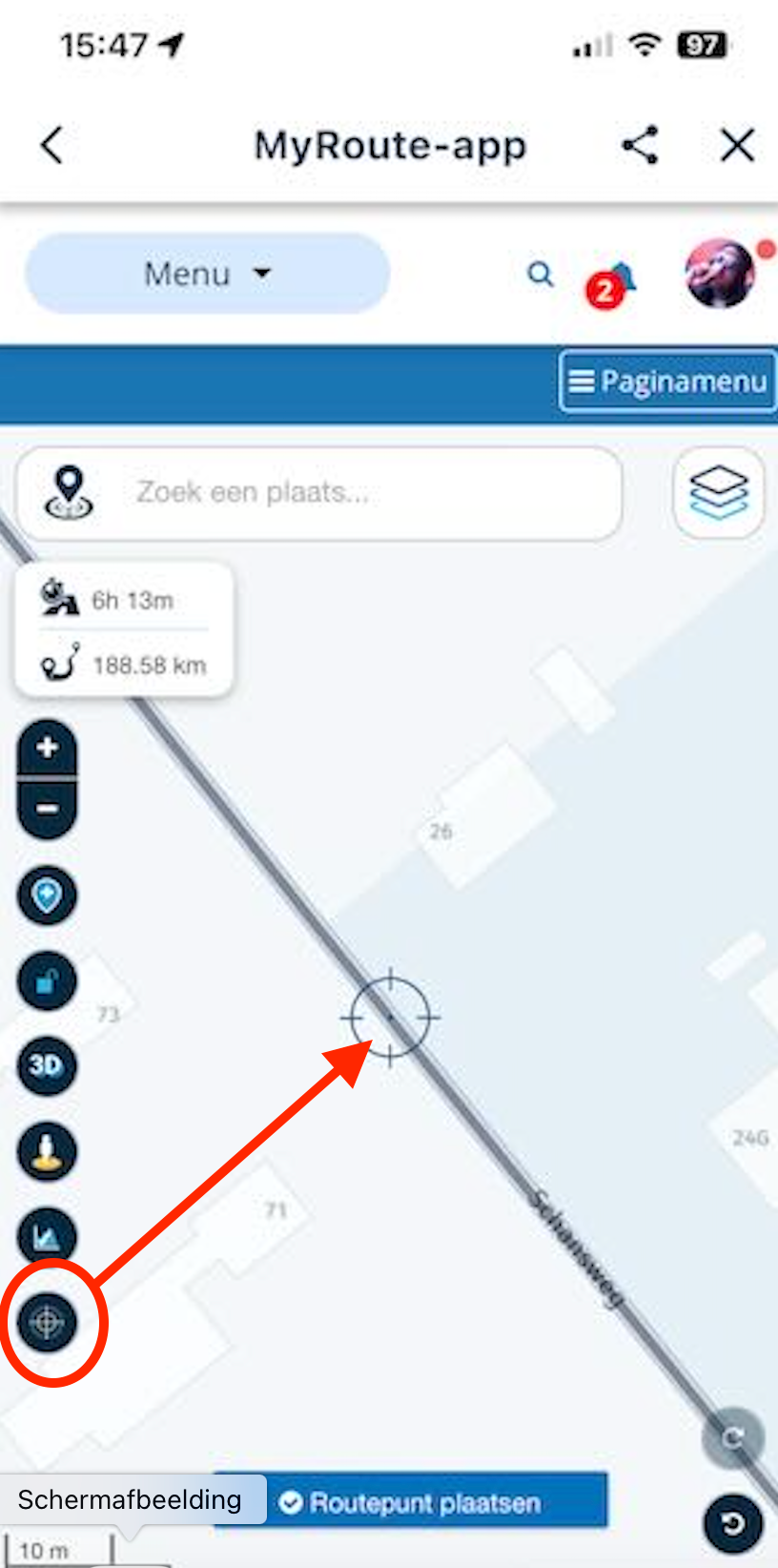
@sjt Point 1 of your question I don't understand. Inserting a waypoint in the web planner with the mouse is very simple. Place the cursor above the route line and wait until the cursor changes to a black circle with a white circle inside it with a crosshair.
For point 2, indeed, you need to zoom in as much as possible on the route. Then, place the crosshair precisely above the black line and click in the middle of your crosshair. Voila, a waypoint placed.
-
-
Re: Inserting a waypoint on an established route
This is the one part of MyRoute-App that is really giving me trouble and I could use some advice.
The difficulty relates specifically to adding a waypoint between two existing waypoints. There are two parts to this post...
-
On my computer, it is easy enough to place the mouse cursor over the existing route, pause briefly until the new waypoint icon appears, and then click to insert a waypoint. That works fine and is ideal if I want to adjust the route slightly at that point by dragging the newly inserted waypoint. When it doesn't work fine is when I want to insert the waypoint at a location NOT near the existing route (something that would require dragging a newly inserted waypoint across much greater (often out of view) areas of the map.
-
On my iOS devices (iPhone and iPad - the devices I have with me when I'm traveling the routes I create and which are used more often than a computer for route creation), there is no cursor to hover over an existing route. The only way I can insert a waypoint is to zoom WAY in on a route and then tap on the route and hope I hit it exactly with my fingertip. Often I don't and I end up with a waypoint that is at the end of my route. I then have to tap on it, delete it, and try again. Sometimes I get lucky and a new waypoint is created between existing waypoints, but often this is a trial-and-error process that takes a few attempts. And when it works, I'm now back to the problem above where I need to zoom way out and drag this new waypoint to my desired point (often only an approximate location because I've had to zoom so far out on the map).
It seems as thought there should be some sort of "insert" mode that allows me to tap a route segment and then tap wherever I'd like to place the new waypoint, allowing MyRoute-App to then recalculate that section of the route from one end of the selected route segment, through the new waypoint, and then to the other end of the selected route segment.
Or, perhaps I'm just totally doing this wrong!
Any advice (or links to instructions that clarify how this should be done) would be appreciated!
Thank you!
[And let me just add, as a user of a crazy array of mapping tools and devices, MyRoute-App is the only solution that really has things figured out! This set of tools is far better than any of the alternatives I have researched and used. THANK YOU!]

@sjt Zooming in and tapping the route line is the way to add a sequential route point.
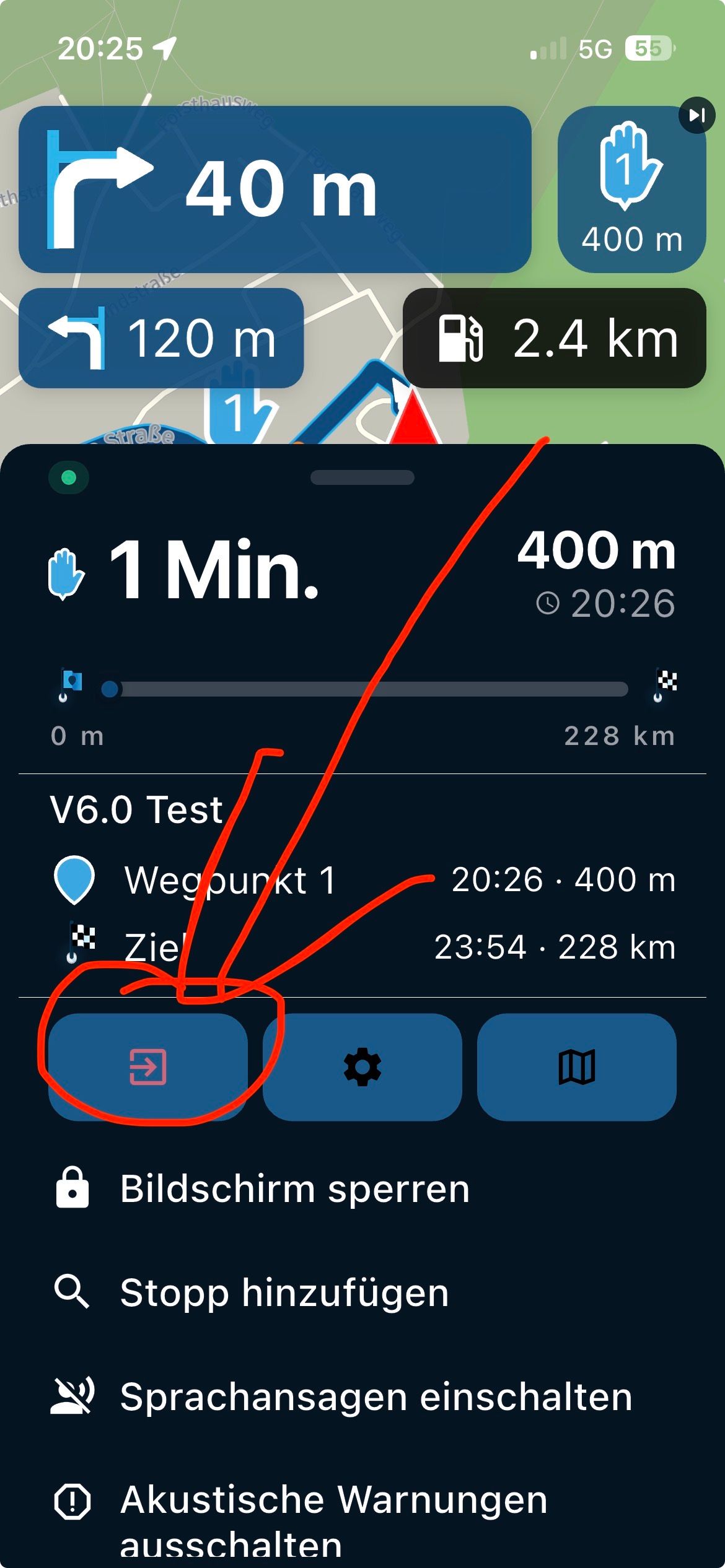
You also have the option in the toolkit to use: Place waypoint button
This adds a crosshairs sight on the screen and a Place waypoint button. Unfortunately using this mid route will add a route point as the final route point, ie out of numerical sequence.
It also adds a Move waypoint button to the route point menu. Pressing this brings up the crosshairs for more accurate positioning.
So tap the route line to add a sequential route point, I find a double tap works better. When it is on or near the line, open the route point menu and press the Move waypoint button to re-position more accurately.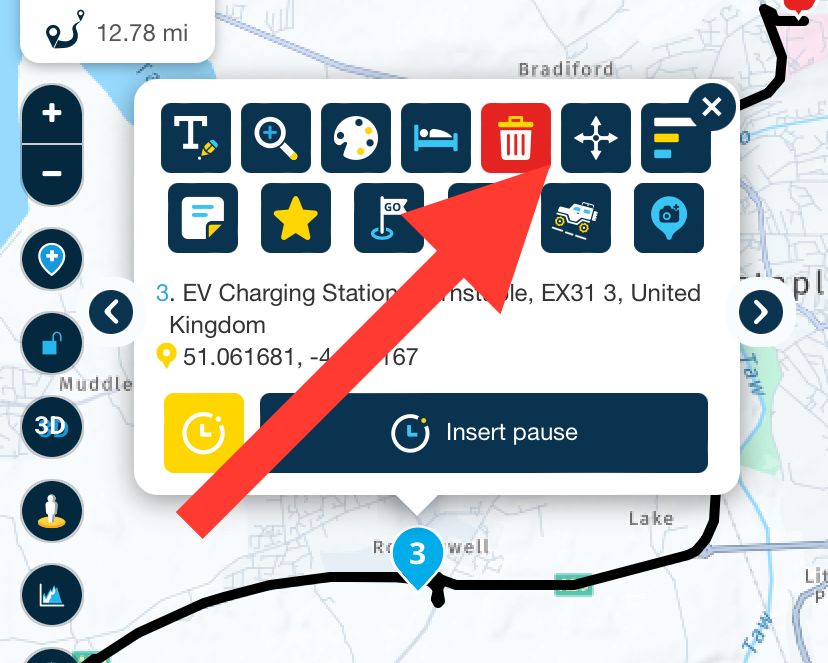
Always willing to help if I can.
Triumph Tiger 1200 XRT called Tina.
MRA Navigation Next and SilverFox BJ8 -
-
@sjt Zooming in and tapping the route line is the way to add a sequential route point.
You also have the option in the toolkit to use: Place waypoint button
This adds a crosshairs sight on the screen and a Place waypoint button. Unfortunately using this mid route will add a route point as the final route point, ie out of numerical sequence.
It also adds a Move waypoint button to the route point menu. Pressing this brings up the crosshairs for more accurate positioning.
So tap the route line to add a sequential route point, I find a double tap works better. When it is on or near the line, open the route point menu and press the Move waypoint button to re-position more accurately. -
Re: Inserting a waypoint on an established route
This is the one part of MyRoute-App that is really giving me trouble and I could use some advice.
The difficulty relates specifically to adding a waypoint between two existing waypoints. There are two parts to this post...
-
On my computer, it is easy enough to place the mouse cursor over the existing route, pause briefly until the new waypoint icon appears, and then click to insert a waypoint. That works fine and is ideal if I want to adjust the route slightly at that point by dragging the newly inserted waypoint. When it doesn't work fine is when I want to insert the waypoint at a location NOT near the existing route (something that would require dragging a newly inserted waypoint across much greater (often out of view) areas of the map.
-
On my iOS devices (iPhone and iPad - the devices I have with me when I'm traveling the routes I create and which are used more often than a computer for route creation), there is no cursor to hover over an existing route. The only way I can insert a waypoint is to zoom WAY in on a route and then tap on the route and hope I hit it exactly with my fingertip. Often I don't and I end up with a waypoint that is at the end of my route. I then have to tap on it, delete it, and try again. Sometimes I get lucky and a new waypoint is created between existing waypoints, but often this is a trial-and-error process that takes a few attempts. And when it works, I'm now back to the problem above where I need to zoom way out and drag this new waypoint to my desired point (often only an approximate location because I've had to zoom so far out on the map).
It seems as thought there should be some sort of "insert" mode that allows me to tap a route segment and then tap wherever I'd like to place the new waypoint, allowing MyRoute-App to then recalculate that section of the route from one end of the selected route segment, through the new waypoint, and then to the other end of the selected route segment.
Or, perhaps I'm just totally doing this wrong!
Any advice (or links to instructions that clarify how this should be done) would be appreciated!
Thank you!
[And let me just add, as a user of a crazy array of mapping tools and devices, MyRoute-App is the only solution that really has things figured out! This set of tools is far better than any of the alternatives I have researched and used. THANK YOU!]

@sjt, what would really help for point 1 is to buy a BT travel mouse.
-
-
Re: Inserting a waypoint on an established route
This is the one part of MyRoute-App that is really giving me trouble and I could use some advice.
The difficulty relates specifically to adding a waypoint between two existing waypoints. There are two parts to this post...
-
On my computer, it is easy enough to place the mouse cursor over the existing route, pause briefly until the new waypoint icon appears, and then click to insert a waypoint. That works fine and is ideal if I want to adjust the route slightly at that point by dragging the newly inserted waypoint. When it doesn't work fine is when I want to insert the waypoint at a location NOT near the existing route (something that would require dragging a newly inserted waypoint across much greater (often out of view) areas of the map.
-
On my iOS devices (iPhone and iPad - the devices I have with me when I'm traveling the routes I create and which are used more often than a computer for route creation), there is no cursor to hover over an existing route. The only way I can insert a waypoint is to zoom WAY in on a route and then tap on the route and hope I hit it exactly with my fingertip. Often I don't and I end up with a waypoint that is at the end of my route. I then have to tap on it, delete it, and try again. Sometimes I get lucky and a new waypoint is created between existing waypoints, but often this is a trial-and-error process that takes a few attempts. And when it works, I'm now back to the problem above where I need to zoom way out and drag this new waypoint to my desired point (often only an approximate location because I've had to zoom so far out on the map).
It seems as thought there should be some sort of "insert" mode that allows me to tap a route segment and then tap wherever I'd like to place the new waypoint, allowing MyRoute-App to then recalculate that section of the route from one end of the selected route segment, through the new waypoint, and then to the other end of the selected route segment.
Or, perhaps I'm just totally doing this wrong!
Any advice (or links to instructions that clarify how this should be done) would be appreciated!
Thank you!
[And let me just add, as a user of a crazy array of mapping tools and devices, MyRoute-App is the only solution that really has things figured out! This set of tools is far better than any of the alternatives I have researched and used. THANK YOU!]

@sjt Use a little Bluetooth mouse and your trouble is gone. Works on my iPad like on Windows PC.
-
-
I appreciate all of the suggestions, everyone!
My takeaway from this is that I am using the MyRoute-App tools correctly, but the functionality I personally would find helpful in an iOS environment simply isn't available. This isn't a big deal as there are plenty of workaround (as several of you pointed out).
I truly appreciate all the feedback.
-
@Peter-Schiefer said in Inserting Waypoints:
Things which are easy and simple on Windows are cumbersome on the iPad.
Tablets are mainly designed to consume information, not to enter information. If they were, they would have a keyboard...


Hello! It looks like you're interested in this conversation, but you don't have an account yet.
Getting fed up of having to scroll through the same posts each visit? When you register for an account, you'll always come back to exactly where you were before, and choose to be notified of new replies (either via email, or push notification). You'll also be able to save bookmarks and upvote posts to show your appreciation to other community members.
With your input, this post could be even better 💗
Register Login-
 836295
-
 427231
-
 18261.8k
-
67495
-
 0633
0633
-
1226225
-
0561
-
 0549
0549