How do you Duplicate a route so you can change the copy
-

Sorry if this is an obvious question but I'm confused.
I'm wanting to make a new route using an existing route as the basis. I don't want to loosing or change the original route in my folder. Normally this would be a "Save As" menu command, but this seems to be used here to designate what file formate is used when exporting a route?
Please explain how I can duplicate a route before changing the copy.
R1200RS, Nav VI, Zumo XT2, iPhone. — Plot the Track, Go the Distance
-
Sorry if this is an obvious question but I'm confused.
I'm wanting to make a new route using an existing route as the basis. I don't want to loosing or change the original route in my folder. Normally this would be a "Save As" menu command, but this seems to be used here to designate what file formate is used when exporting a route?
Please explain how I can duplicate a route before changing the copy.

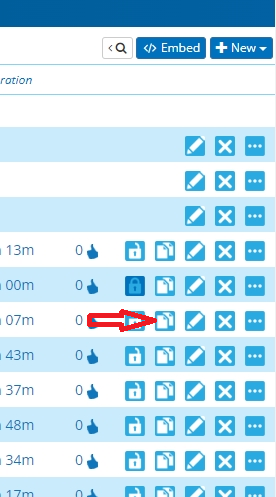
@Neil-Bartlett In your library, click this.
Always willing to help if I can.
Triumph Tiger 1200 XRT called Tina.
MRA Navigation Next and SilverFox BJ8 -
@Neil-Bartlett In your library, click this.
@Nick-Carthew Thanks Nick, how simple. Myopia on my part.
-
@Neil-Bartlett You're welcome, happy to have helped. Everything is simple when you know

Hello! It looks like you're interested in this conversation, but you don't have an account yet.
Getting fed up of having to scroll through the same posts each visit? When you register for an account, you'll always come back to exactly where you were before, and choose to be notified of new replies (either via email, or push notification). You'll also be able to save bookmarks and upvote posts to show your appreciation to other community members.
With your input, this post could be even better 💗
Register Login-
 843430
-
 436370
-
 18261.8k
-
 67509
67509
-
0496
-
 0421
0421
-
 08702
08702
-
1226234