
DMD T665 Phone + MyRoute App?
-
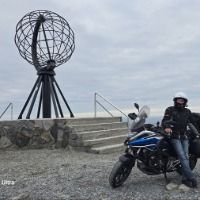
Hello !
As far as I know Bart De Medts tested the DMD T665 Phone with MyRoute App and I was thinking to buy one to get rid of all the Android Auto issues and just use the app at its full potential on a DMD phone.
Has anyone else tried this device before ?
These are Barts opinions regarding this device, but it would be nice to have more, if someone else has used it.
https://info.myrouteapp.com/dmd-t665-nav-phone-test/PS: I am a little concern of using my S24 Ultra on a QuadLock in the summer sun ...
-
Hello !
As far as I know Bart De Medts tested the DMD T665 Phone with MyRoute App and I was thinking to buy one to get rid of all the Android Auto issues and just use the app at its full potential on a DMD phone.
Has anyone else tried this device before ?
These are Barts opinions regarding this device, but it would be nice to have more, if someone else has used it.
https://info.myrouteapp.com/dmd-t665-nav-phone-test/PS: I am a little concern of using my S24 Ultra on a QuadLock in the summer sun ...

@Adrian-Avram hi Adrian
The T665 is also a very good device. The recasons why I chose the T865X is the screen. T66t is 800 nits and the T865X +1300nits. Since you also use the chiquer device witch is even less than 800 nits you’ll be ok. Unless you have room on your bike for the T865X.
Have fun -

I have the t865x. Love it! Also with MRA.
-

I compared both because I wanted to get the smaller one at first. But the parallel test shows me very clear: with the bigger one, now finally I can read p.e. city names on map during the ride. Also in bright sunshine! Decision for T865-X was made quick!
MyRoute-App is running well on the device.
I only wait since a long time for integration of Remote-2 controller from DMD - to not any longer need to touch the screen during ride
-
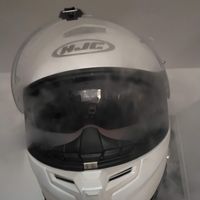
I just got the T665 and the way I've set it up is like this:
-set the app to Virtual Display, massively improves the smoothness/responsiveness of the app;
-from the android settings -> Display size and text, set the Display size to the middle option and the font size to the 2nd;- from the app, leave tilt correction to -2 (for 0 sky/horizon) and zoom to 1.6 (it doesn't seem to zoom anymore above that)
(the two settings above are to make the map easily readable on the smaller screen of the T665)
-increase the size of the POI and the Position indicator (this is just personal choice)
And of course, it is a smaller device, so the screen real estate is limited, especially in landscape mode with the left menu up
-
I just got the T665 and the way I've set it up is like this:
-set the app to Virtual Display, massively improves the smoothness/responsiveness of the app;
-from the android settings -> Display size and text, set the Display size to the middle option and the font size to the 2nd;- from the app, leave tilt correction to -2 (for 0 sky/horizon) and zoom to 1.6 (it doesn't seem to zoom anymore above that)
(the two settings above are to make the map easily readable on the smaller screen of the T665)
-increase the size of the POI and the Position indicator (this is just personal choice)
And of course, it is a smaller device, so the screen real estate is limited, especially in landscape mode with the left menu up
@Ioan-Dragulescu ...in meantime, DMD released a 7" device, which is probably the best solution
-
maybe, but it's a little too big for my taste. And also twice as much as the T665
 I kept waiting before I got mine and hoping that there will be an upgrade to it, maybe some 6 inch tops with better hardware? But ... it didn't happen unfortunately, and with both Carpe Iter and DMD2 just releasing new devices it won't probably happen any time soon.
 -
Hello !
As far as I know Bart De Medts tested the DMD T665 Phone with MyRoute App and I was thinking to buy one to get rid of all the Android Auto issues and just use the app at its full potential on a DMD phone.
Has anyone else tried this device before ?
These are Barts opinions regarding this device, but it would be nice to have more, if someone else has used it.
https://info.myrouteapp.com/dmd-t665-nav-phone-test/PS: I am a little concern of using my S24 Ultra on a QuadLock in the summer sun ...
I’ve been using the T665 for about two years now, and it works great with MRA.
After about a year, I had a problem with the PoGo pins (it stopped charging properly); I sent the device to Thork Racing, and they repaired it for free. The process was quick and hassle-free.
I also had a T865X, but I didn’t like it. The matte display was too blurry for me, and I couldn’t see it at all when the sun was behind me. I sold it. I know that many users prefer the larger device; that’s certainly helpful if you want to see a lot of the surroundings on the display. But for pure road trips, the T665 is absolutely big enough in my opinion.
There’s one thing I particularly love about the T665, and that’s the way the device attaches to the cradle. It’s a combination of a magnet that “pulls” the device into the cradle and a mechanical lock. Attaching and detaching takes seconds, and it stays rock-solid (at least while road riding).
All in all, a clear recommendation.
-
I’ve been using the T665 for about two years now, and it works great with MRA.
After about a year, I had a problem with the PoGo pins (it stopped charging properly); I sent the device to Thork Racing, and they repaired it for free. The process was quick and hassle-free.
I also had a T865X, but I didn’t like it. The matte display was too blurry for me, and I couldn’t see it at all when the sun was behind me. I sold it. I know that many users prefer the larger device; that’s certainly helpful if you want to see a lot of the surroundings on the display. But for pure road trips, the T665 is absolutely big enough in my opinion.
There’s one thing I particularly love about the T665, and that’s the way the device attaches to the cradle. It’s a combination of a magnet that “pulls” the device into the cradle and a mechanical lock. Attaching and detaching takes seconds, and it stays rock-solid (at least while road riding).
All in all, a clear recommendation.
@Martin-Wilcke said in DMD T665 Phone + MyRoute App?:
I also had a T865X, but I didn’t like it. The matte display was too blurry for me, and I couldn’t see it at all when the sun was behind me...
Are you sure, you had a T865-X ? Because I tested all 3: T665, T865 and T865-X. At this time, the T865-X was new and has got a much brighter screen (1300 nits) than the T865 and T665. Therefore I bought this one.
-
@Guzzist
Yes, I am. I also started out with a T865 (with a glossy screen), then a T865-X (with a matte screen). If I remember correctly, there were two versions of one of those models—first glossy, then matte. Was that perhaps the case with the X? -
-
maybe, but it's a little too big for my taste. And also twice as much as the T665
I kept waiting before I got mine and hoping that there will be an upgrade to it, maybe some 6 inch tops with better hardware? But ... it didn't happen unfortunately, and with both Carpe Iter and DMD2 just releasing new devices it won't probably happen any time soon.
@Ioan-Dragulescu said in DMD T665 Phone + MyRoute App?:
maybe, but it's a little too big for my taste. And also twice as much as the T665
I kept waiting before I got mine and hoping that there will be an upgrade to it, maybe some 6 inch tops with better hardware? But ... it didn't happen unfortunately, and with both Carpe Iter and DMD2 just releasing new devices it won't probably happen any time soon.I am currently using a T665 but decided to migrate to the new 7" deivce. This decision has nothing to do with the APP, but with the feact, that the current T665 only supports 4G and that it looses mobile network connection ina reas where a more modern device still have good mobile network reception. This "signal losses" never caused any problems during my rides, but for me it is pretty annoying getting the messages, that I have lost signal and the APP is running "temporarely in offline mode". I opened a tickt with Thorax about this issue and they confirmed to me,that this is related to their used mobile netwirk connectivity components in the T665.
I will let you know how the new device work for me.
Greetings
Thomas -
just did another tour 2500 km through france. I have the t865x with mra. Never failed me! Only once but there was a gps glitch as it turned out later on the dmd forum. The screen is bright in every direction. I have the silverfox c1 with it but i do not use it while riding. Tend to sell it. The screen is on a harley road king.
-
I’ve been using the T665 for about two years now, and it works great with MRA.
After about a year, I had a problem with the PoGo pins (it stopped charging properly); I sent the device to Thork Racing, and they repaired it for free. The process was quick and hassle-free.
I also had a T865X, but I didn’t like it. The matte display was too blurry for me, and I couldn’t see it at all when the sun was behind me. I sold it. I know that many users prefer the larger device; that’s certainly helpful if you want to see a lot of the surroundings on the display. But for pure road trips, the T665 is absolutely big enough in my opinion.
There’s one thing I particularly love about the T665, and that’s the way the device attaches to the cradle. It’s a combination of a magnet that “pulls” the device into the cradle and a mechanical lock. Attaching and detaching takes seconds, and it stays rock-solid (at least while road riding).
All in all, a clear recommendation.
@Martin-Wilcke Funny you should say that, I've just put today an anti glare screen protector on my T665 because I couldn't stand seeing my big head (with a white helmet none the less) in that mirror all the time. And I like the end result so much, I will put the same protector on my bike's LCD also. Maybe the THORQ peeps went a bit too aggressive with their AR coating ?
-
@Martin-Wilcke Funny you should say that, I've just put today an anti glare screen protector on my T665 because I couldn't stand seeing my big head (with a white helmet none the less) in that mirror all the time. And I like the end result so much, I will put the same protector on my bike's LCD also. Maybe the THORQ peeps went a bit too aggressive with their AR coating ?
It is the mounting angle, I guess. I have my T665 above the dashboard, relatively steep. No issue with helmet or bright sky, with the sun only when it comes shallow from the back.
What annoyed me most was its blurriness. I wonder if Thork uses the same AG coating for the Nor7e - according to pics, it is more glossy.
-
@Ioan-Dragulescu said in DMD T665 Phone + MyRoute App?:
maybe, but it's a little too big for my taste. And also twice as much as the T665
I kept waiting before I got mine and hoping that there will be an upgrade to it, maybe some 6 inch tops with better hardware? But ... it didn't happen unfortunately, and with both Carpe Iter and DMD2 just releasing new devices it won't probably happen any time soon.I am currently using a T665 but decided to migrate to the new 7" deivce. This decision has nothing to do with the APP, but with the feact, that the current T665 only supports 4G and that it looses mobile network connection ina reas where a more modern device still have good mobile network reception. This "signal losses" never caused any problems during my rides, but for me it is pretty annoying getting the messages, that I have lost signal and the APP is running "temporarely in offline mode". I opened a tickt with Thorax about this issue and they confirmed to me,that this is related to their used mobile netwirk connectivity components in the T665.
I will let you know how the new device work for me.
Greetings
Thomas
@TomOnTour that sounds annoying indeed. In my case, I just use my main phone as a hotspot and the T665 gets internet from it. I was also planning to use my main SIM, to be able to take phone calls and see messages and so on but the hassle of SIM swapping just made me discard that option for now. It is funny though to see the options we have because we are using android devices, and that's the main reason I said buh bye to Garmin. Hopefully we will get better rugged devices like these, with apps like MRA maturing nicely along the way and yeah, sky's the limit.
About the NOR7E, the thing that bothers me a bit, besides the price and the size, is that they have that screw on power cable. I get their point, reliability and robustness but ... sometimes convenience is nice :), and the pogo pins do offer that.
-
@TomOnTour that sounds annoying indeed. In my case, I just use my main phone as a hotspot and the T665 gets internet from it. I was also planning to use my main SIM, to be able to take phone calls and see messages and so on but the hassle of SIM swapping just made me discard that option for now. It is funny though to see the options we have because we are using android devices, and that's the main reason I said buh bye to Garmin. Hopefully we will get better rugged devices like these, with apps like MRA maturing nicely along the way and yeah, sky's the limit.
About the NOR7E, the thing that bothers me a bit, besides the price and the size, is that they have that screw on power cable. I get their point, reliability and robustness but ... sometimes convenience is nice :), and the pogo pins do offer that.
@Ioan-Dragulescu said in DMD T665 Phone + MyRoute App?:
About the NOR7E, the thing that bothers me a bit, besides the price and the size, is that they have that screw on power cable. I get their point, reliability and robustness but ... sometimes convenience is nice :), and the pogo pins do offer that.
That’s also why I won’t be buying a Nor7e. A screw-type power connection is fine in itself, but then please make it like the Carpe Iter V4:
- on the side, where it’s easy to access
- in addition to pogo pins.
I suspect there will be many frustrated owners who mount a Nor7e behind the windshield and then quickly break the screw terminal because it’s so fiddly.
I’ll wait until Thork builds a twin to the Nor7e that has an easier-to-use connection, one that also caters to non-hardcore enduro users...
Hello! It looks like you're interested in this conversation, but you don't have an account yet.
Getting fed up of having to scroll through the same posts each visit? When you register for an account, you'll always come back to exactly where you were before, and choose to be notified of new replies (either via email, or push notification). You'll also be able to save bookmarks and upvote posts to show your appreciation to other community members.
With your input, this post could be even better 💗
Register Login-
 5994.0k
-
 0549
0549
-
026941
-
 1329
1329
-
08241
-
0236
-
 01296
01296
-
 06157
06157
