Skip to content
  • Categories
  • Recent
  • Popular
  • Support
  • MyRoute-app
Collapse
Brand Logo

MRA Community Forum

  1. Home
  2. The MyRoute-app
  3. [App] Suggestions and Discussion
  4. Unclear tracklog direction

Unclear tracklog direction

Scheduled Pinned Locked Moved [App] Suggestions and Discussion
6 Posts 4 Posters 1.2k Views 3 Watching
  • Oldest to Newest
  • Newest to Oldest
  • Most Votes
Reply
  • Reply as topic
Log in to reply
This topic has been deleted. Only users with topic management privileges can see it.
  • Makro
    Makro
    Makro
    wrote on last edited by
    #1

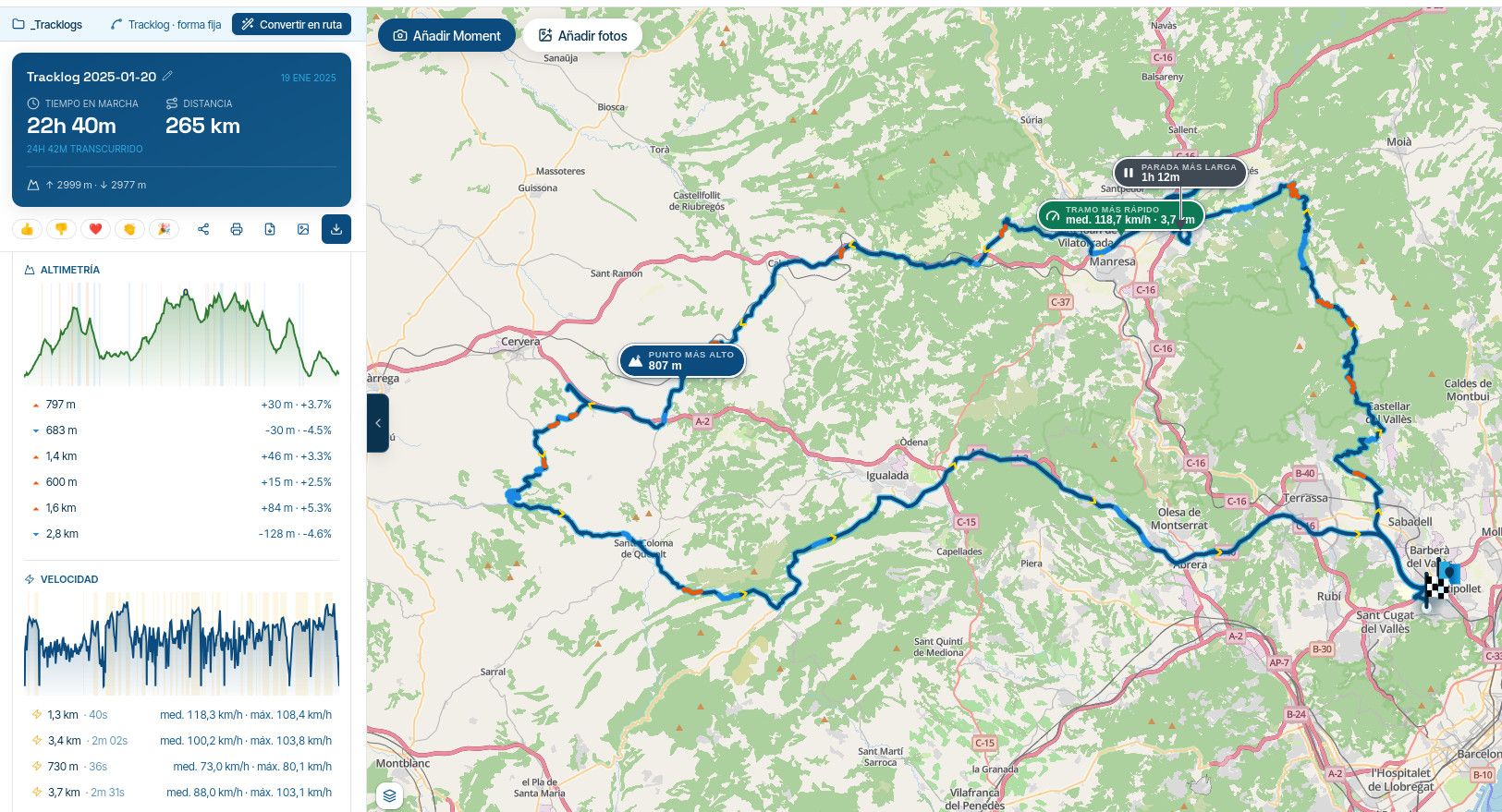
    Viewing a tracklog shows the track as a line. It is not obvious which end is start and end, until it is opened, only then does start and end icons appear. I suggest to add one or more arrows to the line.

    Best regards, Makro

    Rob Verhoeff 1 Reply Last reply
    0
    • Makro Makro

      Viewing a tracklog shows the track as a line. It is not obvious which end is start and end, until it is opened, only then does start and end icons appear. I suggest to add one or more arrows to the line.

      Rob Verhoeff
      Rob Verhoeff
      Rob Verhoeff
      Alpha tester
      wrote on last edited by Rob Verhoeff
      #2

      @Makro The direction is obvious since the startflag is green saying "Go" and the destionationflag is a "Finish"flag. Therefore it's important not to start tracking and stop tracking at the same point. However, 1 or 2 arrows in the route that dispay's the direction could help.
      ๐Ÿ๏ธ BMW K1600GT-P (2013) | Nolan N100-5 with Sena 30K
      ๐Ÿ“ฑ iOS on iPhone 13 & 16 (mounted on Quadlock or AliExpress extention on BMW-cradle)
      ๐Ÿš™ Apple CarPlay in VW T-Roc
      ๐Ÿ’ป Routelab on MacBook Air & iMac (Golden Gate & Ventura)

      Makro 1 Reply Last reply
      0
      • Peter Bijnsdorp
        Peter Bijnsdorp
        Peter Bijnsdorp
        wrote on last edited by
        #3

        Goed idee om een track te voorzin van pijlen welke de rijrichting aangeven, vaak moet men inzoomen om te zien waar de start of waar het einde is om de rijrichting te zien.

        Als er pijlen op staan dan weet je het zonder eerst een handeling te hoeven verrichten nl inzoomen.

        1 Reply Last reply
        0
        • Motobummler
          Motobummler
          Motobummler
          wrote on last edited by
          #4

          I agree with the request. Especially if you have a route that you drive twice (there and back), it is sometimes unpleasant. You feel safer when you can immediately recognise the direction of the track.

          iPhone XR (iOS 18.01)
          iPhone 11 (iOS 18.01)
          Oukitel RT3 (Android 13) + 64GB SD without SIM / connecting with tethering
          Wired CarPlay (KIA Sportage PHEV - 2022)

          1 Reply Last reply
          0
          • Rob Verhoeff Rob Verhoeff

            @Makro The direction is obvious since the startflag is green saying "Go" and the destionationflag is a "Finish"flag. Therefore it's important not to start tracking and stop tracking at the same point. However, 1 or 2 arrows in the route that dispay's the direction could help.

            Makro
            Makro
            Makro
            wrote on last edited by
            #5

            @Rob-Verhoeff said in Unclear tracklog direction:

            @Makro The direction is obvious since the startflag is green saying "Go" and the destionationflag is a "Finish"flag.

            Hi Rob.
            I was referring to the first track log view, shown in the app.
            So, start the app, go to "Routes and tracklogs" -> Tracklogs -> click any of your tracks.
            There are no flags and no arrow(s).

            Best regards, Makro

            Rob Verhoeff 1 Reply Last reply
            0
            • Makro Makro

              @Rob-Verhoeff said in Unclear tracklog direction:

              @Makro The direction is obvious since the startflag is green saying "Go" and the destionationflag is a "Finish"flag.

              Hi Rob.
              I was referring to the first track log view, shown in the app.
              So, start the app, go to "Routes and tracklogs" -> Tracklogs -> click any of your tracks.
              There are no flags and no arrow(s).

              Rob Verhoeff
              Rob Verhoeff
              Rob Verhoeff
              Alpha tester
              wrote on last edited by
              #6

              @Makro said in Unclear tracklog direction:

              There are no flags and no arrow(s).

              Go one step further and there you see the flags. I don't know if it is possible to show those flags in the screen you described.

              ๐Ÿ๏ธ BMW K1600GT-P (2013) | Nolan N100-5 with Sena 30K
              ๐Ÿ“ฑ iOS on iPhone 13 & 16 (mounted on Quadlock or AliExpress extention on BMW-cradle)
              ๐Ÿš™ Apple CarPlay in VW T-Roc
              ๐Ÿ’ป Routelab on MacBook Air & iMac (Golden Gate & Ventura)

              1 Reply Last reply
              0

              Hello! It looks like you're interested in this conversation, but you don't have an account yet.

              Getting fed up of having to scroll through the same posts each visit? When you register for an account, you'll always come back to exactly where you were before, and choose to be notified of new replies (either via email, or push notification). You'll also be able to save bookmarks and upvote posts to show your appreciation to other community members.

              With your input, this post could be even better ๐Ÿ’—

              Register Login
              Reply
              • Reply as topic
              Log in to reply
              • Oldest to Newest
              • Newest to Oldest
              • Most Votes


              ACTIVE USERS
              Rob Verhoeff
              Rob Verhoeff
              Makro
              Makro
              Peter Bijnsdorp
              Peter Bijnsdorp
              Motobummler
              Motobummler
              POPULAR TOPICS
              • Where is the "Routes" option?
                LennyO
                LennyO
                0
                5
                19

              • My Routeapp Stays questions
                Lluis Arasanz
                Lluis Arasanz
                0
                5
                21

              • Foutmelding In MRA Next
                Hans Lamers
                Hans Lamers
                0
                3
                10

              • LAN001 - Statistics data from a Tracklog and Map improvment
                Lluis Arasanz
                Lluis Arasanz
                0
                3
                12

              • Problem Switching App to Beta RoutePlanner
                Rob Verhoeff
                Rob Verhoeff
                0
                7
                46

              • [Request] Recent changes on webplanner...
                Lluis Arasanz
                Lluis Arasanz
                0
                3
                11

              • Strange translation
                Lluis Arasanz
                Lluis Arasanz
                0
                3
                5

              • Kort voorstellen
                Rob Verhoeff
                Rob Verhoeff
                1
                2
                65

              MY GROUPS
              • Login

              • Login or register to search.
              • First post
                Last post
              0
              • Categories
              • Recent
              • Popular
              • Support
              • MyRoute-app