Skip to content
  • Categories
  • Recent
  • Popular
  • Support
  • MyRoute-app
Collapse
Brand Logo

MRA Community Forum

  1. Home
  2. MyRoute-app Routeplanner
  3. [Web] Problems, Bugs and other Issues
  4. 3D doesn't work

3D doesn't work

Scheduled Pinned Locked Moved [Web] Problems, Bugs and other Issues
9 Posts 6 Posters 1.9k Views 5 Watching
  • Oldest to Newest
  • Newest to Oldest
  • Most Votes
Reply
  • Reply as topic
Log in to reply
This topic has been deleted. Only users with topic management privileges can see it.
  • Montorsi Paolo 0 Offline
    Montorsi Paolo 0 Offline
    Montorsi Paolo 0
    wrote on last edited by
    #1

    Win11 Home, Microsoft Hedge, Gold subscription.
    When clicked it starts loading something (loocking at the progression bar on top) but at the end nothing is visualized.

    Advice?

    Hans van de Ven MR.MRA Brian McG Rob Verhoeff Con Hennekens 4 Replies Last reply
    0
    • Montorsi Paolo 0 Montorsi Paolo 0

      Win11 Home, Microsoft Hedge, Gold subscription.
      When clicked it starts loading something (loocking at the progression bar on top) but at the end nothing is visualized.

      Advice?

      Hans van de Ven MR.MRA Offline
      Hans van de Ven MR.MRA Offline
      Hans van de Ven MR.MRA
      Valued contributor
      wrote on last edited by
      #2

      @Montorsi-Paolo-0

      No problem here

      Garmin Zumo XT3/XT2/XT/BMW Connected Ride Navigator/Tourstart/ MyRouteapp (The App)/...
      Een dag niet gelachen is een dag niet geleefd / Een route is net zo goed als deze uitgezet is.

      1 Reply Last reply
      0
      • Montorsi Paolo 0 Montorsi Paolo 0

        Win11 Home, Microsoft Hedge, Gold subscription.
        When clicked it starts loading something (loocking at the progression bar on top) but at the end nothing is visualized.

        Advice?

        Brian McG Offline
        Brian McG Offline
        Brian McG
        wrote on last edited by
        #3

        Hi @Montorsi-Paolo-0 maybe you could provide more details on how you are seeing / creating the problem

        The only way I can get it to fail is by making a new route & having only one point in the route,
        then the 3D google earth view never appears, just a flat grey screen.

        If I open a normal route with multiple waypoints the 3D works fine for me in both Edge & Firefox.

        BlackView BV7100, Android 12
        Navigate "Routes as Tracks" in Offline mode with Offline Maps
        No Wifi, no internet, no interruptions, works well

        1 Reply Last reply
        0
        • Montorsi Paolo 0 Montorsi Paolo 0

          Win11 Home, Microsoft Hedge, Gold subscription.
          When clicked it starts loading something (loocking at the progression bar on top) but at the end nothing is visualized.

          Advice?

          Rob Verhoeff Offline
          Rob Verhoeff Offline
          Rob Verhoeff
          Alpha tester
          wrote on last edited by
          #4

          @Montorsi-Paolo-0 I assume that in the Map Style menu, you selected 3D for "Building view" and possibly 3D for "Elevation difference". After that, while navigating, you can encounter three different views by clicking on the compass:

          1. Top down
          2. 3D
          3. North up

          šŸļø BMW K1600GT-P (2013) | Nolan N100-5 with Sena 30K
          šŸ“± iOS on iPhone 13 & 16 (mounted on Quadlock or AliExpress extention on BMW-cradle)
          šŸš™ Apple CarPlay in VW T-Roc
          šŸ’» Routelab on MacBook Air & iMac (Tahoe & Ventura)

          Brian McG 1 Reply Last reply
          0
          • Rob Verhoeff Rob Verhoeff

            @Montorsi-Paolo-0 I assume that in the Map Style menu, you selected 3D for "Building view" and possibly 3D for "Elevation difference". After that, while navigating, you can encounter three different views by clicking on the compass:

            1. Top down
            2. 3D
            3. North up
            Brian McG Offline
            Brian McG Offline
            Brian McG
            wrote on last edited by
            #5

            Sorry @Rob-Verhoeff, I thought the OP problem was in the web planner
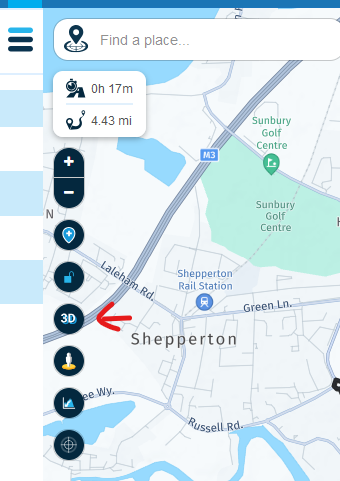
            e3b648ec-d5fc-41a2-97fe-f8c3798e974e-image.png
            "Map Style" is in the Navigation App

            BlackView BV7100, Android 12
            Navigate "Routes as Tracks" in Offline mode with Offline Maps
            No Wifi, no internet, no interruptions, works well

            Rob Verhoeff 1 Reply Last reply
            0
            • Brian McG Brian McG

              Sorry @Rob-Verhoeff, I thought the OP problem was in the web planner
              e3b648ec-d5fc-41a2-97fe-f8c3798e974e-image.png
              "Map Style" is in the Navigation App

              Rob Verhoeff Offline
              Rob Verhoeff Offline
              Rob Verhoeff
              Alpha tester
              wrote on last edited by Rob Verhoeff
              #6

              @Brian-McG I can hardly call that a 3D view, but rather a flat Google Maps display that you tilt šŸ˜‰
              I had assumed it was about the navigation app. It's good that you're asking for clarification.

              šŸļø BMW K1600GT-P (2013) | Nolan N100-5 with Sena 30K
              šŸ“± iOS on iPhone 13 & 16 (mounted on Quadlock or AliExpress extention on BMW-cradle)
              šŸš™ Apple CarPlay in VW T-Roc
              šŸ’» Routelab on MacBook Air & iMac (Tahoe & Ventura)

              1 Reply Last reply
              0
              • Montorsi Paolo 0 Montorsi Paolo 0

                Win11 Home, Microsoft Hedge, Gold subscription.
                When clicked it starts loading something (loocking at the progression bar on top) but at the end nothing is visualized.

                Advice?

                Con Hennekens Offline
                Con Hennekens Offline
                Con Hennekens
                Alpha tester
                wrote on last edited by
                #7

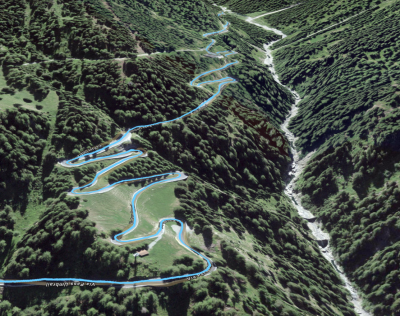
                @Montorsi-Paolo-0, For me it works, thanks for reminding me to this great feature! šŸ˜‰ I guess there was a momentary glitch in the availability of the 3D maps,

                This was last tuesday for me:
                d6e02b4e-899f-4ed6-812d-c7c7f7808a55-image.png

                I am just an enthusiastic MRA user, and hope you will be one too!

                Most motorcycle problems are caused by the nut that connects the handlebar to the saddle.

                Check out RideSleepRepeat.eu, a biker community for sharing stays across Europe

                1 Reply Last reply
                0
                • Montorsi Paolo 0 Offline
                  Montorsi Paolo 0 Offline
                  Montorsi Paolo 0
                  wrote on last edited by Montorsi Paolo 0
                  #8

                  Topic for the developer?

                  How I wrote: "Win11 Home, Microsoft Hedge, Gold subscription"

                  I summarize here the several answers

                  1. Selected a route from "my routes".
                  2. Clicked on the "3D" button on the left
                  3. The map window became al grey
                  4. There is a working blu progression bar at the top of the windows.
                  5. At the end of the progression bar work, the windows map is still grey, there are some button to navigate the 3d map (+/-, pan, rotate, compass) and on the left i can see the "Back to 2D view" button
                  6. I tried to interact with the 3D navigation button, only +/- accept the focus but nothing happen
                  7. Clicking the "Back to 2D view" button it come back to the 2D view without problem.

                  I Tried to change the maps from Openstreet to tomTom and Here and then the map layer, but nothing happen.
                  "Street view", instead work properly.

                  Than I tried on Google Chrome: it works

                  Thanks
                  Paolo

                  1 Reply Last reply
                  0
                  • Corjan Meijerink Offline
                    Corjan Meijerink Offline
                    Corjan Meijerink
                    Developer
                    wrote on last edited by
                    #9

                    @Montorsi-Paolo-0 Could be it's simply not supported on Edge šŸ˜ž

                    1 Reply Last reply
                    0

                    Hello! It looks like you're interested in this conversation, but you don't have an account yet.

                    Getting fed up of having to scroll through the same posts each visit? When you register for an account, you'll always come back to exactly where you were before, and choose to be notified of new replies (either via email, or push notification). You'll also be able to save bookmarks and upvote posts to show your appreciation to other community members.

                    With your input, this post could be even better šŸ’—

                    Register Login
                    Reply
                    • Reply as topic
                    Log in to reply
                    • Oldest to Newest
                    • Newest to Oldest
                    • Most Votes


                    ACTIVE USERS
                    Rob Verhoeff
                    Rob Verhoeff
                    Brian McG
                    Brian McG
                    Hans van de Ven MR.MRA
                    Hans van de Ven MR.MRA
                    Corjan Meijerink
                    Corjan Meijerink
                    Con Hennekens
                    Con Hennekens
                    Montorsi Paolo 0
                    Montorsi Paolo 0
                    POPULAR TOPICS
                    • HERE maps updates
                      Peter Zehentreiter
                      Peter Zehentreiter
                      0
                      4
                      124

                    • GPX Versions 1.1 vs 1.2 for Garmin Visually Explained
                      Guzzist
                      Guzzist
                      7
                      166
                      12.0k

                    • Linker in MRA kleurt blauw (alles geselecteerd)
                      Alfred Schrittwieser
                      Alfred Schrittwieser
                      0
                      10
                      203

                    • Auto skip many waypoints by itself while I was on route. [5.2.0 - 474]
                      Brian McG
                      Brian McG
                      0
                      34
                      1.3k

                    • Route maken in TomTom kaart en vervolgens met de app navigeren
                      Bruno 7
                      Bruno 7
                      0
                      6
                      143

                    • Straatnamen worden uitgesproken
                      Theo Lammerts
                      Theo Lammerts
                      0
                      5
                      310

                    • The compas direction on the elevation circle is wrong
                      Dave J 0
                      Dave J 0
                      0
                      23
                      652

                    • Useful Speed Camera Information
                      Marinus van Deudekom
                      Marinus van Deudekom
                      3
                      3
                      162

                    MY GROUPS
                    • Login

                    • Login or register to search.
                    • First post
                      Last post
                    0
                    • Categories
                    • Recent
                    • Popular
                    • Support
                    • MyRoute-app