Skip to content
  • Categories
  • Recent
  • Popular
  • Support
  • MyRoute-app
Collapse
Brand Logo

MRA Community Forum

  1. Home
  2. MyRoute-app Routeplanner
  3. [Web] Problems, Bugs and other Issues
  4. Zumo XT Cannot calculate the route

Zumo XT Cannot calculate the route

Scheduled Pinned Locked Moved [Web] Problems, Bugs and other Issues
16 Posts 5 Posters 3.4k Views 4 Watching
  • Oldest to Newest
  • Newest to Oldest
  • Most Votes
Reply
  • Reply as topic
Log in to reply
This topic has been deleted. Only users with topic management privileges can see it.
  • Marinus van Deudekom Marinus van Deudekom

    @Serge-4 how do you transfer the route,
    Maybe you could share such a route here and make shure it”s set to public so I could test it for with my XT.
    Last weekend I user it several times without any problems.

    Serge 4 Offline
    Serge 4 Offline
    Serge 4
    wrote on last edited by
    #4

    @Marinus-van-Deudekom
    Hi
    Tx for your reply. How and where may I upload my GPX file?

    Marinus van Deudekom 1 Reply Last reply
    0
    • Reinhard-32 Reinhard-32

      @Serge-4 said in Zumo XT Cannot calculate the route:

      I get this message error when I want to import a route in trip planner.

      The route was planned in MRA (Web version) and exported as Zumo GPX v1.2

      It started to occur after I last updated firmware in the Zumo XT in last august.

      Make sure that each route point is placed exactly on the road. The ZumoXT expects all route points to be exactly on the road. Otherwise there will be problems.

      Serge 4 Offline
      Serge 4 Offline
      Serge 4
      wrote on last edited by
      #5

      @Reinhard-32
      Tx, I checked my waypoints and found some out of the road. I moved them into the route but still the same problem.
      Any idea?

      1 Reply Last reply
      0
      • Serge 4 Serge 4

        @Marinus-van-Deudekom
        Hi
        Tx for your reply. How and where may I upload my GPX file?

        Marinus van Deudekom Offline
        Marinus van Deudekom Offline
        Marinus van Deudekom
        RouteXpert
        wrote on last edited by
        #6

        @Serge-4 hi Serge
        Copy and past the MRA url of your route just here in this topic. Make shure the route is set to public

        Honda Goldwing GL1500,
        Honda Silverwing GL 650
        DMD2 T865X 8 inch Android tablet using MRA next for navigation
        Garmin XT sold
        Samsung S24FE mounted on a Quadlock and using Android Auto in my car

        Serge 4 1 Reply Last reply
        0
        • Marinus van Deudekom Marinus van Deudekom

          @Serge-4 hi Serge
          Copy and past the MRA url of your route just here in this topic. Make shure the route is set to public

          Serge 4 Offline
          Serge 4 Offline
          Serge 4
          wrote on last edited by
          #7

          @Marinus-van-Deudekom
          Thank you

          1 Reply Last reply
          0
          • Serge 4 Serge 4

            I get this message error when I want to import a route in trip planner.

            The route was planned in MRA (Web version) and exported as Zumo GPX v1.2

            It started to occur after I last updated firmware in the Zumo XT in last august.

            Serge 4 Offline
            Serge 4 Offline
            Serge 4
            wrote on last edited by
            #8

            @Serge-4
            Here is the file: https://www.myrouteapp.com/route/open/9961145

            Hans van de Ven MR.MRA 1 Reply Last reply
            0
            • Marinus van Deudekom Marinus van Deudekom

              @Serge-4 how do you transfer the route,
              Maybe you could share such a route here and make shure it”s set to public so I could test it for with my XT.
              Last weekend I user it several times without any problems.

              Serge 4 Offline
              Serge 4 Offline
              Serge 4
              wrote on last edited by
              #9

              @Marinus-van-Deudekom
              Here is the file: https://www.myrouteapp.com/route/open/9961145

              Marinus van Deudekom 1 Reply Last reply
              0
              • Serge 4 Serge 4

                @Serge-4
                Here is the file: https://www.myrouteapp.com/route/open/9961145

                Hans van de Ven MR.MRA Do not disturb
                Hans van de Ven MR.MRA Do not disturb
                Hans van de Ven MR.MRA
                Valued contributor
                wrote on last edited by
                #10

                @Serge-4

                Why all those via points? The Garmin Zumo can handle 29 via points in one route an will devide your route.
                You need the via points only for dtops, like fuel, lunch, photo...
                Place the points on the routeline (zoom in to the max
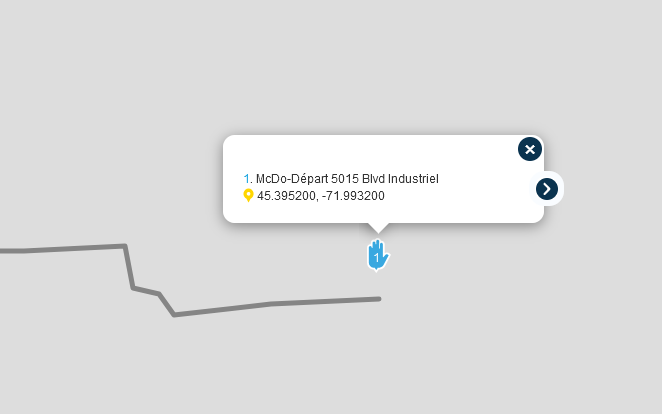
                c31d0814-7fa9-4837-bcf5-56882d4c7a4b-image.png

                Garmin Zumo XT3/XT2/XT/BMW Connected Ride Navigator/Tourstart/ MyRouteapp (The App)/...
                Een dag niet gelachen is een dag niet geleefd / Een route is net zo goed als deze uitgezet is.

                Serge 4 1 Reply Last reply
                0
                • Serge 4 Serge 4

                  @Marinus-van-Deudekom
                  Here is the file: https://www.myrouteapp.com/route/open/9961145

                  Marinus van Deudekom Offline
                  Marinus van Deudekom Offline
                  Marinus van Deudekom
                  RouteXpert
                  wrote on last edited by
                  #11

                  @Serge-4 hi Serge
                  L8ke @Hans-van-de-Ven-MR-MRA said to mutch viapoints. Your route is about 450 km long. I tried importing it into my XT with the same result as you. Not possible to import the route. Then I looked inti the tracks in my XT and there was a track of your route imported BUT the thing was more then 5400 km long.
                  This is what happens with an XT if you do no5 place the via or shapingpoints exactly ON the route.
                  So the advice would be
                  Use a lot less vuapoints, Max 29 in the fashion that @Hans-van-de-Ven-MR-MRA expained.
                  On a route of 450km use a lott more shapingpoints otherwise your XT will mess up your route for shure. You need about 90 shapingpoints for a 450km route
                  Then when your done export the route using the Drive app and 1.2 export.
                  Have fun

                  Honda Goldwing GL1500,
                  Honda Silverwing GL 650
                  DMD2 T865X 8 inch Android tablet using MRA next for navigation
                  Garmin XT sold
                  Samsung S24FE mounted on a Quadlock and using Android Auto in my car

                  1 Reply Last reply
                  0
                  • Serge 4 Serge 4

                    I get this message error when I want to import a route in trip planner.

                    The route was planned in MRA (Web version) and exported as Zumo GPX v1.2

                    It started to occur after I last updated firmware in the Zumo XT in last august.

                    Mzokk Offline
                    Mzokk Offline
                    Mzokk
                    wrote on last edited by
                    #12

                    @Serge-4 When I'm using my XT I tend to use GPX1.1 route and track to download. The via points and shaping points come over to the unit and are visible (Via points as flags shaping points as blue dots) and it recalculates the route. I always make the track visible on the XT as this lets you see if the planned route deviates from the track and allows you correct the route. IF you are using Garmin explore STOP its an awful piece of software and more trouble than its worth. Use Garmin Drive to send routes and tracks from your phone to the XT unit.

                    1 Reply Last reply
                    0
                    • Hans van de Ven MR.MRA Hans van de Ven MR.MRA

                      @Serge-4

                      Why all those via points? The Garmin Zumo can handle 29 via points in one route an will devide your route.
                      You need the via points only for dtops, like fuel, lunch, photo...
                      Place the points on the routeline (zoom in to the max
                      c31d0814-7fa9-4837-bcf5-56882d4c7a4b-image.png

                      Serge 4 Offline
                      Serge 4 Offline
                      Serge 4
                      wrote on last edited by
                      #13

                      @Hans-van-de-Ven-MR-MRA
                      Annoying that the XT split the route when more than 29 points but I can live with that although I hate the fact that it does that. Previous Garmin before the XT were able to handle more than 29. Its deceiving it is not the case anymore 😞

                      I use only Viapoints to prevent the XT to change my route. It occured to me several times and I do not want that. When I plan a route for a motorcycle ride I want specific routes and nothing else...

                      I corrected the first waipoint and I still have the error message

                      Hans van de Ven MR.MRA 1 Reply Last reply
                      0
                      • Serge 4 Offline
                        Serge 4 Offline
                        Serge 4
                        wrote on last edited by
                        #14

                        @Marinus-van-Deudekom
                        I often make routes of up to 70-80 viapoints without problems. Problems started after the last XT firmware update (in June or July I believe)

                        Is there a way to get rid of the tracks to correct that problem?

                        Marinus van Deudekom 1 Reply Last reply
                        0
                        • Serge 4 Serge 4

                          @Marinus-van-Deudekom
                          I often make routes of up to 70-80 viapoints without problems. Problems started after the last XT firmware update (in June or July I believe)

                          Is there a way to get rid of the tracks to correct that problem?

                          Marinus van Deudekom Offline
                          Marinus van Deudekom Offline
                          Marinus van Deudekom
                          RouteXpert
                          wrote on last edited by
                          #15

                          @Serge-4 just change the viapoints into shapingpoints that should do the trick.
                          Make shure that they are ON the route and make shure that the start and finish are separated at least 100 meters
                          Is the points are not ON the route the XT will strange to them

                          Honda Goldwing GL1500,
                          Honda Silverwing GL 650
                          DMD2 T865X 8 inch Android tablet using MRA next for navigation
                          Garmin XT sold
                          Samsung S24FE mounted on a Quadlock and using Android Auto in my car

                          1 Reply Last reply
                          1
                          • Serge 4 Serge 4

                            @Hans-van-de-Ven-MR-MRA
                            Annoying that the XT split the route when more than 29 points but I can live with that although I hate the fact that it does that. Previous Garmin before the XT were able to handle more than 29. Its deceiving it is not the case anymore 😞

                            I use only Viapoints to prevent the XT to change my route. It occured to me several times and I do not want that. When I plan a route for a motorcycle ride I want specific routes and nothing else...

                            I corrected the first waipoint and I still have the error message

                            Hans van de Ven MR.MRA Do not disturb
                            Hans van de Ven MR.MRA Do not disturb
                            Hans van de Ven MR.MRA
                            Valued contributor
                            wrote on last edited by
                            #16

                            @Serge-4

                            Check the whole route and increase the via points to max 29

                            Garmin Zumo XT3/XT2/XT/BMW Connected Ride Navigator/Tourstart/ MyRouteapp (The App)/...
                            Een dag niet gelachen is een dag niet geleefd / Een route is net zo goed als deze uitgezet is.

                            1 Reply Last reply
                            1

                            Hello! It looks like you're interested in this conversation, but you don't have an account yet.

                            Getting fed up of having to scroll through the same posts each visit? When you register for an account, you'll always come back to exactly where you were before, and choose to be notified of new replies (either via email, or push notification). You'll also be able to save bookmarks and upvote posts to show your appreciation to other community members.

                            With your input, this post could be even better 💗

                            Register Login
                            Reply
                            • Reply as topic
                            Log in to reply
                            • Oldest to Newest
                            • Newest to Oldest
                            • Most Votes


                            ACTIVE USERS
                            Hans van de Ven MR.MRA
                            Hans van de Ven MR.MRA
                            Mzokk
                            Mzokk
                            Marinus van Deudekom
                            Marinus van Deudekom
                            Reinhard-32
                            Reinhard-32
                            Serge 4
                            Serge 4
                            POPULAR TOPICS
                            • HERE maps updates
                              Peter Zehentreiter
                              Peter Zehentreiter
                              0
                              4
                              118

                            • GPX Versions 1.1 vs 1.2 for Garmin Visually Explained
                              Guzzist
                              Guzzist
                              7
                              166
                              11.9k

                            • Linker in MRA kleurt blauw (alles geselecteerd)
                              Alfred Schrittwieser
                              Alfred Schrittwieser
                              0
                              10
                              197

                            • Auto skip many waypoints by itself while I was on route. [5.2.0 - 474]
                              Brian McG
                              Brian McG
                              0
                              34
                              1.3k

                            • Route maken in TomTom kaart en vervolgens met de app navigeren
                              Bruno 7
                              Bruno 7
                              0
                              6
                              133

                            • Straatnamen worden uitgesproken
                              Theo Lammerts
                              Theo Lammerts
                              0
                              5
                              308

                            • The compas direction on the elevation circle is wrong
                              Dave J 0
                              Dave J 0
                              0
                              23
                              628

                            • Useful Speed Camera Information
                              Marinus van Deudekom
                              Marinus van Deudekom
                              3
                              3
                              156

                            MY GROUPS
                            • Login

                            • Login or register to search.
                            • First post
                              Last post
                            0
                            • Categories
                            • Recent
                            • Popular
                            • Support
                            • MyRoute-app