BMW Navigator VI loses waypoints between start and finish
-

Hello,
I've got the following problem:
I create a route in MRA with a few waypoints between start and finish then I export it to BMW Navigator VI and the route becomes a track. After importing the track on the BMW GPS it has to be converted back into a Route.When I'm driving and I leave the route and want to get back to it, all the "waypoints" are gone and the GPS directs me to a route that is fastest to my "endpoint" which isn't the route I planned anymore. I also can't just restart the original route because the GPS wants me to get back to the starting point.
So, basically my question is, is there a way to save the "waypoints" that I want to visit along the way from the MRA to my BMW GPS so they aren't lost when I start the route on my GPS.
Thanks for helping me out,
Horst -
Hello,
I've got the following problem:
I create a route in MRA with a few waypoints between start and finish then I export it to BMW Navigator VI and the route becomes a track. After importing the track on the BMW GPS it has to be converted back into a Route.When I'm driving and I leave the route and want to get back to it, all the "waypoints" are gone and the GPS directs me to a route that is fastest to my "endpoint" which isn't the route I planned anymore. I also can't just restart the original route because the GPS wants me to get back to the starting point.
So, basically my question is, is there a way to save the "waypoints" that I want to visit along the way from the MRA to my BMW GPS so they aren't lost when I start the route on my GPS.
Thanks for helping me out,
Horst
Hello Horst, that is the standard behavior off all Garmin/BMW Devices. When you create a route from a track you get a route with two points as result. Nothing between. But I have written a comment about this in the German section of this forum:
https://forum.myrouteapp.com/topic/558/routenexport-von-myroute-app-nach-garmin-zumo-xt-zumo-590
Maybe it will help you. -
Hello,
I've got the following problem:
I create a route in MRA with a few waypoints between start and finish then I export it to BMW Navigator VI and the route becomes a track. After importing the track on the BMW GPS it has to be converted back into a Route.When I'm driving and I leave the route and want to get back to it, all the "waypoints" are gone and the GPS directs me to a route that is fastest to my "endpoint" which isn't the route I planned anymore. I also can't just restart the original route because the GPS wants me to get back to the starting point.
So, basically my question is, is there a way to save the "waypoints" that I want to visit along the way from the MRA to my BMW GPS so they aren't lost when I start the route on my GPS.
Thanks for helping me out,
Horst
Hallo Horst, when you wil use the route in your Navigator, add more routepoints to your route, toen export the route to your navigator. The route, Track and POI’s are exported.
Use the route, the route wil be recalculated.
Try it.When you wil share your route use always the track.
-
Hello Guys,
I have the same problem...maybe.
I am usign Navigator VI.
My question is: if go for same reason out of the route and after i want come back on that route, how I can do?
As @Horst-Szerb Horst wrote there is not a chance to return on a specific waypoint as happen on TomTom.
@Reinhard-32 i will try to translate you post on German section.
Thanks -
Hello Guys,
I have the same problem...maybe.
I am usign Navigator VI.
My question is: if go for same reason out of the route and after i want come back on that route, how I can do?
As @Horst-Szerb Horst wrote there is not a chance to return on a specific waypoint as happen on TomTom.
@Reinhard-32 i will try to translate you post on German section.
Thanks
With older Zumos and BMW Navigators, when driving on the basis of a Track, turn off recalculation, otherwise you will be guided to the end point via the settings on the navigation system when you leave the route. Also for a route with waypoints, I would turn off recalculation.
Make the track visible in your navigation system (if possible) and drive back to the route via the visible track line, as soon as you are back on the route you will be given directions again.
With the new Zumo XT, you can leave the recalculation on. -
With older Zumos and BMW Navigators, when driving on the basis of a Track, turn off recalculation, otherwise you will be guided to the end point via the settings on the navigation system when you leave the route. Also for a route with waypoints, I would turn off recalculation.
Make the track visible in your navigation system (if possible) and drive back to the route via the visible track line, as soon as you are back on the route you will be given directions again.
With the new Zumo XT, you can leave the recalculation on. -
With older Zumos and BMW Navigators, when driving on the basis of a Track, turn off recalculation, otherwise you will be guided to the end point via the settings on the navigation system when you leave the route. Also for a route with waypoints, I would turn off recalculation.
Make the track visible in your navigation system (if possible) and drive back to the route via the visible track line, as soon as you are back on the route you will be given directions again.
With the new Zumo XT, you can leave the recalculation on.
@Hans-van-de-Ven-MRA-Master
Hello. I have the same issue. I created a Route and exported itto my BMW Nav VI. I converted the track following the instruction and I have the route in the decive, but I lost waypoints, I have only Start and Finish and now waypoint. I tried in a drive and when I lost a small direction I tried to reconnect to the original route but the system asked me to come back from the begin.
How is it possible to maintain the waypoints after the export ? it's very strange that this advanced app doesn't export all information in the last BMW device version.thanks.
-
@Hans-van-de-Ven-MRA-Master
Hello. I have the same issue. I created a Route and exported itto my BMW Nav VI. I converted the track following the instruction and I have the route in the decive, but I lost waypoints, I have only Start and Finish and now waypoint. I tried in a drive and when I lost a small direction I tried to reconnect to the original route but the system asked me to come back from the begin.
How is it possible to maintain the waypoints after the export ? it's very strange that this advanced app doesn't export all information in the last BMW device version.thanks.
@Paolo-16
If you drive a route based on a Track, there are only 2 waypoints in it, namely start and finish.
Only start the route when you see enough satellites, at least 3, and turn off recalculation.
Making the track visible can help you get back on the route if you go off the route.BMW BMW Connected Ride Navigator/Garmin Zumo XT3/XT2/XT//Tourstart/ MyRouteapp (The App)/...
Een dag niet gelachen is een dag niet geleefd / Een route is net zo goed als deze uitgezet is. -
@Paolo-16
If you drive a route based on a Track, there are only 2 waypoints in it, namely start and finish.
Only start the route when you see enough satellites, at least 3, and turn off recalculation.
Making the track visible can help you get back on the route if you go off the route. -
@Hans-van-de-Ven-MRA-Master
thanks. I did. Unfortunately it's very strange to not having the possibility export waypoints. if I lost the route during the day it's very complex to reconnect to the original route even if I make the track visible.
@Paolo-16 I apologize for interrupting but if I understand your problem I think you need to use the "Export" function (with your Garmin Nav VI plugged into the computer running MRA) but select "Garmin (old) GPX 1.0" as the desired data format.
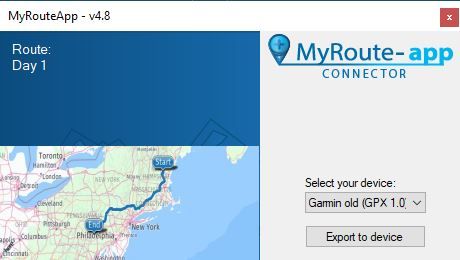
After the export completes, you can unplug your Nav VI from the usb cable and when you restart it you will see a message "New routes found. Import to trip planner?" - Select "Yes". Then you will see a screen with the name of the route(s) which you just exported from MRA. Select that route with a checkmark. The Nav VI will start the calculation as it converts to a Nav VI route.
When that is finished, from the main screen (Where To? View Map) in the Nav VI select "Apps" from the bottom area - and then select "Trip Planner" - go to the bottom of the list (if there are other trips) and you will find a section "Unscheduled Trips" and your route. Select that route and you will see all your waypoints.
A caveat - if you have waypoints are actually "shaping" points, you can change those into shaping points by using the "Edit Destinations" menu selection on the Nav VI trip planner menu.
Hope this is what you were asking about - if not sorry!

Larry
Hello! It looks like you're interested in this conversation, but you don't have an account yet.
Getting fed up of having to scroll through the same posts each visit? When you register for an account, you'll always come back to exactly where you were before, and choose to be notified of new replies (either via email, or push notification). You'll also be able to save bookmarks and upvote posts to show your appreciation to other community members.
With your input, this post could be even better 💗
Register Login-
 01843
01843
-
 01059
01059
-
 05110
05110
-
 0429
0429
-
06206
-
1322230
-
0102.5k
-
 028
028