Skip to content
  • Categories
  • Recent
  • Popular
  • Support
  • MyRoute-app
Collapse
Brand Logo

MRA Community Forum

  1. Home
  2. General Discussion
  3. Force route for a section of a planned ride

Force route for a section of a planned ride

Scheduled Pinned Locked Moved General Discussion
4 Posts 2 Posters 766 Views
  • Oldest to Newest
  • Newest to Oldest
  • Most Votes
Reply
  • Reply as topic
Log in to reply
This topic has been deleted. Only users with topic management privileges can see it.
  • Old Dog  - Arwon Offline
    Old Dog  - Arwon Offline
    Old Dog - Arwon
    wrote on last edited by
    #1

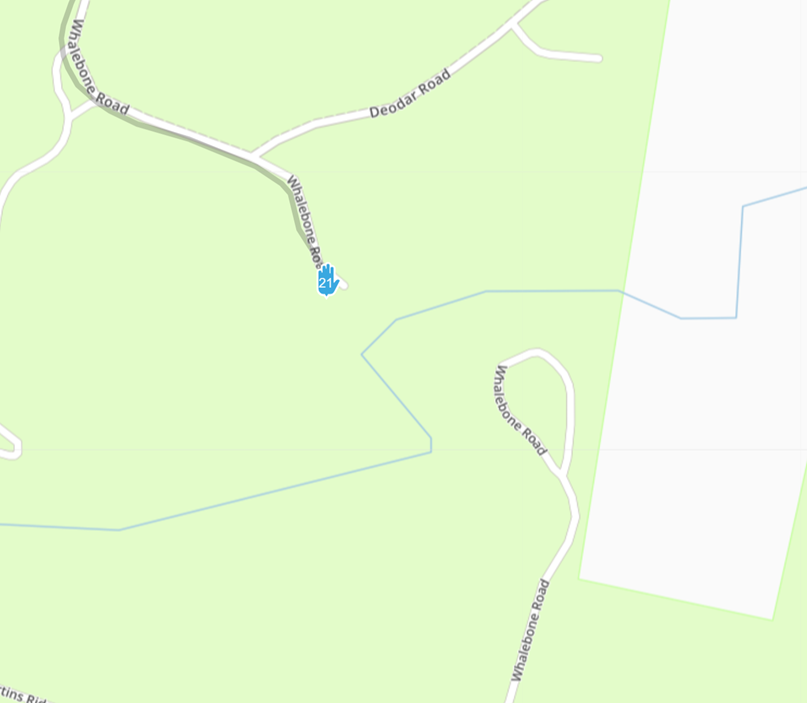
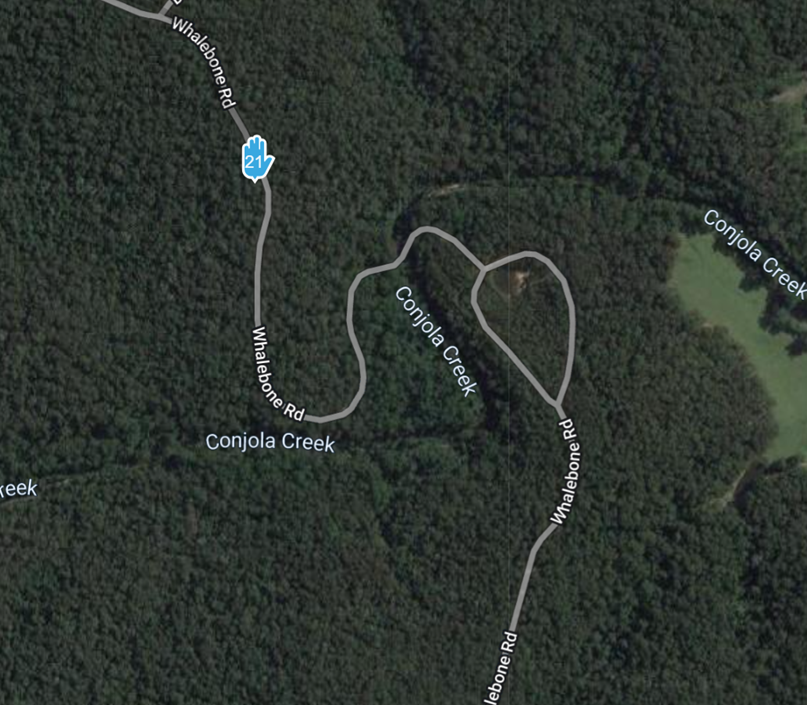
    Have searched and tried the past suggestions on how to force a route but without any luck.
    One map shows no road but others do and other riders have told me the road is there, so it it possible to force a route for a section of a planned ride?
    Have also tried to insert a secondary offroad mapping but I still cannot get it to work 😞
    02886889-42c5-4b51-b3bb-9f27b4130fc0-image.png
    e0e09c8d-0627-4009-9e2a-3c24a94c7fff-image.png

    Old enough to know better, too stubborn to change

    Jack van Tilburg 1 Reply Last reply
    0
    • Old Dog  - Arwon Old Dog - Arwon

      Have searched and tried the past suggestions on how to force a route but without any luck.
      One map shows no road but others do and other riders have told me the road is there, so it it possible to force a route for a section of a planned ride?
      Have also tried to insert a secondary offroad mapping but I still cannot get it to work 😞
      02886889-42c5-4b51-b3bb-9f27b4130fc0-image.png
      e0e09c8d-0627-4009-9e2a-3c24a94c7fff-image.png

      Jack van Tilburg Offline
      Jack van Tilburg Offline
      Jack van Tilburg
      wrote on last edited by Jack van Tilburg
      #2

      @Old-Dog-Arwon
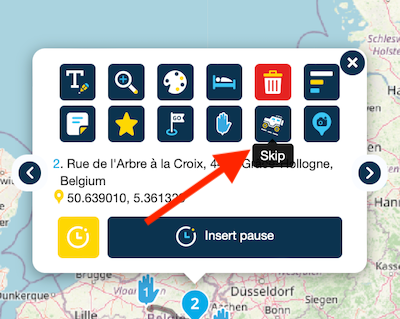
      The most obvious solution is to use the skip function per waypoint.
      So place a waypoint for the relevant road sections and another at the location where the road is known on the map. And enable the skip function in that waypoint.
      Scherm­afbeelding 2023-12-26 om 23.50.09.png

      Old Dog  - Arwon 2 Replies Last reply
      0
      • Jack van Tilburg Jack van Tilburg

        @Old-Dog-Arwon
        The most obvious solution is to use the skip function per waypoint.
        So place a waypoint for the relevant road sections and another at the location where the road is known on the map. And enable the skip function in that waypoint.

        Scherm­afbeelding 2023-12-26 om 23.50.09.png

        Old Dog  - Arwon Offline
        Old Dog  - Arwon Offline
        Old Dog - Arwon
        wrote on last edited by
        #3

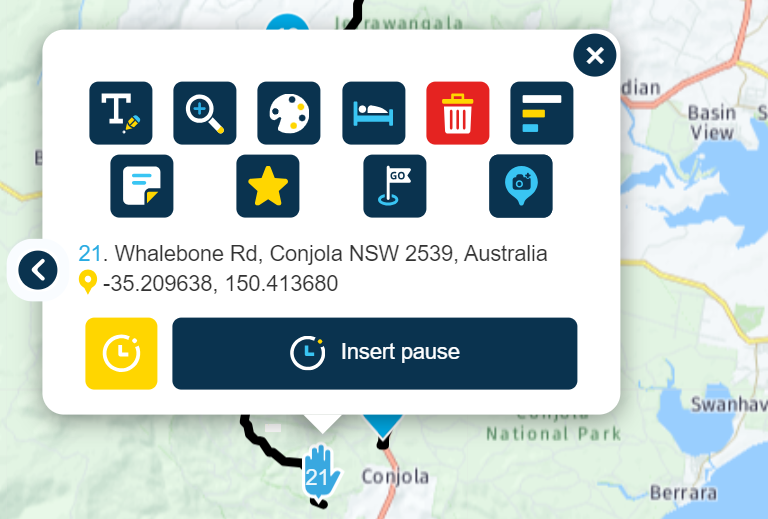
        @Jack-van-Tilburg Thanks, however when I click on the waypoint I do not see this "skip" icon, is there a setting I need to turn on?
        66415a84-a5d1-4780-a0cc-13b66c531186-image.png

        Old enough to know better, too stubborn to change

        1 Reply Last reply
        0
        • Jack van Tilburg Jack van Tilburg

          @Old-Dog-Arwon
          The most obvious solution is to use the skip function per waypoint.
          So place a waypoint for the relevant road sections and another at the location where the road is known on the map. And enable the skip function in that waypoint.

          Scherm­afbeelding 2023-12-26 om 23.50.09.png

          Old Dog  - Arwon Offline
          Old Dog  - Arwon Offline
          Old Dog - Arwon
          wrote on last edited by
          #4

          @Jack-van-Tilburg Just realised I had it set as a Via point rather than a waypoint, have now fix at my end and your sugestion worked a treat. Many thanks for your help.

          Old enough to know better, too stubborn to change

          1 Reply Last reply
          1

          Hello! It looks like you're interested in this conversation, but you don't have an account yet.

          Getting fed up of having to scroll through the same posts each visit? When you register for an account, you'll always come back to exactly where you were before, and choose to be notified of new replies (either via email, or push notification). You'll also be able to save bookmarks and upvote posts to show your appreciation to other community members.

          With your input, this post could be even better 💗

          Register Login
          Reply
          • Reply as topic
          Log in to reply
          • Oldest to Newest
          • Newest to Oldest
          • Most Votes


          ACTIVE USERS
          Old Dog  - Arwon
          Old Dog - Arwon
          Jack van Tilburg
          Jack van Tilburg
          POPULAR TOPICS
          • Google maps and Streetview
            Stevedo 6 0
            Stevedo 6 0
            1
            20
            871

          • Sena 30K Headset with MESH and navigation instructions
            Jörgen
            Jörgen
            0
            4
            98

          • Wegomleiding
            superg
            superg
            0
            3
            44

          • Android TTS question
            Marinus van Deudekom
            Marinus van Deudekom
            0
            2
            52

          • Tracklog correction
            Marinus van Deudekom
            Marinus van Deudekom
            0
            2
            44

          • New Zealand Routes
            Marinus van Deudekom
            Marinus van Deudekom
            1
            2
            59

          • MRA 5.2.2 (489) Avoidances are not taken into account///Vermeidungen werden nicht berücksichtigt
            Hubert Thoring
            Hubert Thoring
            0
            2
            39

          • Navigation Route Line Colour
            Rob Verhoeff
            Rob Verhoeff
            5
            5
            956

          MY GROUPS
          • Login

          • Login or register to search.
          • First post
            Last post
          0
          • Categories
          • Recent
          • Popular
          • Support
          • MyRoute-app