
MRA and BMW connected app
-

I love the simplicity of creating a route in MRA and exporting to BMW connected ride app.
On a good day, I follow the Track, usually circular and all is well.
However, things get messy when
a) the BMW ride app freezes and you have to stop, reset the phone and start the route again. Or b) you stop and turn off your phone to conserve batteryLet's assume your 10 miles into your 100 mile journey and you wish to continue along the planned route. What do you do , direct route, via start or from start point? I wish there was an option stating " follow route from current position"
Love to hear from anyone with experience of this issue and how you resolve it.
-
I love the simplicity of creating a route in MRA and exporting to BMW connected ride app.
On a good day, I follow the Track, usually circular and all is well.
However, things get messy when
a) the BMW ride app freezes and you have to stop, reset the phone and start the route again. Or b) you stop and turn off your phone to conserve batteryLet's assume your 10 miles into your 100 mile journey and you wish to continue along the planned route. What do you do , direct route, via start or from start point? I wish there was an option stating " follow route from current position"
Love to hear from anyone with experience of this issue and how you resolve it.
@Peter-Cheung I use the app occasionally but use waypoints rather than tracks.
In doing so, if you were to have a system crash... you could simply start at the next waypoint (if necessary to do that, you could delete the preceding points from the app and reload it).
The waypoints work pretty well although they don't come up as via points and more shaping points.
Nick
-
@Peter-Cheung I use the app occasionally but use waypoints rather than tracks.
In doing so, if you were to have a system crash... you could simply start at the next waypoint (if necessary to do that, you could delete the preceding points from the app and reload it).
The waypoints work pretty well although they don't come up as via points and more shaping points.
Nick
@Nick-Dawson
Good shout
I'm going to experiment using waypoints, the downside being that the BMW app may calc a different route between two waypoints that you've planned in MRA. Hoping for the magic " would you like to continue route from current position" option rather than messing around deleting waypoints. -
@Nick-Dawson
Good shout
I'm going to experiment using waypoints, the downside being that the BMW app may calc a different route between two waypoints that you've planned in MRA. Hoping for the magic " would you like to continue route from current position" option rather than messing around deleting waypoints.
@Peter-Cheung In my experience (Connected App with K1600 'map view' implementation), if you plan your route in MRA using Tom-Tom maps (Gold feature). then you will need to add 'Waypoints' and 'Via Points' in MRA to make the route go where you want. Once you have done this, export to the connected app. (I use gpx 1.1 (Route, Track, POI)). This is now simple using the 'more' option in iOS as it lists 'Connected'. In the connected app you will be offered at least 2 routes.
- The Track. This will likely have thousands of points
- The route. this will have the number of waypoints and via points you entered in MRA
- Possibly there....POIs if selected from POIs in MRA
Choose 2 and it will look like you have straight lines directly between the number of points. (You actually do), but now click the options button in the Connected app and because you have used Tom-Tom in MRA and Connected app uses Tom-Tom it will plot the route exactly as planned in MRA
Proven over recent 4-day trip to Normandy, pre-planned on MRA.
Hope this helps
-
@Nick-Dawson
Good shout
I'm going to experiment using waypoints, the downside being that the BMW app may calc a different route between two waypoints that you've planned in MRA. Hoping for the magic " would you like to continue route from current position" option rather than messing around deleting waypoints.
@Peter-Cheung Realised the other (main) question was a 'continue route from here' button. My way over that is in the Connected App 'Journey Settings'. Increase the 'Max break time per tour' to a longer period. I think the default is 15 minutes. If you set this to the longest break that's normal. Say 30 minutes, then it's almost impossible to not continue from last point, as it's actually still 'recording'. As you'll see on the home screen if you come out of the route. I did have it on 1 hour, but we seldom stop that long and it's still running (phone battery) for an hour after you're off the bike.
This also stops you having multiple separate 'tracks' recorded in the connected app for a days ride.
HTH
-
I love the simplicity of creating a route in MRA and exporting to BMW connected ride app.
On a good day, I follow the Track, usually circular and all is well.
However, things get messy when
a) the BMW ride app freezes and you have to stop, reset the phone and start the route again. Or b) you stop and turn off your phone to conserve batteryLet's assume your 10 miles into your 100 mile journey and you wish to continue along the planned route. What do you do , direct route, via start or from start point? I wish there was an option stating " follow route from current position"
Love to hear from anyone with experience of this issue and how you resolve it.

@Peter-Cheung
I think you are asking what to do if you are on the road with the BMW Connected app and need to restart the route for some reason or how to restart the route if you have deviated from the route along the way.The app has two ways to start the route:
1: Via starting point
If you use this option, the app will create a route from your current location to the starting point of your route. You can then drive the entire planned route.
2: Straight route
If you take this choice, the route will be created from your current location to the nearest point on the route. You can then continue on the remaining planned route.I myself often use choice 2 if, for example, if I have stopped the route to insert a gasstop or lunch/coffee stop.
(there is a third choice to start a route but I find it useless and I have not used it enough to go into it. In that case the route will be shown on your screen and you will drive there on your own).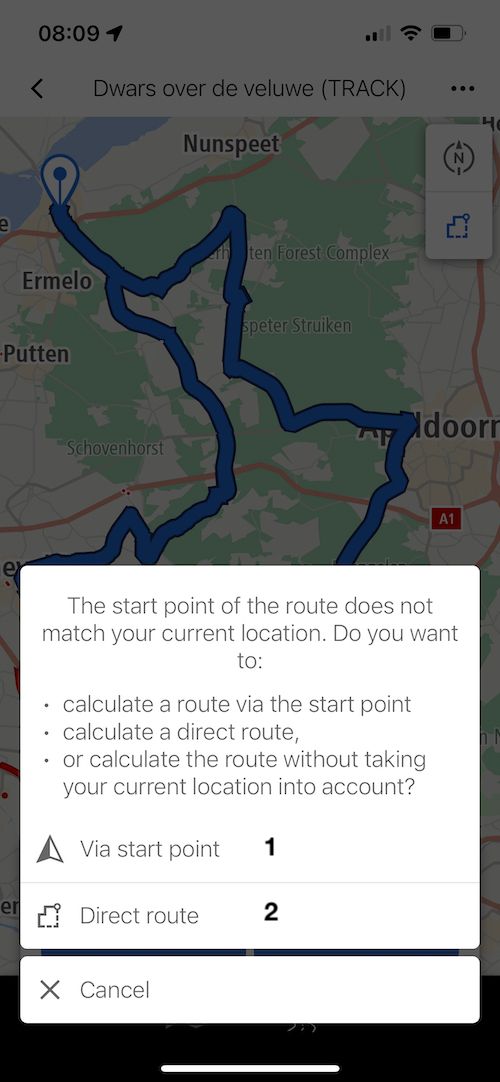
when the BMW ride app freezes
I haven't experienced this yet.
Hello! It looks like you're interested in this conversation, but you don't have an account yet.
Getting fed up of having to scroll through the same posts each visit? When you register for an account, you'll always come back to exactly where you were before, and choose to be notified of new replies (either via email, or push notification). You'll also be able to save bookmarks and upvote posts to show your appreciation to other community members.
With your input, this post could be even better 💗
Register Login-
 0748
0748
-
 1514
1514
-
 0524
0524
-
06281
-
 06248
06248
-
04149
-
 17228
17228
-
0372